Buy anything from 5,000+ international stores. One checkout price. No surprise fees. Join 2M+ shoppers on Desertcart.
Desertcart purchases this item on your behalf and handles shipping, customs, and support to Portugal.
Product description Review: Perfect Plug-and-Play Functionality - Wow! I love this thing. It is totally plug-and-play. I just inserted the USB into my computer and I could instantly use it to control my PowerPoint presentations. The laser pointer works great as well. I tested it on my home computer first. That worked fine. Then I tried it in my classroom. I was worried that it would be confused if I swapped it around to different computers, but it doesn't seem to matter. Just plug the USB in and it's good to go. The fact that the USB slides into the unit is great as well. I'm sure I would loose it otherwise. Oh, and the price is great. Review: Best Presentation Tool Ever - This little clicker is a total presentation lifesaver! The Wireless Presenter Remote makes running slides feel smooth and professionalโno more awkwardly running back to the laptop to hit โnext.โ The buttons are responsive, the range is fantastic, and it just works every time. I love the extra features tooโthe hyperlink and volume control are game-changers. Being able to adjust the sound on the fly or open a link mid-presentation without fumbling makes me look like Iโve got it all together (even if I donโt ). Setup couldnโt be easierโjust plug in the USB dongle and go. No drivers, no headaches. The design is sleek, comfortable to hold, and the pointer is bright and clear. Honestly, it takes the stress out of presenting and lets me focus on delivering my content with confidence. Whether itโs for work, teaching, or even karaoke slides (yes, I tried it), this remote is a must-have tool. Simple, reliable, and makes me look like a pro every time!


| ASIN | B01410YNAM |
| Additional Features | Built-in Laser Pointer, Hyperlink Button |
| Battery Type | AAA |
| Best Sellers Rank | #767 in Office Products ( See Top 100 in Office Products ) #2 in Office Presentation Remotes |
| Brand | DinoFire |
| Button Quantity | 6 |
| Color | Red |
| Compatible Devices | Laptop |
| Compatible Television Models | Hisense 43A6H |
| Connectivity Technology | Radio Frequency |
| Controller Type | Button Control |
| Customer Reviews | 4.4 out of 5 stars 12,152 Reviews |
| Global Trade Identification Number | 00701473808109 |
| Item Weight | 0.3 Ounces |
| Manufacturer | Shenzhen Qixun Space Technology Co., Ltd |
| Max Number of Supported Devices | 1 |
| Maximum Number of Supported Devices | 1 |
| Maximum Range | 30 Meters |
| Mfr Part Number | FR02-01 |
| Model Name | rcrf-011 |
| Model Number | rcrf-011 |
| Number of Batteries | 1 AAA batteries required. |
| Smart Home Compatibility | Not Smart Home Compatible |
| Special Feature | Built-in Laser Pointer, Hyperlink Button |
| UPC | 701473808109 |
| Unit Count | 1.0 Count |
| Warranty Description | 2 Year |
K**D
Perfect Plug-and-Play Functionality
Wow! I love this thing. It is totally plug-and-play. I just inserted the USB into my computer and I could instantly use it to control my PowerPoint presentations. The laser pointer works great as well. I tested it on my home computer first. That worked fine. Then I tried it in my classroom. I was worried that it would be confused if I swapped it around to different computers, but it doesn't seem to matter. Just plug the USB in and it's good to go. The fact that the USB slides into the unit is great as well. I'm sure I would loose it otherwise. Oh, and the price is great.
J**N
Best Presentation Tool Ever
This little clicker is a total presentation lifesaver! The Wireless Presenter Remote makes running slides feel smooth and professionalโno more awkwardly running back to the laptop to hit โnext.โ The buttons are responsive, the range is fantastic, and it just works every time. I love the extra features tooโthe hyperlink and volume control are game-changers. Being able to adjust the sound on the fly or open a link mid-presentation without fumbling makes me look like Iโve got it all together (even if I donโt ). Setup couldnโt be easierโjust plug in the USB dongle and go. No drivers, no headaches. The design is sleek, comfortable to hold, and the pointer is bright and clear. Honestly, it takes the stress out of presenting and lets me focus on delivering my content with confidence. Whether itโs for work, teaching, or even karaoke slides (yes, I tried it), this remote is a must-have tool. Simple, reliable, and makes me look like a pro every time!
A**L
Good product
Works well with windows computers and keeps my presentation in order.
B**S
Fantastic for presentations - reliable tool
Works as description shows - minimal set up and ready out of the box after you put in a battery. Great for professional presentations. No problems with signal strength. Cons: Wish the dongle was USB C rather than USB A
J**9
Works right out of the box with Mac & PC
Just plugged in the dongle and had instant compatibility with both my Mac and PC. Works flawlessly.
N**H
Simple Setup, Reliable, Easy-to-Use
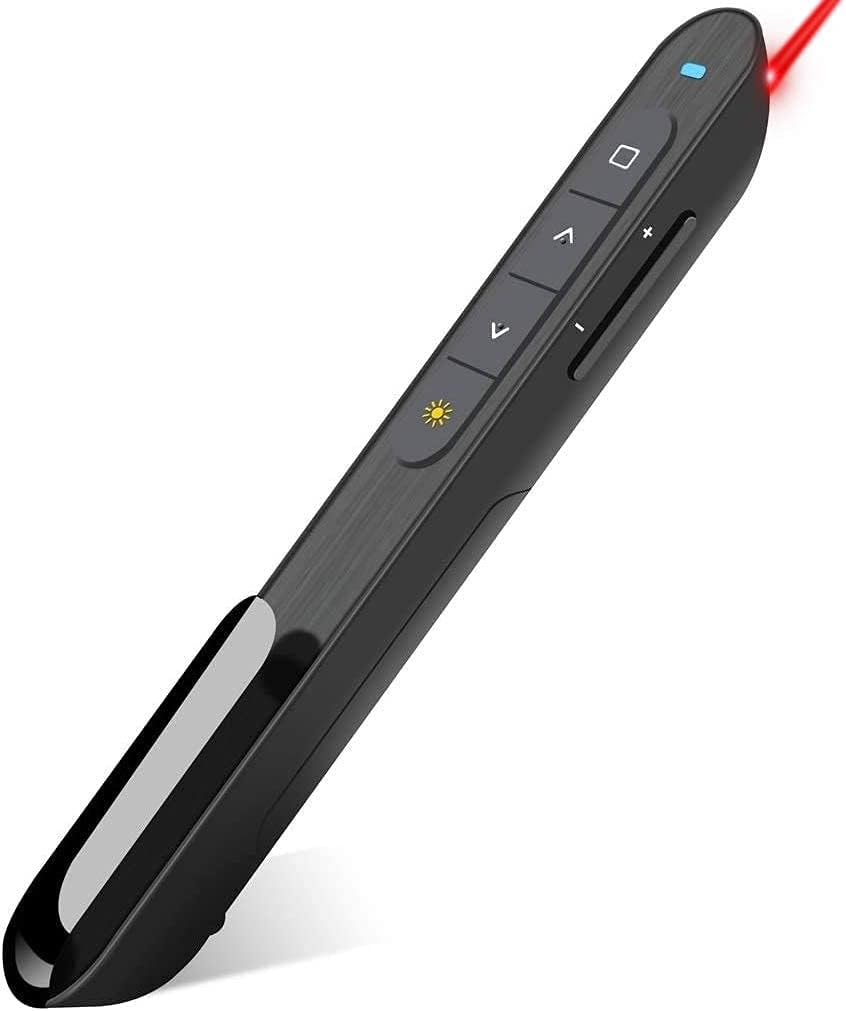
The DinoFire Wireless Presenter replaces my old and cheap method of presenting with my blue-tooth mouse (yes, really). Not only is it easier to navigate through my PowerPoint slides with the DinoFire than the mouseโs scroll-wheel, the DinoFire allows me to easily switch between open programs, including the desktop, or to display a blank screen, though not all at the same time ;-). Similarly, it has a laser pointer which is far more effective than shadow puppets (unintentional or otherwise), and makes for great fun with cats (and some humans). The receiver has a fairly low profile, and is pictured with the DinoFire in a 15โ laptop for size comparison. It sticks out just far enough that I do not recommend leaving it installed when not in use. The receiver is easily removed and stored in the pointer itself, held in place via a magnet. I highly recommend against putting it back in the pointer upside-down for storage. It might seem like a good idea, at least it did to me (face-palm), but you WILL have a hard time getting it back out (unless you have super powers for handling slippery plastic surfaces that defy clumsy fat fingers). The pointer itself has more features than I personally use. For all its specs, options, and software see the manufacturerโs website via your amazing Google-foo: I would include a link here, but want to stay friends with Amazon โฅ. It fits neatly in my hand, shirt pocket, pants pocket, or in any (in)convenient place where I might absently set it down (nope, it does not have a homing beacon). I have used it now on either a daily or a weekly basis for several months without any hiccups or need for battery replacement. Well, except the day I forgot to plug the receiver into the laptop. Took me a bit to figure out why it would not navigate my slides, especially since the pointer worked just fine (face-palm take two). One other tidbit: it helps to turn it on. So, I highly recommend spending a little on the DinoFire, especially as a mouse replacement for both presentations and cats. I purchased the DinoFire fair-and-square, and did not participate in the dubious activity of a paid promotion.
J**L
Education Clicker
As a teacher you are not allowed to sit behind your desk. This time of technology I needed to find a way to be able to present my lesson but also walk around my classroom with ease. This clicker works very well. It is slim and easy to use. I can walk out into the hallway and still be able to control my presentation slides. I sometimes forgot that it was a clicker and thought it was a pen. This is a keeper for the classroom.
E**O
Can sometimes be a little glichy
I bought this to use with my computer. I do a lot of presenting and did not want to be kept to my computer for clicking through the slides. This tool has been great to use and very easy to set up and gives me the ability to walk around the room while giving my presentations. The only thing that I have noticed with it is that sometimes after putting the PowerPoint in slideshow mode is that the slides begin flipping through on their own and the clicker doesn't work. Now I will say that I unplug the USB that comes with the clicker and plug it back it and it begins to work correctly with no issues.
C**S
Good product. Working fine and as expected... But now not working.
The product is quite good and works as expected. One reason for choosing this product is it had the needed feature of controlling the volume from the presenter, some models like Logitech did not have. At the same time I would like to mention that this product ships from abroad and can take up to 3 weeks to deliver. So if its not urgent, then go ahead and place an order...... And now since last two weeks (Sept '19) or so it stopped working. Don't know if it is under any kind of warranty..
M**I
The announced signal range is not valid
I bought this presenter to use in my classroom while teaching students. It doesn't function when you are more than 2 meters far from its USB. Consequently, I had to borrow another presenter from one of my colleagues.
A**H
Good product
Good product Only thing is the light of razor become very tiny at TV screen
V**I
Works with Mac
Tried with the latest MacBook Pro with the touch bar models and it seems to work fine. Even the volume controls work.
V**.
Good
Good
Trustpilot
1 day ago
1 week ago