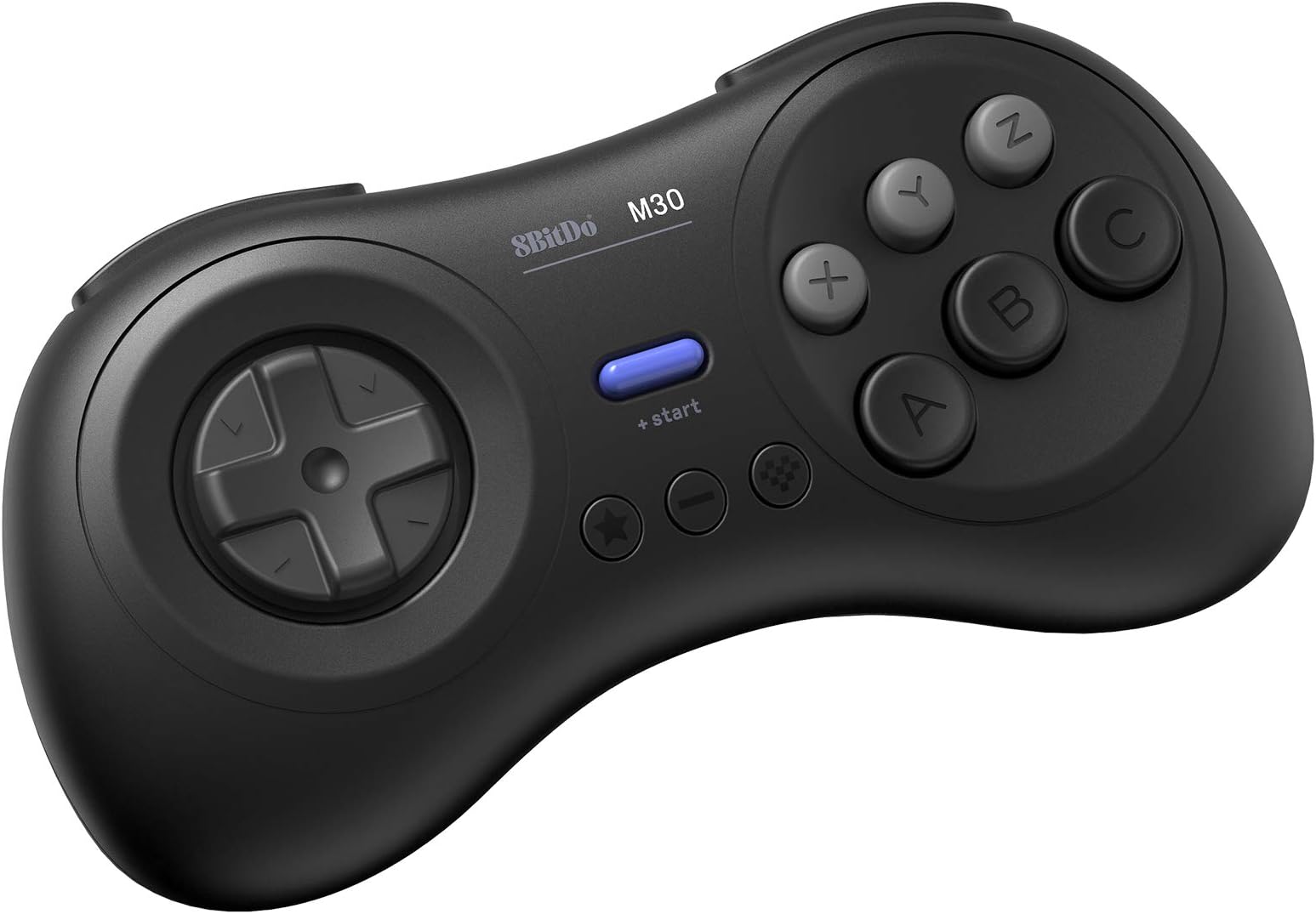




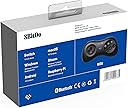
8Bitdo M30 Bluetooth Controller for Switch, Windows and Android, 6-Button Layout for SEGA’s Classic Games (Black)
Product ID: 101486903
🎮6-button classic layout
🔋Rechargeable Bluetooth battery
⚙️Upgradeable firmware
Buy anything from 5,000+ international stores. One checkout price. No surprise fees. Join 2M+ shoppers on Desertcart.
Desertcart purchases this item on your behalf and handles shipping, customs, and support to Portugal.
🎯 Own the classics, dominate the future.
The 8Bitdo M30 Bluetooth Controller revives the iconic 6-button Sega Genesis experience with modern wireless tech. Compatible across Nintendo Switch, Windows, Android, and Raspberry Pi, it features a rechargeable battery, turbo function, and an 8-directional D-pad optimized for precision in retro shoot-em-ups and fighting games. Upgradeable firmware ensures your controller evolves with your gaming needs, making it the ultimate choice for nostalgic pros and new-age gamers alike.







| ASIN | B07MSN1NPC |
| Batteries | 1 Lithium Polymer batteries required. (included) |
| Best Sellers Rank | #1,952 in Video Games ( See Top 100 in Video Games ) #41 in GEM Box Microconsole #44 in PC Gamepads & Standard Controllers #83 in Nintendo Switch Controllers |
| Customer Reviews | 4.4 4.4 out of 5 stars (3,353) |
| Date First Available | January 28, 2019 |
| Item Weight | 4.8 ounces |
| Item model number | 6922621500735 |
| Language | English |
| Manufacturer | 8Bitdo |
| Product Dimensions | 6.18 x 1.57 x 3.86 inches; 4.8 ounces |
| Rated | Everyone |
| Release date | April 16, 2023 |
| Type of item | Video Game |
S**M
A must have for shoot-em-ups on the Nintendo Switch.
So from what I've been reading, a vintage Japanese Sega Saturn controller is considered the ultimate gamepad for shoot-em-ups. Some people prefer the arcade stick, but I think the Saturn controller is more popular in the SHMUP community. It's also considered the best gamepad for retro fighting games, though an arcade stick is favored over the traditional gamepad for fighting games. However, there aren't any adapters that will let you use a real Saturn controller on the Nintendo Switch, so I decided to give this a try. Well, my SHMUP skills shot through the roof as soon as I tried out this pad. I never got seriously into the genre, but I'm now starting to since I have the proper equipment for it. I found modern analog sticks terrible for SHMUPS. There are many instances where you'll need to slowly move in one direction with the bullet patterns(or in some games like Radiant Silvergun or Ikaruga, to get through tight corridors), and this can only be accomplished on an analog stick by tapping the stick to one side over and over again, which works horribly because it's an analog stick, not a button. The Sony/Microsoft/Nintendo d-pads work for moving slowl, but they're still bad for SHMUPS since it's hard to move diagonally or in a circle. However, the 8-direction Sega-style d-pad is perfect. You can move slowly to one side by clicking the d-pad repeatedly and easily move in 8 directions. I wish I could compare this to a vintage Saturn controller or the officially licensed Retro-bit Saturn controller for Switch, but I haven't used either. I can't say if those are better or worse than those. All I know is that this blows away trying to play SHMUPS on a a DS4, Xbox One controller, or Switch Joy-cons(some people do actually like the DS2 for SHMUPS though, try if if you want :Þ). Games I've tested on it include Radiant Silvergun in Retroarch, DoDonPachi Dai-Ou-Jou in Retroarch, Ikaruga on PC, Touhou 16 on PC, Danmaku Unlimited 3 on Switch, Gunbird 2 on Switch, and Aero Fighters 2 on Switch. All controlled beautifully. A few things to note. For Retroarch I had to put it into Android mode(start+B). Windows mode(start+X) had a glitch where the R-button was just a duplicate of the Z-button and L wasn't recognized at all. For Touhou I had to put it into Windows mode and to use Joy2Key, since Joy2Key would not recognize Android mode. Both Android and Windows mode work with Steam, however, in Windows mode LB is mapped to L on the gamepad, LT to R, RB to Z, and RT to C. With Android mode it's mapped like it is on the Switch where L is LB and R is RB, which makes way more sense. But the bottom line is, if Windows mode is not working right on PC then use Android mode, Windows will recognize either(note that I do not know if Android mode works in wired mode, I tested with bluetooth mode). Apparently one is Xinput and one is Dinput, hence the different compatibility. And of course, Joy2Key is always an option for games that refuse to recognize the gamepad like Touhou. I had no issues with it on Switch since the Switch let's you remap controls now. However, the manual doesn't tell you how to change the D-pad from emulating the left analog stick to emulating the D-pad, even though it does have that feature. It's so typical of retro stuff to put features in and not tell you they exist. The pad also worked great in the Sega Genesis classic collection on Switch with Sonic 2 and Streets of Rage 3, and it worked well with Sonic Mania. I'll have to try it with Streets of Rage 4 soon. So bottom line, I can't compare it to the officially licensed Retro-bit controllers for the Nintendo Switch, I just know this a really good gamepad on it's own. And of course a vintage Saturn controller and an adapter is probably superior if you're serious about PC SHMUPS, but they won't work on Switch and will cost you more than this gamepad and lack bluetooth and the extra buttons. Also, while Retroarch, Steam, Joy2Key, and Switch all worked perfectly with this gamepad in the end, it did take some trial and error(that is the norm for anything other than Xbox controller/Windows and pro controller/Switch). I'll just say if you want a gamepad for PC and Switch that's great for SHMUPS and fighting games and classic Sega games, this works great.
T**4
The best retro controller on the market
This controller is, far and away, the absolute best retro controller on the market. Based on the Sega Genesis 6-button controller with inspirations from the Sega Saturn Model 2 controller, this works extremely well with retro games, and has a number of handy features to make the entire experience enjoyable. The ergonomics are great, and dare I say, better than the 6-button Genesis pad by a long shot. It just fits well in the hands. 6 face buttons, 2 shoulder buttons, and 2 extra buttons that function as a select and home button, all come together to make for a controller that works well with just about any retro game out there. It also has a turbo button. The d-pad is every bit as good as the original d-pad (so far...time will tell how durable it is). It is very accurate, and doesn't feel at all uncomfortable to use. I had no issues pulling off various combos and specials in fighting games with this. The buttons are all responsive, as well. The top row of face buttons do have a slight wiggle, but it is so slight, it is never noticeable while playing. The shoulder buttons also are very comfortable to use, and give the controller extra buttons to work with, making it a versatile controller that can work well with SNES, Saturn, and PlayStation games. As described, the controller has Bluetooth connectivity, though you can plug in a USB Type-C cable to play with a wired connection (I'd suggest getting a longer cable, as the included one isn't very long). Wired or wireless, latency is not an issue at all, and I had no problem connecting it to any Bluetooth device. The connection is also very stable. While I haven't tested battery life, 8BitDo advertises 18 hours of continuous play. Having used their SF30 Pro controller, I don't doubt that's accurate, as that gave me roughly 14 hours. The controller works on a nice assortment of consoles, with modes you can toggle by holding a button while turning the controller on. It will connect in XInput, DInput, Mac, and Switch modes. Yep, this works on Switch. With a bit of a caveat. For those wanting to use this with the Genesis Collection, unfortunately, the controls are layed out in a way that is inaccurate to the original Genesis controls, and there isn't an option to remap. That's not a fault of the controller, but the collection itself, though. And the controller is designed in conjunction with the Retro Receiver, and even properly maps the buttons to the Sega Genesis controls, with the L and R buttons mapping themselves to act as extra Z and C buttons, respectively. But all in all, this controller is easily worth the purchase. For those looking for a good controller to use with RetroPie, Lakka, RetroArch, etc, this is perfect. If you were on the fence, I can assure you to climb over. It's a great controller.
R**N
Great Alternative for the Original Genesis Controller
As someone who grew up playing Sega Genesis and have used the SN30 Pro controller on a Nintendo Switch, I was very interested in getting this controller. To keep things short and sweet, if you plan on using this on the Genesis, this controller is a great alternative to the original Genesis controllers. I had no problems with latency, disconnections, or anything with it connected to my Model 2 Genesis, and the fact that 8bitdo went with the 6 button layout is great for playing fighting games with. The only real gripe I have is that Switch controls are switched (really keeping up with the name there), meaning that B is A, A is B, X is Y, and Y is X. That's like me going from playing with a Switch Pro controller to playing with a Xbox controller. Also, don't expect this to be a miracle on Android, as the apps on that OS have spotty controller support. However, for the console it was designed for, that being the Genesis, it works out beautifully. Just remember to get the reciever with this version, or just the cheaper 2.4 GHz version with an included reciever. As far as design, this is a well designed controller. It has a few more curves than the original controllers, making it more comfortable in my opinion, and like it's Super Nintendo with sticks counterpart, it's built like a tank. The d-pad also works well, and the buttons don't feel too shabby either. So, if you're looking for a new controller for the Sega Genesis, or maybe you ordered an Analogue Mega SG system, you can't go wrong with this controller. If you get this Bluetooth version, though, remember to get the Retro Reciever for the Genesis, or if you're just getting this for Genesis and that's it, just get the 2.4 GHz version.
K**R
Very Solid Controller, but Not Perfect
First off, I want to start by saying that the 8BitDo M30 Bluetooth Gamepad feels great and performs very well. If you want a solid alternative to an actual Sega controller, and you want an excellent d-pad for fighting games and/or retro games, then consider this your go-to controller in that regard. Expect some problems along the way, though. First, I tested this game on Switch. I love the built-in menu for testing controllers on Switch, so I went that route first, due to how accurately you can assess the quality of a d-pad with that menu. Alas, none of the d-pad presses registered in the test menu, leading me to believe that the d-pad emulates the left analog stick, instead. Next, I wanted to test it with some fighting games, so I tried both Samurai Shodown and King of Fighters 2003, and the d-pad performed admirably on both tests, with any botched move commands likely the fault of myself (as I'm not used to the stricter input requirements typical of SNK games). I decided to perform one final test on Switch, mostly to confirm my assumption about the d-pad emulating the left analog stick, rather than the directional buttons on other Switch controllers. I chose Tetris 99 for this task, since you control tetrominos with the directional buttons on other Switch controllers and use the left analog stick to target specific opponents. Alas, as I assumed would happen, the d-pad on the 8BitDo M30 did nothing more than target opponents, leaving me unable to control the placement or descent speed of my tetrominos. I wish 8BitDo would consider doing what Hori does with its Fighting Commander controllers by including switches that allow players to change whether the d-pad emulates an actual d-pad or the left analog stick, as I can't imagine such functionality drastically increasing the price of production. That said, given how many indie developers seem to insist on mapping character movement in 2D platformers to the left analog stick on modern controllers, I can see why 8BitDo chose to have the d-pad emulate the left analog stick if that choice had to be made. UPDATE: Apparently, you can change the d-pad's function! Thanks to Anita L. (whose review appears on this page) for this info! By holding the - (Minus) button and Up, Left or Right on the d-pad for five seconds, you can change what the d-pad does. Up make the d-pad act as a d-pad, while Left and Right make the d-pad act as a left or right analog stick. This means that Tetris 99 is at least playable with this controller, even if you can't easily target opponents anymore. WHY WASN'T THIS IN THE MANUAL?! People more familiar with Nintendo's controller layouts should consider the fact that Sega's controllers' button layouts tend to clash with those of Nintendo's controllers. As such, you should expect some confusion surrounding the button labels and their actual functions. For example, A and B on the 8BitDo M30 act as the respective B and A buttons on other Switch controllers, with X and Y similarly reversed. C and Z act as R and L, with L and R acting as ZL and RL. The + Start and - (Minus) buttons at least match their Switch controller counterparts, with the Star and Heart buttons acting as Capture and Home respectively. UPDATE: Similar to the above d-pad trick, you can change the functions of the A/B/X/Y buttons to match their Switch counterparts by holding the - (Minus) button and Down on the d-pad for five seconds. To change it back, just do it again. As I mentioned before, I'm not so great at SNK fighting games, so I decided to test the 8BitDo M30 with Ultra Street Fighter IV on PC via Steam. I couldn't begin to imagine the difficulty I'd have in getting this controller to work. For some reason, Microsoft seems to have recently 'implemented' mouse cursor control in XInput controllers, toggled on and off by pressing the Start button on whatever XInput controller you happen to be using. I use the word 'implemented' loosely, as I suspect that the manner in which I experienced this 'feature' was unintended. Basically, I found that the 8BitDo M30's d-pad would occasionally move my mouse pointer around. Eventually, I came to the realization that the 8BitDo M30's Start button was toggling this 'feature' on and off. Terrible. I seem to have found a fix for this issue. Note that I'd previously made sure that the desktop controller configuration through Steam was properly dealt with, which led me to realize that this was, in fact, a Windows 10 issue. To fix this issue, try doing the following: 1) Go to Device Manager. (You can access it by right-clicking the Start menu in Windows 10 and choosing 'Device Manager' from the context menu that appears, or by simply typing 'Device Manager' in the Start menu and selecting it from the search results.) 2) In Device Manager, expand the Human Interface Devices section by clicking on the > symbol to the left of that section. 3) Locate a device called 'Bluetooth XINPUT compatible input device' in the Human Interface Devices section. 4) Make sure your 8BitDo M30 is turned on and connected to your PC via Bluetooth. 5) Right-click on 'Bluetooth XINPUT compatible input device' and choose 'Disable device' to disable it. 6) Since the 8BitDo M30 is turned on and connected to your PC via Bluetooth, you'll be prompted to restart your PC, so restart your PC as prompted. 7) Once your computer has restarted and you're logged into Windows 10, go to Device Manager again, then to the Human Interfaces Device to locate the 'Bluetooth XINPUT compatible input device' one more time. Right-click it and choose 'Enable device' to re-enable it. 8) Turn on your 8BitDo M30 (as it likely turned off automatically when you restarted your PC). You should notice that the Start button on your 8BitDo M30 no longer toggles mouse control on and off. Anyway... So, I tested the controller with Ultra Street Fighter IV, and it performed beautifully. Not a single botched move command. I couldn't be more pleased. Overall, I highly recommend the 8BitDo M30 for people who prefer Sega controller layouts or just want a solid controller with six action buttons on the face of the controller. It's a bit of a shame that the experience falls so short of perfection when other controllers manage to offer a more streamlined experience, but it's worth the extra work, in my opinion.
B**7
Fantastic Controller for a Sega fix.
I primarily bought this controller for the Sega Ages games coming for and on the Nintendo Switch. It pairs and works on different things like android, PC, Switch, and Steam similar to most of 8bitdo's products. The build of the controller is as solid as I expected it to be, light but doesn't feel cheap. The buttons feel great, similar to the 6 button Genesis controller and the same can be said about the D-Pad (which is a major plus). This D-pad is fantastic imo, a HUGE improvement from the other controllers I have from them (the SN30Pro), barely any misread inputs from left or right going up or down instead. One main caveat for using this on the Switch is that it follows the Nintendo button layout (so A on this controller is B and X on this controller is Y, and the Z and C buttons are mapped to L and R while the L and R buttons on the controller are mapped to ZL and ZR). Plus the D-Pad is apparently detected as an analouge stick instead of a D-Pad/the 4 directional buttons so that might cause some problems with some games. This isn't a huge problem for the Sega Ages games since you can remap the buttons if need be but if you plan to use this controller for a game that doesn't let you remap your buttons then it could be a problem. (And the Z and C buttons are mapped to L and R while the L and R buttons on the controller are mapped to ZL and ZR) Using this controller on Steam works pretty great using X-input (and Big Picture Mode) too. Overall, this is probably 8bitdo's best controller so far. I know that Retro-Bit are also releasing original cased wireless Sega Genesis and Saturn controllers in the future (who knows when) that will also work with the Switch, but for $30 this is hard to beat and is a great for all the Sega Ages games that are planned for the Nintendo Switch and Sonic Mania.
C**Y
Nice controller for Mega Drive & Saturn retro/emu setups
I bought one of these because I was so pleased with the 8Bitdo SF30, which I am using with my Rpi 3 B+ Retropie. Being a Sega kid growing up, having the Nintendo controller without a Sega counterpart felt something like treason. The M30 very closely resembles the Sega Saturn mk-80116 controller; this was very similar to the 6-button controller that came with the model 2 Genesis, with added R/L bumpers and a more ergonomic design. Needless to say, the similarity to the 6-button MD controllers makes it a de facto choice for this purpose. By virtue of quality, the M30 is a reasonably faithful representation of the original Saturn mk-80116, and works nicely as an amalgam for the Genesis/Mega Drive/Saturn generation of controllers. The unique three button A-B-C array of the Sega controllers from this period was fairly unique, and it immediately feels much better when playing Genesis games (where SNES replicas require an awkward mapping configuration to work). The D-pad feel of Sega controllers from this time - which I always felt was a little bit of a "deeper" action than the SNES controllers - seems to be bang-on, and reminds me very much of the original 3-button Genesis controller I used to play on as a kid. The A, B, and C buttons have a nice action and also feel very similar to the original models. When it comes to feel and performance, I take no issue with this model at this point. If anything, it feels better than the originals. The unit came in a decently nice chipboard box, which was sadly damaged. I like keeping boxes to store electronics, even though most electronics come in crappy packaging that isn't worth saving. The fact that this one came in a very nice little box that was damaged was a slap in the face, but that's on Amazon and not 8Bitdo. Fortunately, the controller itself wasn't damaged. It also comes with a USB type-C charge cable and an instruction booklet. Pairing it up with the Rpi was a breeze. Mapping was a bit annoying, but that can mostly be attributed to a Retropie controller quick-configuration scheme that favors Nintendo hardware. I imagine that more advanced exploration/configuration within Retroarch could ease these issues, but it's not yet enough to push me to such an undertaking. I've seen some issues with unusual D-pad/analog stick association, as well, but have not personally run into any issues thus far. Without too many miles on it, this is a great controller. It replaced a higher-end wired MD 6-button replica, and seems to have one-upped it considerably. 8Bitdo appears to be the quality standard for bluetooth/wireless retro controllers. My wallet is cowering in fear, as it knows I'll probably buying another one in the future. If you find yourself reaching for your retro consoles/emus more than your Xbox One/PS4/PC games, investing in something like this is well worth the coin.
M**O
Necessary for immersive retro gaming with a 6 button system.
This thing is an almost perfect replica of the six button Genesis controller. It may feel very light, but that seems normal and still feels great in large hands. Menu button works for RetroArch out of the box (always a great surprise). Recommended for getting the full nostalgia from 6 button retro consoles.
K**L
What's old is new again
A very, very nice 6-button Genesis/Saturn-style controller. Very sturdy, feels great to hold, and seems to have a pretty long battery life from what I'm seeing. I bought this because I recently got the Genesis Classics collection on Switch and thought this would help compliment that and add a layer of authenticity. And it does, to a degree. This is no fault of the controller itself, but the button inputs don't work exactly as you'd expect in this particular case. This acts as a Pro Controller when connected to the Switch, and the Pro Controller is emulating a Genesis controller when playing games on the collection (Y, B, and A on the Pro stand in for A, B, and C on the Genesis). What this means is that when you press A on this controller, the Genesis game you're playing thinks you're pressing C. If that sounds confusing, that's because it is. Honestly though, I find it's only an issue with Genesis games that fully utilize a 6-button layout rather than 3; and thankfully the vast majority of games in the collection are the latter. It's very easy to wrap your head around in that case, and in something like Sonic it doesn't matter in the slightest since all the buttons do the same thing. I figured I'd bring this up because I wouldn't be surprised if other people also want to get this for the collection on Switch. As for the controller itself, the only gripe I had was that I had some trouble connecting it to my Switch at first. I followed the directions step by step and it just wouldn't connect for more than a couple seconds. Finally I rebooted the Switch, tried again, and that apparently did the trick. And of course, this is also compatible with most other Switch games (I don't see anyone using it to play Breath of the Wild, but playing Sonic Mania with this puppy feels like a dream) as well as computers and phones, so you're bound to find a good use for this. I find $30 to be a pretty reasonable asking price considering its overall quality. It's a definite recommend for retro enthusiasts!
も**ん
SFC風でコンパクトで手に馴染む
他の社外品ゲームパッド(ロジクールF310使用)が、カチャカチャうるさく、保持に無駄な力が必要で指が痛くなっていたので買い換えて正解です。 Bluetoothも低遅延で格闘系でも、コマンド入力がしやすいのが◎です。 (上面にボタン×6もポイント) 勿論、USB-Cポートを無駄に取らないためAndroid端末とエミュレータでレトロゲームする人にはマジ推奨します。
L**S
Control de buena calidad
El control es de buena calidad. Los botones tienen buen tacto. A pesar de ser bluetooth no tiene lag.
D**O
Why is Mortal Kombat 3 on PC not responding to this Controller?
This star rating is merely out of frustration. Why is this pad none responsive and not working with my Mortal Kombat 3 installed game on my Laptop?? I already purchased the other Nintendo type 8bit SN 30 and it is working well with games like "Gaurdian Legend" and Super Mario Bros 2.
W**L
Bluetooth Version not compatible with Ultimate Software X
The build quality is great, but I wouldn't recommend the Bluetooth version. I have been trying for hours to get the "Ultimate Software X" to even RECOGNISE my device so that I can customise my controller inputs. I have had it plugged in and still says "Please connect an Xbox licensed 8BitDo device" I managed to update the firmware, which seemed to recognise it was plugged in, but not the worthless software they supply? Sorry, but if I am spending money on a controller like this, I think I deserve it to function like all the other products. I found there is another app they have for their higher-end controllers, and that doesn't recognise my device either. I suggest combining the two software and removing the Ultimate Software X from the Microsoft App Store, as it often freezes and fails to launch. It's honestly such a shame. I really wanted to enjoy this controller, but in the current state of the program side of things, I'd say it's best to steer clear of this brand, as I doubt they will last much longer if this is how they handle things.
J**S
Zurück zum Ursprung mit kleinen aber feinen Upgrades!
Dank 8BitDo kommt das Retrofeeling aus den Kinderzimmern zurück in die Wohnzimmer. Nicht jeder ist mit einem Sega Saturn aufgewachsen, aber hatte zumindest Berührungspunkte mit dem Sega Genesis (Megadrive) das Eine oder andere Mal. Daher gleich vorweg - der 8BitDo M30 liegt zwischen Genesis und Saturn, da er eine "ergonomischere" Form an den Tag legt und die vom Saturn bekannten Shoulderbuttons mitbringt, sowie das "6-Button-Layout", was man auf dem Genesis später kennenlernte, wenn nicht zumindest am Saturn. Das D-Pad ist der heimliche Star der Show, da es haptisch unangefochten ist am derzeitigen Konsolenmarkt und sich nicht nur für Sega-Enthusiasten hervorragend eignet, sondern auch für Freunde der Fighting Games eine durchaus attraktive Option darstellt am derzeitigen Fightpad-Markt. Der Controller weißt super Werte auf im Bluetooth/Wireless Betrieb, sowie er kabgelgebunden natürlich an der Speerspitze der ms-Werte liegt, wie man es von 8BitDo und Brook gewohnt ist! Die 8BitDo-typischen Menu-Buttons und extra Buttons finden sich unterhalb des Startknopfs, wodurch man das Pad für diverseste Systeme einsetzen kann, wie zum Beispiel TurboGrafX-16 (auch bekannt als PC Engine) aber auch auf Basis des sehr horizontalen Layouts für Sega Master System oder auch den klassischen NES. Der Controller funktioniert reibungslos auf PC, Switch, mit Wingman auch auf allen Xbox-Plattformen, sowie äußerst hervorragend auf dem MiSTer FPGA. Hier sollte nicht lang überlegt werden, klare Kaufempfehlung für den M30! Preislich unschlagbar und qualitativ, wie gewohnt, ein Top-Produkt!
Trustpilot
3 days ago
2 months ago