Desertcart purchases this item on your behalf and handles shipping, customs, and support to Portugal.
🔗 Bridge the old and new with flawless HD clarity and sound!
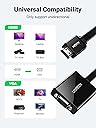
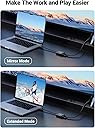
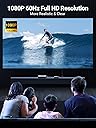
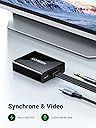
The UGREEN Active HDMI to VGA Adapter with 3.5mm Audio Jack converts digital HDMI signals to analog VGA with up to 1080p resolution at 60Hz. It includes a separate micro USB cable for optional power, enhancing compatibility with low-power HDMI devices like MacBook Mini and Raspberry Pi. The adapter features a built-in chipset for stable signal conversion and a 3.5mm audio output jack to connect external speakers or headphones, making it ideal for professionals needing seamless connectivity between modern laptops and legacy VGA monitors or projectors.


| ASIN | B00NBUTHJG |
| Best Sellers Rank | #26 in HDMI-to-VGA Adapters |
| Brand | UGREEN |
| Color | Black |
| Compatible Devices | Monitor, PC, Speaker |
| Connector Type | ['HDMI', 'VGA'] |
| Customer Reviews | 4.5 out of 5 stars 14,628 Reviews |
| Finish | Hdmi,Projector |
| Global Trade Identification Number | 06957303842483 |
| Item Dimensions | 8.58 x 8.58 x 1.77 inches |
| Item Weight | 0.05 kg |
| Item dimensions L x W x H | 8.58 x 8.58 x 1.77 inches |
| Manufacturer | UGREEN GROUP LIMITED |
| Mfr Part Number | 40248 |
| Model Number | 40248 |
| Nominal Power | 15 watts |
| Number of Items | 1 |
| Number of Ports | 2 |
| Package Quantity | 1 |
| Power Plug Type | No Plug |
| Specific Uses For Product | TV |
| Unit Count | 1 Count |
M**.
Works for DE-10 Mister VGA direct_video mode on a CRT TV!
I got this for my brother's Mister DE-10 Nano setup. It works great for the direct_video mode. (see attached video and pics) This allows you to output a pure signal from the HDMI port and this converter can handle it. You can plug your MiSTer into an old teevee or a VGA monitor (haven't tried that but i'm sure it works fine). And the output is native resolution/pixel clock. I used this VGA->component adapter (which also does SCART), and I highly recommend both of them. https://www.amazon.com/dp/B0DFLRZ5G1 VIDEO: This is the good stuff, it looks amazing on a CRT, and there is 0 latency! Gameboy advance on a CRT? Yes sir!!! AUDIO: The analog audio 3.5 mm output from the UGREEN converter sounds as good as the picture looks. The only slight limitation is that you must leave the output at 16-bit/48kHz. I tried 96kHz and i got crackles... but it's not a big issue for this setup. For me, the audio quality coming out of the UGREEN was MUCH better than the audio coming from my mom's cheap flat-screen (which is what i was using before).
P**A
Buena calidad
buen articulo.
B**B
Good.
Works great. 1080p TV died and needed hdmi output from my game consoles. Had a spare 1366x768p monitor lying around and this did the trick. Before buying, keep in mind: 1. If using this on a PS3 like myself, you will need an HDMI splitter. This does not support HDCP as far as I know. 2. This DOES allow for output of larger resolutions than the size of the monitor it will be used on. My PS3 outputs in 1080p on my 1366x768 screen which obviously is much smaller than 1080. 3. You will need an extra plug, as well as a USB power block in order to power this lil thing. I actually had to break out an extension cable just for this. 4. There is no input lag as far as I know and this is going through an HDMI splitter, then through a capture card, then through this thing. 5. It does not come with a 3.5mm audio cable so you will need that and some form of speakers if you want audio. Some monitors have 3.5mm input built-in. I can't really complain about anything. It does what it needs to and it's cheap. Go for it, don't go for anything cheaper.
C**C
They worked great with the HP stream book cloud computers we used ...
I got two of these for clinic rooms at the 2015 NMRA National Convention because two of our projectors had only VGA inputs. They worked great with the HP stream book cloud computers we used for PowerPoint duty. They also worked well with the smattering of laptops that individual clinicians brought with them. However, a couple of months after that I tried using one to convert the output of a MacBook Pro (sorry don't know the model) belonging to a clinician at a mini-meet. The MacBook refused to recognize it! Luckily we tested this combination before the clinician was in front of an audience so were able to export the mac presentation file to .pdf on a thumb drive and used that with one of the HP stream books. The picture quality seemed decent, however I wasn't using them with top of the line projectors so I can't say they were "picture perfect"
T**E
UGREEN Active HDMI to VGA Adapter
I ordered this to connect an old VGA monitor to my laptop computer which only had an HDMI port. The product was actually delivered a few days early. The packaging was very secure and the item functions well. No complaints.
J**0
Great
Works perfectly
G**A
Not quite plug and play, but works.
I ordered this adapter to use with my Amazon FireTV after my Plasma TV took a dump and I thought I'd save some money and just use a projector I had. The projector is SVGA with a resolution of 800x600 pixels. I plugged everything in along with the USB power from an old cell phone charger (the power adapter was NOT included, but the cable was) and all my hopes and dreams were deflated as I read the message from the projector, "Out of Range." I posted a question on Amazon community hoping someone had an easy fix. No useful answers were received, but I did get it working. This is a 2 step process and step 2 has to be done every time I power up the system. • Step 1 -- Using a computer monitor, I confirmed the device worked and went into the system settings on FIRETV and changed the resolution from automatic to 800x600 pixels. • Step 2 -- Here's what I have to do EVERY time I want to use the projector. • A) Unplug HDMI from FireTV • B) Unplug USB power source to adapter • C) Power on projector • D) Plug USB power to adapter • E) Plug HDMI into FireTV Once this is done, the unit works flawlessly, but it is a pain in the rump to repeat all the steps in #2 above every time the power cycles. All-in-all, it is a good buy for me because I like saving money and this little trinket does the job well once you get it working. It would be nice if there were a button to select the output resolution manually.
C**A
It works perfect
I bought it as a backup for an alternative connection and I wasn't planning to use it but I ended up trying it with an old LCD screen by connecting it to a relatively new GPU (Rx 6700) and it worked great, previous adapters didn't work and I decided to buy this one because it had a connection for extra power and indeed that was the problem with the others. Now I have a very useful extra monitor. There is no distortion in the image, there is no type of interference in the signal, the image quality is what it should be.
L**A
Ótimo, vale muito a pena
Muito bom! Funciona muito
H**I
Quick delivery- solves the problem
Shipment and delivery---top notch...that one for Amazon. Item itself solved the problem of having one HDMI port with two intermittent HDMI inputs from different sources. and Yes, it is functional and works fine so far. To be honest, perhaps a better option than utilising different ports behind a screen (say VGA and HDMI) and use different cables and converters. This one seems to be a clean solution.
S**N
Worth for it’s price
Helle guys . I almost search every video on YouTube regarding How to connect ps4 to vga monitor. Nothing got . But after I saw this product on Amazon and purchased . This is excellent product to connect ps4 to vga monitor with out any other source like power . Because this product has in built micro usb port to provide power required to connect ps4 to monitor. So you don’t need to be get vga splitter to provide power . Its also has aur connection for audio. Its very small and works like two to three adapter in single adapter. Quality is Best . So If you want to connect PS4 to your VGA monitor then go for this .
R**N
Super Adaptateur simple d'utilisation
/******** AVIS COMPLET ******** / J’ai acheté cet article il y a quelques mois, après plusieurs mois d'utilisation, le résultat est super et voici mon avis. Tout d'abord, une fois déballé on peut l’utiliser directement, en quelques minutes l’adaptateur est prêt à l'emploi. /******** TEST ******** / Cet adaptateur me permet de pouvoir brancher un câble VGA sur mon ordinateur via le port HDMI. Il est pratique pour faire des présentations. /******** NOTES ******** / Livraison : 10/10 Livré dans les temps indiqué, très bien protéger. Présentation : 9/10 Adaptateur dans une boite. Qualité : 8/10 Le produit est bien finis, et me semble résistant sur le long terme. Utilisation : 10/10 Une prise et hop c’est facile. Efficacité : 8/10 Efficace pour les présentations. /******** POINTS POSITIFS ******** / + Il est léger et petit, il peut s’utiliser facilement, et se ranger dans un petit coin, ou dans un placard. + Ergonomique, il est adapté à une utilisation simple et rapide, le design est simple mais beau. + Fiable après plusieurs mois d’utilisation. /******** POINTS NEGATIFS ******** / - Longueur du câble, un peu court à mon gout environ 10 cm.
C**.
Después de varios intentos, he encontrado un cable HDMI - VGA que funciona
Los adaptadores de cable HDMI a VGA son un producto algo problemático. Se pierde bastante energÃa en la conversión y tienen un cableado complejo. La salida de audio HDMI requiere un extra de potencia que no todos los adaptadores dan, y es algo que debemos tener en cuenta a la hora de elegir. Aparatos como Raspberry Pi se oyen muy muy mal por la salida analógica asà que nuestra única opción "digna" es un conversor HDMI con salida de audio jack de 3,5 mm. Esta complejidad del producto provoca que un pequeño defecto impida la reproducción de un color, o que la señal se vuelva inestable. Por eso hay tantos cables conversores que dejan de funcionar al poco tiempo, sobre todo si la instalación/manipulación no es la adecuada. Antes de adquirir este producto, he tenido que devolver otros dos HDMI-VGA de otras marcas porque o no funcionaba el audio, o distorsionaba la imagen, o directamente no se veÃa nada. Mi experiencia: a) El video se ve perfectamente, nÃtido y claro. b) El cable tiene una entrada USB que permite alimentarse con un extra de energÃa. Es un punto importante para mi Raspberry Pi, porque los adaptadores que utiliza no son especialmente potentes (5v y 2,5-3a) y a menudo suele provocar una falta de potencia en la placa. c) El cable tiene una salida de audio de buena calidad. Se oye muy bien. Problemas: El mismo que otros cables: SON DELICADOS, manipúlalos con cuidado. Trata de ponerlos en horizontal, sin que el peso provoque tirones. Tampoco los retuerzas, porque si no, a la larga se estropeará o perderá calidad. Lo ideal es que el cable esté recto y no soporte pesos excesivos. Actualizaré dentro de unos meses, para ver qué tal la durabilidad del producto, pero de momento todo perfecto.
Trustpilot
3 weeks ago
5 days ago