๐ท๏ธ Label like a pro, organize like a boss!
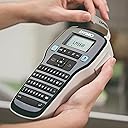
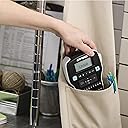
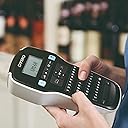
The DYMO LabelManager 160 is a sleek, portable label maker featuring a familiar QWERTY keyboard and one-touch smart keys for quick, professional label creation. It supports multiple label widths and offers over 20 formatting options plus 200+ symbols, all displayed on a large, easy-to-read screen. Designed for on-the-go use, it includes an auto power-off feature to extend battery life and works exclusively with authentic DYMO D1 label tapes, making it the perfect tool for home and office organization.


| ASIN | B005X9VZ70 |
| Additional Printer Functions | Print Only |
| B&W Pages per Minute | 3 ppm |
| Best Sellers Rank | #12,669 in Office Products ( See Top 100 in Office Products ) #22 in Label Makers |
| Brand | DYMO |
| Built-In Media | 1-Year Limited Warranty, D1 Starter Label Cassette Black on White, 1/2" x 10', LabelManager 160 Label Maker, Quick Start Guide |
| Color | Black |
| Compatible Cartridge | DYMO D1 |
| Compatible Devices | PC |
| Control Method | Touch |
| Controller Type | iOS |
| Customer Reviews | 4.6 4.6 out of 5 stars (24,006) |
| Display Type | LCD |
| Dual-sided printing | Yes |
| Duplex | Automatic |
| Global Trade Identification Number | 00071701059352, 00071701059383, 00086009731251, 03501170946374 |
| Hardware Interface | USB |
| Ink Color | black |
| Item Dimensions D x W x H | 3.9"D x 7.9"W x 2.8"H |
| Item Type Name | Label Maker |
| Item Weight | 0.77 Ounces |
| Manufacturer | Sanford |
| Maximum Copy Resolution Black and White | 300 dpi |
| Maximum Copy Speed Black and White | 3 ppm |
| Maximum Media Size | Label |
| Maximum Print Resolution Black and White | 300 dpi |
| Maximum Sheet Capacity | 2 |
| Model Name | LabelManager 160 |
| Model Number | 1790415 |
| Model Series | LM160 |
| Other Special Features of the Product | Portable |
| Output sheet capacity | 2 |
| Paper Size | Label |
| Print media | Labels |
| Printer Connectivity Type | Wi-Fi |
| Printer Output Type | Black and White |
| Printer Type | Thermal |
| Resolution | 300 x 300 |
| Scanner Type | Portable |
| Specific Uses For Product | personal |
| Total Usb Ports | 1 |
| UPC | 300717586607 300715216094 611105195234 012304139348 785525508612 343538235972 300715227243 300718786518 300717591335 300717596316 854587363214 689016514543 617297058517 300717681166 300717590086 300717583286 680806805520 300715224662 300717677107 300717668129 071701059352 071701059383 |
| Unit Count | 1.0 Count |
| Warranty Description | Manufacture |
| Warranty Type | limited warranty |
S**.
Great product
The DYMO LabelManager 160 Portable Label Maker has been a game-changer for my home and office organization. Its sleek black design caught my eye, and I must say, I am thoroughly impressed with its performance. This label maker features a user-friendly QWERTY keyboard and one-touch smart keys, making labeling a breeze. The large display is easy to read, and I appreciate the convenience it offers. Labeling has never been this efficient and fun! I've used other label makers in the past, but the DYMO LabelManager 160 stands out with its simplicity and reliability. It has become an indispensable tool in my daily routine, helping me keep everything neatly labeled and organized. I can confidently say that this label maker has simplified my life and made my home and office look more organized than ever. If you're in need of a label maker that's easy to use and gets the job done, I highly recommend the DYMO LabelManager 160. It's a product I love and can't imagine living without!
M**N
Easy to use
Works great
N**L
Still love it 10 months later! QWERTY all the way!
I have been using this very frequently for over 10 months. I did some research reading reviews and even read the one reviewer who compared the cost of the label refills. I am so glad I chose the Dymo LabelMaker 160! What I love about this machine: 1 - QUALITY - Never ever had an issue printing, it has been a reliable machine 2 - Love the QWERTY keyboard. An ABC keyboard would have driven me nuts. 3 - It prints super clearly, even the off-brand refills that I bought. 4 - Battery life has been forever. In fact, I have not put new batteries in it yet (and I've printed the small roll it came with and almost a whole regular-sized refill). I'm using regular batteries. 5 - Lots of font sizes - from 8 to 24 with steps of 2 in between 6 - Two lines of text - you can print one or two lines of text, wish I could do three though 7 - Features - It has everything I need: a few borders, many special symbols, text styles (not different fonts, just styles - italic, bold), can print vertical, etc. 8 - Cutter works smoothly every time 9 - Does not waste much label when printing 10 - Nice size - It's not huge like some label makers. It's also not tiny making it difficult to type what you need. I had originally thought I wanted it even smaller but now, I'm thinking it's like the Goldilocks size, just right. Wish list: 1 - Wish I could print 3 lines and not just 2. There's enough room on the label in the smallest size but it doesn't do it. 2 - Wish it had 2-3 fonts (not a ton, but more than one would be nice) 3 - I wish the special symbols that I use most frequently would be in the first "row" of special symbols. Like I think it's crazy that I have to tab down 8 times to get to the "&" symbol. In fact, the 3-5 most frequently used symbols should be added to the keyboard. Other than that, I don't mind that special symbols are accessed through a special button. It's fairly easy and doesn't clutter the keyboard, keeping the machine a hand-held size.
B**R
10 years old and going strong
10 years old and going strong and I believe that I will have another ten years to go. Not bad! . I brought mine 10 years ago I normally buy my tape elsewhere but they were out of stock so I decided to order some on Amazon. I canโt say enough good things about this label maker. I would buy another one but this one is still going strong after 10 years. So Iโll just keep buying the tape for it. We believe it is worth giving it a try.
N**L
Nice handheld label printer with QWERTY keyboard.
Most of the handheld label printers are built using ABC keybaords vs. the QWERTY keyboard, and that was a key factor in my decision to buy this scanner. Some people have claimed that using DYMO label makers vs. Brother label makers will save money as the DYMO does waste less label when printing, this is both true and false --- I will explain more further down in this review. I would like to add to this review a comment about batteries, there has been multiple comments about this label maker "eating batteries"; I have used up trial cartridge and many labels into my second cartridge and have not changed the batteries in this unit. I am using Eneloop Rechargeable batteries and they have performed flawlessly. Keep in mind that this would be a higher drain type of device when printing and cheap "Super Duty" (Non-alkaline or cheap Rechargeable) batteries are probably not going to work well. As always, I recommend the investment in Eneloop batteries with a good charger (LaCrosse BC-700) PROs: - Handheld form factor - Easy to use - Prints nice looking labels - QWERTY Keyboard CONs: - NO access to any special charactors except via menus (i.e. if you need a "-" or a "." on your label, there is NO button for this and you have to go into the symbol menu to find the symbol you want) ... This is annoying and is the reason that this label maker looses one star (most of my labels include "-" or "." in them) **************************************************************************************** *** The truth about actual label costs (Pictures will be attached to this review) *** **************************************************************************************** I printed out labels using a Brother P-Touch PT-2030 and the DYMO LabelManager 160 and these were the results of my findings: As of the time of this writing, the DYMO 1/2" D-1 label roll is selling for $14 and includes 23 feet (276 inches) of label As of the time of this writing, the Brother 1/2" P-Touch label roll is selling for $11 and includes 26.2 feet (314 inches) of label I printed two labels that had this text in 24pt BOLD "TEST-XX-01" The DYMO label that was printed including wasted space on both sides was 2.75" in length which would allow 100 labels to be printed on a $14 roll *** $0.14 per label The Brother label that was printed including wasted space on both sides was 4" in length which would allow 78 labels to be printed on the $11 roll *** $0.14 per label *** TIE *** I printed two labels that had this text in 24pt BOLD "255.255.255.255" The DYMO label that was printed including wasted space on both sides was 3.375" (3 3/8") in length which would allow 81 labels on $14 roll *** $0.17 per label The Brother label that was printed including wasted space on both sides was 4.5" in length which would allow 69 labels on a $11 roll *** $0.16 per label *** BROTHER WINS *** The DYMO would win with smaller labels, it seems that my first label tested is about the tie breaker in size. Bottom line: If you print SMALL labels, you will get more for your money using a DYMO label printer with less waste per label If you print larger labels, you will get more for your money using a BROTHER label printer even though it waste more per label The DYMO generally prints more labels per roll than the brother, even though there is less label per cart, however the Brother label is cheaper at this time. There is also the consideration that you might be ok with the extra tape used by the dymo, and that you might hate how much extra tape is used with the brother, ... How much time might you spend trimming brother labels because they are huge? They are both great label makers ... I hope this review helps someone make an informed decision!
R**N
Dymo d160 after years of use
Good label maker. Over a decade of occasional use and still going strong. Rarely any issues with printing or feeding. Battery life is fine. Wish the strongest adhesive labels were stronger, they fall off in cold weather, in an unconditioned space.
Trustpilot
1 month ago
4 days ago