Buy anything from 5,000+ international stores. One checkout price. No surprise fees. Join 2M+ shoppers on Desertcart.
Desertcart purchases this item on your behalf and handles shipping, customs, and support to Portugal.
๐๏ธ Elevate your chill gameโhands-free binge-watching just got a pro upgrade!
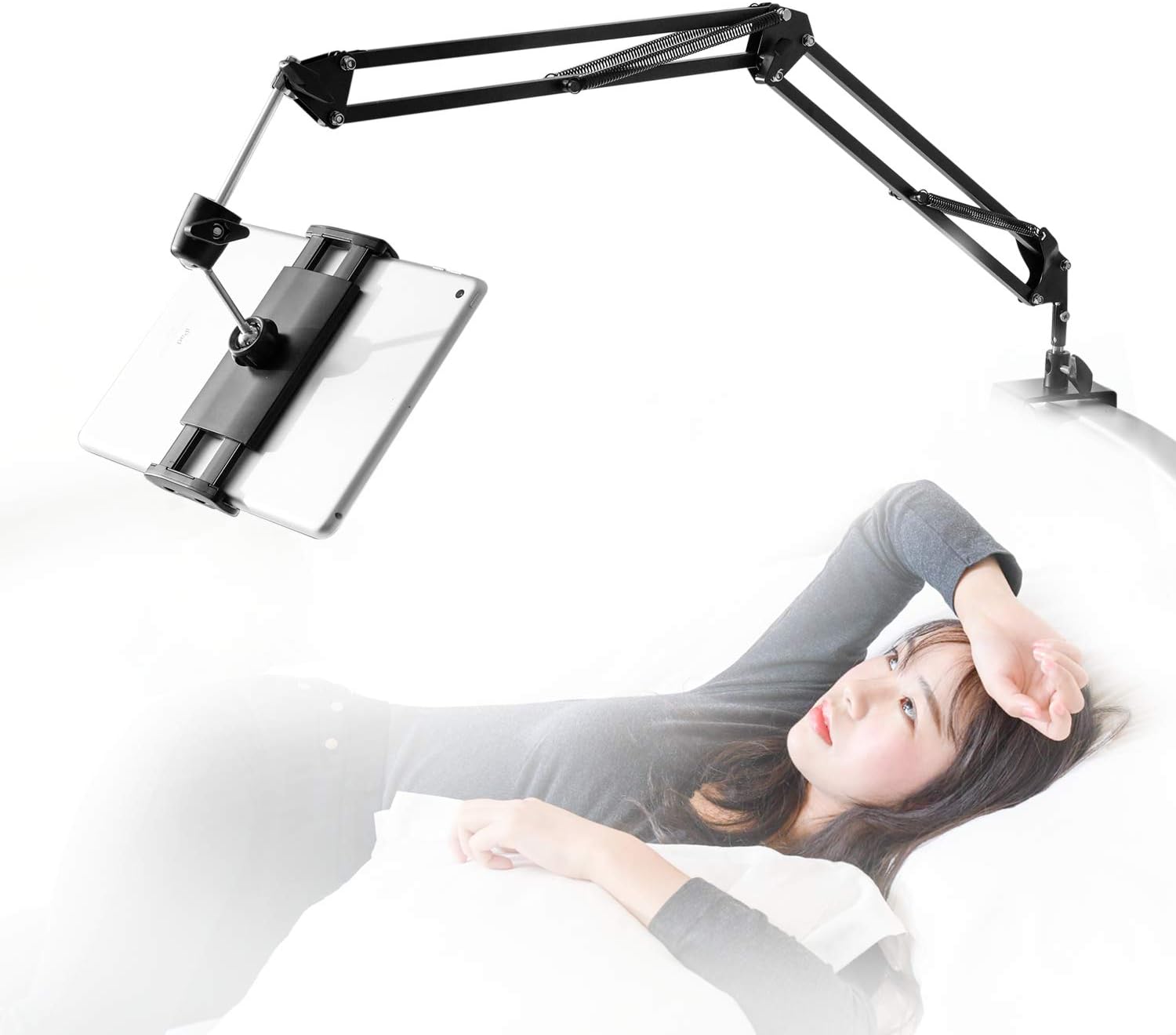
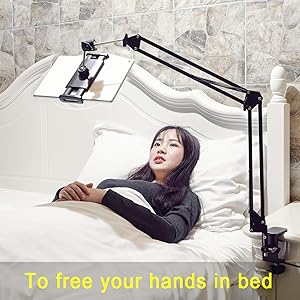
The SAMHOUSING Tablet Stand is a premium, 360-degree rotatable mount with a sturdy aluminum arm designed to hold devices weighing up to 1000g. Compatible with a wide range of tablets and phones (4.7"โ12.9" screens), it installs easily on surfaces up to 52mm thick without tools. Its robust build and versatile adjustability make it perfect for hands-free entertainment or work in bed or at your desk.


| ASIN | B07P8YHKLF |
| Adjustable Length | Yes |
| Antenna Location | bed desk |
| Best Sellers Rank | #262 in Tablet Stands |
| Brand | SAMHOUSING |
| Color | black |
| Compatible Devices | 2022 iPad 10 9 8 7 6 5 4 3 2 / iPad Pro 12.9 / 11 / 10.5 / 10.2 / 9.7 / iPad Air 4 3 2/ iPad Mini 6 5 4 3 2 / iPhone 14, iPhone 14 Pro, iPhone 14 Pro Max ,iPhone 13, iPhone 13 Pro, iPhone 13 Pro Max, iPhone 12 Mini, 12, 12 Pro, 12 Pro Max, iPhone 11, 11 Pro, 11 Pro Max, Xs, Xs Max, XR, X, 8, 7, 7 Plus, 6s, 6s Plus, 6, 6 plus, 5s, 5, 5c, 4, 4s / Galaxy Z S Note A / Galaxy Galaxy Tab S7 A7 S7+ S6 A S5e A; Galaxy S Note Z A M W F / Galaxy Z Flip Fold Fold2 / Galaxy S21 S21+ Ultra S20+ S20 Ultra S10+ S10 S10e S10 S10e S9+ S9 S8+ S8 / Galaxy Note 20 10+ 10 9 / Galaxy A52 A51 A71 A70s A50s A20s A90 A80 A40s A60 A70 A8s A9s A6s F52 5G / W21 W20 W2019 / Xperia Z Tablet, Switch, Amazon Kindle, Desktop, Tablets, Switc Compatible Devices 2022 iPad 10 9 8 7 6 5 4 3 2 / iPad Pro 12.9 / 11 / 10.5 / 10.2 / 9.7 / iPad Air 4 3 2/ iPad Mini 6 5 4 3 2 / iPhone 14, iPhone 14 Pro, iPhone 14 Pro Max ,iPhone 13, iPhone 13 Pro, iPhone 13 Pro Max, iPhone 12 Mini, 12, 12 Pro, 12 Pro Max, iPhone 11, 11 Pro, 11 Pro Max, Xs, Xs Max, XR, X, 8, 7, 7 Plus, 6s, 6s Plus, 6, 6 plus, 5s, 5, 5c, 4, 4s / Galaxy Z S Note A / Galaxy Galaxy Tab S7 A7 S7+ S6 A S5e A; Galaxy S Note Z A M W F / Galaxy Z Flip Fold Fold2 / Galaxy S21 S21+ Ultra S20+ S20 Ultra S10+ S10 S10e S10 S10e S9+ S9 S8+ S8 / Galaxy Note 20 10+ 10 9 / Galaxy A52 A51 A71 A70s A50s A20s A90 A80 A40s A60 A70 A8s A9s A6s F52 5G / W21 W20 W2019 / Xperia Z Tablet, Switch, Amazon Kindle, Desktop, Tablets, Switc See more |
| Compatible Phone Models | Iphone |
| Customer Reviews | 4.2 out of 5 stars 7,441 Reviews |
| EU Spare Part Availability Duration | 3 Years |
| Enclosure Material | Iron |
| Fastening Type | Clip Holder |
| Finish | Polished or Brushed |
| Form Factor | Gimbal |
| Item Dimensions | 11.81 x 11.02 x 2.76 inches |
| Item Weight | 930 Grams |
| Manufacturer | Samhouse |
| Mfr Part Number | VFD684RR |
| Model Name | tablet holder |
| Model Number | VFD684RR |
| Mounting Type | Tabletop |
| Number of Items | 1 |
| Other Special Features of the Product | Adjustable |
| Style Name | Sturdy |
| UPC | 748323387605 |
| Unit Count | 1.0 Count |
M**Y
OMG, this thing is worth every dollar!
Let's start with some basics so you understand if this review is for you or not. I use an iPad Pro 12.9", and I use it mostly for reading technical material. So any sort of "holder" that I utilize has to support that level of weight, and has to support the iPad in portrait mode. Out the box this is a mediocre stand, just like others I have tried. For example the gooseneck stands can't really support the weight of the largest iPad and are a hassle to maneuver into place every time you use them. So how did I convert mediocre to perfection? Look at the photos! The first step (thank you some other reviewer who gave me the idea!) is to deal with the iPad mounting. The mounting that's supplied by the manufacturer is a pain in the ass to use, requiring an effort to slide the iPad in and pull it out on every use. Solution is to get a magnetic mount. Amazon is kinda weird about including URLs, but look for "ORASANT Strong Magnetic Tripod Mount". That supplies the "head" that's at the very end of my setup, holding the iPad. How do you connect it? Well look at how the mount connects to the arm that you have just bought. At the very end, the mount that holds the iPad, has a little neck, a screw ring, and a holder that holds a mini-ball-head thats connected to the final metal rod you see just before the iPad. You unscrew that ring and can pop the mount off the ball head. A similar setup connects the magnetic part of the ORASANT mount to the plastic holder that it sits on. And (yay standards!) they are identically sized ball heads. So just swap the one for the other! If you look at my second photo, the focal point of the photo, the black magnetic mount in the lower third of the picture, is the ORASANT mount connected to the rest of the arm that you've bought. At the very end you see the three-fold magnetic head, then right behind the head you see a black ring. Unscrew that ring and you have the ball-head that connects to the rest of the arm. Step two is your need your iPad to hold onto the magnetic mount, meaning you need to attach some thin iron sheets to its back, as you can see in the photo. I attached two "sections" of iron sheet, the upper section is for holding the iPad in portrait mode, the lower section is better for holding it in landscape mode. Since I use a Smart Folio as my iPad cover, it's very easy to pull the Folio off the iPad (it's connected by magnetism around the edge of the iPad Pro) and pop the iPad onto the magnetic mount, then to pull the iPad off the mount and pop its cover back on. You will obviously think this so, yes, I tried some obvious short cuts! Is the magnetism around the iPad edges (used by the Smart Folio or the Magic Keyboard) strong enough to hold it up if you bought maybe a cheaper mount with just an iron based? IMHO that's unsatisfactory because you can't really position the iPad nicely with it hanging by its edge. Just buy the magnetic mount, it's not expensive! Can you stick the iPad to the mount with its Smart Folio on? Not very satisfactorily! You can kinda just get it to work, but the magnetic strength through the additional thickness of the case is weak enough that the slightest wrong touch makes it fall off. But without the case the connection is very satisfactory and does not feel at all fragile. You can find the sorts of thin iron plates you need by doing a search for "Metal Plates for Magnetic Car Mount". OK, at this stage we now have a great connection from our iPad to this mounting arm. What's the next step? You will see photos showing various mounting options (and to be fair, the vice clamp that the arm comes with is pretty damn well designed, very flexible and capable of clamping onto a lot of different things. But I found that all the obvious options I tried (variants of nightstand on the side, or behind the headboard) were all unsatisfactory. The nightstand angles were always wrong, and clamped to the headboard the iPad was a few inches too close to my eyes for comfortable reading. This may not matter to you depending on your eyes, or whether you are watching movies lying down, rather than reading while somewhat vertical. But to me it made the product so close but still useless :-( Hence the last stage. You'll see I mounted a bracket on the wall that projects about ten inches over the bed, then I clamped the arm onto the end of that bracket. (This was just a bracket I had lying around, I'm afraid you will have to look for something similar in your garage or at Home Depot.) It's obviously not QUITE ideal -- you can (and I do) swing the arm all the way around to against the wall when it's not in use, but you still have that bracket sticking out ten inches, and if you share a bed that may be problematic. But for my use of the bed I have not found it to be a problem, mounting it as I did towards one side of the bed (not the middle). In the last photo you see the arm rotated away against the wall. The payoff for all this (about $50 in parts and half an hour with a stud finder and a drill) is a system that feels astonishingly good. The arm is robust and stiff, the iPad sits still where it should, and it's very easy to position the iPad exactly where I want it so that I can read for a long time without getting tired.
A**L
Good customer service.
Updated review at the bottom: Its alright. It doesn't have many points of rotation so its a bit difficult to adjust to where you want it. Once you get it, its fine. After a week or so of use the ball on the back got so loose it slowly sags my tablet. Got so annoyed I just tapped it. Probably will be super gluing it. It has a pointy edge that ive caught skin and clothes in so be careful. It was cheap so I cant complain to much. UPDATE! The seller offered a replacement so it seems this was just a defect in the one I received.
T**G
Excellent Find
I like it because I can adjust my iPad straight up and down, leaning, etc without the black bar getting in the way. I have ordered one that kept it at a lean, I think a phone would work better. I lay in bed reading and my hands frequently have numbness and tingling from pinched nerves. Trying to keep a holder on my chest from popping me in the face or sliding around got ridiculous if I couldnโt keep a hold of. The problem: for me it somehow starts flopping forward no matter what I do after a couple of months. I admit I am constantly adjusting it this way or that, side to side, up and down, so I probably help it along. Iโve tried taking apart, putting back together, loosening, tightening, nothing helps. I take a thick rubber band and attach to the top of the holder and up around the bar. This gets me a few more weeks. The solution: I just buy a new one about every 3 months. Some may not can afford to. Some are just ticked it does this or whatever. Maybe it should last me but it doesnโt. I canโt go back to trying to put in a holder on my chest laying in bed, or looking down if Iโm sitting. Here is how I justify it to myself. We spend $20 these days for fast food for the 2 of us if I donโt use reward points or offers on apps. Way more at a sit down restaurant. We do one or the other at least once a week. So, that fast food doesnโt last an hour, but this at same price will last me 3 months! My logic. It also helps I live in Louisiana and my husband loves crawfish, I donโt. So during season, he spends an average of $25 for just him some each week through the season. Now thatโs some Tracey logic/reasoning to splurge here and there, lol.
G**I
Works great, good price, life safer, read if interested.
I decided to write this review because this item, despite the bad reviews people left, has been a life saver. Here's the story, I have a friend who due to medical reasons has to lay flat for an extended period of time. I mean extended as in 2 months or more. After a few days of staring at the ceiling he was losing his marbles. So I decided to find something to help him keep his mind occupied. Although this item didn't have a lot of good reviews and was marked by Amazon as "Frequently returned", I decided to give it a shot for the $20 price. I also bought one of these: https://www.amazon.com/dp/B0B9M5SCG4 to connect to his PC. The two holders are used to hold the display and an iPad mini (about 9 inches) These two holders have worked flawlessly. Strong enough to hold that display or the iPad. He is able to adjust the position to make sure his neck doesn't get tired in one spot. Also, the arms can swivel out of the way for getting up or laying back down. Honestly, I don't know why people call these flimsy. I wanted to write this review to make sure people see these as usable and affordable. Not everyone is looking to watch instagram in bed. Some people have a medical need. Hopefully this review helps other in similar position.
D**.
Creepy, annoying yet functional
Iโm not sure why I donโt like this thing but I just donโt. Itโs very sturdy and doesnโt move around when itโs set up. It has articulating joints so you can move it pretty much anywhere you want to angle ur device for the best viewing. Sturdy metal parts. What is disturbing though, is itโs difficult to get each joint positioned perfectly. Thatโs a pain bc once this is mounted, the last thing you want to do is try to shimmy under it and reposition the joints. Thatโs another thingโhow you mount itโsay for watching ur tablet in bedโitโs like permanently affixed in that position, so u need to slither out from under it if u need to get a snack or something. My bedroom isnโt set up to mount this to the headboard(it needs several inches between the wall and ur headboard for that), so I clamp mine to the door, which swings inward enuff to be close to the bedโฆso if I need to get out of bed, I can just push the door and this arm will swing away too. If it was mounted to the headboard, I couldnโt do anything (it does not budge) other than crawl under it. Itโs โpermanentโ feel is disturbing. On my door, it seems like some metal arm reaching for my face(try it and see-itโs creepy af)โฆmounted to the headboard would feel like having a giant scorpion tail poised over my head, constantly ready to strikeโฆ ok I get that sounds insane but trust me if u try this thing it just is all kinds of creepy and isnโt one of those โjust fold it up and itโs put awayโ kinda situationsโฆonce up, this thing is going NOWHERE until u take it down. To make it even more awful, I use a washcloth over the wooden door so that the armโs vice-like grip doesnโt scratch the woodโฆthis thing grips and will not jiggle, wiggle or move! (Hence the having to crawl under it) Since itโs such a pita to install, I only put it up when I intend to watch a movie in bed, which is rare. I was initially under the impression that it just folds all kinds of up and can be stored easily/quickly. No. The joints, and there are many, would need to be loosened and releasedโฆand I donโt know that they even โfoldโ enough to be considered folded or not a big nuisance. Basically this thing is like having a big, unwieldy Terminator arm lashed to ur bed. Itโs ugly and gives me the creeps. But itโs stable and more solid than most tripods and stands. Once u get the elbows all angled, and screws tightened, itโs solid and not gonna budge. Very high quality. It would be great for holding equipment for filming or doing web meetings. However, just to watch movies like a big ol lazy slug, itโs alot of workโฆand it takes up space after ur viewing experience, bc it literally doesnโt fold upโฆso u have to toss this thing under the bed or in a closet. Not exactly a โspace savingโ device. Unless u watch a lot of videos in bed, this is more irritating than helpful. Just prop ur iPad on a pillow and call it a day. I do find itโs useful in helping me not get neck strain thoโa pillow doesnโt prop an iPad at the right height/angleโฆIf Iโm doing a sheet mask, this allows me to watch videos without disturbing my mask or getting essence on the iPad. Great too to watch vids while soaking off gel polish. But not something Iโd use every day. A nice helper at times but not really a necessity. You may find it useful but it also takes up a lot of space and Iโd just oddly creepy. Good buy if u get use out of itโotherwise, something thatโll wind up at a garage sale.lol
T**N
Truly amazing product and beyond amazing customer support
I love this product and I didn't even know they existed before I purchased it. I'm a little late to the party sometimes. I had just purchased a tablet and do most of my work in bed because of some health problems. I got a mouse a stylus and this strange looking appendage arm/holder and boy am I set up. It works great and now I can't live without it it seems. One slight problem.. two of the plastic pieces the round ball joints attach to wore out too soon but I do use mine a lot. It was still under warranty I emailed their address on the brochure and they sent me a new one the NEXT DAY!! How's that for service! And it looks like they made some improvements to the design. I highly recommend this product for everyone.
J**T
Best phone holder for bed
I use this to hold my iPhone and kindle When Iโm reading in bed. Thereโs a small learning curve to figuring out how to put your phone in the holder with only two hands - you can thread the charger through the bottom, and then plug it into your phone, and that helps. Itโs very sturdy, even though itโs very light, and it will hold your phone in many different positions. After a year and a half of using it every day, sometimes for long periods of time, it still works. Recently I had my first problem with it, the last ball joint came loose and so my phone was prone to tip sideways, this was easy to fix by unscrewing the joint and putting a little epoxy in it. It is good as new again. I canโt hold my phone due to physical illness and damage, and itโs really helpful to have this tool that will hold it right in front of my face for as long as necessary. I tried to other phone holders before getting this one, one that went around my neck and was very uncomfortable, and one that relied on a single flexible tube. The flexible tube that attaches to your table is really bouncy, so when you scroll or turn pages thereโs a lot of rebound, and that makes it hard to read. Every phone holder has this problem to some extent, but this one has the least. Also, If you can prop one hand up on pillows to give it a little support, that helps.
M**T
Functionality
Bought this for my wife and she loves it for her tablet. Super steady, the only thing i dont like it bounces a little because of the springs, but, besides that super strong and easy to move around Sturdiness: it absolutely is Grip: extremely grippy Phone hold: Holds my wife's 10" tablet no problem Functionality: perfect Ease of assembly: You dont need to be a rocket scientist Flexibility: Strong and flexible I do not review anything that I don't want/need for my own personal use and I have enough knowledge about it to provide accurate and useful details. I do tell it like it is and I am not influenced to provide feedback that isn't based on facts or my own experience. Therefore you can trust my unbiased review as if I were a friend looking out for your best interest and that of your hard-earned money.
D**E
High quality and sturdy, and affordable
Updated December 2023: 1st unit still holding up as good as the day it was bought. I Just bought a 2nd unit for my home, for all the original reasons stated below in the original review. These tablet arms are incredibly handy and useful, I found myself constantly moving mine around to different rooms where I needed it. Decided to buy a 2nd one (I'll probably buy a few more yet eventually). Bought this for holding an Amazon Fire HD8 Tablet and a portable 13" secondary flatpanel monitor screen holder. The product is EXACTLY as the promo images display. This review might be a bit on the long side however i'll cover several uses i've found to be really handy that nobody sofar has mentioned in their reviews. I'm very impressed by the build quality All metal frame, springs and bolts, including the whole bracket clamp. Only non metal parts are the plastic knobs ends on the tension-bolts, the spring loaded tablet clamp grip assembly, and tightening nut at the back of that clamp grip assembly, and silicon pad on the bracket clamps themselves as to not damage or leave marks the finish on any choice of furniture you chose to mount the base on, whether it be it a bedside night stand, headboard, coffee table, countertop, table, glass top table or glass-top coffee table or wall shelf; or just about anywhere else you can think of. The base bracket clamp has 2 socket mounting options to clamp onto - horizontally (ie: table ledge) or vertically (ie: headboard), and the clamp has a full minimum 1/4" to 3" maximum clearance to accommodate some very thin (glass top coffee table) and thick mounting applications like a headboard. The tablet stand is very sturdy, while priced affordably. The Tablet stand has 6 tension-bolts: - one for the clamp plate adjustment screw, a good sized thick round knob with 5 deep finger sized indentations that allow you to firmly grip and tighten the clamp to the surface/ledge/etc spot you have chosen. It doesn't matter if you have small or large hands, thin or thick fingers, or wearing gloves, you'd have no problem or issue getting a solid grip on this knob. - one on the base clamp bracket with 2 holes - one for each orientation which will secure the tablet stand, preventing from swinging to either side if you prefer or require a "fixed" placement of the arm. - three on the remaining arm hinge joints (base, middle end), which lock the 2 arm sections in the position you want them - one on at the very end that connects the end of the tablet arm with the 2 sets of short metal rods, with one of the rods ending in a ball-joint to the backplate of the tablet gripper assembly. The tablet arm comes neatly folded inside a small box, with a easy to understand set of instructions, Assembly is very minimal, and that covers both the horizontal or vertical orientation of the base bracket clamp, and the attachment of the spring loaded tablet gripper holder assembly - which is a plastic nut and a ball-joint / ball-joint socket. Setup of the tablet arm is very simple, once choosing an adequate spot/surface/ledge to tighten the base clamp onto attaching that tablet gripper assembly and inserting the tablet arm into the rod, it's merely a matter of positioning the tablet arm and tightening those tension knobs, and lastly your tablet or display device between the pair of padded grip holders. As advertised, the spring loaded tablet clamps will accommodate devices within 5 3/8" to 11" size, as the clamps extend just a little past 11". - Both clamps measure at 2 5/8" wide across. - The rubber padded lip has a full 5/8" of depth for gripping onto whatever phone, tablet or screen that will fit within the 5 3/8" to 11" measurement. - Both top and bottom lips are slotted across inside to accommodate most usb charge cables and headphone cables, The slot measures about 1 3/4" wide by 3/8" deep, should the device your using (a phone or tablet) require charging; and/or should you want to plug in your headphones - The springs in those clamps have a considerable amount of tension 'clamping force' that will keep your device/tablet/screen securely in place if it gets accidentally bumped. Testing and using the tablet arm, I use this tablet arm with 5 different devices, in several different setups: 2 brands / sizes of smart phones, one of them being 'phablet' in size with a 6" screen, both phones with protective cases on. I found removing the cases was unnecessary. The phones are held in the typical portrait mode, and the usb cables I have on hand, do have enough clearance through the inner lip slot, and also able to comfortably fit 3.5mm headphone cable as well. Amazon Fire tablet HD8, in both portrait and landscape modes, the spring loaded grips extend wide enough to hold the HD8 on both long or short edges (8 1/8" x 5 5/8"), and the spring tension has enough to hold the tablet snug and firm, even while the tablet is within its case. Alternative Pc / Laptop display mount: For people who use their laptops while laying down in bed and get tired of constantly bending their neck down to look at the screen, I tested a 15" portable monitor (Amazon has a bunch in the store here - just search for 'portable monitor' ), the only caveat here is you'd need to have a hdmi + power cable extension or single usb cable long enough to reach said computer / laptop / video source and use zip-ties to fasten the cables neatly along the length of the arm to keep things tidy. That being said, this Tablet Stand is a very unique and convenient solution, allowing the person to comfortably lay back in bed and keeping their neck in a more neutral posture position. No more sore necks, and your neck will thank you. Alternatively, this Tablet Stand works great clamped to the side of the computer desk or livingroom end table to mount a portable 15" monitor for use as a secondary or third display screen when desk space / workpace is cramped, limited or simply unable to fit an extra display screen. A person could buy and use 2 of these and have a 3 monitor display spread on a desk/workspace that's only big enough for a single monitor or laptop. I've tried this and it works wonderfully in my livingroom - sitting at the end of the sofa or in the arm-chair with an end table off to the side, I'm able to use the laptop with a second screen, and have the second screen positioned exactly where I want / need it. This is also true when needing a third arm and spare hand to hold your cell phone or tablet while working in tandem with your laptop. Its a great hands-free device holder and mount. I also have a 2-in-1 convertible 11.6" sized chromebook (brand unimportant, 11.6" is a common chromebook size), that has a touch-screen and the screen lid folds a full 180 degrees to the other side / backside of the keyboard converting from laptop to 'tablet mode' . The outer dimensions of the chromebook is 8 1/8" x 11 3/4", and the tablet arm grippers does accommodate the 8 1/8" 'landscape' orientation without issue. There's enough 'lip' on those grippers, and this tablet arm is rated for up to 1500grams (1.5kg / 3.3lb), which is within the weight of the chromebook i have. The Chromebook is arguably the heaviest of the devices I tried, and once those tension knobs are tightened, there's only a slightest bit of jiggle/wobble if tapping the screen with your finger using one of those android screen styluses. The ball-joint socket at the back of the tablet gripper assembly is also quite sturdy, I'm able to tighten the nut enough so that the gripper plate is stiff and holds the position you set it to, wile at the same time still able to tilt / adjust whichever device I'm using to a comfortable viewing angle.
M**M
Tablet stand does not work
Struggling with this product since i received it. Does not secure the tablet enough and wobbles all the time. How to return it??
M**N
Great phone holder, especially with a phone remote
It does its job well. So well in fact, my dad wants one too. So I ordered a second one! Installing was easy. Great for watching videos handsfree and reading novels with auto scroller/remote. The phone stays in place without moving. However it does shake quite a bit if you do intend to touch the screen by hand so definitely would recommend one of those phone remotes/controllers or something similar.
A**R
Best I ever tried!
I LOVE this! If you want hands free comfortable viewing in bed ( must have a headboard to attach to) then this is the longest reaching and best, it has fantastic adjustment of all angles. Strong ( shakes a bit if you move around but settles quickly) Brilliant bit of kit!
O**A
Cumple y facil de usar, pero si tiembla un poco
Tengo un Smartphone rugerizado no apto para las dimensiones de este dispositivo ya que tiene un grosor de 18 mm pero aun asรญ lo sujeta bien aunque por lo mismo, no puedo conectar su cable de carga, tambien sujeta muy bien una Nintendo switch sin los joycon
Trustpilot
3 weeks ago
1 month ago