Buy anything from 5,000+ international stores. One checkout price. No surprise fees. Join 2M+ shoppers on Desertcart.
Desertcart purchases this item on your behalf and handles shipping, customs, and support to Portugal.
โจ๏ธ Elevate your desk game with the RK61 โ compact, connected, and colorfully yours!
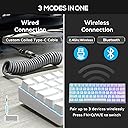
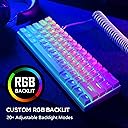
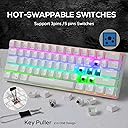
The RK61 is a versatile 61-key mechanical keyboard featuring hot-swappable tactile brown switches, triple-mode connectivity (Bluetooth, 2.4Ghz wireless, and USB wired), and a rich RGB lighting system with 27 modes. Its compact 60% design maximizes desk space while an ergonomic 8ยฐ angle and integrated wrist rest ensure comfort during extended use. Compatible across Windows, MacOS, and Android, itโs a portable powerhouse tailored for professionals and gamers seeking style, flexibility, and performance without breaking the bank.


| ASIN | B07P832XSX |
| Additional Features | Backlit, Lightweight, Rechargeable |
| Antenna Location | Everyday Use |
| Best Sellers Rank | #5,874 in Video Games ( See Top 100 in Video Games ) #447 in PC Gaming Keyboards |
| Brand | RK ROYAL KLUDGE |
| Built-In Media | Keycap Puller, USB Cable |
| Button Quantity | 61 |
| Color | White |
| Compatible Devices | Gaming Console, Laptop, PC |
| Compatible Operating System Family | Linux, MacOS, Windows |
| Connectivity Technology | Wireless |
| Customer Reviews | 4.5 out of 5 stars 3,572 Reviews |
| Enclosure Material | Acrylonitrile Butadiene Styrene |
| Hand Orientation | Ambidextrous |
| Item Dimensions L x W x H | 12"L x 4"W x 2"H |
| Item Type Name | wireless gaming keyboard |
| Item Weight | 500 Grams |
| Keyboard Backlighting Color Support | RGB |
| Keyboard Description | Mechanical, Gaming |
| Keyboard Layout | QWERTY |
| Language | English |
| Manufacturer | RK ROYAL KLUDGE |
| Mfr Part Number | 01-001-061-00-05 |
| Model Name | RK61 |
| Model Number | 01-001-061-00-05 |
| Number of Batteries Required | 1 |
| Number of Keys | 61 |
| Number of Sections | 61 |
| Power Source | Battery Powered |
| Recommended Uses For Product | Everyday Use |
| Special Feature | Backlit, Lightweight, Rechargeable |
| Style Name | Classic |
| Switch Type | Tactile |
| UPC | 712317049916 |
| Unit Count | 1 Count |
M**I
Been Using For Months, Still Great! Would Buy Again In A Heartbeat
I bought this board a while back and didn't write a review. Well, I still love it. It's certainly not the nicest board; the quality difference between my friend's $130 board and mine is extreme. The Anne Pro 2, which this replicates, is also way nicer. However, for the price, it's awesome and works perfectly. โฟ ๐๐๐ซ๐ค๐ง๐๐ฉ๐ ๐ผ๐จ๐ฅ๐๐๐ฉ๐จ ๐๐ฒ๐ ๐๐ฒ๐๐๐ฒ๐ฟ๐ถ๐ป๐ด Keys have letters cut into it so the RGB lighting shines through and they don't fade. The font is aesthetically pleasing, too. ๐ฃ๐ฟ๐ผ๐ด๐ฟ๐ฎ๐บ๐บ๐ฎ๐ฏ๐น๐ฒ ๐ฅ๐๐๐ Individually programmable RGB LEDs beneath each key; looks great and allows a TON of customization! I had a lot of fun setting mine. Pictured is one of the generic manufacturer settings. Looks especially amazing in the dark. ๐ฃ๐ฟ๐ผ๐ด๐ฟ๐ฎ๐บ๐บ๐ฎ๐ฏ๐น๐ฒ ๐๐ฒ๐ ๐๐๐ป๐ฐ๐๐ถ๐ผ๐ป๐ You can change a key to open a specific program, give it three functions, give it no function, etc. If you can think of it, you can do it. ๐๐น๐๐ฒ๐๐ผ๐ผ๐๐ต Connects with Bluetooth easily. ๐ฃ๐ผ๐ฟ๐๐ฎ๐ฏ๐น๐ฒ Small and light for travel because it's not made of aluminum. ๐๐ผ๐ป๐ด ๐๐ฎ๐๐๐ฒ๐ฟ๐ ๐๐ถ๐ณ๐ฒ The battery feels like it never dies. I've charged it like three times. It lasts for a solid two weeks minimum and I use it on a once a day basis. ๐๐ต๐ฒ๐ฎ๐ฝ For a mechanical keyboard, this bad boy is CHEAP. I was looking at boards without RGB or bluetooth for $80+. Sure, those boards are made out of higher quality materials and have a better typing experience. But for the average user, it's perfect and the quality differences are unnoticeable. ๐๐ฒ๐๐๐ต๐ฒ๐๐ถ๐ฐ๐ฎ๐น๐น๐ ๐ฃ๐น๐ฒ๐ฎ๐๐ถ๐ป๐ด I love the look of this board; I'm a sucker for white colored electronics! It looks very nice with the RGB, too. โฟ ๐ฟ๐ง๐๐ฌ๐๐๐๐ ๐จ ๐๐ก ๐๐ฒ๐๐ They are combined with number keys (it's a 60% board). I switched my computer to Ubuntu and needed frequent access to the FNs because I had a lot of issues. Sometimes they wouldn't work, despite me using the correct key inputs. This is my biggest issue but in months of using, it only occurred once! ๐จ๐ฆ๐ ๐ ๐ฃ๐ผ๐ฟ๐ Doesn't work with some USB C cords despite them fitting into the port perfectly. ๐๐ผ๐บ๐ฝ๐น๐ถ๐ฐ๐ฎ๐๐ฒ๐ฑ ๐๐ฒ๐ ๐๐ป๐ฝ๐๐๐ Learning curve on the secondary key function inputs. However, this is par for the course when it comes to 60% boards, so it isn't a manufacturer issue. Make sure you're prepared to learn them before you buy. If you need frequent access to FN keys, or both the arrow keys and the ?/ keys, consider getting a 75% or larger board. ๐๐ฒ๐ถ๐ด๐ต๐ Set just a little bit too high to be fully comfortable on my wrists. ๐ฆ๐ผ๐ณ๐๐๐ฎ๐ฟ๐ฒ ๐ฆ๐ฒ๐๐๐ฝ The physical page explaining the keyboard's functions is a bit confusing. The software itself is easy to use if you're somewhat experienced with computers, though. ๐๐ผ๐ด๐ผ Nitpicking, but the logo on the side of the board is a bit ugly. This is standard on knockoff electronics, though. I use this with a gaming laptop and gaming PC for both writing assignments and gaming purposes. Serves both functions well. I can't go into advanced aspects like the point of actuation because I'm not an advanced user. ๐๐ผ๐๐๐ผ๐บ ๐น๐ถ๐ป๐ฒ: ๐ถ๐ณ ๐๐ผ๐ ๐๐ฎ๐ป๐ ๐ฎ ๐ป๐ถ๐ฐ๐ฒ, ๐ฝ๐ผ๐ฟ๐๐ฎ๐ฏ๐น๐ฒ ๐ธ๐ฒ๐๐ฏ๐ผ๐ฎ๐ฟ๐ฑ ๐๐ต๐ฎ๐ ๐๐ผ๐ป'๐ ๐ฏ๐ฟ๐ฒ๐ฎ๐ธ ๐๐ต๐ฒ ๐ฏ๐ฎ๐ป๐ธ, ๐๐ต๐ถ๐ ๐ผ๐ป๐ฒ ๐ถ๐ ๐ด๐ฟ๐ฒ๐ฎ๐. If you have the money to spend on a nicer board, check out the Anne Pro 2.
T**N
Budget Mech KB That Performs Just As Good!
This is definitely one of the top 3 budget keyboards I'd definitely recommend especially if you're looking for a small or minimal 60% look or simply don't need the functionality of the function row or numpad. When purchasing make sure you know what kind of switches you want because you have the option of linear reds, tactile browns, or clicky blues. I went with browns since I've used reds before, but felt a little too light for me to the touch. I included 2 pictures with different keycaps. The first pic has some HyperX pudding keycaps, and the second pic are the keycaps it comes with along with a 10 CMYK keycap set, similar to what comes with the Anne Pro 2 60% keyboards. This is definitely worth it. I only wish that it came with at least Outemus or Gaterons instead of their proprietary RK switches, but if you want you can purchase the ones you want, as long as it's compatible with the pcb, and do some soldering. I also did lube the stabilizers, as recommended by some, to negate the ping-y sound that may reverberate when pushing on the keys that have stabilizers (shift, enter, and especially spacebar). I used dielectric grease that I purchase at a local autozone (you can also find it at home depot, or any hardware or auto store), that only cost me $1 during a sale, but only normally $5 or less. Do this and you'll have an amazing 60% mechanical keyboard. The RGB's aren't too dim and actually brighter than the ones I had on a previous Tecware Phantom 87 TKL. I love the led patterns on this a lot, but you can also turn them off if you want to. The wireless and bluetooth functionality on this keyboard is also very easy to use. Make sure you read the manual! It'll have the commands/inputs you need if your keyboard does not automatically pair to the device you want. You can pair it up to 3 devices such as your Pc, Ipad, and/or Iphone or anything with bluetooth functionality. I usually use this wired since it's specifically for gaming, but I can see this being of use as a portable wireless keyboard on the go since it is only a 60%. I've only found one issue that might of been on my end, and that was when I tried using a cheapo usb that had leds on this versus the one it came with, or one of decent quality. The usb I tried using was mostly for aesthetics since it blinked blue/red leds, but was also just cheap and gimmicky. Other than that I have had know issues, and I've own this for a few months now. If anything changes I will update this review.
R**T
Great in Most of the Ways that Count
I'll just do an initial impressions/opinions first then the pros and cons list after. I've gone through the flagship keyboards of nearly every major brand you can think of: Razer, Logitech, Cherry, Corsair, Roccat, and others. But only a couple of them (IMHO of course) have been better than this keyboard and not overall, just in certain ways. I'll explain: Razer usually blows the budget on lighting. I think we all know that's their main draw. But their keys are AT BEST comparable to these. Logitech always has all the bells and whistles, but again, key switches are comparable at best. Corsair probably has marginally better keys (in that they are usually not dry but, rather, dry lubed and not very "clacky" which, for some, is great and others, not so great). But the feel of these brown key switches? Oh lord... Its like typing on the smoothest and yet... I can't really describe what I think when I type on it. It just feels "right." Pros: Key switches, while proprietary, are outstanding: not obnoxiously clicky and loud, but feel nice to press RGB Colors are very vivid Key travel distance is rather short which I see as a pro; YMMV Very sturdy construction Cons: RGB lighting is not as bright as other main stream brands' Brown switches are not for everyone, they take stronger fingers to use effectively (only my opinion) Its a 60% keyboard, you know what you're getting into with secondary key functions; however, once you learn where they are, its not that bad Lack of adjustable feet/legs; not a huge deal as the design almost negates the need for them, its still just a bit low for my liking These of course are only my opinions and only reflect as much. I purchased this keyboard for 10% off, but that was an Amazon deal and I was not compensated in any way for this review. It reflects my true and honest thoughts on the RK Royal Kludge RGB 60% Mechanical Keyboard, brown switches, white.
J**.
Nice budget option
RK61 RGB Wireless: Black Ended up with brown switches after trying the red switch version. With the red switches I couldn't feel when the button was being depressed and I couldn't lightly rest my hand on the keys without accidentally pressing a key. Brown was perfect and what I was used to, with an ever so slight resistance prior to a smooth downstroke. Pro's: -Bluetooth and wired works well and connected to any supported devices easily. -Keys aren't bad at all. Relatively quiet and feel the same as my older Logitech board. -RGB has a bunch of options and the software allows for more customization. Cons: -2.4ghz wireless was dead on arrival, all troubleshooting options were exhausted with no success -Battery life wasn't amazing, but was fine for a day of gaming -Software was difficult to find and not amazingly designed (spelling errors) I couldn't figure out how to reprogram the default layers. If you wanted to reprogram the y key to something other than printscreen while fn is held, not do-able. It supports basic remaps of keys, function layers not included I guess. -RGB isn't the brightest and the white is kind of a "cool white" -61% is not a great format without decent software support. Third-party applications exist that allow better customization such as AutoHotkey (Windows only) but they're only software based and cannot be added to the hardware so customization can be taken with you on the keyboard itself. If you don't care about customization of remaps and macros and don't mind the size format, get this, it's great. If you're looking for a top of the line software and tons of customization and a great software, don't get this. I only use Windows and android and I've utilized AutoHotkey to improve usability while on Windows. For the money it's totally acceptable to me.
K**E
Amazing Keyboard, great customer service, too small.
I've used this keyboard for a little while now and I love it so much, but it's my first 60% board and I just couldn't get into it. The RGB is amazing, it has some of the best looking lighting I've seen on a RGB keyboard, the preset RGB settings are awesome and can be really customized even without using the software. The FN bindings are keyboard layout changes took me while to get the hang of. I feel that is product of it being a 60% KB rather than anything with RK, because I even looked at the "holy grail" Anne Pro 2 and it has annoying keybindings to get over it's small size too. I never had any issues with delay, keys not working, functions not binding, I mean overall this was a very nice keyboard. This was my first experience with brown switches, they're really nice, I like the tactile feeling but overall I think I'm mostly into blue switches even thought they're loud. The bad: I just couldn't get used to using a 60% KB. If you're like me and have used a full size KB or even an 87 key for your whole like a switch to a 61 key is rough. Even using an ancillary number-pad I found myself annoyed with it. Ultimately, this is a gaming keyboard, which is does very well, but I had to work from home on my rig a few times with this keyboard and I was pissed. I don't feel like that should detract from my rating of this product though, because most people hopefully know what they're getting into. TL:DR if RK makes a full 104 or 108 KB I'd buy it without question since this KB was so nice. I jsut can't get used to a 60% KB.
A**R
Accurate typing, feels great, and flexible with windows and Linux
Love this keyboard with the brown switch!!! It is very professional performance, compact and yet same key size and spacing, solid build, handle multiple operating systems at same time, and looks great. At first, got this keyboard because I wanted a mechanical keyboard to handle my Jetson Nano (Linux OS like Raspberry Pi) and keep around on desk with my Windows machine Logitech mechanical gaming keyboard (Logitech G810). I type a lot with the Windows machine for work and the software development job I do so I need a keyboard that is fast, feels good for typing, and fingers can easily maneuver with it from the first minute to the 12th hour or continuous use. I got this keyboard because it was small and had to be on my desk at the same time that I had my main use Logitech keyboard. After using this new keyboard I changed my mind about keeping two keyboards on my desk at the same time. This keyboard will be the only keyboard on my desk. This keyboard is much better in most features I described above and more than the Logitech mechanical keyboard; makes me sad because I really like the Logitech keyboard. The Logitech does have the up/down/left/right arrows separated and a very important feature you might think twice about before getting this keyboard. The manufacturer totally missed out on the keyboard increase and decrease volume. This could be a deciding point for many people because you don't want to hunt around for volume if you are doing something fast and continuous; I almost did not get this keyboard because of that and this manufacturer is probably missing a lot of more detailed experienced customers on this issue; THERE IS A FIX - read easy fix in following paragraph below. This keyboard switches between Windows and Linux (between computers) with ease where the Logitech and others have difficulty because of software they download and place in Windows with no other support. For this keyboard I did not download any software and it maintains all the color settings; function key settings are done from the operating systems so that does not matter for me. The colors chosen and area of display is also much better and a professional feel than the Logitech and the color pallet and lighting balance make me feel good; I used to do a little of lighting design and this feels more professional than some cheap lit keyboard that feels like it was won at some kids arcade. Programming the function keys on Linux is easy. On Windows you can download "AutoHotKey" and create a very short three line script for volume up down and mute; plenty of examples you could copy/paste and modify. Remember to place finished script in "startUp" directory to work with computer restart. The free non-commercial app (have not noticed any spy or adware software with it) will also allow any other modification of key press with mouse interaction; for example open some app on key-press or hold windows key with mouse buttons to control volume... or anything you probably any functionality running through your mind. I am very picky about keyboards, I don't like a car with just an OK suspension that fails in bad weather or keeps you from driving fast and easy. I like a more accurate, precise, and fast acting suspension on a car that makes driving fast like driving half the speed with out getting stressed out for a very long distance. This keyboard is that.
D**E
Love it.
I really like RKs, I've bought three of them now. The battery died in my original bluetooth only RK61 and I wired in my own. This one I like for the 2.4ghz dongle, no more missed keystrokes just because it sat around for a few minutes unused. I think it has a newer bluetooth version too because that seems to be working better as well. The LED colors are cool but I really only use red personally (my older one is red only). Pretty customizable with just the keyboard buttons, haven't tried the software. My only gripe with these is the question mark is grouped in with the arrow keys, so you'll have to choose which one you need more and swap the default behavior. Thankfully it's easy to do, and I dont really know of a better solution for this form factor, so I'm not really mad at it. Great little portable keyboard.
R**E
1 YEAR REVIEW
I searched for a 60% keyboard because I would keep smacking my mouse into my larger one while gaming on low sensitivity, and this one was at least $20 cheaper than the competition while having the same features if not more. REVIEW It does not have dedicated arrow keys (function keys needed) or kick out feet, which I knew before buying so no problem there. The included Bluetooth was not something I personally used, but the option being there at this price point is pretty nice. The case is plastic but I had no issue with the build quality, it feels solid. After a full year of use, it is just as solid and reliable. I've used Brown Cherry MX switches before and the Gateron Brown switches are great in my opinion. Tactile and pretty quiet. Oh, and the keyboard lights up with pretty colors! Overall this keyboard met all my expectations and then some. The cherry on top was the aesthetic it gave my setup, the only things on my desk were my 3XL mousepad, mouse, and 60% keyboard. Initially it didn't seem like too much changed swapping from my TKL keyboard, but when I put it next to the 60% it looked bulky and extra in caparison. PROS -Relatively affordable -Space Saving -ACTUAL RGB with different color modes - Bluetooth if you're into that -Minimal aesthetic -Good switches CONS -No dedicated arrow keys -No kickout feet TL;DR: Its small, aesthetic, feature packed, and affordable. If you use arrow keys a lot, it may not be worth. If space is the priority, it is definitely worth.
N**L
Missing coil cable
I couldn't be more disappointed with my experience. The primary reason for choosing this keyboard was the included coil cable, but it was missing from the package. When I contacted customer support to address this issue, I expected a quick and straightforward resolution. However, my frustration grew as I was informed that the coil cable was not available for replacement, and they could not send a new keyboard or process a return either. This left me with a keyboard that didn't meet my expectations and no solution in sight. The keyboard itself may be functional, but it's not what I paid for. Missing components and the inability to rectify the situation through customer support has left a sour taste in my mouth. I would strongly caution against purchasing this keyboard, as it seems the company does not stand by their product or customers.
B**9
Amazing
The product is really great and sturdy when it got here. The lights looks great and are very satisfying. I recommend this product. It is great as it came with some accessories in the box. Good purchase!
G**N
Highly Recommended for gaming!!!
This is the best keyboard I've ever used, and I have used many expensive but good quality keyboards. There are many keyboards that are over $100 just to be the same as this one. It is a great keyboard with good LED but has been better with it plugged in through cable. Other than that, it is a great budget keyboard.
F**R
Spiele Tastatur
Alles bestens
S**P
Great keyboard!
Works perfectly on my pc through Bluetooth. Love the RGB backlights and clacking sound. Recommend for any minimalist or white setup!
Trustpilot
1 month ago
3 weeks ago