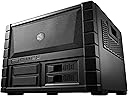
๐ฅ๏ธ Elevate your build with airflow and access that means business.
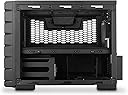
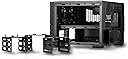
The Cooler Master HAF XB EVO is a high-airflow cube-style ATX case designed for serious PC builders. Featuring dual 120mm XtraFlo fans, removable drive cages, and a detachable motherboard tray, it offers exceptional cooling, easy upgrades, and flexible storage options. With support for large CPU coolers and GPUs, plus front-panel USB 3.0 and X-Dock slots, itโs engineered for performance and convenience.
| ASIN | B00FB45WPI |
| Antenna Location | Gaming |
| Brand | Cooler Master |
| Case Type | Mid Tower |
| Color | Black |
| Compatible Devices | CPU |
| Cooling Method | Air |
| Customer Reviews | 4.6 out of 5 stars 123 Reviews |
| Enclosure Material | Steel, Polymer |
| Global Trade Identification Number | 00884102025587 |
| Hard Disk Form Factor | 3.5 inches |
| Internal Bays Quantity | 4 |
| Item Weight | 18.1 pounds |
| Manufacturer | 2 |
| Material | Steel, Polymer |
| Mfr Part Number | RC-902XB-KKN2-AMZ |
| Model Name | RC-902XB-KKN2, RC-902XB-KWN2 |
| Model Number | RC-902XB-KKN2-AMZ |
| Motherboard Compatability | micro ATX , ATX |
| Number of Fans | 2 |
| Number of Items | 1 |
| Other Special Features of the Product | tsa-compliant |
| Power Supply Mounting Type | Bottom Mount |
| Recommended Uses For Product | Gaming |
| Supported Motherboard | micro ATX, ATX |
| Total USB 3.0 Ports | 2 |
| Total Usb Ports | 2 |
| UPC | 884102025587 |
| Unit Count | 1 Count |
| Warranty Description | 1Year |
T**B
Great computer case, easy to work on once familiar, too big for some applications
Very well designed case. At first look it was intimidating, thinking I had to snake all the power cables here and there. But really this is how computer cases should be standard. It takes more quite a bit more room, this thing is huge I'll admit, but the benefits far outweigh the little things. It's about 17 inches wide at the face, 16 inches deep to the back, and 13 inches tall from the bottom of the feet to the top where it curves upward for a large fan. This means your computer desk needs a space that is about 20"x20" wide at the base and 16" tall to comfortably put this thing in. My current computer desk I built for normal tower-type cases will not hold this thing inside it's enclosure, so I had to lay this on top of my desk and it takes up lots of real estate. Before you buy don't make the same mistake I did and not have a place to fit this thing, but even with it sitting on top of my desk I love the engineering behind this case and just cannot make myself hate it. All the hard work getting it to fit on my desk and putting it together really is worth it in the end. Another note before buying, the front USB ports use a USB 3.0 plug. I had to buy an adapter cable to go from a USB 3.0 female to a USB 2.0 male plug for about $5 here on Amazon so I could use the front ports. First for the PSU it gets put into a tiny metal frame that can then slide in and out of the back and overhangs a little. Once that is in there you start snaking the power cables to the general spots they need to go, the SATA power cables for HDD's and disc drives etc go below and the 24-pin connector and whatnot go up top around the side closest to where it is on your motherboard. Then install the HDD's and whatever else you want in the 5.25 bays. The quick-swap HDD mount on the bottom right works really well. Make sure you have Sata cables with the 90 degree bend in them to fit onto the board that the two front HDD's connect into. I really wish we could get one more of these quick-swap bays with the case so you can swap out a 3rd drive if needed, but there is a mounting location for HDD's in the back left bottom of the case if you plan on just having HDD's permanently attached. Once you get the bottom sorted you put the motherboard tray in and start installing the motherboard like any other PC. Luckily even with a crowded bottom half with all the power cables the top when finished looks very clean, especially compared to standard PC cases. The top and the two sides with handles come off very easily and more than a few times in the first week I assembled my PC I had to slide them off while it was running to move like a fan wire barely clipping a 120mm fan or move some cabling in slightly better spots. Maintenance on top is really easy, so much easier it's totally worth it. Where the problem comes in long-term I think isn't blowing out dust from the top but from the bottom. That thing looks crowded but it still gets very good airflow so as long as I secure all the fans to prevent the blades from spinning I can just use my air compressor with blower attachment and get it all out. It's still super easy to get to everything top and bottom when you take off the side panels. Lots of space in this thing. There is a 120mm fan slot on the back close to where the CPU cooler sits on most motherboards, point the fan on the cooler and the case fan both to exhaust out the back and the 2 120mm's in front to pull in from the front and you have a very cool computer system. 4 hours into Far Cry 4 with high settings @1080p and my GPU wasn't anywhere near as hot as it's normal listed operating temperatures and the CPU is staying about 4 degrees cooler under load compared to my old case, but I will admit my old case while very well made was too crowded, it wouldn't fit my new GPU if it wanted. Summary: Very well made case, lives up to the HAF name of high air flow and keeps the case cool. It has room for a radiator if I ever wanted to go that route in the future, it has the hot-swap HDD bays on front so you can swap 1TB HDD's like a giant flash card, everything is just well designed and done smartly. You will spend a little more time getting all the power and sata cables in place compared to a normal case, expect a few more hours over your normal assembly time if you never used this case before because it is quite different from the norm. Be sure to measure out a space big enough to put it in with room to still breathe.
T**E
Just short of perfect...
I've built many a PC and by far this is the best case I've ever had, probably my last. It's well built, and mostly very easy to access. The cable routing is fantastic as is the air flow for cooling. The quick access/release for the HD's are great, maybe too easy if you have curious kids that want to know what's behind that door! There were just a few issues I had with installation of my equipment I wanted to share.... 1) The case was not at all friendly to my particular power supply, which has removable cable assemblies that allow me to mix and match different cord ends for whatever configuration I might need. It's a large 1200w unit so not an issue everyone will have, but with mine I found the long connectors would not fit in the tight spaces allowed, even broke one of my power SATA connectors trying to squish the drive into the proper position in the drive bay. I recommend avoiding a higher end power supply such as this with this case and use a power supply that has fixed (and short) connection leads. 2) In reading the reviews, I saw plenty of comments about how much room there was for a large CPU tower so I ordered a Cooler Master Hyper 212 Plus for my CPU cooling. The cooling tower will fit, but not with the 200mm fan installed on the top cover, and only by about 1/4". If you're going with a large CPU fan, avoid the top fan. The standard fan that typically comes with your CPU will not be an issue at all for the top fan. 3) I also read some reviews about the 200mm fan having the wrong hardware for mounting the fan. My case came with black screws to mount the fan in the top panel and those worked great for me. The fan I ordered also came with silver screws which would have worked as well, so perhaps that poster just got the wrong fan or a bad package of hardware. 4) If you're going to use the 5.25 bays or the two hidden 3.5 bays I recommend having short or 90 degree connectors for SATA and power as there is only a short distance to a wall and if you have long straight connectors, such as I, you will not be able to make that connection. As my equipment is fairly unique, I suspect most buyers will not have many issues with this case and I do highly recommend this product.
J**S
Great case, easy to install.
I gave this product 4 stars out of 5 due to not having more different size mounting holes for different size fans/water radiators. Granted, the product is a different form factor and I am very familiar with Cooler Master having owned one of the best cases I've ever had with the Cosmos 1000. This case however, I bought for a specific build. I travel broadcasting Twitch game broadcast and interviews and figured that the tall HAFX and HAF 912 cases I originally had were just going to be awkward hauling around from area to area, especially since the taller the case, the easier it would get to tip over. I was in the market to find a nice size box that would be easily stack able with wide footing for easy carrying and travel. This case honestly fit the build as I was wanting to get a case fully compatible with ATX form factor motherboards and enough expansion card slots for a respectable build instead of all the ITX cases out on the market which only support one (1) or two (2) expansion slots. Having said that, I was able to fit everything from both my computers into two separate XB Evo cases. But I could not fit more fans from side panels except for the the back 120mm and the 200mm at the top. A few more mounting hole options would have been great having been marketed as a HAF series high air-flow case. Don't get me wrong, it is high airflow so long as you have both the 120mm fan and 200mm fan installed, but when an enthusiast thinks high air-flow, we're probably thinking maybe just a few more fans than that. The case is beautiful and could easily be a respectable gaming case for easy moving with the added reinforced handles on the side. The handles are supported from both the panel and the frame from inside\ making the case always feel strong and dependable. The feet are rubber to the touch and definitely keep it from slipping or moving at all on most surfaces and vibration at a minimum. The clearance from the floor to bottom of the case are tall enough to be able to set on semi-shaggy rug without gumming up the PSU intake/vent. I like that they included two 120mm fans in the front as well and the mounting case for SSDs are now a standard but still appreciated to those who are making the transition. There is plenty of room for navigating cables even from non-modular power supplies and hides cables easily at the bottom where it will least be seen with proper cable management planning. I haven't found any replacement side panels with optional window/fan holes but to be honest, might not be needed since the mesh at the top clearly gives you the best view of the internals if there is no 200mm fan installed. I think this is a great product and built to last. Now, if Cooler Master could only bring back my silver Cosmos 1000. I'd buy another in a heartbeat.
R**N
A truly great system builders case. Highly recommended!!!
For the first time I decided to build my own custom computer system from scratch using this case. I based my case decision on my reviews that I ran across during my research on the best case to choose. I am glad I purchased this case and very happy with it! This case is designed with the system builder in mind and is very easy to work with as you can access almost everything during the build process very easily. The removable mother board tray makes motherboard installation a snap. The only issues I ran across during the build process were: 1. The case supports five fans but only two 120mm fans are provided. There is good ventilation in the case so this is a minor issue. In any case I purchased enough additional fans to max out the fans as I believe you can never have enough system cooling! 2. With a Corsair Hydro Series H105 CPU cooler installed (I did it in push/pull mode with a total of four fans) there is only room for a 10-1/2inch maximum length graphics card. My EVGA GeForce GTX 780 Ti Superclocked w/ACX Cooler graphics card did fit but there isnโt much room left between the card and the cooler. 3. Unless you buy a 200mm fan from Coolermaster you will probably find that any other 200mm fan will probably only be able to be installed with two screws as the four screw holes donโt line up. I had to do this myself but two screws worked just fine for me so I consider this a minor issue. For those who want to know here are the specific components I installed during my build which were all bought from Amazon Corsair RM Series 750 Watt US Gold-Certified Power Supply Corsair Hydro Series H105 Extreme Performance Liquid CPU Cooler EVGA GeForce GTX 780 Ti Superclocked w/ACX Cooler 3GB GDDR5 Graphics Card Samsung Electronics 840 EVO-Series 1TB 2.5-Inch SATA III Internal Solid State Drive ASUS ATX DDR3 2600 LGA 1150 MAXIMUS VI FORMULA Motherboard Intel Core i7-4770K Quad-Core Desktop Processor (3.5 GHz, 8 MB Cache) Corsair Dominator Platinum 16GB (2x8GB) DDR3 1866 MHZ (PC3 15000) Desktop Memory LG Internal UH12NS30 BD-ROM Blu-ray Optical Drive
K**R
Great case. Love the motherboard tray and front remove 3.5" HDD caddy
I just got this case couple of days ago from Amazon. It's a solid build quality. The 2 front swappable HDD caddy are of great quality and swapping the drives is very easy. Cable management is easy on this case. Trying to find a 200mm fan however for the top cage is hard to find that actually fits the provided holes. Airflow is great. My only gripe is that it only has a total of 4 HDD slots. 2 at front (hot swappable) and 2 internal. Should have at least 6 HDD slots in total. It does comes with a 2.5" caddy and side locks to place it in the internal HDD slot. There are also 2 x 5.25" slots at the front. I am planning to buy a NZXT Sentry 3 or 2 fan controller for one slot and may be a 5.25" to 3.5" hot swappable caddy for the other to increase the number of HDD the case can take. There are also 2 front USB 3.0 ports which provide great performance. I installed Windows 8.1 x64 Pro via a USB 3 stick using the front USB 3.0 port and install was super quick. Overall I am extremely happy with the case. My specs are below. AMD FX-8320 Asus Sabertooth 990FX R2.0 Noctua NH-U14S CPU Cooler Samsung EVO 250GB SSD Western Digital Red 2TB (x2) Crucial Ballistix Sport 16GB DDR3-1600 RAM (2 x 8GB) EVGA SuperNova 750W G2 PSU Cooler Master HAF XB EVO Case Windows 8.1 x64 Professional Gigabyte R9 270X Windforce GPU
T**E
Very easy to get to everything
Monster of a case. Built very solid. Very easy to get to everything. If you are looking for a small case forget it. It's pretty heavy and large but it's built solid, easy to get to every thing and lots of air vents and more air space over MB than any tower I have seen. Comes with two 120mm fans. Plenty of room for Corsair H100i water cooler. Fans are good quality and dont seem any different then the fans that came with water cooler. So a tip is just leave the fans that come with the case where they are and install the radiator. I installed/uninstalled/reinstalled fans for cooler inside case then went back to outside and works just as well and leaves that much more room inside case without the fans on the radiator. Purchase a 200mm fan for top of case and there is plenty of air flow.
R**T
Great Form Factor
Pro: Really easy to build. Almost too big, the case is a couple of inches wider than it needs to be. Top, sides and mobo come out so there is no problem fitting anything in. Looks impressive. Built to high quality standard, everything fits perfectly and nicely finished. The included case fans are quiet. As open as it is, it is virtually silent. Fits any air cpu cooler. Con: You need to buy (2) 80 mm and (1) 120mm case fans to complete. The mesh top with grommets looks odd. I replaced with a 9x10 3/8 sheet of lexan. Too big for desktop, plan on a separate stand. Highly recommend
S**.
Polarizing - You already know if you want it...
I have used this case for about a week now. It is one of the better experiences that I have had assembling a machine (been a builder for well over a decade now.) One thing you will know right away before reading the rest of this review, is if you want the case or not. It has a very polarizing look and feel to it. It is more sizable than you would think. Pros: 1. Open air for the most part 2. Ease of assembly, accessibility of parts. 3. Well constructed, tight fitting parts and pieces 4. Price for features 5. USB 3.0 on the front 6. STACKABLE! Cons: 1. Noise (hardly a con, this is as close to open air as you can get without actually being open air) 2. Size (sorta a con? It has almost the same footprint as an HAF 922 laid on its side.) 2. Drive bays feel plasticy, cheap 3. Power supply caddy fits a power supply EXTREMELY tight. (If your PSU has a fan grill on the OUTSIDE of the psu, be ready to remove it) 4. Hot swap bay power cable is darn near bare wires. Recommend caution when installing PSU and attaching to power. The case has great airflow, and an abundance of fan locations. I found the fans that were included worked just fine for my purposes. *Install* Installing everything in the case was simple. You can easily remove the motherboard tray for access to lower components. The PSU caddy surprised me however. It was such a tight fit, that in order for the PSU I used in this build (Corsair AX750) to work, I had to remove the external fan grill. This was slightly annoying at first, but I soon realized that not only was that not going to be an issue, but it was thought of by Cooler Master. They placed a removable, cleanable filter under the psu, that can be pulled out and cleaned without turning the machine off. If you prefer to vent your PSU up and out, you are out of luck. The other issue with the PSU area in general, was the hot swap backplane. The way to hookup the unit to power felt veryyyy flimsy. The connections look well soldered on, but are disconcerting no matter what. If you have a longer PSU, BE CAREFUL. It feels like too much movement or commotion around the backplane will break that cable. *Running, modifying, etc.* Everything runs great so far. Temps are steady about 2-3c lower than in the HAF-922 I had before it. Within the margin of error. My GPU runs about 6-10c lower in this (560ti 448 classified) due I imagine, to the orientation. Modification to parts is as easy as you could imagine. Both the sides and top are held on with thumb screws. The expansion card slot covers are heald on with thumb screws. I was able to swap out my gpu in about 45 seconds with no issues. Hard drives are easy to access, optical drives can be swapped out without issue as well. *OVERALL* Pretty awesome case. If you like the looks and like to tinker with your system, its a must have. If you have multiple systems, this unit is stackable (sorta, the feet are tall enough that you can stack it on itself without a problem.)
Trustpilot
1 month ago
2 weeks ago