๐ Discover the Power of Precision!
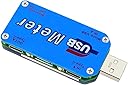
The USB Tester UM25C is a versatile and high-precision USB meter that allows users to monitor voltage, current, and power through a Bluetooth connection. With a vibrant 1.44-inch color LCD display and support for various charging standards, this device is essential for anyone looking to ensure the quality and efficiency of their charging equipment.
| ASIN | B07PZRSYXD |
| Best Sellers Rank | #1,017,628 in Tools & Home Improvement ( See Top 100 in Tools & Home Improvement ) #1,596 in Multi Testers |
| Brand | Deegoo-FPV |
| Brand Name | Deegoo-FPV |
| Color | Gold |
| Customer Reviews | 4.3 out of 5 stars 85 Reviews |
| Manufacturer | Deegoo |
| Measurement Type | Ammeter, Multimeter, Voltmeter |
| Part Number | SNS-192-B07PZRSYXD |
| Power Source | Battery Powered |
| Style | Digital |
| Style Name | Digital |
| UPC | 608603912425 |
Z**Z
The Ruideng UM25C USB power meter with bluetooth, best for hackers and nerds
Much of good reviews for the unit is for a Ruideng model, I do not know if clones exists as it is sold by many vendors under different brands, but this unique design functionally works very well. The company has fielded many models and whomever engineers this is worth watching, as he knows his stuff, so getting an actual Ruideng is a must if you want a bluetooth USB power meter. The photo for the product shows a USB test load, which is not included. As devices use USB power standard, being able to optimize charging using the right cable and supply can be confusing since users can't determine whether a cable is truly a power capable, or a USB A jack can supply more than 5V. Weakening batteries can be estimated by determining the Ah required to charge a battery. Pros Boot screen shows Ruideng logo, V2.0 excellent protective box for storage and transport Accurate at minimum to its spec of 0.5% VDC and 1% ADC compared to a fluke 87V and HP6114 precision power supply Stable and correct data collection over 24 hour period of test burn in BT pairing, Win10 and Android apps quick and work without glitches or dropouts; data is stored on the dongle and only data since pairing is graphed to the apps Win10 program has undocumented feature of adjusting graph scale, just click highest axis digit and type new value PC app is based on National Instruments libraries, well known for reliability easy to read bright LCD screen, easy to navigate for dongle only usage design pays needs of USB, such as rotating screen due to multiple positions USB can be put in heavily reviewed elsewhere for accuracy, reliability and performance box comes with QR code to link URL with software for unit Cons cable resistance algorithm is helpful but not as accurate as it could be, can be used to compare cables but not actual cable resistance fast charging algorithm identification is vague if correctly identified, but is not vital to know confusing versions of variant models from Ruideng that all look the same, so users have to read carefully what they do documentation can be confusing for non nerds as different models are very close to each other Arial Unicode MS fonts are included in package and should be installed but cannot force Win10 to use it, so the font on app is a bit large for the screens and aphanumerics can bleed off their placeholders Cannot resize scale on Android app App only recently appeared on Google Play, so users should be aware of issues loading APK from unverified sources PC app loads slowly because it copies a large number of libraries. Its a bloaty for what it does but it works reliably
D**Z
Truly Awesome!
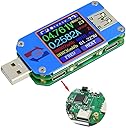
This is a great tester! I really love the upgrade from the A3-B that I have. The screen is flush to the face and seems much clearer and slightly brighter. The color, brightness and orientation of the display are easily configurable. Power can be input from USB-A, Micro-USB, or USB-C and will pass out through the various connections (example input micro-USB and output USB-A or input USB-A and output USB-C or C-to-C.) I have not tried every combination, I do not believe that C->A works for example. The Bluetooth interface to the Android App is interesting, but I mostly use the built-in display. I like that they added the micro-switch to disable Bluetooth and the annoying flashing blue light also. I have been successful with QC2.0 and QC3.0 as well as many PD standards up to 60+ watts and PPS works with my Note 20 Ultra 5G when the source supply is capable. The triple-sandwich PCB in this model is quite sturdy, and seems to better reinforce the connectors and wedges the display in place (older models had issues with the display losing tack and rotating slightly due to no stops.) Highly recommended. You will see quickly which cable / power supply combinations are best matched and whether your setup is faulty (bad cable or power supply.) I see that many USB-C cables will not carry more than 20W due to high resistance, and some power supplies will compensate, some won't. I have been successful passing data and power through USB-C to a dock that drives displays / ethernet etc. with 45-50W PD.
J**S
Super accurate! Works well with app.
I found to my surprise, that this little tester Exactly matched my high end Agilent multimeter (60,000 count U1253B, tested at .03% DC error +/-2 div) on voltage and within 2 counts on current. So for a device costing well over 10 times less than my meter, that's very good! It works perfectly through the standard USB A to A connectors. The USB C connectors are a bit different. I found it will not identify the charge mode. I also found if you connect from a charger/battery bank via a USB A to a USB C cable and connect to the tester via USB C, that the device being charged apparently is not communicating to the charger what mode to use. Therefore, you're stuck at 5 volts at whatever the receiving device takes. This is due to the limited connectivity usage of the USB C connection to the tester's processor. You will even likely need to occasionally turn a cable around in the input connection to get the tester to power up. For me this isn't a real big deal. If you connect USB C all the way through, your receiving device (likely a phone) will communicate with the charger. The tester, in my case never identified the mode using the C connection. In all other respects though, this tester is awesome! The accuracy is well worth the downside of the C connection issues. The Bluetooth works perfectly and even allows you to power it off if you don't need it. The app worked well for me. I simply needed to see the readings. Connection was a snap. Those having an issue likely never paired the tester before running the app. It must be paired. Then you simply tap the Bluetooth icon, and find the UM25 on the list and tap it, and it connected. Simple as that. My only gripe is that it should remember this device or have an option to. Still, not a big deal. My reason for 4 instead of 5 stars is the lack of complete usefulness of the C connections. If this is your main usage, you need to get a dedicated C tester.
J**E
Just buy it!
Simple it does what it says and is fairly accurate when testing against my fluke volt meter. Very nice and easy to read display and is great for testing usb cables!!
J**F
awesome blue tooth power meter
this is an awesome bluetooth power meter. I am making power measurements on several small odroid computers and some are 12 volt and others 5. this works flawlessly. There is an occasional hiccup on the bluetooth re-connect but it can be cleared by removing and then repairing the device.
T**3
C input flakey
Does not deliver 20A on USB-A input, only 15, C input does not work, very easy to set back to Chinese language by accident. To the junk drawer..
R**S
Display Turns OFF too quickly to assess charging statuses. Frustrating.
Importantly, this unit's display turns OFF pretty quickly. This is a headache when trying to assess charging, wattage etc., in short what it's supposed to do. Also, This does NOT come with a USB C input adapter, which is useful for a device like this one as many or most checks will be plugged in to a USB C charger. While I was aware of this, I became even more aware of what a headache it is when having to find additional cable to work with. A short adapter cable is a must so remember to buy one if you go with this unit. ALSO? While I cannot be sure if my cables are bad or the unit, but I sometimes have to turn the USB C cable around to get the unit to light up. My initial feeling about this particular tester is , MEH... IT works but not the way I'd like it to.
M**V
I am satisfied with my purchase.
I like this device. It seems to be accurate easy to read and the right size for me.
J**F
Nice power and energy meter
This device is useful for monitoring the power. Consumption of a usb device. You can also monitor the total mah charging energy to check your power bricks.
Trustpilot
3 weeks ago
5 days ago