Desertcart purchases this item on your behalf and handles shipping, customs, and support to Portugal.
🖥️ Elevate your workspace comfort—type smarter, not harder!
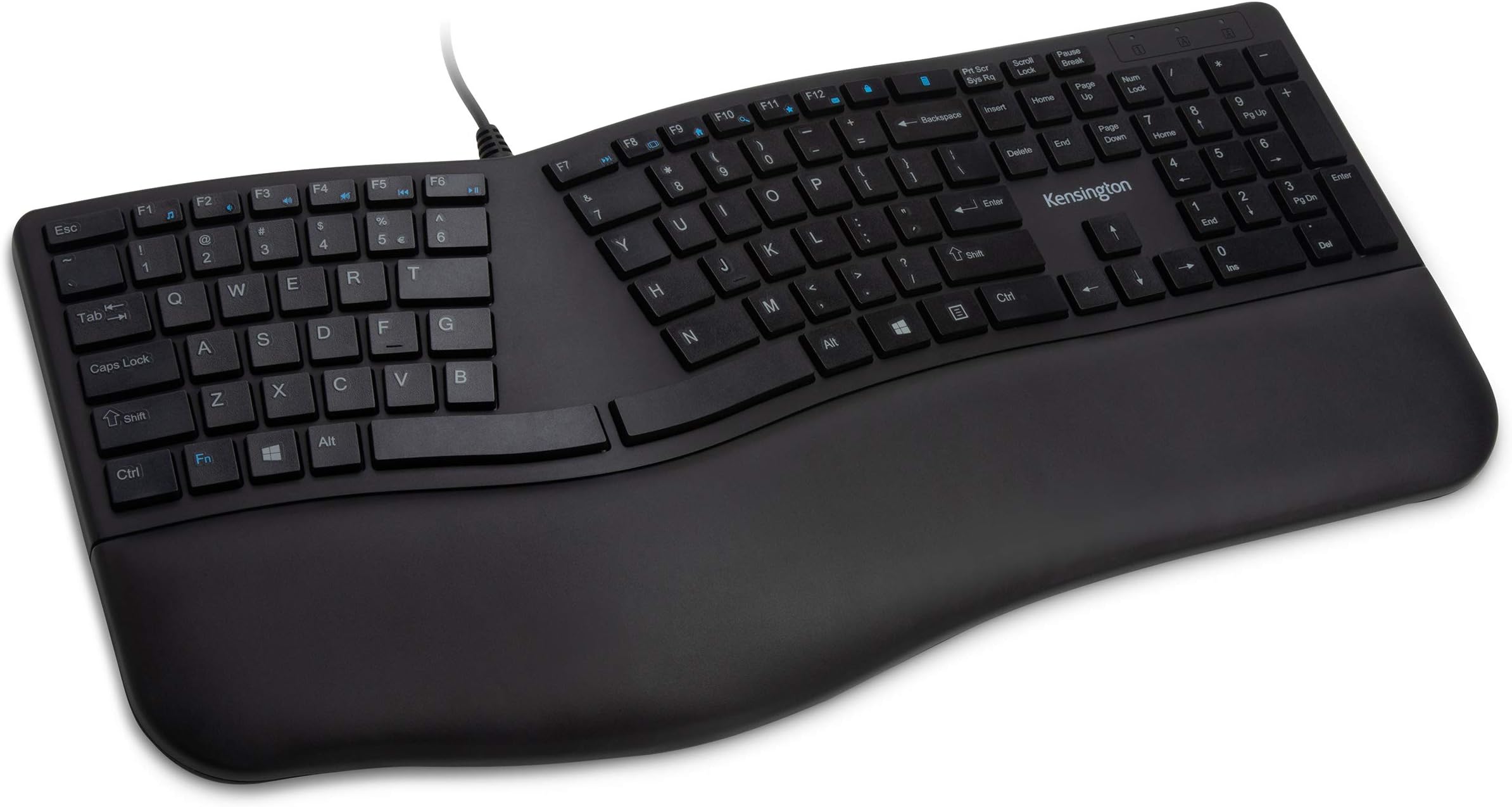
The Kensington Pro Fit Ergonomic Wired Keyboard (K75400US) is a professional-grade, ambidextrous keyboard featuring 104 keys, a built-in cushioned wrist rest, and a split, sloped design with adjustable reverse tilt to promote neutral hand alignment. Its spill-proof keys meet MIL-STD-810H standards, ensuring durability against fluids and cleaning solvents. Designed for quiet, smooth typing, it connects via USB for easy plug & play compatibility across ChromeOS, MacOS, and Windows systems—ideal for office and gaming use.


| ASIN | B07XGD9XJL |
| Additional Features | Wrist Rest |
| Antenna Location | Gaming, Office |
| Best Sellers Rank | #125 in Computer Keyboards |
| Brand | Kensington |
| Built-In Media | Built-in cushioned wrist rest |
| Button Quantity | 78 |
| Color | Black |
| Compatible Devices | PC |
| Compatible Operating System Family | ChromeOS, MacOS, Windows |
| Connectivity Technology | wired |
| Customer Reviews | 4.1 out of 5 stars 825 Reviews |
| Enclosure Material | Plastic |
| Global Trade Identification Number | 00085896754008 |
| Hand Orientation | Ambidextrous |
| Item Dimensions L x W x H | 2"L x 19"W x 10"H |
| Item Weight | 2.2 pounds |
| Keyboard Backlighting Color Support | Single Color |
| Keyboard Description | Ergonomic Wired Keyboard |
| Keyboard Layout | QWERTY |
| Manufacturer | Kensington |
| Mfr Part Number | K75400US |
| Minimum Required Operating System Version | ChromeOs 134, Mac OS 14 Sonoma, Windows 11 |
| Model Name | Pro Fit Ergo |
| Model Number | K75400US |
| Number of Keys | 104 |
| Number of Sections | 1 |
| Power Source | Corded Electric |
| Recommended Uses For Product | Gaming, Office |
| Series Number | 75400 |
| Special Feature | Wrist Rest |
| Style Name | Ergonomic Wired |
| Switch Type | Linear |
| Theme | Ergonomics |
| UPC | 085896754008 |
| Unit Count | 1 Count |
| Warranty Description | 3 Year |
| Water Resistance Level | Water Resistant |
C**T
Built for comfort
Great keyboard! The cushion rest is very supportive and the shape of the keyboard is really comfortable to type on.
K**E
Good keyboard
Price a bit high for what it is, however it does the job and is nice to use and quiet.
D**M
I love this keyboard
I tried two other keyboards before this one. and I was bracing myself to have to buy a super-expensive one, just to get something I liked. But this one is near perfect. I love the soft, almost-silent touch of the keys. The previous keyboard I tried had squishy keys that actually fatigued my hands by the end of the day, due to the effort needed to push them. On this keyboard it feels good to type. I also like that the caps lock light is in the upper right corner, not on the key, which means I can see it without moving my hand (this was a problem with one of the other keyboards I tried). The split between F6 and F7 threw me off for a bit, but I've adjusted (the old Microsoft ergo keyboard split between f5 and f6, so I had to adjust to the different positions). Aside from that, all the keys are in the right place and I'm pretty good at hitting them without looking. I like the spacing and layout of the arrow keys. This keyboard doesn't try to do anything fancy with the layout, which means it looks plain, but the keys are all in the right place. If I had to complain? I'd rather there be no keys at all above the backspace key. It's easy to aim too high and hit the calc or the lock key instead of backspace. A little extra space between the numbers and the F keys might be nice, as well. But it's rare that I punch the wrong key. Maybe a little more padding on the wrist rest -- this one isn't as cushiony as the others I've tried. I'd also like pop-out feet at the top and bottom of the keyboard -- this one only has them at the bottom, which seems like the opposite of what most people would want. But I'm very comfortable typing with it, the way it is.
S**E
Excellent
The keys are nice and soft, the calculator key is above the backspace rather than the lock key above the backspace which is ideal (I'd rather accidentally pop up a calculator than lock my computer), and the arrangement of the keys is ideal. My only suggestion for improvement on this keyboard is to use mechanical (brown? - the ones that are quiet and with minimal actuation pressure) switches, and to widen the wrist pad on the left side because the left hand hangs off the edge. This model is slightly wider than the cherry keys model which is even worse in this aspect, but hey, why not try widening it a little more so it gets the whole hand. I'll emphasize that the az, sx, dc, fv, and gb alignment is so nice. The keyboards that stagger these keys are far more inconvenient to type on. The funny thing is there are no keyboards on the market that have mechanical key switches and this type of keyboard alignment along with this keyboard layout. If someone made that keyboard, it would become the best keyboard in the entire world, and I have a feeling few people would take notice until maybe 10 years later. At which point it would become discontinued right as it was becoming a living legend. Because that is how the market for perfect keyboards works.
K**R
Great price, quiet, BUT too-tight F# row & badly-placed Calculator key
This was my pick ~Nov 2025 for a replacement quiet-typing full-size keyboard. I considered everything else I could find for ergonomic, quiet/chiclet-style keys. It's *pretty* good and a great price, quiet as advertised, responsive, and needed no drivers. But use has led me to some frustrating snags. The major thing I overlooked was the lack of gap between the number row and the top row F keys / Insert-Delete block. By that I mean it's identical to the gap between all the other main-key rows. I never realized how much my touch typing relied on a wider gap in those. With this Kensington, I CONSTANTLY hit the Calculator shortcut key above Backspace, and often overshoot into the F keys when hitting numbers. I had to use a 3rd-party app to forcibly disable the calc key due to how disruptive it was to have Calculator constantly launching mid-thought. Now I have to choose...do I find another KB that meets everything this one does, or do I find some custom key caps that can help my fingers better detect the edge of the main key set? Hitting random F keys or Printscreen/Ins/Del is still disruptive. Also, after <20hrs of use, the home rows already started fading. I use the Dvorak layout, so my time on the home keys is 4-10x that of QWERTY users, but still its durability should be much higher. The Dell chiclet style I had before this lasted 6 or 10 years and I never noticed any fading. Only reason I didn't just do that one again when needing replacement was the lack of ergo split was really getting to my wrists. Also of note but I *think* not Kensington's problem: It doesn't work with my Dell Thunderbolt dock. This dock is also iffy with my mouse and laptop in other ways. Those other glitches work with a couple simple steps, but the keyboard has never responded when connected thru it. I'm hoping a firmware update will help.
R**G
Comfortable soft type keyboard with sturdy feet
I waited awhile to post this review to make sure it was functioning well long term. So far so good! The wrist pad is very comfortable, the negative tilt feels comfortable and relaxed, and the soft type keys feel very nice under the fingers. The biggest pet peeve I've had with previous keyboards I've tried in the last few years are stuck keys and very flimsy feet that break off easily. Those were for a Nulea keyboard and I've had none of those issues with this one. So far I would highly recommend this keyboard.
I**K
It often thinks alt is held down when it's not
There are two major things that are problematic with this keyboard: 1. I've had this keyboard for 3 months and the letters are already fading off the most commonly used keys. I've never known any keyboard to fade like this, so the fact it's doing so after so short a time is telling. 2. The much bigger problem is that if I leave the keyboard untouched for a period of time while the computer is on, when I come back to it, the computer will behave as though I'm holding down the alt key, even though I'm not. This happens on two separate computers, so I know it's an issue with the keyboard, not with the computers. To fix it, it either requires 3 - 5 minutes of pressing the alt key for various durations, as well as unplugging and plugging back in the keyboard, etc., or it requires restarting the computer. This is unacceptable. Unfortunately, I didn't realize what was happening with it until a few days after the return window, or I would have returned it.
A**R
Recommend this one
The Kensington Pro Fit Ergonomic Wired Keyboard in Black (K75400US) has become an indispensable part of my daily routine. I'm a stickler for a wired keyboard because I hate replacing batteries or using Bluetooth. The keyboard's low noise level doesn't create much noise while I'm on conference calls. The ergonomic design sets this keyboard apart; a genuine game-changer for me. As someone who spends long hours at the computer, I suffered from wrist pain and discomfort. Thankfully, the Kensington Pro Fit's thoughtful ergonomic layout has significantly improved my daily comfort. The gentle slope and integrated palm rest provide excellent support, reducing strain on my wrists and allowing me to work comfortably for extended periods without discomfort. It's remarkable how this seemingly small change has transformed my work experience, enabling me to stay focused and engaged without being hindered by physical discomfort. I will use this keyboard until someone makes a better wired, ergonomic one. I have yet to see one.
Z**Z
Super teclado
Regalo para mi hijo. Empaque limpio y cuidado. Producto excelentes condiciones y el funcionamiento increíble. Un teclado que todo mundo debería tener porque ayuda con las articulaciones para los que pasamos mucho tiempo en la computadora
F**Z
Tuşların Yazıları Siliniyor
Yaklaşık beş ay içerisinde çok kullanılan tuşların yazıları silindi, iade ettim, iadem kabul edildi.
D**N
good keyboard but stopped working after 5 months
worked pretty well for about 5 months but then the top row of keys suddenly stopped working and even after a clean out, still wouldn't work. Might just my one that had problems. It was under warranty and I got a refund. Performance was good until it stopped working.
A**M
Great keyboard!
This keyboard is taking me some time to get used to, because of the split erogonomic design. But, with bad carpel tunnel syndrome, I was advised to buy an erogonomic keyboard. Sometimes, simple is best. I had ordered TWO other wireless keyboards by other brands, more expensive, and they were both faulty! I had to return them. I decided to go with a good old wired keyboard, and I'm glad I did. The keys on this keyboard are smooth like butter when you type. Some people like that, and some people prefer more clicky keys. This keyboard isn't for those who like clicky keys. I am very impressed with this keyboard for the price. I'm noticing a reduction in my wrist and arm pain after having it almost a month now. The padded wrist pad is making all the difference. I paired this keyboard with a Tecknet erogonomic mouse, and they're both helping a lot.
V**G
Great product for great price!
Ordered it because I have issues with carpal tunnel and wrist strain. Working from home this whole year, I've definitely noticed wear-and-tear on my wrist, elbow and back. The split keyboard is comfortable and the edge closest to you elevates so that you type with your wrists in a very neutral & natural position. I touch-type quite well and it took me less than a day to get used to the split keyboard layout. The key action is on the softer side but not exactly silent, which may or may not be an issue if you're sharing an office with your family (Zoom calls and typing noises...). Overall, I'm very pleased with the product, and it arrived within a couple of days of ordering on Amazon.
Trustpilot
1 month ago
1 day ago