Buy anything from 5,000+ international stores. One checkout price. No surprise fees. Join 2M+ shoppers on Desertcart.
Desertcart purchases this item on your behalf and handles shipping, customs, and support to Portugal.
❄️ Keep your Pi cool, controlled, and connected—because overheating is so last season.
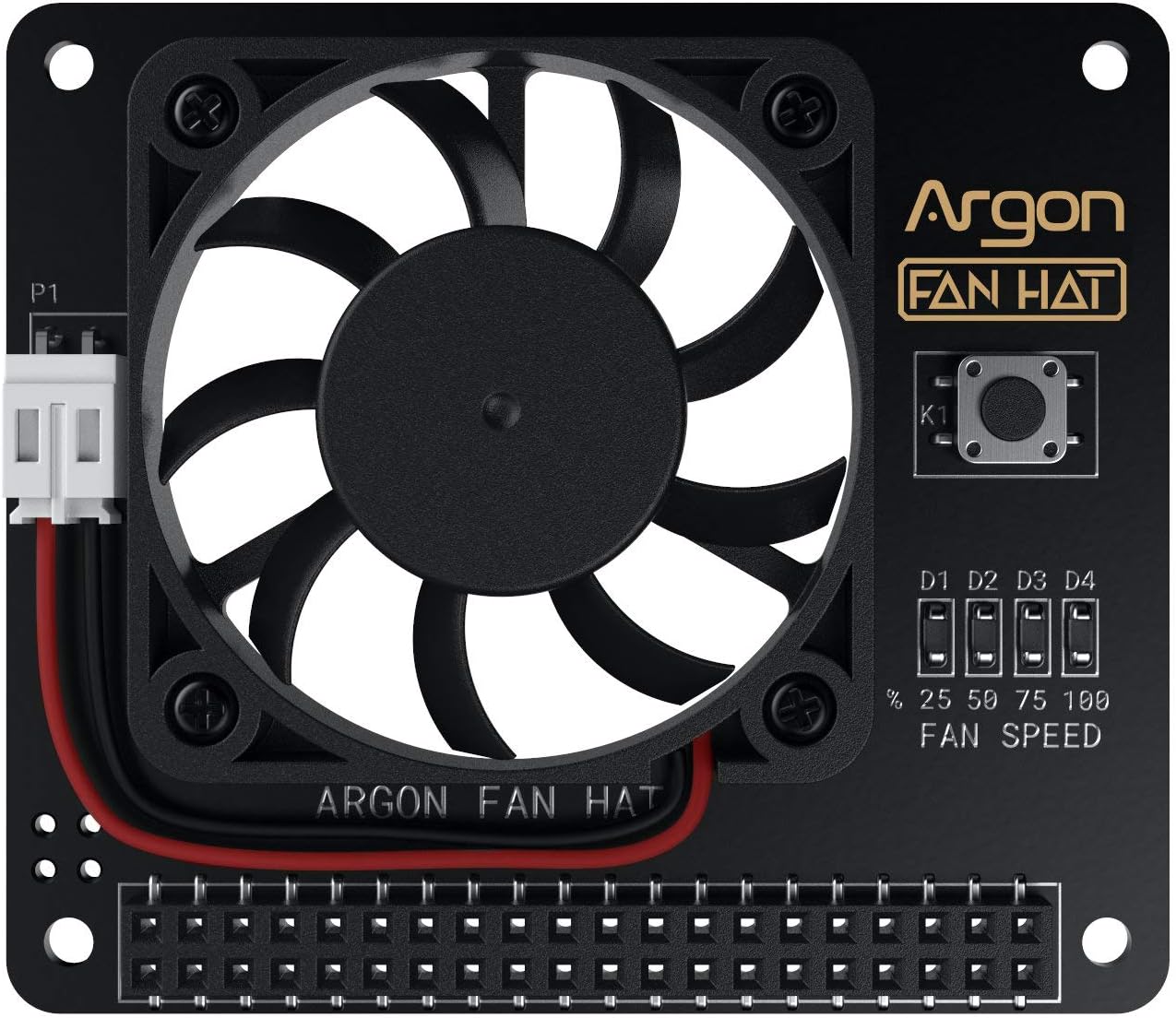
The Argon Fan HAT is a compact 40mm PWM cooling fan designed for Raspberry Pi 3 and 4, featuring software-controlled fan speed for efficient, quiet cooling. It includes an integrated multi-function power button for safe shutdown, reboot, and forced power off. Easy one-line installation and compatibility with most Pi cases make it ideal for professional-grade projects requiring reliable thermal management and power control.


| ASIN | B07Y9LFP1J |
| Air Flow Capacity | 4.34 Cubic Feet Per Minute |
| Best Sellers Rank | #457 in Computer CPU Cooling Fans |
| Brand Name | Argon Forty |
| Compatible Devices | Server |
| Cooling Method | Air |
| Customer Reviews | 4.4 4.4 out of 5 stars (762) |
| Item Weight | 9.07 g |
| Manufacturer | Argon Forty |
| Material Type | Plastic |
| Noise Level | 48 Decibels |
| Power Connector Type | 2x20 pin header |
| UPC | 670924946939 |
| Unit Count | 1.0 Count |
| Voltage | 5 Volts (DC) |
R**H
Quiet and Effective
This fan is easy to install and runs quietly, even at full speed. It can be run at full-time at full speed and is supposed to have an automatic mode where the speed controlled based on user-supplied temperature settings. A set of LEDs is supposed to show which of three temperature bands it is operating in. I have not been able to get the automatic mode to work, but to tell the truth, I didn’t spend much time trying. As a result, mine are running full-speed with all three LEDs lit. Something I don’t find much use for is a power button mounted by the LEDs that controls power the the Pi. I had already installed switches on the power cables of my Pis. All-in-all, I would recommend the Argon fan HAT, but wish I could get auto mode to work. Nonetheless the fan does a great job of getting the Pi cool while running distributed apps 24/7.
D**H
Perfect in every way
The Argon Fan Hat is a low profile, programmable speed fan, for RaspPi. It is nicely built, and takes power off the GPIO connector; no ugly wire for power. All GPIO connections are passed through so that adding another hat would be easy. The speed control is programmable, according to temperature and allows full on, or various % of speed to be set at 3 different user selected temperature points. The fan is very quiet, and kicks in and out almost imperceptably. I bought 3 and could not be more pleased. The construction is superb and it installs easily. They provide a link for the control software, which can be installed without problems. A very nice addition for working Pis.
B**B
Perfect fan for a case or without
Excellent fan, quiet and efficient, I would ask Argon to write the script (for fan control) to work on other variants, but I can rewrite it myself.
T**R
Good fan, quick install hardware/software, on-off switch works
I bought this on price, potential cooling and the power button. I have it in a pishop HighPi case. The configuration software is downloadable via curl and installed via bash. Contrary to another reviewers statement, the controller software (as of this review) only allows 3 head/fan speed configurations [vs. 4] (of your choice). I can't say how good the cooling action is yet (my Pi4 is oc'd right now anyway at 1750-1900) - have not stress-tested the combo yet. It does clear all the little heat-sinks I have on. Only time will tell if the fan holds up, which is par for the course. It only gets a 4 our 5 right now because: 1) The fan is not objectionably loud, but you can definitely hear it sitting nearby when it turns on (and only gets louder at the speed increases. If you need an absolutely noise-free environment, this may not be it). 2) Love the on/off button, works great if you do NOT have a top on your case. I drilled a hole in the top of my HighPi directly over the button. Don't have a 3D printer, but if I did I would make a flat-head, blunger-like stick to fit in the hole that could be used to press on the on/off button with a case top on.
B**N
Works well and are mostly quiet
These fans are awesome. They are also configurable via software on the Raspberry Pi that allows you to set what temp the fan will turn on and also what speed it will run. If you choose not use the software at all, the fan will just stay on a run at the 50% speed. Just doing this chopped off about 10 degrees on my devices, so I think I'll just leave that setting as is. I have three units running all at the same time and while I can hear the fans when up close, they aren't super annoying. It wouldn't bother me anyway since I have these devices running in a dedicated network rack, so it's not something I ever have to be close to.
Y**Y
Great Pi 4 fan
Not using this fan for overclocking my Pi 4 but just need something to keep the heat down during the long hot summer months since the Pi 4 computer stays in the garage where temps can get up to around 104F in the summer. This fan doesn't come with any mounting hardware but I already have a kit and made it work along with mounting a MMDVM hat on to of the fan. Also the nice thing about this fan kit is that it has a pass thru GPIO header so you can mount whatever boards you need on top of the fan and not have to worry about loosing the 2 GPIO pins for power. I didn't modify the config file but just mount it and left it alone. And so far in the heat, the operating temp is a cool 92 F degrees. This should prolong the lifespan on the Pi 4 computer in the heat. Installation again was easy as long you have the mounting hardware for it. As for connectivity it has the pass thru GPIO and the fan pulls power from the two pins (see photos for a better explanation. Lastly if you're using a passive heat sink, you probably have to get those GPIO spacers so it clears the heat sink.
H**D
A Very Bad Fan, Do not buy, it destroyed my Pi!
I bought this to use with an Argon Neo case. The case has very little ventilation, so if you dont have a fan you are going to have some real temperature problems. A fatal flaw in the design of the fan is that if the power goes off and then back on, the fan will NOT turn back on. You have to fully unplug the Pi and then plug it back in. That is not very helpful in an unattended deployment of the Pi. I noticed that behaviour when I was testing it, but unfortunately, I did not think the consiquences all the way through. As it goes, the power went off and then back on, but, due to their terrible design, the fan didnt turn back on, and my Pi got fried. Now I am out $140 bucks for a dead Pi due to this terrible design. The next time i was able to check on the Pi, the fan was off, but the Pi power light was on. It was so hot that i got burned just touching the metal Neo case. This is not a fan you can depend on. Buy it at your own risk, and at the risk of your Pi.
M**N
Wir haben verschiedene Produkte für die Kühlung von Raspberry Pi 4Bs gekauft und in Langzeittests verglichen. Zwei Hauptkriterien dabei waren Geräuschentwicklung und Kühlleistung. Der Argon 1 Fan HAT ist eine stabile Lösung, die allerdings die komplette Pfostensteckerleiste belegt. Das Board ist stabil und professionell hergestellt. Die Bauteile sorgfältig platziert, die Lötstellen sauber. Der Lüfter ist auf dem Board mit vier Schrauben/Muttern befestigt. Die Stromversorgung des Lüfters ist nicht verlötet, sondern mit einem Standard-Stecker versehen, der in einer Buchse der Platine einrastet. Gut gemacht, denn durch diese Art der Befestigung und Stromversorgung kann der Lüfter jederzeit getauscht werden. Bravo! Die ganze Lösung macht einen sehr guten Eindruck und ist – im Vergleich zu anderen Lösungen – nicht nennenswert teurer oder billiger. Der Argon1 Fan HAT lässt sich per (Python-)Script in vier Geschwindigkeitsstufen steuern. Diese lassen sich auch selektiv beim Erreichen eines Schwellwerts per Script auslösen. Das klingt allerdings besser, als es sich in der Realität darstellt. Grund dafür ist die grobe Granularität des cron-Dienstes, über den das Script gestartet wird. cron läuft minütlich, kann das Script also auch nur alle 60 Sekunden starten. Es hat sozusagen einen Takt von 60 Sekunden. Wenn der (übertaktete) RPi Last hat, steigt die Temperatur der CPU innerhalb von 3-5 Sekunden in den Bereich, in dem Kühlung erforderlich wird, um den Takt nicht drosseln zu müssen. Aber das Script startet nicht. Es müssen weitere 55-57 Sekunden vergehen, also das zehnfache bis zwanzigfache der Zeit bis zum Erreichen des Schwellwerts, bis das Script startet. Dann setzt der Lüfter ein und reduziert die Temperatur in ca. 10 Sekunden auf ca. 63 °C. Er läuft dann – ohne Not – weitere 50 Sekunden, bis das Script erneut startet, erkennt dass die Temperatur unter dem kritischen Schwellwert von 80 °C liegt und den Lüfter abschaltet. 3-5 Sekunden später kocht die CPU wieder bei 80 °C und erneut beginnt das Warten auf den Lüfter. Fazit: Wenn der Lüfter läuft, kühlt er gut. Aber er läuft halt entweder ständig, oder zu selten. Oder anders formuliert: Mit Script läuft er zu selten. Wenn er ständig läuft, braucht es kein Script. Die ganze – auch elektronisch aufwändige – Script-Steuerung ist nutzlos. Ein Gimmick. Verkaufsfördernd, aber im in unserem Einsatzszenario sinnfrei. Aus dem obigen Absatz geht hervor, dass der Lüfter – wie bei allen anderen getesteten Produkten – ständig laufen muss. Da wäre eine niedrige Geräuschentwicklung wünschenswert. Leider ist der Argon1 Fan HAT deutlich zu hören. Sehr deutlich. Auch in der niedrigsten Betriebsstufe. Das ist schlecht. Dafür ist die Kühlleistung sehr gut. Die Lautstärke rührt von der hohen Geschwindigkeit, mit der der Lüfter läuft, >und< von dem eher günstigen Lüfter an sich. Wo die Platine vorbildlich professionell ist, ist der Lüfter eher kostenorientiert ausgewählt. Das 5 V-Modell dreht schnell, und das hört man. Dafür hat es eine große Förderleistung, die den RPi4 dauerhaft und in allen Belastungsszenarien bei 63-65 °C hält. Das ist ein sehr gutes Ergebnis und mit dem besten getesteten Modell vergleichbar. Als zusätzlichen Test haben wir den 5 V-Lüfter durch ein 12 V-Modell ersetzt. Die Geräuschentwicklung war dann deutlich geringer und angenehmer. Durch die gute Konstruktion der Platine ist das problemlos möglich (führt aber zu Zusatzkosten und -aufwänden). Zum Vergleich: Die beste aller getesteten Kühllösungen, ein simpler 12 V Lüfter mit keramischen Lagern auf einem Kühlkörper befestigt und bei 5V lautlos betrieben, hatte eine Kühlleistung von 26 °C und den RPi4 selbst bei tagelanger Voll-Last, übertaktet von 1500 auf 2100 MHz und der höchsten Kernspannung bei 25 °C Umgebungstemperatur in einer Wärmekammer bei konstant 63 °C gehalten - weit von den 83 °C entfernt, bei dem der RPi die CPU-Frequenz drosselt. Wenn man mit der deutlichen Geräuschentwicklung des Argon1 Fan HAT leben kann, bspweise weil das Gerät ohnehin irgendwo verbaut wird, wo die Lautstärke des Lüfters unkritisch sein wird, ist es ein empfehlenswertes Produkt.
R**H
Did a lot of research before buying the suitable fan for my new raspberry pi 4. So far this is working as expected. The perfect companion Argon NEO Raspberry Pi 4 Model B Heatsink Case. In a quiet room you can hear the fan but not loud. Like my other appliances, a little noise is good. It's a sign that things are working and gives you that peace of mind. Recommend.
B**X
Super simple à installer et très efficace...
G**A
Eccellente ventola, silenziosa e dal basso profilo andrebbe montata senza dissipatori sui chip del raspberry ma con uno spacer gpio si può montare leggermente sollevata permettendo l'uso di dissipatori su tutti i chip della rpi4. In accoppiata con il case neo é perfettamente integrata sotto allo sportello magnetico del case stesso (che però non ha fori di areazione). Una volta forato e settata una strategia di controllo termico per la ventola (script comodissimo in dotazione) la mia board resta costantemente tra i 30 e 35 gradi in ogni condizione di carico. Soddisfattissimo
S**N
Fan works great.. installs in seconds.. script for fan was easy.. I went a step further and cut a large hole into the top case so I could continue to use the additional passive cooling while also using the fan.. also it just looks better this way (my opinion)
Trustpilot
3 weeks ago
2 weeks ago