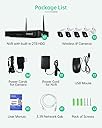
This review applies to Firstrend Wireless NVR Kit Model # FTUS-W843M1TA-XM, which includes a wireless NVR unit, (4) 3MP wireless bullet cameras (resolution: 2288x1288), 5 power cables, a mini mouse, drill templates, a short ethernet cable and a user manual. This was my first purchase with a CCTV solution and it was an easy learning curve. Unboxing was straight forward, no issues there. The NVR itself is housed in a metal chassis with a 1 TB hard drive, the outer ports are (1) VGA, (1) HDMI port, (1) Ethernet port, (2) USB ports, (1) power port, and 2 wifi antennas. The unit does not come with an HDMI or VGA cable, so you must supply yourself if you want to setup the unit through the onboard setup. Once you connect the unit to power, and you can see a picture on the TV/monitor, the NVR will run through a setup wizard that is self explanatory. You cannot type in this interface, or hook up a keyboard, but the on screen menu will let you use a virtual keyboard where you can click the letters to setup a password for the system. The cameras come pre configured and paired from the factory. All you need to do is supply power. If for some reason your camera isn’t paired, you can run through the menus and pair them by using the supplied ethernet cable. Each camera comes with an antenna, an adjustable ball socket that will clamp down, a mounting bracket with (3) screw holes, and a pair of wires that hold an ethernet jack and a power dongle. Placing them is relatively easy, and there are packs of drywall mounting screws if you need that. I tested this system for 30 days. What I liked: Easy setup: I was able to get it running in about 20 minutes, unboxing to NVR setup. Wireless connection is very strong. It runs the cameras on its own wireless network using an MKK protocol by default. Silent: the unit isn’t noisy at all. Interface: the onboard interface can be clunky, but once you’ve been in the menus, everything is just a right click away. Storage: the entire 30 days I was recording, I managed to fill up about 600GB of the 1 TB storage. This is 24/7 footage with motion alert clips. Backup: you can backup your clips to an external storage. My 5 TB drive wasn’t recognized, but a 2TB drive worked just fine. Voice: each clip was also accompanied with audio. Playback: I could see all of my clips through the interface by using a quick search. Support: their technical support is top notch. They will usually respond to emails in a day or so, and their phone tech support is amazing. RTSP support: it is not explicitly mentioned anywhere, but after trying varying combinations of rtp:// urls I was able to get a feed from the different cameras to stream to YouTube or Twitch. For those interested it is rtsp://[username]:[password]@[ipaddress]:[port]/channel=[camera number]&stream=[0 or 1].sdp? Remote login: You can setup your router to port forward 3 different ports to login and view the clips or live feed. Phone app: XMEye Pro is what is recommended for this NVR. It connected flawlessly and I was able to manage the cameras and NVR easily. What I disliked: Power setup: each camera needs to be individually plugged in. Be prepared to use extension cords. Backup: to backup your clips, you must use the onboard software or the VMS software. You can only backup 1024 records or files at a time, and each backup of 1024 records takes on average about an hour. I had about 14,000 records. Customer service said they would fix this in a future update. Backup format: you can choose between three different formats to backup in: .h264, .avi, .mp4. The .h264 standard this NVR system uses is a proprietary version, so if you want to somehow view them on your computer, they won’t play unless you use the included video codec executable the backup software writes to the backup directory. If you want avi and mp4 backups, be prepared for clips that are sped up too fast. I think it has something to do with the conversion trying to force a 30fps framerate on a 6-7 (average) fps clip. Also, sometimes the mp4/avi clips will drop entire chunks of video (20 seconds at a time). Windows software: You can also control this NVR through a windows application that is not included with the package nor available on their website. You need to contact customer service to get it. Once you have it, the interface is intuitive, and you can reach most settings for the NVR. The camera live feed is nice, but if you click on another tab of the program, it will sometimes bug out and not be able to load the feed. Restarting the software fixes this. Hard drive: As mentioned before, you need to use the software to get your clips. If you physically take the hard drive out to backup your clips, the drive is not recognized in any OS – Linux and Windows (didn’t have a Mac). This is for security reasons I’m sure, but it’s annoying when I just want to copy the raw data. Wireless positioning: The wireless signal is strong, but you will need to find a place somewhere in the middle of your cameras if you want the sweet spot without having to piggyback one camera off another. The piggyback solution uses one of your cameras as a repeater of sorts to connect a far away camera to a camera that’s closer to your NVR. I tried doing this to one of my cameras, and it fixed that cameras connection, but left the repeating camera’s connection slower. Inconsistent clips: The cameras come with a resolution of 2288x1288 max, but sometimes they will record in 1280x720, 1920x1080 and the framerate will vary wildly from as low as 4 fps to 25fps. I know this cuts down on size, but it’s annoying when I want to use the clip elsewhere.