❄️ Stay cool, stay silent, stay ahead.
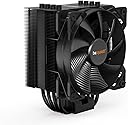
The be quiet! Pure Rock 2 is a high-performance CPU cooler designed for desktop systems, offering 150W TDP cooling via four 6mm heat pipes with HDT technology. It features a silent 120mm Pure Wings 2 PWM fan operating at a max noise level of 26.8 dB(A), an easy top-down installation kit, and a sleek black finish. Engineered and quality-controlled in Germany, it supports multiple Intel and AMD sockets and comes with a 3-year warranty.


| ASIN | B087VL2Z21 |
| Air Flow Capacity | 51.4 Cubic Feet Per Minute |
| Best Sellers Rank | #688 in Computer CPU Cooling Fans |
| Brand | be quiet! |
| Brand Name | be quiet! |
| Compatible Devices | Desktop, LGA1851 socket |
| Cooling Method | Fan |
| Customer Reviews | 4.7 out of 5 stars 5,489 Reviews |
| Global Trade Identification Number | 04260052187968 |
| Item Dimensions L x W x H | 4.76"L x 3.43"W x 6.1"H |
| Item Type Name | be quiet! Pure Rock 2 Black, BK007, 150W TDP, CPU cooler, elegant black surface, HDT technology |
| Item Weight | 575 Grams |
| Manufacturer | be quiet! |
| Material Type | Aluminum |
| Maximum Rotational Speed | 1500 RPM |
| Model | BK007 |
| Noise Level | 23.8 Decibels |
| Number of Items | 1 |
| Part Number | BK007 |
| Power Connector Type | 4-Pin |
| Product Dimensions | 4.76"L x 3.43"W x 6.1"H |
| Unit Count | 1.0 Count |
| Voltage | 12 Volts |
| Warranty Description | 3 years |
| Wattage | 1.4 watts |
A**N
Phenomenal CPU Cooler
Pros - My CPU came with a cooler out of the box, however it took up space in the worst way possible. Even though the Be Quiet! CPU cooler's heat sink is MASSIVE it scales upwards before it starts scaling outwards which allows you access to ALL the necessary parts of your motherboard while providing a huge heatsink which helps keep things cool - The Fan can be fit to your needs and blow either direction, it fits nicely on the CPU cooler - Pins that hold the fan are TIGHT which provides piece of mind that the fan won't come down tumbling on top of the GPU or other components - This thing runs cold, like really cold. Out of the box my CPU was running at 30C with this CPU Cooler. I decided to overclock my CPU to the recommended max overclock and it still remains under 45C under heavy gaming load and during all stress tests. - Comes with every mounting brace imaginable to man, it will fit on your motherboard there are brackets for multiple motherboard options and it comes with a simple assembly guide to help you attach it correctly - Comes with thermal paste ready to go and it applies nicely Cons - I wasn't aware of which way the CPU Cooler was supposed to be facing. So I had to detach and reattach within a 5 minute time frame, which wasn't fun with the thermal paste, but it worked out; I used this in my first PC build, so just make sure you know which way your motherboard is going into your case so you can assemble it with the words "Be Quiet!" not facing upside down in your case Overall - I'd buy again. No complaints. I'm not sure how it fairs to those in the price range but I feel like i got my money's worth - My CPU is happy and running cool - I have not heard the fans on this thing once, can't hear them during stress tests, gaming, or anything else, which is awesome
S**E
Great Cooler, but Instructions Could be Better
After 2 days with my stock cooler that came with my 5600, I couldn't handle the noise any longer. Also, when my CPU was maxed out, it sat at 88 degrees C. So I went out to find a new quieter fan that would at least cool as well. After performing a deep dive on Amazon, I came across this one. Decent price and good reviews. Sure enough, it's definitely a LOT quieter than the POS stock cooler, but surprisingly, it performs a lot better too. With the CPU maxed out, I'm now at 65 degrees C. So, for the price, this is a great cooler. My only issue was the instructions for the install. They aren't the greatest. The barrels that have to be installed under the unit have a bigger hole that slips ver the holder. They don't tell you this in the instructions, so I spent a good 5 minutes trying to get it screwed down and the barrel was upside down. Trying to figure out how to stall the fan was a challenge as well. Probably took me an extra 10 minutes to install with the crappy instructions. Either way, I'm not taking that off as the quality is just too good and I'm just pleased with the outcome.
R**N
It’s Super Quiet
It’s quite a large cooler, so make sure you have a case that can accommodate it. It’s incredibly silent. The only time I hear this fan is at first boot, when I turn the machine on. It’s of great build quality. Thermals are great so long as you use correct thermal paste and remember to remove the plastic covering on the base of the cooler. The mounting system was a bit tricky to install, only because I have an older motherboard. Despite this, I was able to fit the cooler perfectly. It’s compatible with a lot of different motherboard models, including older ones. It’s quite expensive but for what it’s worth, it keeps temps low under stress, is dead silent, and looks great!
A**N
Cooling is excellent
I have a Ryzen 7 5700G on an MSI B550 and routinely use it for programming, virtual machines, gaming, and home office use. I was using a stock AMD cooler and decided to upgrade. I noticed that my idle temps are slightly higher than what they were on my stock cooler, which was a bit of a surprise. However, my overall temps went down quite a bit. I don't think I've seen it go past 65 Celsius under some pretty heavy loads. Compared to my stock cooler I would often go up to nearly 80 Celsius when running multiple VMs and running simple games. I would definitely recommend adding another fan. I already had an exhaust fan that lined up perfectly on the back of my case, so there was no need to add another one, but the push pull config is hard to beat with tower coolers. The fan is extremely silent, which is to be expected from this brand, and I have had no issues with it so far (about 2 months of use). Installation is a bit tricky if you were lazy like me and didn't want to take apart your whole PC, but I was able to get it installed pretty quickly. The brackets for the AM4 boards weren't the easiest to install and line up to get that perfect fit, which is really the only issue I had with the product. If not for that I would have given 5 stars. Overall great product and I would recommend it.
W**D
Much Quieter and Cooler than the AMD Cooler
I highly recommend this cooler based on the price, performance, and overall appearance. This beast is easy to install; it keeps my CPU an average of 20 degrees cooler than the AMD cooler; it looks really nice; and the icing on top is how quiet it is. It's almost dead silent. Excellent product!
R**Y
Super cooler for an Intel i5 9400!
This cooler replaced a severely underperforming Intel heatsink that came with the 9400. It's for my "hackintosh" which sports said chip (i5 9400). Day to day tasks were fine with the included cooler but for rendering video or doing anything else that was CPU intensive, the stock cooler would spool up and sound like an electric leaf blower. This cooler took that problem and stomped it flat. The CPU and this cooler are on a Gigabyte Z390 Designaire motherboard (nice board and it has thunderbolt too!) along with 32 GB of RAM. It runs dead silent and is very responsive. For installation, it wasn't too bad, just a little tedious. But that's with most coolers, really. It does involve taking both panels off of your case (each side) to access the back of the motherboard in order to fit the cooler's back plate. The instructions provided are adequate enough. You can probably get more bang for your $ by going with Thermalright but I don't know how quiet their coolers are compared to Be Quiet's. But it's definitely that: QUIET! It's best to chunk those stock coolers to the side and spend a little extra dough to get a good cooler so that you won't think your computer is about to grow wings and take off.
O**A
Great with One Caveat
I got the Pure Rock 2 Black. I’ve been using the stock cooler (Wraith Prism) for my Ryzen 7-2700x for a good two years now. With the stock cooler I would usually get around 50C* - 60C* idle and around 60C* - 75C* under load over various games. Using Prime95, I was able to get it up towards 86C* degrees max. Now, it is a good cooler for being stock, but my main problem was noise of the fan. I was able to hear it ramp up when reaching 70C* through my headphones and at some point I was pretty annoyed by it. Even with custom fan curves, it still did not help my case. I bit the bullet and bought this cooler because of video reviews and also for its name (bequiet!). Installation was pretty straight forward (I suggest looking at bequiet!’s videos on this cooler’s installation because the manual got me a bit confused) and all was fine. The main problem for me was probably the fan installation as you have to be very careful when putting the clips around the heat sink. It was even more difficult because I was installing it already inside the case. You can easily bend the fins, but you can easily bend them back. After I was done with it, I saw an immediate decrease in temps, especially under load. From 50-60 idle to under 50 most of the time. The huge difference was under load by never going above 70C* in CPU intensive titles. Can barely hear my computer running it’s fans now and feel satisfied with it. TLDR: Be careful when installing the fan. Temps with Stock cooler: 50C*-60C* idle, 60C*-75C* under load. Temps with Pure Rock 2: Under 50C* idle, under 70C* under load.
A**R
Fits well, it is big but not too oversized and very quiet, cools fast 32c on i9 CPU
Two words - GERMAN ENGINEERING! Do I need to say more? Buy it you won't regret it. Fits my Gigabyte Aorus Z790 motherboard like a glove and is very quiet! I was skeptical if it will clear my Gigabyte Aorus heat sinks but it fit perfectly even with 4 sticks of RGB memory sticking up. Very satisfied. Just be careful not to bend the fins while installing. It also comes with a good installation video and pre-attached thermal paste. Intel Core i9-14900KF runs at 32C idle with 72 deg ambient temp, very good cooler I am buying a 2nd one.
A**M
Be Quiet Pure Rock 2 Black
Article conforme à la description et de bonne qualité. Seul problème, le ventilateur est un peu difficile à fixer au radiateur avec les attaches fournies (un meilleur système de fixation serait une nette amélioration). Sinon le refroidissement est bon et sans être bruyant.
A**I
مبرد اسطوري بمعنى الكلمة🔥🔥👍
مبرد اسطوري بمعنى الكلمة ، انا كان عندي مبرد انتل العادي على معالج i51400 وكان صوت المرحة مزعج جداً ، وسرعه المروحة تطلع وتنزل كل خمس ثواني ، والحرارة توصل فوق ٨٥ اغلب الاوقات اثناء اللعب ، لكن مع هذا المبرد الحرارة ماتعدت ٥٥ والصوت هادىء وثابت ، اشتريه بدون تردد على مسؤوليتي 🔥🔥👍👍
T**E
A great little cooler
The Be Quiet! Pure Rock 2 CPU Cooler is a great little cooler. I had it connected up to a AMD Ryzen™ 7 5800X3D. Running temperature was 33 celsius. Ran a burn in test and it handled it easily with temps only getting to 81 celsius
B**N
Sessiz ve soğuk
Yakın zamanda daha iyi bir işlemcide kullanacak olsamda i5 6500 üzerinde denemesini yaptım. 2 saat işlemci kullanımı %100 olacak şekilde stres testine soktuğumda en fazla 55 dereceyi gördüm. Ortam sıcaklığı 25 derece. 55 dereceye soğutmak için fanlar 795 rpm hızına çıktı. Yani max hız olan 1400 rpm ile daha iyi bir soğutma performansına ulaşmak mümkün. Tabi %100 de bir miktar ses te oluyor, bunu göz önünde bulundurmak gerek. Genel olarak gayet memnunum. Yüksek tdp değerine sahip bir işlemci ile test etme fırsatı bulduğumda yorumu güncellemeye çalışacağım.
Y**A
So close to being a Noctua killer
So be quiet are not a small company anymore and it shows that they been in the buiz for some time now. This cooler is great, its goodlooking, easy to install, does the job good, and last but really important its quite. Its like a better looking Noctua but the finstacking is less I think it has less pipes then the top tier Noctua. If u have the money buy Noctua but this is the second best choice. I love it.
Trustpilot
4 days ago
2 weeks ago