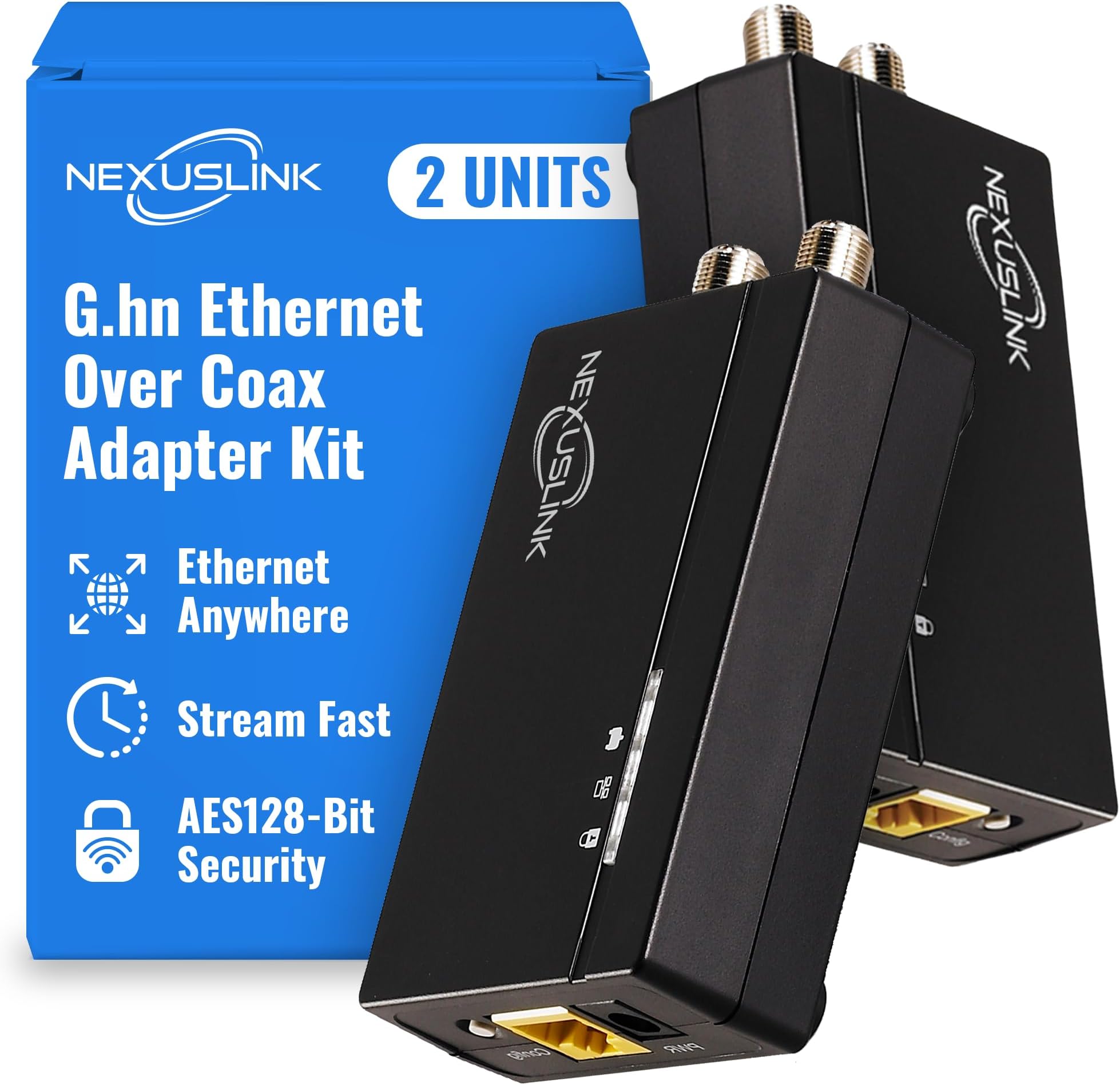
GCA-1200-KIT
Product ID: 215764040
Details
- BrandNEXUSLINK
- Colorblack
- Compatible DevicesSmart TV
- Data Link ProtocolEthernet
- Data Transfer Rate1200
- Hardware InterfaceEthernet
⚡1.2Gbps blazing speed
📶800m extended range
🔒secure wired connection
Desertcart purchases this item on your behalf and handles shipping, customs, and support to Portugal.
🚀 Turn your dark coax into a lightning-fast network—because buffering is so last decade!
The Nexuslink G.hn Ethernet Over Coax Adapter Kit transforms unused coaxial cables into a high-speed 1.2Gbps wired network spanning up to 800 meters. Ideal for gamers and streamers seeking stable, low-latency connections, this easy-to-install 2-unit kit is optimized for fiber and satellite internet setups. Note: it is not compatible with active cable TV or internet coax lines.


| ASIN | B088LQ7V1Q |
| Best Sellers Rank | #114 in Powerline Network Adapters |
| Brand | NEXUSLINK |
| Color | black |
| Compatible Devices | Smart TV |
| Customer Reviews | 4.3 out of 5 stars 193 Reviews |
| Data Link Protocol | Ethernet |
| Data Transfer Rate | 1200 megabits_per_second |
| Hardware Interface | Ethernet |
| Item Weight | 0.66 kg |
| Manufacturer | NEXUSLINK |
| Mfr Part Number | AUB088LQ7V1Q |
| Model Number | AUB088LQ7V1Q |
| Number of Items | 2 |
| UPC | 850005998006 |
| Unit Count | 2 Count |
D**A
Works wonders for my mesh system
This was exactly what I needed to boost speed on my mesh system. I have a fairly decent mesh system, but it was slow in the upstairs of the house. I have a fiber service and the only place they could put the ONT was in a very far back bedroom. Well, the signal just didn’t reach well enough throughout the house to give me a decent speed. This on the other hand was exactly what the doctor ordered. Occasionally I now have my full speed of 500 Mb per second (generally about 400 upstairs) where I was only getting 200 Mb wirelessly. Installation was very simple. I thought there was some button I had to push to pair these: not at all. I connected the one downstairs in the bedroom to the cable, came upstairs attached that to the cable outlet and boom it was done they paired and it works flawlessly. Plus, the fact that Amazon reduced the price by 20% made it affordable for me so this was a no-brainer. I definitely can recommend this product.
A**R
Works great when you figure out how to pair them
Pretty simple plug and play but I had a hard time getting them to pair . But otherwise work as intended went from 40mbps wifi to 500mbps with this Ethernet over coax system. Note : If you have issues with them pairing ie. the connection light won’t come on , then directly connect them with a coax cable (plug into the “In” port on both the TV port is only used for older TVs ) while one is plugged into the router via cat-6-8 cable then press the config button for 5 seconds on both units . After the secure light and Ethernet light start blinking let them sit for a few minutes instructions say 10 seconds but it took a lot longer for mine to pair. Once the connection light is on and green you are good to take the unit that is not connected to the router to the device you intend to install it on . You may need to press the config button on both of them again .
B**1
Works better than expected. Recommended.
Works better than I expected. Managed to get 650/650 up/down rates over RG-6 coax on a Gig fiber connection that gets 950/950 on CAT-6 hard wire. All things considered (like the convenience of not having to run 150 feet of CAT-6 through the walls) it works just fine, and a 30% drop in speed is acceptable. Clear instructions - this will NOT WORK if the coax you want to use has anything else also running on it, like Cable TV or security cameras or satellite TV signals. The coax needs to be electronically DARK, have no other signals running through it. Fire it up near your router/switch using a short piece of coax to connect the two parts, and once they sync up, move one unit to the destination point, connect and power it, and give it a minute to sync with the source one. The two parts are cleverly interchangeable - either one can act as the 'transmitter' or 'receiver'. Been running for over a month now 24/7 and I have seen no problems except I just noticed the price dropped 20% a week after I received it and Amazon will not credit the difference.
J**L
Easy to set up and works as advertised
In one location of my house, I have only one Cat6 but needed to run two devices on separate networks. It is on the first floor of a two story house so running another cable was problematic. I had been using smart switches and VLAN's but was always experiencing random "slow downs". Was it due to the switch hardware, switch configuration, or device interference? Hard to say... I had a run of coax that was not being used. I ordered this EOC adapter hoping to get rid of the complications. I hooked them adapters together with a short piece of coax (to the "In" ports) to sync them. No need for an ethernet cable yet. 10-20 seconds later they were sync'd. 10-20 seconds to "lock" them. Powered everything down and moved both devices to their new homes. Plugged everything back up, including ethernet. Withing 30 seconds both devices were again sync'd and locked. Confirmed ethernet was working fine. Easy! I highly recommend!
I**C
Works fine, read for full review
Plain and simple - it works. It's a little slow, and this is slightly disappointing based on the price. Read below for more details. Product setup is very easy. I have been in IT for about 25 years, so my view may be slightly different from other people, but I read the directions and had it up in less than 5 minutes. Brass tax, you want to connect the two devices together using a coax cable (I used a 1-foot cable for simplicity). You then press a button for 3 seconds on each device, and then the devices automatically pair (takes about 10 seconds). When this was done, one device wouldn't stop flashing, but I power cycled to resolve. My house is relatively new (6 years old), so all my cabling is pretty much up to current standards. Since I had cable put in every room but not ethernet, I needed this equipment for rooms that I wanted an ethernet connection. I only give that background to make it clear that the underperformance is not related to bad cabling. Using a traditional speed test app (Ookla Speedtest), the performance is about 650Mbps to the internet. By contrast, other devices in the home register just below 1Gb. I do get gigabit performance between my laptop and the device, but not between devices. I can also confirm that, on both devices (the PC and the switch), the device registers as 1Gbps full duplex. The distance between the device and my network switch is approximately 20 meters, but there could be extra distance depending on how the wires run in the ceiling. I have tested this with multiple PCs, but yielded the same results. I also tried adding a coaxial signal amplifier to the mix, but surprisingly that actually degraded performance to about 350Mpbs. Otherwise, a little pricy for the performance, but ultimately I am keeping it and would recommend it to others. If I decide to do this in another room in the house, I may test a different device, but I would not be unhappy to buy this same equipment again.
A**A
Does Not Play Well With Xfinity
So I bought this product in hopes of having an additional ethernet connection available for my PS5. I hooked it up like the instructions stated, and it worked for a few minutes. Then my after about an hour my internet connection went out. I called customer service, they sent a technician out and he said someone had disconnected my internet connection from the outside. We both found that strange but shrugged our shoulders. I showed him this product he was skeptical, and told me he had never heard of it. He also said it might interfere with my internet, and he would not advise me to hook it up. I went ahead and hooked it up again, and everything was working fine. About 30 minutes later the internet went down again, and there was a knock at my door. It was ANOTHER Xfinity representative who said that he asked me was I a customer and what did I have in my house. I told him about this product what it is used for etc. He was like yeah don't hook that up anymore. It is affecting the whole neighborhood. Everyone's cable and internet is screwed up and this device is the culprit. I said um okay. So this device does not play well with Xfinity and it does shut down the neighborhood.
S**A
Best if you have coaxial cables and can some how isolated them from cable internet.
THIS SEEMS LIKE JUST A REBRAND OF OLD COMTREND G.HN WHICH WAS GOOD. I have cable internet. This product is not the best suited one if I had just added the connectors everywhere in my house. So I had to go to my attic and isolate the incoming internet coax from the other ones in my house. I had to put 1-3(explained later) extra cables from my attic to my router. That was easy as my router is very close to my attic. But this saved me the extra ethernet wiring I would have to add. At first I isolated the incoming coax so that it directly goes to my router. METHOD 1 (not recommended but cheaper): NLC == Nexuslink/Comtrend converter Router(WAN PORT) -- COAX0 ---1-1 Coax Connector COAX1 form CABLE INTERNET from PROVIDER Router(LAN PORT) -- Ethernet -- NLC -- COAX2 -- SPLITTER -- COAX3 ------ NLC -- TV -- COAX4 ------ NLC -- Access Point -- COAX5 ------ NLC -- Switch -- Laptop/Desktops I added 1 coax from router to attic. This coax was connected via splitter to all other coax in my house. Then I added converters to all end points. Thus creating a mesh of coax with this converter at all ends, one of which is attached by ethernet to router. This seems to work quiet well and my latency reduced quiet a lot. At some endpoints I even connected switches or Access points. Everything was fine (very good infact) till I replaced Access points at some endpoints with mesh nodes (ethernet backhaul). Mesh nodes were constantly dropping. To fix this and only this i went to method 2 METHOD 2: NLC == Nexuslink/Comtrend converter Router(WAN PORT) -- COAX0 ---1-1 Coax Connector COAX1 form CABLE INTERNET from PROVIDER Router(LAN PORT1) -- Ethernet -- NLC -- COAX2 -- 1-1 Coax Connector -- COAX3 ------ NLC -- TV Router(LAN PORT2) -- Ethernet -- NLC -- COAX6 -- 1-1 Coax Connector -- COAX4 ------ NLC -- Mesh Node 1 Router(LAN PORT3) -- Ethernet -- NLC -- COAX7 -- 1-1 Coax Connector -- COAX5 ------ NLC -- Mesh Node 2 I I added 3 coax cables fron router to attic. Each of these new cables connected 1 on 1 to each endpoint in my house. So one side of each of these 3 links were connected to converter and then to router while the other sides to mesh nodes. This created an effect of having put a dedicated ethernet cable to each endpoint. This method works best and has the best throughput but is obviously expensive and difficult to achieve.
W**S
Difficult to ser up
Had issues getting adapters to pair up. No feedback from their tech people. Finally got AI to help. Working well so far.
P**Y
Gute Alternative bei bestehender Coax Verkabelung
Habe das Kit am Freitag bestellt. Montag war es da. Lieferung aus USA. Einrichtung bzw. In Betrieb nähme verlief ohne Probleme. Wie hier schon beschrieben benötigt man andere Netzteile oder Adapter von US auf EU Stecker. Die Webinterfaces sind über die IP 192.168.0.5 zu erreichen. Ich komme nach Test mit iperf auf Fritzbox auf 300MBit. Da ist bestimmt noch Potential nach oben. Für mich eine gute Variante ohne neue Kabel zu legen das WLAN dort hinzubekommen wo ich es benötige. AP angeschlossen und gut.
M**T
It worked better than a bonded MoCA 2.0 pair!
Installation was a breeze. Easy to pair and setup and it secured my network with encryption so that no one else could tap in. Transfer speed and stability is far better than my former bonded MoCA pair. Truly plug and play!
P**.
Netzwerk im Dachboden
Funktioniert bislang ohne Probleme. Würde ich wieder kaufen.
B**.
Einfache Inbetriebnahme
Einfache Inbetriebnahme auf einem einfachen Coax Kabel erreiche ich gut 600 MBit/s. Das hätte schon etwas mehr sein können.
S**E
SAT parallel funktioniert nicht
Die beiden Geräte übertragen zuverlässig die Daten über eine ungenutzte Koax-Kabelstrecke. Ich hatte versucht, zusätzlich ein Satellitensignal mit zu übertragen. Laut Angaben soll das funktionieren. Das hat nur einmal geklappt, danach nie wieder. Information des Herstellers war, bzw. so habe ich es verstanden, dass die Steuersignale vom Receiver nicht zurück übertragen werden.
Trustpilot
1 month ago
3 weeks ago