


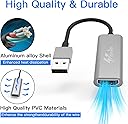


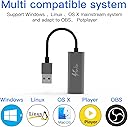
Upgraded Version HDMI Capture Card USB 2.0 Audio Video Capture Card USB to HDMI HD 4K 1080p 30fps Record Video Audio Grabber Game Capture Card for Live Streaming/Live Broadcasts/Game/Video
Product ID: 245821877
Upgraded Version HDMI Capture Card USB 2.0 Audio Video Capture Card USB to HDMI HD 4K 1080p 30fps Record Video Audio Grabber Game Capture Card for Live Streaming/Live Broadcasts/Game/Video : desertcart.co.uk: DIY & Tools Review: This item DOES allow you to record PS3 footage! - I looked at SO many capture devices and could not find a definitive answer anywhere. So, I thought I would write this quick review to let people know that you CAN use this capture device to record footage from your PS3 console directly and bypass the annoying HDCP that the PS3 has on at all times. It may also work on some other HDCP sources as well but I haven't tried those. At this point, I've only tried it a few times and of course, being a non-branded piece of tech means it could just fail randomly in the future but as of right now, it works perfectly. It records both video (up to 1080p) and audio. The set up is very easy and requires no drivers or updates if you're using Windows 10. All you have to do is: 1. Plug the device into your PC via a USB 3.0 port (it says it supports 2.0 as well but I haven't tested that) 2. Plug your HDMI cable into the back of your PS3, then the other end into this device. 3. Turn on the PS3 console. 4. On the PC that you're recording to, open OBS and create a new source by pressing the + button in the sources box (As you can see in the picture I named mine PS3 Capture), leave everything as default, click OK and it should now be showing your PS3 in the preview video. NOTES: There is no way to record this way while playing the game on your TV. In other words there is no passthrough like you would get on an Elgato for example. There is a way to hear the sound through the OBS preview but in my experience it has a small delay on it that will also be present in the recording. However, I'm sure there's a way to do it properly, I just don't know how. I usually record random footage for reviews as opposed to Lets Plays so for me the sound isn't important. I use OBS to record and have not tried this on any other video capture programs but I see no reason as to why it wouldn't be roughly the same. If recording footage from a PS3 console is what you're trying to do then I would recommend giving this thing a try. Hopefully it will last a long time if used carefully. Review: Honestly a fantastic product for the price - This product is honestly fantastic and probably the best captured device for value on desertcart. The quality is amazing and it’s so easy to set up - you do need to install third party software however. You just plug it into your hdmi output and into you laptop or computer. I used it with an Xbox series x just fine. Gameplay quality is really good. This is great for casual streamers or for people making a casual gameplay captures. Naturally the limitation here is that it only captures 60fps at 720p, so 1080p gameplay is only at 30fps but this really isn’t an issue considering the amazing price. That said I haven’t yet worked out how to configure it to capture at 60fps but even if I don’t it’s still not an issue considering the amazing price. Also worth noting that captures are exported and saved in quite large file sizes. 30fps 1080p gameplay is about 2gb every 3 mins, so if you have a low storage capacity so consider this. Overall this product is awesome considering the price.


| ASIN | B08MWL3HTL |
| Antenna Location | Audio,Video Capture |
| Brand | Tander |
| Brand Name | Tander |
| Compatible Devices | DVD Player, Laptop, Monitor, Personal Computer, Projector, TV, Xbox |
| Customer Reviews | 4.1 out of 5 stars 516 Reviews |
| Hardware Interface | USB |
| Hardware interface | USB |
| Manufacturer | Venker |
| Manufacturer Part Number | YE001 |
| Platform | Android, Linux, PlayStation 4, Windows, Xbox One |
| Recommended uses for product | Audio,Video Capture |
| Tuner Type | Digital |
| Tuner technology | Digital |
| UPC | 706189936092 |
| Video Capture Resolution | 1080p, 4K |
| Video capture resolution | 1080p , 4K |
S**E
This item DOES allow you to record PS3 footage!
I looked at SO many capture devices and could not find a definitive answer anywhere. So, I thought I would write this quick review to let people know that you CAN use this capture device to record footage from your PS3 console directly and bypass the annoying HDCP that the PS3 has on at all times. It may also work on some other HDCP sources as well but I haven't tried those. At this point, I've only tried it a few times and of course, being a non-branded piece of tech means it could just fail randomly in the future but as of right now, it works perfectly. It records both video (up to 1080p) and audio. The set up is very easy and requires no drivers or updates if you're using Windows 10. All you have to do is: 1. Plug the device into your PC via a USB 3.0 port (it says it supports 2.0 as well but I haven't tested that) 2. Plug your HDMI cable into the back of your PS3, then the other end into this device. 3. Turn on the PS3 console. 4. On the PC that you're recording to, open OBS and create a new source by pressing the + button in the sources box (As you can see in the picture I named mine PS3 Capture), leave everything as default, click OK and it should now be showing your PS3 in the preview video. NOTES: There is no way to record this way while playing the game on your TV. In other words there is no passthrough like you would get on an Elgato for example. There is a way to hear the sound through the OBS preview but in my experience it has a small delay on it that will also be present in the recording. However, I'm sure there's a way to do it properly, I just don't know how. I usually record random footage for reviews as opposed to Lets Plays so for me the sound isn't important. I use OBS to record and have not tried this on any other video capture programs but I see no reason as to why it wouldn't be roughly the same. If recording footage from a PS3 console is what you're trying to do then I would recommend giving this thing a try. Hopefully it will last a long time if used carefully.
E**.
Honestly a fantastic product for the price
This product is honestly fantastic and probably the best captured device for value on Amazon. The quality is amazing and it’s so easy to set up - you do need to install third party software however. You just plug it into your hdmi output and into you laptop or computer. I used it with an Xbox series x just fine. Gameplay quality is really good. This is great for casual streamers or for people making a casual gameplay captures. Naturally the limitation here is that it only captures 60fps at 720p, so 1080p gameplay is only at 30fps but this really isn’t an issue considering the amazing price. That said I haven’t yet worked out how to configure it to capture at 60fps but even if I don’t it’s still not an issue considering the amazing price. Also worth noting that captures are exported and saved in quite large file sizes. 30fps 1080p gameplay is about 2gb every 3 mins, so if you have a low storage capacity so consider this. Overall this product is awesome considering the price.
C**A
Really good capture card…Just a sound delay
I did have my doubts about a capture card this cheap. It seemed too good to be true! However it works fantastically. Pretty much plug and play. I don’t use OBS Studio, but OBS Streamlabs with it which is easy to set up. The only issue I have so far is a slight sound delay, but that’s probably due to my set up. I use it to live stream from my Nintendo Switch and it’s pretty much flawless. I saw a lot of people complain about heat issues, which I was concerned about. After 4 hours of live streaming with it, I checked it’s heat. It was warm at best. Not hot at all. I really like this product. I’ve given it 4 stars due to the sound delay, but will amend that if I find out it’s due to my set up and not the device itself.
T**A
Exploded burning my usb port during stream, Mono only
Last night, during the live stream, it started to smell like something is burning. Then I've heard the tick sound and everything went gone. When I touched the adaptor I almost burned my fingers, it was so hot. After close investigation, the USB port at my screen (the adaptor was connected to) is burned and the adaptor itself is burned. So check if it's not overheating, otherwise it can cause a big trouble. MONO ONLY! I was using it for PS4 live stream and for the camera. For PS4 it was working fine, nice quality and almost no delays. Unfortunatelly it is mono only, and there is no option to change it, so if you are ok with that sound quality, then it's ok.
S**T
Excellent Little Gadget But Only Records in MONO
The item worked first time of asking, the picture is excellent one issue is I can't hear the sound whilst recording but the sound is there when playing it back. It's the first time I have used OBS but I'll get used to it.I do have other devices to capture video and this is a worthy addition. My laptop was a bit under powered to run it as the picture was a bit choppy. However when installed on my Desktop (Win 10 quad core) PC it runs fine. Well Recommended. UPDATE. As other reviewers have said this device only records in Mono - I tried with various gadgets and also had a look in advanced audio settings, it would be great if someone from Venker could explain why this is.
S**E
This gadget is DEFINITELY worth it's weight!
Oh my days! It's given my Sony FDR X3000 action cam a whole new lease of life! If you have a camera like mine, go-pro springs to mind, and you need a webcam, don't buy an inferior quality dedicated webcam, but one of these! The FDR X3000 is capable of 4k recording, but even at 1080 it's better than most dedicated webcams. I'm not a total tech head, although I'm not afraid to play around with it, but on Windows this literally was plug and play! It worked flawlessly with TEAMS for over 2 hours, and honestly, I'm over the moon with this gadget, especially given that I was going to spend nearly 200 notes on a dedicated webcam! In a nutshell, I LOVE IT! 5 stars from me! Cheers!
C**0
Seems to only capture sound in mono... What year is this??
Generally a really nice capture card for the most part, however... I was pretty disappointed to discover the thing only presents a single mono channel for audio, am I missing something here?? in 2021 I would have expected better, many sources don't just have Stereo sound but also 5.1 in many cases and I would have expected this to be a pretty basic expectation for a product of this nature , so to discover that this device only seems to allow mono audio capture is pretty disappointing. Thankfully in my case this isn't a huge problem as I am able to run a separate audio feed into my computer, unfortunately this does mea I have to resync the audio manually in editing. I feel this should be mentioned as for some people only having a mono audio feed can be a real problem.
A**S
Hdmi capture into OBS
Was requested to assist in the provision of a live stream of a funeral service. Due to covid era, family and friends were not going to be able to attend Installation on windows 10 was plug and play Obs studio, where the steam was being run from could see it as a usb video device When hdmi cable connected between the converter and camera, video came through with no noticeable lag or dropped frames. Ran flawlessly for over 2 hours!
Trustpilot
1 month ago
3 weeks ago