Buy anything from 5,000+ international stores. One checkout price. No surprise fees. Join 2M+ shoppers on Desertcart.
Desertcart purchases this item on your behalf and handles shipping, customs, and support to Portugal.
๐ Connect Everything, Miss Nothing!
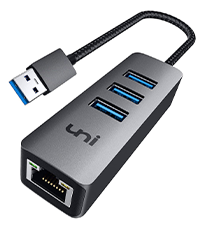
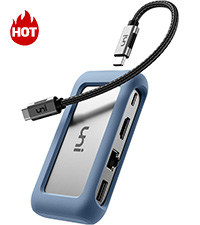
The uni USB C 8-In-1 Hub is a sleek, aluminum-encased powerhouse designed for professionals on the go. Featuring 100W fast charging, 4K HDMI output, gigabit Ethernet, and ultra-fast 5Gbps data transfer, it seamlessly expands your MacBook Pro, iPad Pro, Galaxy, and other USB-C devices with 8 versatile ports. Compact yet durable, itโs the ultimate all-in-one hub to keep your productivity and entertainment flowing without compromise.


| ASIN | B07Q6YS7W2 |
| Additional Features | Fast Charging |
| Best Sellers Rank | #98,090 in Computers ( See Top 100 in Computers ) #1,700 in USB Hubs |
| Brand | uni |
| Color | silver" or "gray |
| Colour | silver" or "gray |
| Compatible Devices | MacBook Pro 2023, Air, iPad Galaxy S24/S23, laptops, smartphones, tablets, desktops, monitors, projectors, cameras, card readers, USB flash drives, hard disk and other USB-C Thunderbolt 3 devices |
| Compatible devices | MacBook Pro 2023, Air, iPad Galaxy S24/S23, laptops, smartphones, tablets, desktops, monitors, projectors, cameras, card readers, USB flash drives, hard disk and other USB-C Thunderbolt 3 devices Compatible devices MacBook Pro 2023, Air, iPad Galaxy S24/S23, laptops, smartphones, tablets, desktops, monitors, projectors, cameras, card readers, USB flash drives, hard disk and other USB-C Thunderbolt 3 devices See more |
| Customer Reviews | 4.5 out of 5 stars 344 Reviews |
| Data Transfer Rate | 5 Gigabits Per Second |
| Enclosure Material | Aluminum |
| Hardware Interface | Ethernet, HDMI, MicroSD, USB 3.0, USB Type C |
| Hardware interface | Ethernet , HDMI , MicroSD, USB 3.0, USB Type C |
| Item Dimensions L x W x H | 10.8L x 5.7W x 2.2H centimeters |
| Manufacturer | uni |
| Mfr Part Number | unic8in1ks |
| Model Number | 27-23 |
| Number of Ports | 8 |
| Operating System | Linux, Mac OS X 10.6 Snow Leopard, Windows 10, Windows 7, Windows 8 |
| Special features | Fast Charging |
| Total USB ports | 3 |
| Total Usb Ports | 3 |
| UPC | 787446459455 |
| Unit Count | 1 Count |
S**R
Super nice!
Small, sturdy, satisfyingly presice ports. It does the thing and it feels like it'll last!
N**C
Sturdy and reliable...mostly
I had bought the original version when I got my 16" MacBook Pro in 2022. Love the MBP but I normally push around files too heavy for WiFi so I miss a real Ethernet port and this seemed of fill the bill. Seemed pointless to have both the USB-C connection for data and the power cable for the MagSafe 3 connector since it's going to be plugged in almost all the time. 100w is what the MBP will take through its USB3/Thunderbolt 3 ports even when it's being juiced by its 140w power supply, so this hub is perfect. While I was transferring files from my dead 2011 MacBook Pro's SSDs onto the spiffy new M1 this hub did everything I asked of it. The setup was rock solid for a couple of years, then every couple of months my screen would dim and I'd see my charger icon said I was running on battery. If I unplugged from the hub both the cable to the Apple power supply and the USB-C cable to the MBP, then plugged them back in all was well again. Then a few months ago I suddenly started getting a pop-up alert every day or so saying "USB Accessories Disabled. Unplug the accessory using too much power to re-enable USB devices." This is odd because the only external USB device normally plugged in is this hub - which is powering the MBP. Not sure if the hub is starting to have issues, or if the MBP's original power supply is fading. I do need to investigate more. For normal users who unplug their 'book to go mobile regularly, this hub should be great. Update: 2025.09.18 Once I stopped using the Uni hub for power the "USB Accessories Disabled. Unplug the accessory using too much power to re-enable USB devices." alert stopped. Means I have both a heavy-duty USB3 cable and the light-as-a-feather Apple MagSafe cable plugged in, but say-la-vee. I got a second one for my spouse's M1 MacBook Pro too for her wired mouse and speedy Ethernet. Works great most of the time but about 1/3 of the time she has no mouse. We'd have to unplug from the Uni and plug back in before the connection was restored. It appeared the blue silicon case was pushing the host USB cable out slightly so I slipped off the case. Now it's down to about one day in five - down to the annoying but can live with it level.
C**.
Solid!
Mosdef a great product. Just buy it..its durable, reliable and universal...I also use it with my phone/tablet.
O**N
USB C for power delivery only, no data
Works well, high quality build, only shortcoming is the USB C port is for power only, wont work for data
R**S
Great product
Great product
Trustpilot
2 months ago
1 week ago