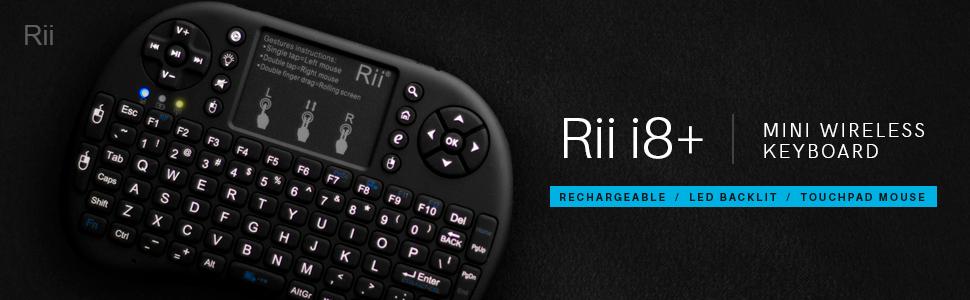
🎯 Master your digital domain with the Rii i8+ — small device, big control!
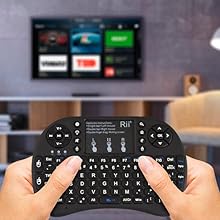
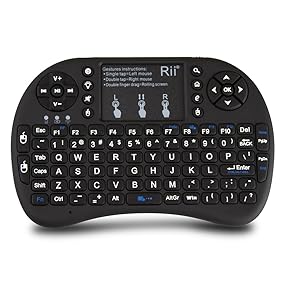
The Rii i8+ Mini Wireless Keyboard is a versatile 3-in-1 device combining a compact QWERTY keyboard, multi-finger touchpad, and LED backlighting. Its ergonomic game-handle design ensures comfort during extended use, while the 2.4GHz wireless connection offers a reliable 25-meter range. Compatible with a wide range of devices including PCs, Macs, gaming consoles, and smart TVs, it doubles as a remote control replacement. Powered by a built-in rechargeable lithium battery with smart sleep mode, it delivers convenience and portability for professionals and gamers alike.


| ASIN | B01ERN8FZM |
| Additional Features | Backlit, Rechargeable |
| Antenna Location | Gaming |
| Best Sellers Rank | #468 in Computer Keyboard & Mouse Combos |
| Brand | Rii |
| Built-In Media | Keyboard^Receiver^ChargingCable^Manual |
| Button Quantity | 104 |
| Color | Red |
| Compatible Amazon Tablet Models | Amazon Fire 7 12th Generation, Amazon Fire HD 10 13th Generation, Amazon Fire HD 8 12th Generation |
| Compatible Devices | Gaming Console, Laptop, PC, Tablet |
| Compatible Operating System Family | Android, Windows |
| Connectivity Technology | RF |
| Customer Reviews | 4.2 out of 5 stars 7,117 Reviews |
| Enclosure Material | Plastic |
| Global Trade Identification Number | 00605175758468 |
| Hand Orientation | Ambidextrous |
| Item Dimensions L x W x H | 5.91"L x 3.94"W x 0.79"H |
| Item Type Name | Rii 10038-EST i8 Mini 2.4GHz Wireless Touchpad Keyboard with Mouse for PC (Black) |
| Item Weight | 6.4 ounces |
| Keyboard Backlighting Color Support | Single Color |
| Keyboard Description | The Rii 2.4GHz Mini Wireless Keyboard is a compact and portable keyboard with touchpad, designed like game handle for convenience. It has QWERTY layout LED backlit keys supports multi-finger functions on the touchpad. connected to devices via wireless connection USB interface adapter can be used as remote replacement. compatible various such laptops, PCs, tablets, Windows, Mac, TV, Xbox, PS3, Raspberry Pi. built-in rechargeable lithium battery comes 12-month warranty. Keyboard Description The Rii 2.4GHz Mini Wireless Keyboard is a compact and portable keyboard with touchpad, designed like game handle for convenience. It has QWERTY layout LED backlit keys supports multi-finger functions on the touchpad. connected to devices via wireless connection USB interface adapter can be used as remote replacement. compatible various such laptops, PCs, tablets, Windows, Mac, TV, Xbox, PS3, Raspberry Pi. built-in rechargeable lithium battery comes 12-month warranty. See more |
| Keyboard Layout | QWERTY |
| Manufacturer | Zettaguard Inc. |
| Mfr Part Number | 10038-PM |
| Minimum Required Operating System Version | Android 12.0, Mac OS 12 Monterey, Windows 10 |
| Model Name | i8+ Red |
| Model Number | 10038-PM |
| Number of Items | 1 |
| Number of Keys | 92 |
| Number of Packs | 1 |
| Number of Sections | 3 |
| Power Source | Battery Powered |
| Recommended Uses For Product | Gaming |
| Series Number | 10038 |
| Special Feature | Backlit, Rechargeable |
| Style Name | 2.4G RF |
| Switch Type | Membrane |
| Theme | Gaming |
| Total USB 2.0 Ports | 1 |
| UPC | 737590738173 605175758468 |
| Unit Count | 1 Count |
| Warranty Description | 1 Year Warranty |
| Water Resistance Level | Not Water Resistant |
R**T
Love, love, LOVE it!!!
I was going to buy a dedicated HTPC to have computer access on my 60" HDTV in my living room and some that I looked at came with a similar wireless keyboard (but without the backlight). For now though I decided to use one of my XPS laptops connected to HDMI instead of buying a new PC. Problem is that is was a real pain to go into the media cabinet and pretty much crawl on the floor to control the laptop every time I wanted to locate, start, or stop a movie, etc. I decided to order this wireless keyboard/touchpad combo instead since it was a lot less expensive then buying a new computer. I am SO glad I did and am VERY IMPRESSED with this little device! It is super easy to use and gives me complete control over my computer, even from across the room. The backlighting is also wonderful and works very well. The keys have a very nice 'click' to them and I can easily and quickly type using my thumbs. The keyboard is very comfortable to hold and use. Even my wife loved it after using it the first time and she had no problems using it either. I have a very large living room and our chairs are more then 20' away from the media cabinet and we have no issues with connectivity with the included USB receiver. The laptop is inside a media cabinet behind heavy wooden doors and there are all kinds of other pieces of equipment in there, including some that are wireless. One note though is that when I had the receiver plugged directly into the USB port I would occasionally lose connection for brief moments; however, I decided to use the USB extension cable that came with the keyboard and put the receiver closer to the front of the cabinet and in that location it never loses connection at all. The touchpad is also very nice and easy to use. I love the layout of the keys and there are multiple options for left and right click. Scrolling and multi-finger gestures work perfectly. My one and only minor compliant is that there is no auto backlight mode option (i.e. having it turn on automatically when a key is pressed and then turn off after a certain time.) The way it is you have to manually turn on the backlight by pressing a button; it then stays on for a preset amount of time after no key is pressed. Next time you want backlight, you have to press the backlight button again but nothing happens, and then you have to press a second time to turn on (it does not reset the state after it turns itself off). I wish you could just set it to turn on when a key is pressed, then turn off by itself, then on again next time a key is pressed. This is only a minor issue though and the device is so nice and so well thought out that it is not a deal breaker. I would definitely recommend this product to anyone who needs a great, compact controller for a HTPC or similar device. UPDATE 11/8/2015 I found out through trial and error that once you activate the back light the first time it will come back on automatically when you press any key OTHER THAN THE BACK LIGHT KEY), even after the keyboard goes into sleep. If you press the back light key then it does turn it back off and would require a second press to turn back on. So, just press it once to turn on and then it will come back on by itself when you press a key. Note, if you turn the power switch off you'll have to turn back light on again when to first turn the keyboard back on. I've upped my rating to 5 stars now as it's perfect for me. Still have no issues at all and still on my initial charge. Still love it!!
C**E
Rii - The Mini Backlit Keyboard that just plain works. Not made too cheaply. Not too overpriced.
The Rii i8 + Wireless 2.4G Mini Keyboard is basically palm sized. It comes with a USB charging cable, the keyboard itself (that contains a pre-charged built-in Lithium ion battery), a USB dongle receiver, and a small Thank You card from the manufacturer and user manual. When you open the package, the USB dongle is located in the compartment on the backside of the keyboard. It's driver-less - meaning for Windows or Android 4.4 Streaming Media Boxes or Linux systems it's just plug the dongle receiver into an available USB port and switch on the Wireless keyboard. Pairing is immediate. That's it. It has proven compatible with any Smart TV, Streaming Media Box, Windows PC, or Linux PC I've hooked it up to. Incredibly light with good wireless range and positive key clicks ... the caveat is the amount of wireless "pollution" around you. I've seen it used fine in large lecture halls with some professor droning on about the mating habits of the common household dust mite ... but in rooms and labs with a lot of interference or a lot of competing wireless keyboard devices or a lot of NSA snooping, your range will significantly decrease. Not waterproof or anywhere near resistant. Do not do a Lil Wayne and pour champagne on it. This is not a Samsung Galaxy S7. It has LED indicator lights that light up whenever you're typing something, whenever the device is coming out of sleep mode, or whenever you turn it on and it reconnects to its USB receiver. The blue LED a little too bright, LOL. The key feature of this Rii model is the backlit keyboard. Although it is bright enough to see all buttons in a dark room without blinding you, the spotty placement of the LEDs under the keyboard make some keys dimmer and some keys brighter and the buttons around the touch screen barely visible at all. It's usable though, and if you're like me, I'm not looking at the keyboard keys when using it anyway. Another key feature is the battery life. A major complaint with the Rii's cheaper clones out there for sale that people buy, is that their battery life is so poor they don't last more than a few class periods before demanding a charge - the solution of which is to buy two cheap clones which brings you up to the cost of a single Rii. Mainly this happens because the clones usually lack a sleep feature, they're transmitting all the time and require you to manually power them off when not in use. After a short span of time, the Rii will go into sleep mode conserving battery. A simple press on the OK button and you're typing away again. I've used the Rii for up to 10 days without a recharge. The downside ... the battery is not end user replaceable unless you're really handy with a soldering iron and can find the replacement battery wholesale (which by the way, costs 3x the amount of the entire Rii). Battery life, with reasonable care, can be up to 5 years. If it dies in year 6, you've pretty much got your money's worth out of it. It's a good usable quality for what you're paying for. Uses a lower grade of plastic for the shell that may give it a slick feeling ... and here are more solid feeling, rubberized versions of it's design by other manufacturers ... but for such unnecessary cosmetic items you'll be paying more money for essentially the same thing. There are cheaper clone versions of this by budget manufacturers that are made so cheap and flimsy that pressing one key presses multiple keys and the back storage compartment door falls off (essentially anything under $15), not to mention their short battery spans. You get what you pay for. In short ... It will do the job it's supposed to do. If you want cheaper, you'll get a cheaper device you'll end up pitching in the trash.
M**.
Not perfect yet, but getting closer.
I wish I could have rated this a 9/10 instead of a 4/5 as I like it quite a lot - I've had it for a few weeks now- but after the initial familiarization there are a few items that could be slightly better, at least for me. For a start, I bought this to replace a Hausbell mini keyboard that I used daily for the last 2 years and the space bar started not working. It has the exact same form and 2 really big improvements to me- the first is the Rii has an illuminated keyboard which is a huge plus to me. The keyboard is easy enough to use one handed but the keys are not intuitive that way as it depends on hand placement, so I still have to look when tapping something out with one finger. Browsing, writing, emails etc done at night are much much faster when done with the illuminated keyboard. Another improvement is the cable now has a female USB connector on it. The old charging cord did not, so when you have a device with only one USB port you could either charge the keyboard OR plug in the wireless adapter but with only one available port you cannot both charge AND use the keyboard. Of course there are work-arounds for that but it is all conveniently handled with the new cord. It does last for several hours on a charge and it also has a sleep mode but for whatever reason I have had mine go dead when left on overnight which is now a non-issue with my tablet computer and its one port. Especially with the illumination you can actually do a productive amount of writing with this little thing, much more if you are like me and do not like fumbling your way through an on-screen keyboard. Anyway, after all the good this one does have some issues I have found over the past few weeks. A major one is a random difficulty when coming out of sleep mode when you have not pressed a key for a while the cursor will sometimes not work, you have to switch the power off then back on. Not a killer but does get annoying when you are reading from several different windows and you finish some paragraphs in a tab and then discover the cursor will not switch to a different tab. A "First World Problem" for certain but if you need to focus on detailed writing it does get distracting. The sensitivity on the touch pad taps also varies, sometimes 2 taps suffice and sometimes you need 10 to do the same thing as a left mouse click. Part of this is just learning the new touchpad but in my rough opinion it was easier to learn how to use the Hausbell touchpad than this one, maybe in a few more weeks I will have figured it out completely. There are a few button changes that I wish had remained the same. The Hausbell pad had a ".www" and a ".com" on the left sde of the pad. Those were quite useful when surfing. They have been replaced by extra laft and right mouse buttons in place. If you type a lot of URL's those were 2 handy shortcuts, more so to me than an extra pair of mouse buttons but to be honest the illuminated keys make it a lot easier to type the URL's in anyway so not that big an issue but enough to deserve mention. At any rate, in my estimation even though there are still a few things that can still be improved, this mini keypad at the current point in time (January 2016) is one of the best (if not the best) choices for a small and portable but still quite usable keypad.
S**B
Perfect, compact, easy to use and has a backlight!!!
Really love this keyboard. It is a perfect fit in my average sized hands, all the keys are easy to reach. The backlight makes it perfect in low light. I wish the function keys were able to be visible with the backlight on as well. That is just a minor issue as there are only three function keys that I use. It has a full keyboard which others don't, which is what I need. I connected the dongle to my computer and am able to use it in any application. My main use for it is in Kodi and it is so much better than the full wireless Logiteck keyboardbwith touch pad I was using. I would recommend this over any other mini wireless keyboard of similar look as it has the right and left mouse buttons located at the top instead of two little buttons by the touch pad, sort of like a Playstation controller. You an also do right and left clicks on the touch pad as well as scrolling. The touch pad it is the perfect sensitivit for me, much better than the Logitech I was using. I also love the replacable litium ion battery, which can be purchased on Amazon as well, BL-5B. The keyboard turns itself off when not in use and is awoken by any button press. It also has an on/off switch when not in use for extended periods of time. Mine charged quite quickly, the first recommended charge before first use. Not sure how long will take to charge from dead or how long a full charge will last but will edit once I find out. The only negative thing I would say, and this is just personal opinion, is I wish it had the six axis feature. If it did then it could be used as a game pad as well for racing type games. No installation required completely plug and play. Convenient, easy to use, fits in my average size hands perfectly, has a full QWERTY keyboard and love the backlight feature. Also you can't beat the price! Overall, I would recommend this over similar items on Amazon! Additional info after a couple weeks of use... Have had the mini keyboard for a couple of weeks now and wanted to add some more thoughts. I still am very happy with the keyboard and its performance. I have had no issues whatsoever. I am not sure what the complaints about the battery life are about, I have been using it daily and the battery lasted me just over two weeks. It may be due to the other reviewers using the backlight excessively, that I am sure drains the battery much faster. The layout is perfect for my needs, using it to navigate through Kodi which is installed on my PC desktop. It also works on the computer without issue, which is located behind my flat screen TV. I have had no issues with it disconnecting or with distance. The furthest I have used it is about five feet from the computer. Still am very impressed with the fit in my hands, layout and feel. Really like the fact that the right and left mouse buttons are located on the top if the device and not littlle buttons on it. As to others complaining about the touchpad and the curser being erradic. I think it may be caused by a dirty or greasy tochpad. I experienced the same thing but once I cleaned the touchpad it worked as usual. Made the mistake if eating fried chicken then using the keyboard with greasy fingers. It is responsive with minimal, if any, delay. I still believe it is worth my five star rating and would recommend it over other mini keyboards of similar design but without the added features. Only thing I would like to suggest is a six axis feature be added so it could be used for game play without having to rely on the buttons for everything.
M**E
I will replace this with a touchscreen when I find something I like. So how is this working out for me
Having lived with this for a few weeks now I feel it is time to write a review. This is my only human input device for my audio playback PC. Ultimately, I will replace this with a touchscreen when I find something I like. So how is this working out for me? Pretty good. It takes a bit of getting used to. It has multiple ways to left and right mouse click. I settled on the left/right mouse buttons on the left and right side of the touch pad, there is another pair on the left side as well as the 1 finger, 2 finger touch pad trick which I have not used. I did have to really slow the mouse click speed down as I just could not double click the buttons quick enough(or tap), never had a problem with a real mouse. I have small hands; my thumbs can easily reach all the keys on each half of the keyboard. The touch pad is... well a touch pad. I am not a fan of them and this one works just about as well as any I have ever used. The directions as to how to single click/double click/scroll are printed on the pad, not an overlay to be removed by the user. I thought this clever. I set pointer speed to maximum so a single stroke across the pad moves the pointer the maximum distance. I also had to turn of windows "Enhance Pointer Precision". Wireless range is not an issue, it worked fine from over 25 feet, farther than I can see the audio system monitor. Using the shift key with characters on the left side is a bit cumbersome. I have to let go of the right side to be able to reach the left keys with my thumb. Bigger hands may not have this issue. The caps lock might be the better way… as long as you remember to caps unlock! The backlight button is very handy as I often listen to music in the dark. Easy to find in the once you remember where it is. I have not run the internal battery to empty, it lasted over a week before I plugged it back in for a charge. I would have really preferred a replaceable battery. I use the lithium batteries (not the rechargeable lithium ion) in my wireless mouse and keyboards and get a least a year’s use... this on my daily use work PC. Simpler to just replace the battery every year than finding it dead and plug it in. Another clever idea, the USB cable to recharge the device also has a USB A female port on it for the USB receiver. Waking up the device after the 3 minute inactivity time expires (blue led is off when asleep) requires only a quick press of a key brings it back to life, the function key works nicely for this without performing any real actions. The three minutes does seem a bit brief as I am always having to wake it up. I have not dropped it to determine its durability. All in all, a handy device. I can see it being even better while reclined in front of a big TV surfing the internet.
O**H
Will this be another knock off?
EDIT @ Bottom :) Background for Purchase: Have you ever been tempted to buy something that just broke but didn't mind so much cause it fit so well into functionality???? Well, that's me. Have to start at what I have already owned and enjoyed and was frustrated that it only lasted from January to April 2014. Had received a Hausbell ® Mini H7 2.4GHz for Christmas that came in a generic box with a Hausbell sticker on the side, and not Hausbell printing on the touchpad or anywhere except on the white label affixed to the box. I'm saying this as many a similar products are in the Amazon Marketplace that have varying price points and user reviews up and down the 1 ~ 5 Star range. (got an Image up if you care to poke around). This item is new and was not easily found unless looking specifically for Rii. (Perhaps this will change soon). Packaging: My product came in a Rii Box with a thank you slip, directions, USB charge cable and the device itself. I stress the packaging for a reason. What you purchase now as opposed to what is available a year from now may differ.. Heck I was so cautious I bought the black unit cause the kickin colored devices were not reviewed at the time and ALSO came from a different seller. Sold By: Mine came from Yes Digi. and at this moment has: 4.8 stars over the past 12 months (866 ratings) Currently the Black is being sold by FASDEAL: 4.7 stars over the past 12 months (1,219 ratings) The cool colors I wanted to test drive G/B are Amexs: 4.8 stars over the past 12 months (1,044 ratings) Now the Device: The feel is slippery compared to the other mini I used, and the grip pads on the back are no so much.. EVERYBODY knows that a remote holds best to sloped arm rests, pets, pillows, cute baby faces with the button side down for grip; am I right?!!! Yet those grips on the Rii are lacking sticktum, so it's gonna be button side down once again.. sigh.... The special keys are not CYAN as pictured in the Amazon Photos. Dark Blue and hard to see. The Rii is lighter than the defunct Hausbell ( and it's battery is out) -2 star for look and feel and weight. But dab bum it.. if it last.. and last it will EARN my 5 star for keeping to the design and ease of use and recharge-ability... and ohh If I could only write the words of how much I depended on the mini wireless device as it JUST FITS MY LIFESTYLE.. So just LIVE and Let me Live. Rating:TBD could be a 5, might be a dog. only longevity will tell the tale. I feel the need to update this if it makes it to November. That way it will see plenty of use and be redi for the next hysterical, Black Friday crowd. Till then, this is a solid 3. Shame on me for felling burned by the other guys device, but now my trust has to be earned.. so suck it up Rii... Prove your device is superior and last as long as my 1970 Technics Tuner. EDIT: If your mini keyboard device all of a sudden does not work, yet is detected by PC, etc; AND your button mashes light up on the mini.. yet no function is represented on the connected device.. THEN.. While holding in Both the FN and RF (F1) buttons wait till the far left indicator blinks. Confirm a connection; use the touchpad, mash enter, dance around the house.. Then you can afford to buy the New Crazy Colored Rii's Jury's still out.. this tidbit was not in the trouble shooting tips. So there.. keep the 3 till November.
S**6
Great after 5 years.
It is hard to believe that I have had this for 5 years now and it works great! I love that it is small and portable, the battery life is still decent after all this time and it works great on any device from TVs to PCs to gaming consoles etc. I would buy this again.
J**D
Doesn't work with android
This device seems to work fine with my windows laptop but not at all with my nvidia shield pro. The shied is a high end android tv box purchased new about 2 months ago. I've been using it with an a old full sized wireless logitech keyboard and mouse set. The shield works fine with logitech. While this set works well it's full size and a pain to use on a couch. So I looked around and this seemed to fit the bill. How wrong I am. I charged the rii overnight and tried it this morning. Some of the keys work, some don't do what they indicate what they should and some do nothing at all. The circled keys either don't do anything at all or don't do what they indicate they should. For instance the home key does nothing. Not only do they not function properly they can't be mapped to do something useful. The build quality is pretty good. The keys feel good. I got the blue one and it looks nice. Unfortunately there are some duel function keys. They are printed with dark blue ink on black keys. See the problem. Actually I can't see the problem cause I can see the printed icons. To be easily visible they need to printed in contrasting color. It really doesn't matter, as, what ever they are supposed to do they don't. So I tried remapping some of the keys. Guess what. To do that I have to root my tv box. Not a big deal normally but in this case doing so I would loose some of the functionality is part of the reason why I picked the shield specifically. Here's the thing I don't understand. Who is this made for? Sure not a desktop computer. Those have keyboards and mice. I have a nice mechanical keyboard on mine. The wireless set I mentioned earlier is over ten years old. Is the rii made for laptops? surely not. Is it made for phones and or tablets? I don't think so. That leaves us with smart TV's and or TV boxes like android, firestick, apple tv, roku. This RII I8+ upgraded version is clearly made for MS Windows. All the features and buttons work well with windows from my own testing. On the other hand almost none of them work with android tv. And it has a hard time with firestick. I should have seen that as a warning sign since firestick's OS is a version of android. I don't think RII understand who their customers are. I am returning this and getting the Ipazzport. From what I have been reading tonight the Ipazzport is of lower quality in every respect, but, it functions properly and is made specifically to work with set top boxes. Meaning all the buttons function and do what they are supposed to do in android.
R**H
Works great!
Works great on my devices with a USB port, especially Android TV Box. Good feel and well laid out.
M**M
Perfect...just started using
I received the product today..here are my initial impression about the product The build quality: It is perfectly built,feels very handy and has a soft feel,light weight nice grip,this model now comes with micro usb not usb 2.0 which is great Connectivity: There is a receiver compartment at the back,just plug nd play it's that simple the range is good and very responsive the no lag in the operation Keys and touchpad: Keys are backlight and has 2 step brightness,keys are soft and easy to press feels good and the touchpad is super responsive great touchpad. The device goes into sleep mode if not used for about 3min and wake up by pressing any key,a good feature to save battery... speaking of battery it has an inbuilt battery. My initial impression is great about this device
O**I
تصميم مثالي جودة ممتازة مقابل السعر ولكن..
السلام عليكم ورحمه الله وبركاته، اشتريت لوحة مفاتيح لاسلكية صغيرة 2.4 جيجا هرتز من ري تعمل باللمس (النسخه المحسّنه) محتويات المنتج كالتالي: - لوحه المفاتيح - كيبل ميني USB للشحن - USB رسيفر - دليل المستخدم باللغه الانجليزية •لوحه مفاتيح مصغرة مع لوحه اللمس تتميز بالأبعاد التالية: - 145 مم (14.5 سم) للعرض - 100 مم (10 سم) للطول -18 مم للسمك - الوزن 200 جرام تقريباً • يوجد 3 لمبات رئيسيه بالكيبورد من المهم تعرف معناها: ازرق : يعبر عن حاله البطاريه، اذا كانت شغاله معناته الجهاز بطاريته ممتلئه. اذا كانت تومض معناته الجهاز بحاجه لإعادة شحن احمر: يعبر عن حاله الشحن، اذا كانت شغاله معناته الجهاز باقي يشحن. اذا انطفئت معناته الجهاز فلل ومعد يحتاج يشحن أصفر: يعبر عن حاله الاقتران، بعد تشغيل الكيبورد اذا ما اشتغلت معناته أن الجهاز تم توصيله بنجاح، برضو اللمبه الصفراء تشتغل عند ضغط اي زر أو لوحه اللمس • طريقه ربط الكيبورد بجهازك: في خلف الكيبورد موجود الرسيفر قم بتركيبه في الجهاز المراد التحكم فيه وشغل الكيبورد من السويتش في الاعلى على جهه اليمين، اذا اللمبه الصفراء طفت، معناته أن جهازك اقترن خلاص وتقدر تستخدمه ملاحظة: في حال استمر اللمبه الصفراء بالوميض، معناته لازم تربط الكيبورد بجهازك يدوياً، بالنسبه لطريقه الربط اليدويه تابع الخطوات التاليه: الخطوة 1 تأكد من الكيبورد أنه شغال بشكل طبيعي، اللمبه الزرقاء لازم تكون دايم شغاله وهذا يعني أن البطاريه مشحونه، في حال كانت اللمبه الزرقاء تومض حاول تشحن الكيبورد الخطوة 2 تأكد أن البي سي او تلفزيونك شغال، اضغط وعلق على زر F1 بالكيبورد وثم شغل الكيبورد وانت مستمر بالضغط، اللمبه الصفراء رح تستمر بالوميض بسرعه في هذا الوقت ركب الرسيفر بالجهاز المراد ربطه والمفترض أن اللمبه الصفراء تطفى وبكذا تم ربط الجهاز بنجاح • تم تصميم لوحه المفاتيح للتتوافق مع اغلب الأجهزة (بي سي/لاب توب/ماك/لينكس/اي بي تي في/جوجل اندرويد/ويندوز 7، 8، 10) انا شخصيا جربتها على ويندوز ١٠ وتلفزيون TCL بنظام اندرويد وكانت شغاله تمام التمام • لوحه اللمس تتميز بالابعاد التاليه : 48 مم (4.8 سم) للعرض 34 مم (3.4 سم) للطول • طريقه التحكم في لوحه اللمس: نقرة باصبعين = الزر الايمن بالفارة نقرة وحدة = الزر الايسر بالفارة السحب باصبعين = تحريك الشاشه لأعلى وأسفل • يحتوي الكيبورد على 93 زر تحكم تتميز بالاضائه ويمديك تتحكم في قوتها عن طريق الضغط على زر المصباح • جميع الاختصارات بالكيبورد موضحه باللون الاحمر كل اللي عليك تستمر بالضغط على زر Fn وتضغط عالاختصار • هذي بعض الاختصارات: FN+F7: طباعه الشاشة FN+F8: تفعيل/تعطيل لوحه اللمس FN+F9: F11 FN+F10: F12 FN+Enter: CTRL+ALT+DEL FN+Space: تعديل سرعه لوحه اللمس ميزة السكون والنشاط التلقائية : • يوجد خيارين بالنسبه للسكون (الخيار الاول يدخل وضع السكون بعد 3 دقائق, الخيار الثاني يدخل وضع السكون بعد ساعتين) • اذا ضغطت اي زر رح يتنشط الجهاز، للاسف ما يتنشط من لوحه اللمس • يمديك تتحكم في خيارات وضع السكون عن طريق الضغط على FN + Esc سواء 3 دقائق أو ساعتين ككل الكيبورد جودة مقابل سعر (42 ريال) صحيح في بعض الاشياء كان من الممكن تكون افضل لكن أنا سعيد جدا بالمنتج الحالي تحديث: الكيبورد يتأخر في الكتابه خصوصا لو كنت سريع بالكتابه ويكرر حروف احياناً وهذا سبب كافي آني اطلب له إرجاع
B**B
perfetta
arrivata entro il tempo prestabilito possibilità di tracciamento del pacco. Funziona perfettamente retroilluminata adatta se si usa al buio. funziona su pc e ps4
D**.
Compacto, practico y facil de usar. / Compact, useful and easy to use.
Ahora sí le doy 5 estrellas. Cuando recién llegó el teclado, lo conecté a mi Smart TV Samsung y NO funcionó en ninguna de las apps. Con el explorador sí, pero solamente. Pensé que era el teclado y le dí una calificación mas baja. Sin embargo, lo conecté a otro smart tv (LG) y funcionó PERFECTAMENTE, en todas las apps, con todos los botones, luz, y demás atributos que tiene el teclado Rii Mini I8+. Cabe mencionar que primero lo califiqué bajo porque pensé que hacía falta que tuviera drives que se pudieran descargar por internet, pero ahora me doy cuenta que es el TV Samsung que no funciona bien y no el teclado. Conecté otro teclado con cable al puerto USB y lo mismo, no funciona con las apps. El mismo teclado alambrico funciona en todos lados menos en la Samsung tv. Por lo que llegué a la conclusion de que es la tv y NO el Rii Mini I8+. Ahora estoy feliz con el teclado ergonómico y ligero. Disculpas para los de RiiTek, he corregido esta reseña. **I first gave it a lower evaluation. When it arrived I connected the keyboard right away to my Smart tv Samsung, and it did not work properly, it worked with the internet but not with any of the apps. I was disappointed and came right away and expressed my frustration evaluating the product poorly. The next day I connect the Rii Mini I8+ to my other smart tv LG, and voila! it worked PERFECTLY, in all of its functions and with all apps and menus. The range was incredible I was able to use the keyboard even at 15 meters from the tv (and around the wall).. I then went back to my Samsung and plugged a cable USB keyboard, and that's when I noticed IT IS NOT The Rii Mini I8+ keyboard it is the TV that simply does not allow you to add a keyboard for certain functions. I know give this compact and functional keyboard a 5 star and a "10" (and apologies) to the RiiTek group... :D
Trustpilot
2 weeks ago
2 days ago