Desertcart purchases this item on your behalf and handles shipping, customs, and support to Portugal.
๐ Elevate your home network with speed, security, and seamless sharing!
The Netgear N300 Wireless ADSL2+ Modem Router (DGN2200) combines a high-speed 300 Mbps Wireless-N router with a built-in ADSL2+ modem, delivering a complete DSL Internet gateway. It supports fast downloads, jitter-free gaming with QoS, easy USB storage sharing via ReadySHARE, and enhanced security features including parental controls and guest network access, all wrapped in an easy-to-setup package.
| ASIN | B003NZSX7G |
| Antenna Location | Security |
| Antenna Type | Internal |
| Best Sellers Rank | #136,092 in Computers & Accessories ( See Top 100 in Computers & Accessories ) #2,680 in Computer Routers |
| Brand | NETGEAR |
| Compatible Devices | Personal Computer |
| Connectivity Protocol | Ethernet, Wi-Fi |
| Connectivity Range | 150 square_meters |
| Connectivity Technology | Wi-Fi |
| Control Method | App |
| Coverage | 100-150 square meters (1076-1615 square feet) indoors |
| Customer Reviews | 3.9 out of 5 stars 252 Reviews |
| Data Transfer Rate | 300 megabits_per_second |
| Frequency | 2.4 GHz |
| Frequency Band Class | Single-Band |
| Global Trade Identification Number | 10606449067276 |
| Item Weight | 1.5 pounds |
| LAN Port Bandwidth | 10/100 megabits_per_second |
| Manufacturer | Netgear |
| Maximum Upstream Data Transfer Rate | 150 megabits_per_second |
| Mfr Part Number | DGN2200 |
| Model Name | DGN2200 |
| Model Number | DGN2200 |
| Number of Items | 1 |
| Number of Ports | 1 |
| Operating System | Netgear Genie |
| Other Special Features of the Product | QoS, WPS |
| Router Network Type | hybrid |
| Security Protocol | WEP, WPA-PSK, WPA2-PSK, WPS |
| Special Feature | QoS , WPS |
| UPC | 191120038827 151903028841 606449067279 624775646715 803982775474 080000423733 |
| Unit Count | 1 Count |
| Wi-Fi Generation | Wi-Fi 4 |
| Wireless Communication Standard | 802.11bgn |
| Wireless Compability | 802.11bgn |
R**H
I would recommend it.
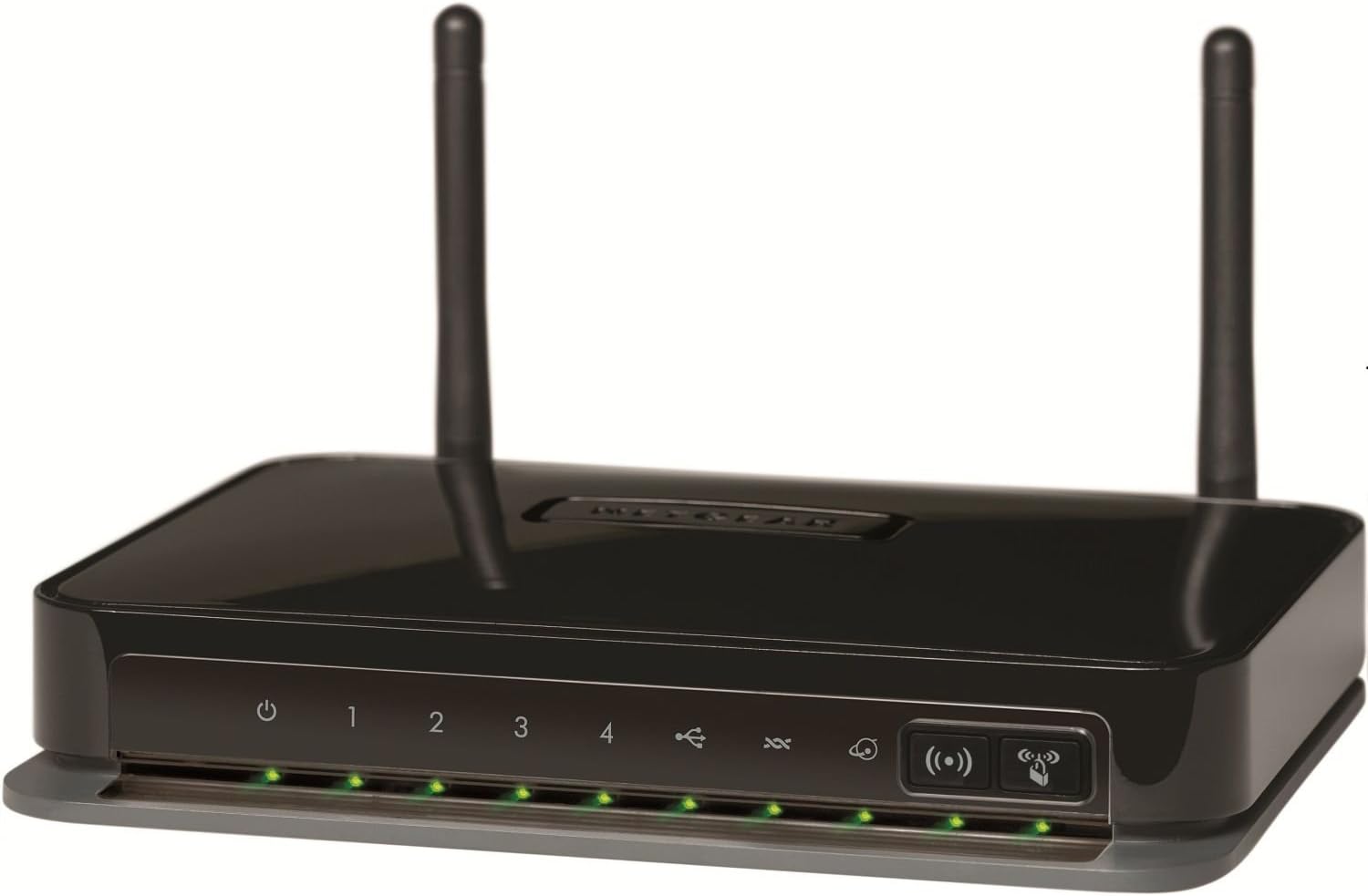
I have AT&T and when I called them to verify my DSL Username and Password, all they have for my username was "asterisks" showing up on their computer?! The agent told me that because my account with them was 'too old'?! Anyway, password reset ensued. After I got the info I called Netgear [24/7] just to be sure he/she talks me through the process. It was pretty easy once I got the username/password info. Kudos to Netgear. The day after, I called again for assistance on setting up my USB drive attached to the modem/router. The signal is pretty good. No complaints. It seems just a weebit slower than wired, but no biggie. I'm new to wifi, so every now and then I would look at the device to see whether all the lights on or not. One reason we got later on I plan to get a wifi tablet, so this definitely helps. I also tried my phone on wifi, it's much faster than my phone network provider. Anyway, so far, the device seems dependable. Like my title says, I definitely would recommend it. Nice packaging, too, but documentation is sparse. Also, I searched the all over the internet to see what those symbols are for in front of the modem/router, no avail. Now I know they're for ASDL, Internet, etc., but which is what, I still not quite sure.
S**L
I was not satisfied at all with the technical support for installation
I purchased this modem router to replace a much older Netgear router, which was beginning to show signs of aging. When I received this item I was a bit concerned because the picture shows two external antennas but the one I received had none.I searched everywhere I could but was unable to find whether this was something wrong, the picture was the wrong picture, or I had an older model. I could answer none of these questions although a couple of responses said the antennas were probably internal (well, what else could they be?) Amazon does not appear yet to have corrected the image or explained the disparity. I went ahead, though, and installed the router. I was not satisfied at all with the technical support for installation, which connected me to someone in India with a heavy accent and a telephone connection that was very weak anyway. I finally did get the installation completed after several tries, when I actually got some technician with a louder voice and less of an accent. The bottom line is that once the router was installed and in operation, it works perfectly and has increased the strength of the signal throughout my medium-sized house. I was very satisfied with the first Netgear router and just as satisfied with this one. However, as I had to change the wireless adapter I found that the right N300 Netgear adapter was very expensive. I bought the Bolse 300Mbps and it works fine for considerably less cost.
N**R
Great product
Had it almost a year and it works like a charm with DSL and I even use the USB network drive connection. The only problems I have ever had is that every once in a while the network drive starts running slow or is not accessable but cycling power on the router fixes that - this problem has happened about three or four times.
A**A
Bad routers and horrible quality control
I bought this back in September and am having many problems with it. It worked fine for the first few weeks then started overheating, the wireless started haveing issues with N devices. I called netgear and they sent me a RMA unit. The RMA unit went into a reboot loop when WiFi was enabled, so they sent me another unit. This one also did the reboot loop (Netgear verified that it wasnt configuration problems). Also, the antennas were broke on the second RMA unit. I will most likely not buy another Netgear product. They've outsourced their support so its difficult to understand their techs. Quality control is apparently lacking. I would give this a ZERO if possible. I never did get full 300mbps speeds with N. Even though my laptop has connected to other networks at 300mbps.
S**Y
Working great a year later!!
Even though this product had a lot of bad review's, they had to do with the wireless portion of the modem/router and since I had another router, I was mostly needing a modem. To my happy surprise, both work marvelously and are still working perfectly after a year!! I found it easy to set up with the instructions and couldn't beat the price at $21.97 plus $6 shipping!!! The installation disk was missing and, upon notifying Amazon of this, I was refunded $10 for my trouble making the total for my purchase $17.97!!!! I couldn't be happier!!! Give this product a chance!! I suspect that it may have been user problems rather than Netgear failure for most of the bad reviews!!
E**H
Not easy to install
This may be a fantastic product but if you have difficulty installing it as I did, you will not be too pleased with the experience. If there is an installation CD available for this product (which they say there is), it was not included with this order nor was the manual which had to be downloaded from the netgear web site and assumes you already had a DSL modem installed and already had access to the web. Were it not for the grudging help from the Tech Support at my DSL provider (they did not supply the modem and wanted $39.99 for "Premium Support") I would not have been able to install this on my own. This is an incomplete package without the installation CD and manual and I would hesitate recommending anyone purchase this item unless they are thoroughly familiar with the installation process or know someone who is. I consider myself lucky to have found a friendly support technician.
D**T
Combines DSL modem and Wireless(n) Router in small package
This unit combines both the DSL modem and a wireless(n) router in one compact package. It was easy to set up and has a front panel WPA(one push) button for adding wireless network devices like printers.. It also has a USB port for adding network storage(hard drives or flashdrives). With it installed on the middle floor the wireless range covers my complete 3-story house, and handles 1 hard wired computer, 4 wireless connected computers, and two wireless network printers. This particular unit covers up through the (n) format using a single frequency with multiple channels. If you need dual frequencies to avoid interference from other devices you may want to upgrade to the next model.
D**J
Worth it
Moved up from using both a modem and a wireless router to this. It is an attempt to circumvent calling the phone company for faster service, but I still probably will although this boosted the speed a little, and the connection is more reliable then the one the phone company gave me 10 years ago upon signing up for broadband. I don't know specifics as another technical person might. We are average home users with the computer on a couple of hours a day and it works for us. We also have tablets and phones that run at the same time off the same wireless. I think the real test will be winter when we are all really stuck inside at the same time with all machines going. I'll have to update at a later time.
Trustpilot
5 days ago
1 month ago