Buy anything from 5,000+ international stores. One checkout price. No surprise fees. Join 2M+ shoppers on Desertcart.
Desertcart purchases this item on your behalf and handles shipping, customs, and support to Portugal.
🔄 Master your multi-device setup with seamless 4K switching!
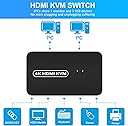
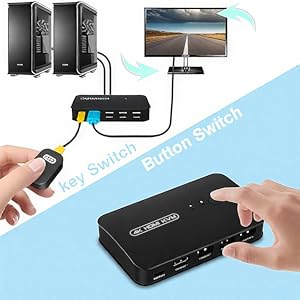
The DGODRT HDMI USB KVM Switch is a compact 2-port selector that enables sharing of one 4K UHD monitor and up to three USB 2.0 devices between two computers. Featuring dual switching modes—panel button and wired remote—it supports Windows, Mac, Unix, and DOS with plug-and-play ease. Designed for office and home use, it includes two KVM cables and delivers vibrant 4K visuals at 30Hz, making multi-device management effortless and visually stunning.


| ASIN | B092Q42VPS |
| Actuator Type | Push Button |
| Best Sellers Rank | #275 in KVM Switches |
| Brand | DGODRT |
| Brand Name | DGODRT |
| Circuit Type | 2-way |
| Color | Black |
| Compatible Devices | Computers (PC, Laptop), TV Box, HDMI compatible devices |
| Connectivity Protocol | HDMI |
| Connector Type | 'Hdmi' |
| Contact Material | Metal |
| Contact Type | Normally Open |
| Control Method | Remote, Touch |
| Control Type | Manual |
| Controller Type | Push Button |
| Current Rating | 1 Amps |
| Customer Reviews | 4.0 out of 5 stars 1,841 Reviews |
| Included Components | HDMI KVM Switch, KVM Cable, Wired Remote, User Manual |
| International Protection Rating | IP54 |
| Item Dimensions | 3.7 x 5.01 x 6.22 inches |
| Item Weight | 0.3 Pounds |
| Manufacturer | DGODRT |
| Material Type | Acrylonitrile Butadiene Styrene |
| Model | KS602H |
| Mounting Type | Panel Mount |
| Number of Items | 1 |
| Number of Positions | 1 |
| Operating Voltage | 5 Volts |
| Operation Mode | ON-ON |
| Part Number | KS602H |
| Specification Met | CE |
| Switch Type | MOSFET |
| Terminal | Through Hole |
| UPC | 751031441842 |
| Unit Count | 1 Count |
| Wattage | 5 watts |
J**R
Simple, works great w wired K and M
UPDATE: I've been using this for about 15 months now and, although once in a long while the laptop does does not "recognize the USB device", generally I just change the usb port its plugged into and that solves the issue. As I said in my original review, this KVM is inexpensive and has been doing it's job, so I'm happy with it. I purchased several KVM switches, including one that costs 4 times the price of this one. All had insurmountable issues with the Logitech wireless mouse (M) and keyboard (K) used by my work laptop. In the end I decided the benefits of a KVM switch outweighed those of a wireless K and M. I bought a nice K and a basic M and this KVM is the one I kept. The wired remote is indespensible. I have it velcroed to my keyboard tray by the upper edge on the M side. It's almost as convenient as a dedicated M button. No leaning forward to switch machines, no wirey mess within arm's reach on the desk. I have the K, M and a camera hooked up the the three USB ports. Works perfectly. With the remote in place I can put the KVM out of sight. It has 7 cables going to and from it, so mounting it (with velcro; there are no wall mount features) on the back of my desk's hutch keeps the clutter hidden. Another USB port would be nice, but most KVMs don't have more than this one has (2 for K and M, one for some other device. If it lasts more than a year or two, I'll consider it worth the price. If it works for many years, I'll consider it a fantastic purchase.
G**R
An incredibly affordable switch that performs EXACTLY as it should
I'm a skeptical shopper and a critical consumer. I'm the first to complain about a crappy product. I use my tech to its limits. The switch came nicely packaged, WITH THE NECESSARY (CUSTOM) CABLES, and was installed and working within minutes. I've been using it for a week now and have tried many different configurations with the two computers, the switch and peripherals. It always functions as expected, even under abnormal arrangements. It's currently attached to two computers with the monitor having a direct connection and only the K/M being switched. It's NOT automatic, instead uses a VERY convenient little "KEY" switch that is easily placed next to your mouse. Other products may be automatic, but this causes issues and complaints. This one works the way YOU want it to and it's fast to react. The included custom HDMI cables are of high quality construction and work perfectly. Maybe they could be a little longer, but that is merely a preference, not a complaint. They are plenty long enough for most installations. I highly recommend this switch! I have found nothing to dislike about it. I only wish I had a need for more of these switches. If you're debating buying it, JUST BUY IT, YOU WON'T BE DISAPPOINTED!
M**R
not easy to get support
I got this and at first it would not connect correctly, but I was able to get it working. Now i just cannot get the second pc to work on it...I cannot tell if the other pc is having some sort of issue or not, but it had rebooted, and now I can no longer connect to it via the KVM. There is no support available for this device from the company at all...so there does not seem to be any need to install any drivers of any sort. The few times I used it, it was working fine.
J**.
Not sure what happened, but it messed with my computer
This is a review for the DGODRT HDMI USB KVM Switch Selector for 2 Computers Share Keyboard Mouse Printer and 1 HD 4K Monitor, 2 KVM Cables Included TL;DR - would not recommend Been having a tough time finding a kvm switch for my computer since I'm trying to use my existing usbc for a docking station and can't run the kvm through that, so this switch seemed to be a nice option for a low cost. It was easy to set up, but annoying that the HDMI input goes in the front, meaning there were extra cables running onto my desk. (Most switches have the HDMI input in back since the monitor cables are coming from the back of the desk.) After set up, I quickly noticed some flickering in the monitor - it would just go black while I was using it seemingly with no cause. I tried adjusting the HDMI cable, but that did not improve it. The cables, by the way, are VERY sensitive and lost connection easily when making any kind of small movements on both the switch and computer sides. Since I use a laptop I occasionally had to take my computer with me and disconnect the switch, which made for lots of readjustment when I reconnected. The dealbreaker though, occurred today, when I sat at my computer to start work. The monitor would not connect, and on the laptop screen my desktop background was gone, all icons had rearranged, and though my mouse and keyboard were responsive, I couldn't get the start menu to open. I then got a particularly nasty error message from a program I couldn't identify (it just listed a bunch of code), and after i got the error window close it just stopped responding. Tried a bunch of other things, but I ended up having to do a hard shutdown of the computer and disconnected the keyboard and mouse entirely in order to return things back to normal. I ended up pulling out an old kvm switch to run the keyboard and mouse for now that doesn't work with my monitor, but I won't be reconnecting the DGODRT switch. Most kvm switches run at least $50, so I guess you get what you pay for. I was able to use this for about 2 weeks before it crapped out on me. Aside from offering a different way to connect other than USBC, it didnt offer any unique value over more expensive switches, and ultimately was more trouble since now I have to go find another one. If you're wanting to save some money, I think you're better off going for one of the slightly more expensive models that is going to give you more consistent results.
M**T
Works as advertized
My son has his keyboard, mouse, and headphones along with his HDMI monitor shared between personal and school computer. Was very straightforward to plug together and use. Pros: Minimal number of cables easier to minimize cable management needed Three ports is useful compared to a traditional 2 usb port KVM. Cons: Unsure if I could purchase a replacement HDMI/USB cable should it fail. (NONE of the cables I received with a KVM I purchased over a decade ago are being used, but that KVM still works!) So if you need to stress the cables regularly (like if it was on a sit/stand desk) you may want to think twice. Searching on amazon I did find other cables like "Monoprice - 136645 HDMI USB Combo", but I don't know how to verify if they would work as replacements. In my son's case he is NOT using a sit/stand so these cables should not get stressed so he should be fine.
D**T
Worked Great for Over 2 Years—Solid Budget KVM While It Lasted
This KVM switch worked really well for me for a good 2+ years. I used it to switch between my work and personal computers, and for that time, it was smooth sailing. No real issues with switching, and the setup was straightforward. One big plus: it cost under $30. For that price, I wasn’t expecting anything fancy, but it definitely delivered. The fact that it doesn’t require a separate AC adapter was another win—it pulls power from the HDMI cables, which saved me a slot on the power outlet. It looks exactly like the pictures—simple, compact, and clean—and has three USB-A output slots, which was enough for my basic setup. It came with all the necessary cables, and they were generously long. Depending on your space, that could be a bonus. For me, it added a bit of cable clutter, but that’s more of a personal workspace preference. Now, fast forward to today—while it still switches video between the two computers, the USB ports have become unreliable. My keyboard will randomly stop responding unless I unplug everything, wait, and plug it all back in. Sometimes reconnecting the USB cable and pressing the switch button twice helps, but it's not ideal. At this point, it kind of defeats the convenience I originally got it for. That said, for under $30 and over two years of consistent use, I honestly think I got my money’s worth. After reading other reviews, it seems like mine even lasted longer than most before acting up. I’m now in the market for a new KVM switch and will probably invest a little more next time. But if you’re looking for an entry-level option and don’t mind replacing it after a couple years, this one did the job well for quite a while.
K**S
Liked it enough I bought another
A very simple KVM thar comes with the parts for a simple 1 monitor, mouse, keyboard share. Nothing fancy, but gets the job done. I have my second monitor switchable by input type. The remote switch is very convenient and the switching time is a bit slower than more expensive units, but suits my needs. Simple, eay and cheap...pretty much everything I was looking for in a switch for my home office.
D**T
Perfect for the job
Got this to display to an older Epson projector from both a Chromebook with USB-c to HDMI adapter (forced on us by the organization, to display Tax Software) and an LG Gram to display PowerPoint slideshows. Worked perfectly with all the parts needed out of the box. This made it easy to go from slideshow to the tax software without losing our place in the training materials and back again without a hitch. Only thing I wish it had was a wireless remote switcher clicker rather than the wired version (but for the price this worked fine and was easy to find in the darkened room!). Minimal delay in switching between computers. Easy setup, no drivers, and a spot to plug in the laser pointer/mouse control. Now if I could just get the organization to upgrade the projector to one with native HDMI rather than VGA it would be sweet (and better resolution).
B**K
So far, so good
I’ve just started working from home more regularly and want to split my gaming peripherals with my work PC. I’d tried a more expensive option from a store and it just wasn’t powerful enough, so I took a punt on this. It’s only been used once but it worked perfectly right out of the box. I use a Razer Deathadder Elite and Cooler Master SK652 keyboard and the switch is more than powerful enough to keep them both illuminated. So far, very impressed! Long may it continue…
J**S
Simple but great
Simple, but great. I needed a simple KVM in my server room at home. This KVM is simple, does not need an extra power supply and is stable. What do you want more?!
R**H
Good but facing issue while switching screen offs for sometimes
F**O
Es rápido el cambio de ordenador
Funciona muy bien, pero hay que tener en cuenta que siempre hay que encender primero el ordenador que se apagó el último, si no, no funciona.
G**L
Muy bien pero puede mejorar
Funciona muy bien pero sí se siente de baja calidad en cuanto a los acabados. El botón incorporado en el KVM que hace de switch no responde inmediatamente y hay que presionarlo varias veces o más fuerte.
Trustpilot
2 months ago
3 weeks ago