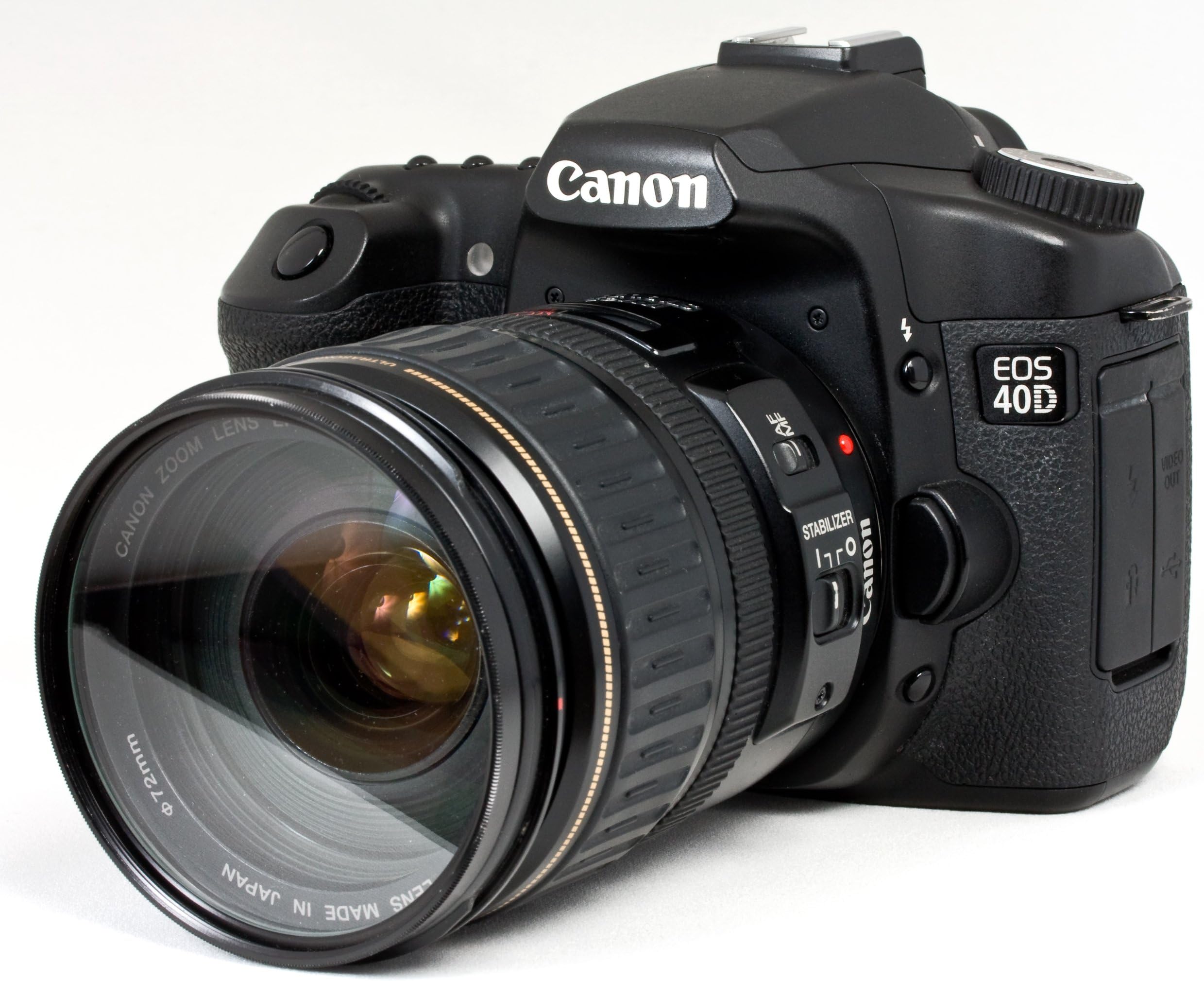
I have divided this review into two sections. The first is a brief summary of how I feel about the camera. The second is a detailed comparison of the 30D and 40D based on my experiences with both cameras. After reading this section you will see why I gave this camera a 5 star rating. I loved my 30D but the 40D simply blows it away. Update: 1/6/2008 I have added a third section to discuss general guidelines for determining if this is the right camera for you. Update: 2/2/2008 In this section I discuss my thoughts about how the new Canon Rebel XSi might impact your buy/upgrade decision. SUMMARY: In less than a couple of months I have gone from a S3 to a S5 to a 30D and I just got my 40D earlier on today. Wow! What a fantastic camera! The pictures that this camera takes are just amazing. I thought it could not get any better than the 30D but Canon has really taken it a notch or two up with the 40D. I want anyone considering buying this camera to know to get it right away. Trust me. It is worth every penny. DETAILED REVIEW OF THE CANON EOS 40D: -The Outside The first thing that stood out is the larger, 3 inch, LCD screen. This makes reading the menus and changing settings a lot easier. Canon did not stop there. When I used the 30D I really wished reading the LCD screen was a lot easier when I was shooting outdoors in bright sunlight. When I did a shot I would sometimes have to quickly find a shaded area to view the screen. I am happy to say that Canon did address this issue as well. It is now a lot easier to read the screen in bright sunlight. There are 2 new buttons on the outside that you can use to quickly access settings rather than wasting time going through the menu. - Info This allows you to quickly review your shooting information for an image - ISO speed, Picture Style and Metering Mode etc. There are two things that I really like here: 1. Highlight Alerts When this feature is enabled, if there any overexposed areas in the image they will blink when the shooting information is displayed. 2. AF Point Display When this feature is enabled, you will see the AF point(s) that achieved focus displayed in red. There is another use of the Info button that I really like. It can be used to set the shooting information right there on the LCD screen. I prefer this option of setting shooting information as the names of the various icons are also displayed along with the icons. I remember when I just started using my 30D that I would sometimes forget which icon was for Tungsten Light vs. White Fluorescent Light when I was setting the White Balance using the control panel. Now the name of each icon is clearly displayed as I scroll through them on the LCD screen. - Picture Style I really love this feature. There are times when I make a standard shot and then need to make a landscape shot. Then I would need to switch back to a standard shot. I can now do this really quickly without having to wade through the menu. There is a new Auto Focus (AF-ON) button. Assuming that you hold the camera in a conventional way, this new button will be just below your thumb. It allows you to auto focus independently of pressing the shutter button. I found this feature really useful when making continuous shots of a trainer riding on the belly of Lolita the killer whale at Miami Seaquarium. I was able to maintain continuous focus right throughout the shots. There are 3 new positions on the mode dial - C1, C2 and C3. You can register most of the current camera settings under them. Believe it or not but this includes not just the current shooting mode but even the menus and custom function settings. I cannot express enough what a time saver these new positions are to me. I find that I have to do different types of shots frequently so with my 30D I had to really change settings frequently. I can now save 3 of the settings that I use most often and have instant access to them. I also like the fact that I still have the option of making changes even after selecting one of these positions. For example, if my C1 was saved with an ISO speed of 400 I am not restricted to that ISO when I select C1. If I find that I only need an ISO speed of 320 I can make that change just as normal. One feature that has been removed is the ability to use the Delete button to delete all images. I really liked this feature as there were times I wanted to delete all the images and it was more convenient to use the Delete button rather than having to go through the menu. However, I think it might have been removed because it was rather easy for someone to inadvertently erase all the images when they really wanted to erase the currently selected image. - Start Up and Power Off When you turn the camera on or off you can't help noticing the "Sensor Cleaning" message. This was one feature that I really eagerly anticipated. Buying a camera at this price plus quality lens represents a substantial investment. It is really reassuring to know that the camera has dust reduction built into it. What I like further is the fact that if I need to do a quick shot at start up, as soon as I press the shutter button half way to focus, the self cleaning operation is suspended. I also have the ability to turn this option off for start up and power off and run it manually whenever I feel like. I also have the added comfort of knowing that if the self cleaning sensor unit does not get rid of all the dust, I can always append the Dust Delete Data to images and then use Digital Photo Professional (one of the provided software) to remove the dust spots. At first I was a little concerned about the impact on file sizes as a result of appending the dust delete data. It is important to understand that once the dust delete data is obtained it is attached to every image that is captured after that so I was really concerned about the impact of increased file sizes. However, it turns out that this data is so small that its impact on file sizes is really negligible. - Shooting When I first put my eye to the optical viewfinder I could immediately see the benefit of Canon increasing the magnification from 0.90x to 0.95x - images are much clearer and brighter and of course, it is also easier to read the various settings. Another welcome change is the displaying of ISO right there in the viewfinder. I really love this. I never liked having to move from the viewfinder to the control panel just to see what the ISO was. Another small change in the viewfinder is the displaying of a warning (B/W icon) when you are shooting in black and white. This camera focuses really fast and accurately. At the Miami Seaquarium I had to do several quick shots of dolphins doing jumps. The problem here is that you never quite know from which direction they will be starting. Despite this I never missed a shot. The 40D has the same nine focus points as the 30D. The increase in speed and accuracy is as a result of the points on the 40D being cross-type. This means that they are sensitive to both horizontal and vertical detail when shooting with lenses of F5.6 or faster. In addition, if you are using a lens of F2.8 or faster the center point is twice as sensitive as any other point. If you want to increase the focusing speed and accuracy even more you can take advantage of the two optional interchangeable focusing screens for the 40D - the Precision Matte with Grid (Ef-D) and Super Precision Matte (Ef-S). The first optional screen is pretty much the standard included screen, with a grid that makes it easier to align vertical or horizontal lines when you are composing the image. The second screen is optimized for f/2.8 and faster lenses and makes it easier to focus manually with these lenses. However, if you are using a lens that is not f/2.8 or faster the viewfinder will look darker than with the standard screen. Something that really stood out with the very first shot from this camera was the shorter blackout time and the quieter, more professional, shutter release sound. The 30D used a spring to lift the mirror while the 40D uses a motor in both directions which means that the mirror mechanism is both quicker and quieter. At first I did not think much of the increase from 5 to 6.5fps for continuous shooting. However, when you couple this with the fact that the buffer can now hold twice the images that the 30D did you get some amazing results when doing continuous shooting. I have several action shots from the Miami Seaquarium with trainers riding dolphins and the killer whale and with the dolphins and whale pushing up trainers in the air. Trust me - they are awesome. It is fantastic that a non-professional can find a reasonable priced camera that takes such awesome action shots. I am really happy that Canon decided to add Live View Mode shooting. I really liked that mode on the S5 point-and-shoot camera. I never used the optical viewfinder on that camera. I definitely will use the viewfinder most of the times on my 40D but I know there will be situations where it is more convenient to use Live View. Also, sometimes I just don't feel like putting my eye to the viewfinder. Well, I thoroughly tested Live View Mode shooting and, no surprise here, it works just as well as it did on my S5. You can even use auto focus while in Live View Mode. The new AF-ON button can be used for this. You can set just about every shooting function, such as ISO speed and drive mode, while in live view mode. The only thing you cannot change is the metering mode. There are two silent (quiet) modes to go along with Live View. Pay attention to the high temperature warning when shooting in this mode. I have to mention sRaw here. I stayed away from shooting RAW with my 30D because of the file sizes. However, I am now using the new sRAW (small RAW) format and I really like it. A sRAW file is about a quarter the size of a regular RAW file. After applying all the usual post-processing RAW adjustments the resulting image is smaller in size than a regular image. However, this is not a problem for me for the images that I do decide to shoot in sRAW. There are times when I want to take a shot in dim household light and I don't want to use the flash because I want to capture the moment just the way it was. Of course, there are other situations where you are not allowed to use a flash so this issue is also applicable there. The first thing to do is increase the ISO speed. However, in addition you also need to manually set the color temperature for the white balance. The problem with the 30D, however, was that it only allowed a range starting at 2,800K. With this minimum setting you could capture the moment without using the flash but the image would have an annoying orange look. The 40D allows you to set a minimum color temperature of 2,500K. With this new minimum the orange look is gone completely. One of the things that I really disliked about my 30D was that it would instantly power down if I somehow opened the card door while it was still recording images. I am happy to report that Canon has now fixed this problem. Rather than powering down, the 40D displays a warning message that the CF door is opened on the LCD screen. More importantly, it continues to write the images to the CF card without any interruption. - Ergonomics This camera feels just right. All the buttons are in the right place. It is not too heavy. It is amazing that despite all the new features Canon has added, the overall dimensions and weight of the camera have not changed significantly. - Transferring Images to a PC I must say that this seems to be a lot quicker than with the 30D. With the 30D it took a while for the transfer utility to launch after I had connected the camera to my PC. However, this part of the process is a lot quicker with the 40D and the actual transfer process itself seems to be somewhat quicker as well. - Custom Functions The new custom function, Highlight Tone Priority, can provide better highlights. However, depending on the ISO speed you are using you might notice more noise than usual in the shadow areas. There is definitely a trade-off involved and Canon has correctly chosen to disable this function by default. So far I have only done shots up to ISO speeds of 800. I did not notice any noise in the shots that I took with this option enabled but I suspect that it will show up at very high ISO speeds. I absolutely love the new My Menu tab. It allows for the registering of up to 6 menus and custom functions that you find that you have to change often. This is another huge time saver even though you have to use the menu. Some of the items that I have to change frequently are the Image Quality, Review Time, White Balance, Auto Play and Live View Function Settings. I now store all of these under the My Menu tab. In addition I have also set this tab to be my default tab so it is shown first whenever the menu is displayed. Something else that I did to save even more time was to sort the items registered under this tab so I can quickly locate them. - Tabbed Menu System The 30D had one long scrolling menu system. The menu was divided into categories with a different color for each category. You could jump from one category to the next. In contrast, the 40D has a tabbed menu system so it is much easier to get to an item when you do need to use the menu. The tabs and their colors generally correspond to the existing categories from the 30D. The shooting and image playback categories each has two tabs. The set-up category actually has three tabs. The custom function category has one tab. The My Menu tab, discussed earlier on, does not have a corresponding category from the 30D. Having multiple tabs for most categories further allow you to save time when searching for an item in a category. - Weatherproof Battery and Storage Compartment Doors Once the battery and storage compartment doors are closed, dust and water won't be able to get into the respective compartments. This is a welcome improvement. I wish the entire body was weatherproof but I understand that that would have bumped the price up further. - Direct Printing I do direct printing using a Canon Selphy Photo Printer. One of the less talked about new feature of the Canon 40D is the ability to trim (crop) an image right there in play back mode when doing direct printing. This is a really convenient feature but it does not end there. When you set the crop rectangle you can also tilt it by +10 or -10 degrees in 0.5 degrees increments. This allows you to correct a slightly tilted image before direct print. - External Flash Management The built-in flash on both the 30D and 40D are good walk-around performers just like the 28-135mm kit lens. However, there are situations where I definitely need a high performance flash so I bought the Canon Speedlite 580EX II Flash to go with my 30D. I could not have been happier with this flash. The only small disappointment that I had was the fact that I could not configure the flash from my 30D. Canon has resolved this issue on the 40D so now I can configure my external flash right there from my camera. Please note that this in-camera configuration of the external flash currently only works with the 580EX II Flash. - Metering The metering mode is the way in which the camera determines the correct exposure. The four metering modes from the 30D were carried over to the 40D with one significant change. The modes are as follows: -- Evaluative The camera measures the light intensity in several points in the scene. The results are then combined to find the settings for the best exposure. This is the default mode on both the 30D and 40D. -- Partial In this case the light intensity is taken from an area that represents about 9% of the viewfinder area at the center. I use this when backlighting causes the background to be much brighter than the subject. If evaluative mode was used in this scenario the camera would be fooled by the intensity of the light in the background and the subject would be underexposed. This is remains unchanged from the 30D. -- Spot The light intensity is taken from an area that represents about 3.8% of the viewfinder area at the center. This has increased from 3.5% on the 30D. I use this when I want the metering to be based on a specific part of a subject or scene such as a face, the eyes or a smile. -- Center-weighted Average With this metering mode, the light intensity is weighted at the center and then sort of "feathered" out towards the edges. I use this when there are many subjects in the central part of the viewfinder but there are small areas that vary greatly in brightness at the edges of the viewfinder. This is the same on both the 30D and 40D. - Image Quality At the end of the day I am really interested in the quality of the images that my camera produces. The people viewing my images are really not concerned about the fact that my camera has dust reduction and all the other high tech features. What they are interested in is the final result that they see. I know some people equate more mega pixels with better quality images. However, simply adding more pixels without modifying the sensor to handle the increase properly only degrades noise performance. This time around Canon not only increased the megapixel but also improved the sensor design. These changes, along with the DIGIC III image processor and a 14-bit Analog-to-Digital (A/D) converter instead of the 12-bit in the 30D have definitely improved image quality. This was obvious from the very first shot I took with the 40D. However, that was in a well lit area. At the Miami Seaquarium I had to shoot at various ISO levels due to the unstable weather at this time of year. I did shots up to ISO 800 and there was absolutely no noise. Canon must be commended for this. Other companies got caught up in the megapixel war and lost sight of the goal of producing quality images. Something else relating to ISO that I really love is the fact that I can now use auto ISO in the creative modes. I considered it a waste of time having to set this on my 30D. UPDATE: IS THIS THE RIGHT CAMERA FOR YOU? (1/6/2008) This section is really for first time buyers. If you already own a DSLR I am assuming that you know enough to use the specifications of the 40D along with reviews here on Amazon to make your decision. After reading my glowing review of the 40D you might think that I would recommend this camera for everyone - absolutely not. The right camera for you depends on three main factors: - Your Functional Requirements for the Camera You need to identify the main requirements for the camera. For example, if you will be primarily shooting sports then obviously a camera that only shoots 3fps will generally not be a very good candidate unless you are shooting something like child soccer games. If you intend to shoot more fast paced sports then you will probably want at least 5 fps. If you are more into wildlife photography and will be shooting very fast moving animals in low light then ideally you will need a camera with very good high ISO performance and probably something like 10 fps. Another important consideration is the maximum print size that you expect for your photos. Here is a summary of the maximum print sizes for different megapixels (resolution): 6 megapixels 8" * 10" 8 megapixels 11" * 14" 10 megapixels 13" * 19" As you can see if your maximum print size is 8" * 10" then you are covered with even a 6 megapixels camera. Once you have identified the primary use of the camera you can go look at the specifications of the main cameras on the market. Don't get caught up in the Canon vs. Nikon debate. Both companies produce great camera and lenses. Make sure you take the time to first read the specs and then the reviews about each camera. If you come across terms that you don't understand don't be afraid to ask your question right here on Amazon. Lets apply what we have learn here so far. Assume that you are just interested in shooting pictures of your family and you have decided that 8" * 10" prints are the maximum that you are concerned about. Based on just functional requirements I would NOT recommend the 40D for you. I would recommend something like the Nikon D40 with 6.1 megapixels for a cost of just $470 which even includes the 18-55mm kit lens. You can even shoot 2.5 fps so you could use it to shoot the kids soccer games. The next two cameras on your list would be the Nikon D40x and the Canon Rebel XTi. Both cameras are 10 megapixels and allow you to shoot 3 fps. - Your Budget After you have identified the ideal camera(s) based on functional requirements you have to take your budget into consideration. For example, based on functional requirements you might decide that the ideal camera would be a ID Mark III. However, if you don't have the $4K+ to buy it you might have to settle for the 40D which is its smaller sibling. You might even decide to go for the Nikon D300 instead. On the other hand, you might have a very generous budget and can afford to buy a more advance camera than just what is needed based on your functional requirements. Based on function requirements you might only need a Nikon D40 but can afford to spend $2000. In that case I would definitely recommend the Canon 40D or the Nikon D300. - Your Personal Preferences You have to live with your camera. When you pick it up it should feel comfortable and inspire confidence. Before you buy any camera make sure you go to a store and actually try the camera so you see how it feels. This is totally up to you. What is comfortable and inspiring for one person might not work for another person. As you can see the right camera for you really depend on things that only you can really decide. One of the main questions people ask me is about the Nikon D300. I do not own one so I cannot offer a review here but I have read the reviews here on Amazon and they are all very good. You can use the guidelines above to decide if that is a better camera for you. It offers a lot more features but is also more expensive. Do you need these additional features and can you afford the difference in price? Don't forget that you will need quality lens to get the most out of these expensive cameras. How do you feel about the difference in image quality and high ISO performance between Canon and Nikon? Is this even a concern for you as there are people on both sides that swear that the other one is better? Once again, only you can really answer these questions. Here is my personal account of how I ended up going with Canon and the 40D. I wanted a camera that could shoot fast paced action, portraits and weddings. The wedding requirement meant that I needed a camera that had very good high ISO performance since I would need to make many low light romantic shots without using the flash. There is nothing to spoil a romantic picture like using the flash. I started out looking at the Nikon D80 and the Canon Rebel XTi. I hated the small size of the Rebel XTi. It just never felt good in my hands. I really preferred the Nikon D80. It even had more features such as spot metering that is important in wedding photography. However, when I tested the ISO performance of both cameras it was clear to me that the Canon definitely had superior performance when it came to high ISO. This does not mean that the Nikon was bad - just that the Canon was noticeably better. The official reviews by a prominent testing site had the same conclusions. I also felt that the Rebel XTi had better image quality than the D80, something else that was also confirmed on the testing site. At this point I decided to look at the Canon 30D and the Nikon D200. The D200 cost more but it also offered more features. Both cameras were large enough where I would be comfortable with either one. I went to the closest camera store and tried out the 30D. They did not carry the D200 so I was not able to test it. I was really impressed with 30D but it had a problem since it was only 8 megapixels and I might need to blow up wedding pictures to 13" * 19". I went to a prominent site to see the official tests on both cameras. I was really surprised to find that when it came to image quality and high ISO performance the Canon once again received better scores even though the Nikon had more features. However, since I needed the 10 megapixels I decided to go with the D200. Hey, life is always about some trade-off and I have no problem with a Nikon or a Canon. I almost ordered the D200 when I found out that Canon would be releasing the 40D in a few months so I instead decided to go with the 30D and then upgrade to the 40D when it came out. After four months of using the 40D I have no regrets. I believe it represents the best combination of features and price. However, this is based on my personal functional requirements, budget and preferences. You need to identify your requirements, see which camera fits into your budget and then make sure that you are comfortable with the camera. That is the best camera for you. What is best for me might not be the best for you. Just don't let the fanatics mislead you - both Canon and Nikon produce great camera and lenses. Pick one and stick with it. Once you have invested heavily in equipment for one there is no reason to be switching to the other. These two companies will always be trying to outdo each other which mean better products for us. 3/6/2008: If you are new to DSLRs and would like to get up to speed quickly with the most important concepts you can check out my Website at tajdigistudios for some notes. You will see a menu item titled Photographic Notes. They were added in response to several questions from Jennie. You can also see some of the photos I have taken with the 40D under the Portfolio menu item. The galleries display photos I purchased from iStockPhoto. Over time I will expand the notes to include photos to better demonstrate the concepts. The site is a DotNetNuke application so it is a bit slow when you first launch the application but it should be okay after that. 8/7/2008: I have started putting the photography notes into a free course at this website, tajdslrcourse. UPDATE: THE IMPACT OF THE NEW CANON REBEL XSi (2/2/2008) The replacement for the current Rebel XTi, the Rebel XSi, is scheduled for release on 4/15/2008. If you are in the market for a serious entry level DSLR I strongly recommend that you take a look at this camera. Here is a list of the key new features: - Larger Viewfinder - 12.2 Megapixel CMOS Sensor up from 10 Megapixel - 3.0" LCD Monitor - Live view Mode including Contrast-detect AF - Spot Metering - Improved 9-point AF System - Redesigned Menu System (including My Menu as seen in the 40D) - Highlight Tone Priority (as seen in the 40D) - Continuous Shooting at 3.5fps up from 3.0fps - 14 bit A/D converter and processing - ISO setting displays in viewfinder and ISO button - Multi-shot Self-timer Mode - Auto Lighting Optimiser (boosts shadows after shooting) - Kit lens: Image stabilized version of Canon's 18-55mm f/3.5-5.6 lens It is slightly larger than the camera it replaces. At just $800 for the body and $900 for the kit this is definitely worth serious consideration depending on your requirements, budget and preferences. To be honest with you I think current 40D owners might be a little jealous of the features on this "baby" Canon DSLR. In my opinion the competition from Nikon has forced Canon to add more features than it would normally have done. Competition is certainly great for consumers in a free-market. I cannot wait to see what the 5D replacement will be like. I have been waiting on that camera since I plan to use it as my main camera and my 40D as a backup. PURPOSE OF REVIEWS: My understanding was that the purpose of these reviews was for owners to share their experience with the product being reviewed. At the time of updating my review it is really disappointing to see that of 13 reviews, there are actually 5 which are from people who have not purchased the product and are simply rehashing the specs and/or engaging in useless debates about Nikon vs. Canon. This makes it difficult for potential buyers to quickly determine if existing owners are happy with the product and if not, why. I purchased a lot of items from Amazon, mostly books, and I find that I cannot simply rely on the overall ratings anymore. I have to wade through numerous negative reviews from people who do not even own the items. Another problem is the people who buy something that clearly could not satisfy their requirements in the first place. For example, I once saw a review of a book where the reviewer criticized the book for being a beginner's book. The problem, however, is that the book clearly stated that it was for beginners. The title of the book "Teach Yourself ... in 24 hours" should have been enough for anyone to know that this book was intended for beginners. Why would someone buy it then and then criticize for being such? I think Amazon need to come up with a way of restricting reviews to people who have actually purchased the item in question from them. This would truly make the reviews more meaningful. In the meantime potential buyers need to carefully evaluate negative reviews. I am not suggesting that all reviews must be 5 stars like the one I gave the 40D. However, I really would like to see the reviews based on the experiences of actual owners. For example, has image quality increased or decreased with the increase in mega pixels and what is the impact when using higher ISO?