Buy anything from 5,000+ international stores. One checkout price. No surprise fees. Join 2M+ shoppers on Desertcart.
Desertcart purchases this item on your behalf and handles shipping, customs, and support to Portugal.
🚀 Elevate Your WiFi Game!
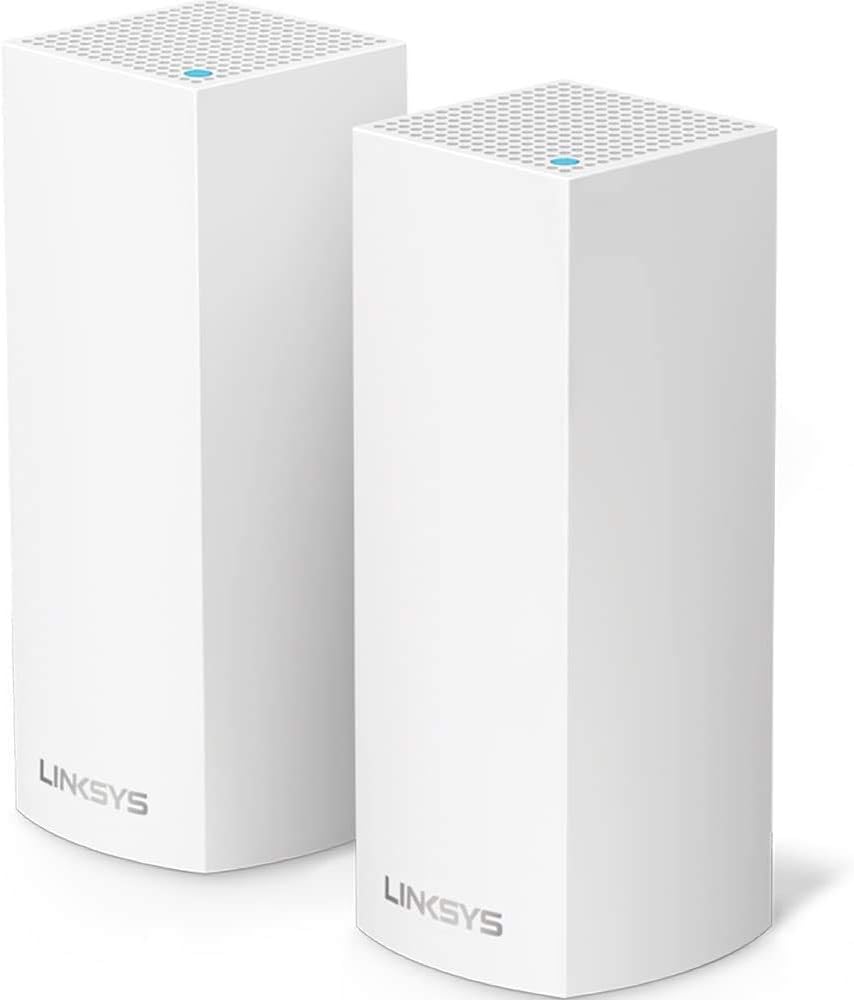
The Linksys Velop Mesh Home WiFi System offers expansive coverage of up to 4,000 square feet, supporting over 40 devices with lightning-fast speeds of up to 2.2 Gbps. Ideal for multi-story homes, it features tri-band connectivity, easy setup via the Linksys App, and compatibility with Apple HomeKit for seamless smart home integration.
| ASIN | B01MSSUG2H |
| Antenna Location | Gaming, Home |
| Antenna Type | Internal |
| Best Sellers Rank | #121,906 in Electronics ( See Top 100 in Electronics ) #370 in Whole Home & Mesh Wi-Fi Systems |
| Brand | Linksys |
| Built-In Media | Ethernet cable (x1), Linksys Velop (x2), Power adapter (x2), Printed Documentation, Quick Start Guide |
| Color | White |
| Compatible Devices | Personal Computer |
| Connectivity Protocol | wi-fi |
| Connectivity Technology | Wireless |
| Control Method | Voice |
| Controller Type | homekit, vera |
| Coverage | 4,000 Sq. ft |
| Customer Reviews | 4.3 out of 5 stars 2,300 Reviews |
| Data Transfer Rate | 4400 Megabits Per Second |
| Frequency | 2.4 GHz |
| Frequency Band Class | Tri-Band |
| Global Trade Identification Number | 00745883728183 |
| Is Modem Compatible | Yes |
| Item Type Name | Linksys WHW0302 Velop Wireless Whole Home Wi-Fi AC4400 Tri-band Mesh System |
| Item Weight | 1.08 Pounds |
| LAN Port Bandwidth | Gigabit Ethernet |
| Manufacturer | Linksys |
| Maximum Upstream Data Transfer Rate | 867 Megabits Per Second |
| Mfr Part Number | WHW0302 |
| Model Name | WHW0301 |
| Model Number | WHW0302 |
| Number of Antennas | 6 |
| Number of Ports | 4 |
| Operating System | [Proprietary router firmware developed by Linksys] |
| Other Special Features of the Product | Guest Mode, WPS |
| RAM Memory Installed | 512 MB |
| Security Protocol | WPA2 |
| Special Feature | Guest Mode , WPS |
| UPC | 745883728190 745883728183 |
| Unit Count | 2.0 Count |
| Warranty Description | 3 year |
| Wireless Communication Standard | 2.4 GHz Radio Frequency , 5 GHz Radio Frequency , 802.11b/n/ac, 802.11bgn |
| Wireless Compability | 2.4 GHz Radio Frequency, 5 GHz Radio Frequency, 802.11b/n/ac, 802.11bgn |
T**N
It just works.
I don't think I've ever experienced such a simple set-up process for a router since my first AirPort Extreme. I always assumed "the other" routers in general would never become as easy to set up and use. I held on to my 5 year old airport for as long as I could, but unfortunately the range wasn't reaching a new and critical part of our house. So I started doing tons and tons of research trying to find the best router replacement. I came across "mesh routers" and discovered how popular they are for people with coverage problems. I then did even more research trying to find the best mesh router that wasn't astronomically expensive. I initially ignored the Velop because of it's high price, but kept it in the back of my head because of the strong performance it offered in comparison to the majority of it's competitors. I started to become dead set on getting the Netgear Orbi, because of it's high performance and the fact that it was on sale during Black Friday. I kept hesitating though because I'm not a fan of Netgear products and became worried that the quality and experience of the product might not live up to my standards. Then I casually looked again at the Velop and was shocked to see the new sale price on Black Friday and immediately pulled the trigger. Set up took no longer than 30 minutes. The companion app did it's job well and everything was up and running like nothing ever changed. (I kept the same wifi name and password as my old router and everything reconnected.) I immediately noticed the speed and range differences throughout the house. I'm now getting between 200-300 mbps throughout all of my house. Even in my backyard. I pay for 300mbps down 20mbps up. I did have to restart the modem and routers once since I've had it because I was getting abnormally slow speeds, but I'm not sure if it was the router or my internet providers fault. We'll see with time how often this occurs. So far though, It's just a set it and forget product. Like how they all should be. I'm a happy camper with better range and faster speeds. I'm definitely happy that I skipped the Orbi and went with the Velop.
S**A
Solved our slow network issues!
Bought the 2-node system for a house that's just around 4,000 sq ft and am very happy with the results. We had tried range extenders before and just wasted money on those, so finally decided to see if any of the mesh systems will help. I found the set up pretty straight forward and easy. We had a FIOS modem/router combo so i had our old parallel wifi running while installing the Velop which made me more comfortable that we won't be stuck without connection if set up went wrong. It took about 30 minutes or so to set up both nodes, we have one in the upstairs office right next to the modem and the other one downstairs in the kitchen, probably roughly 22-23 feet direct line (through walls) from the modem connected one. Each node is supposed to cover about 2,000 sq ft which is a circle with a 25 ft radius (50ft diameter) around it. We get great and consistent speeds throughout the house, with the exception of our bedroom where we do get connection but it's a bit slower - however, our modem is to the one side of the house, not in the center, so we really need another node to have the full proper coverage there if we wanted it (bedroom is furthest away from the two nodes). This is probably obvious (though not really explained in the set up process), but if you do have a combo modem/router like we did, you should turn off the router part so you are not running two wifi networks which might interfere with each other. I found that pretty easy to do from FIOS's router/modem website. I did call Linksys support to confirm that I am supposed to do that, and found them easy to get through to and helpful. I am also not a techie by any means, though comfortable with technology. Overall, very happy with purchase. UPDATE 12/14: I bought an extra node (so now we have the 3-node system) to complete the coverage of the house. Setting that node up was very easy using their app, I did try initially a location that was a bit too far and the system made me move it to a spot that it links up easily with the 2nd node. The new one has been operating for just over a week and we have full coverage everywhere in our house now. COuldn't be happier with Linksys!
M**Y
Performance A+++, Ease of Install A+, Customization C
30 hours with the Velop. This is surely a mixed review, and one which Linksys could EASILY make an A+, 5-star across the board. I have had a number of wireless routers, APs, and extenders. 2 story home - a LOT of devices, most recently- Uverse router located on one end of second story, connected via cat 5 to AP on other side of 2nd story, delivered strong signals to each end of the house, but handoff's were iffy, and in the middle of the home, sometimes a gap of coverage. Replaced this with Velop - turning off Uverse routing, placing one Velop node at Uverse router, and one on other side of house, and DID NOT Use the CAT 5 15-year old wiring. WOW. 20 minute simple install, and the coverage is consistently strong and fast everywhere in the home. The ease of setup was amazing, and Velop after determining the type of Uverse router, setup the Velop network quickly and reliably. This is the kind of easy network setup that I would recommend to anyone who doesn't understand networks, even my parents. And especially if they have had issues with home wireless in the past. But Customization.. Linksys has chosen to bury this under the covers... even a simple task of changing the DNS servers. If you are trying to provide some limits on the worst of the internet, you might want to use a limited DNS service, like OpenDNS Family Shield. To me, it should be a no-brainer for Linksys and every other manufacturer to let you point and click to using various DNS services, Open DNS, Family Shield, Google DNS, or yout provider's DNS. The Velop DOES allow you to change the DNS, in the same way you would most any other router, but getting to that customization is hidden. There are some ways you can dig in forums to do it, but I chose to call Linksys, late on a Sunday night, and had a great experience (seriously) with the Velop support (a 24-hour dedicated tech team)- and she was prepared to even remote desktop to help me change the DNS, but upon determining my comfort/knowledge level, she just guided me to the customization screen. Now I have full access to change the main settings whenever I want to, but it did take a call. This could have been done easier, without the call though, with going through a series of warnings and consents to let me there without involving tech support. the Velop App on the mobile device could even allow me to set checkpoints/config points and let me roll back changes that did "break my internet", and such functionality would be easy to do. Last point is the family features of the Velop. I think at the most basic for the routers should be to just use an alternate DNS. For any novice, that isn't an easy experience, but one that could be plug and play. It isn't something that you can do from the Velop App, and surely isn't plug and play. Velop allows you to block internet to devices, or to block access up to 10 sites. Seriously, 10 sites. And out of the box, I have to do that on my mobile device, not from a PC. Out of the box there is also no logging of where devices have gone. And out of the box, I can't easily see how to set up access times or to limit times for devices. These are all features which i expected to have in Velop by the description. So surely this is a mixed review. I had multiple reasons for wanting the Velop and for it's features. For performance, the main reason, the two node completely solved issues I have had for years for the couple dozen devices spread across my house, and it solved that in minutes and very easily. For ease of setup, awesome, A+. But in customization and family features, it is customizable- but hard to get to. It is similar to customizing I have seen in other good routers, but it could be easier and more accessible. And I don't think it is delivering on the family features it is promising. It may very well in the coming weeks and months, it upgrades easily, perhaps it was just rushed to market to meet the Orbi and Google devices.
M**L
Amazing in every respect!
Okay. I'll be frank. This is not the product I wanted. I wanted Google WiFi because it had good reviews and was cheaper but it is currently impossible to get. I figured I would need 2 nodes but since Google does not sell a two pack I would buy the 3 pack for $300 which is only $40 more than 2 single packs. When I couldn't get that I decided to spend another $50 bucks and get the Velop based on great reviews and the fact a Velop covers 2000 sf a node while Google covers 1500 sf. The fact that Velop has a dedicated backhaul channel was not important to me since both my nodes would be wired but if you are not planing to do that, this is a big plus for LinkSys. Also, if you have child nodes far from the parent, Velop will relay through a child node if necessary. Not all Mesh products do that. The nodes seem well made, installation was clean and easy although I got interrupted with company during install and missed a step in what was really an idiot proof application that takes you through setup. So I called support, after 5 on a weekend no less, and they were there. Three year free support 24/7 in English! Folks, these babies are powerful. I have an Asus AC68 dual band router that is fairly powerful however I needed an extender even though my house is only 1900 sf. When the extender died I decided to go Mesh as I was tired of switching WiFi channels every time a moved to a different part of the house. I almost could have gotten away with 1 Velop node, which kind of defeats the purpose of Mesh, as this device beats the pants off the Asus when it comes to signal strength. But I am glad I have two as I have a lot of AV equipment on the other side of the house and I get full WiFi throughput in every corner. I'm glad Google WiFi was not available because I can't believe it would be better than the LinkSys system. So now my WiFi is ready for all the new devices I'm sure I will get over the next few years. Right now I am looking at a WiFi dog.
M**B
... I has an asus rt66u and it was a great router but the range was very limited for the ...
So I want to start this review off by saying that I has an asus rt66u and it was a great router but the range was very limited for the size of my home (2200 square feet). So I decided to research mesh units for over 2 months. I researched the Orbi, Eero, Luma, Google and Velop. I decided on the Orbi. That experience did not go well so I replaced it with another Orbi and had a similar experience. This isnt to say the Orbi was bad, but I had dropped wifi over and over. After my last return I decided to take a flyer on the Velop. The reason I did not purchase the Velop originally is because of the limited number of ethernet ports. I prefer my FireTV and Xbox One hard wired so my original choice was not this. After I received the Velop i was curious about the setup time, so I purposely waited until I had a two hour block of time in case I experienced issues. I remembered my last experiences. I unboxed it, and downloaded the linksys app on my android phone. After following the instructions, it did not find my modem right away. So I just reset my modem and tried again. Boom! Found the modem. Then I placed the other node (I bought the two node system) upstairs. It found that node within minutes. So the total setup time....15 MINUTES! Ok so now i had to test the range. I went in the far corners of my house and it was getting top speeds throughout. I even went into my basement in the far corner and was getting terrific speed. I would like to say that my basement is finished and I have steel studs in the walls. This was always an issue. Not with the Velop! My ISP speeds that I purchase is 25 mps down. I was getting 17 in the far corner of my home surrounded by steel studs. Anywhere upstairs on either floor I was getting 20+. Outside 50 feet in my backyard I was getting 15. I also got 15 by my front mailbox which is 50 feet the other way. Now the consistency test. The Orbi never went more than 3 hours without 1 drop. This product I have had for about a week and NO drops! We had a quick power outage/power surge in our neighborhood where my lights went on and off and so did my modem. My Velop dropped at that point (obviously) but then picked right back up without even touching it! Blazing speeds! I was convinced I was going to take this back but how can I? I think people want consistency and speed out of router more than advanced settings. Well that is precisely what you get with this. The app is limited with no real bells and whistles. I had that before and really dont need that out of a router. Oh by the way....My Xbox one...it is wireless now because this mesh unit is so good you dont need ethernet cables! I know. I was tough to convince but this did it for me. We have 2 fire TVs which are wireless, xbox 360, xbox one which are wireless and we have 3 laptops, 3 tablets and 5 smartphones. The Velop handles them all with NO ISSUES! I dont need a DMZ, dont need port forwarding, blah blah blah. I just needed this beast the whole time. THANKS LINKSYS. I dont mind shelling out the bucks for this one. Peace of mind is valuable!
B**R
Good Idea, Execution??? UPDATE: Avoid, DO NOT BUY!
I purchased the Linksys Velop system after my Apple AirPort Extreme was taken out by a surge through my cable system which also took out an 8 port switch, cable modem and an APC UPS. What attracted me about the Velop system was the true mesh networking as well as distributed wifi. A wired Access Point and the AirPort worked well but I needed really good wifi coverage with all the IoT devices. The Velop system looked good on paper. Setting Up the Velop System Setup of the Velop system took about 8 hours of mis starts, freezing up and error messages saying to basically start over again. Since all the Velop nodes are the same, I grabbed another and got the system up with 4 nodes in about an hour. First off the Velop system only recognized about half of the IoT devices. Reading blogs and comments found how to access via a PC and not go through the App. After several days of experimenting I split the network into two with a 2.4 and 5 GHz SSID and turned on the Guest Network. I still cannot get 15 of the IoT devices to link with the main network and not the Guest Network. These devices are Ring, Nest, Lutron,Chamberlain,Echo, Apple, Amazon, Epson, SolarEdge, Haiku and Etekcity. Having these devices split across the main and guest network is problematic due to the constraints of the Guest Network. The Velop node I could not get working as the main node I placed in my dining area immediately adjacent to my outside Ring Doorbell. The doorbell refused to connect and would only connect to the main node at a barely workable -58 RSSI. Decided to try wiring the backhaul from other nodes back to the main node with CAT 6 feeding into an HP ProCurve 16 port switch. Vola! As soon as I connected two of the nodes homerun back to the main node the doorbell and several other devices immediately connected at around -18 RSSI. However, over the next several days with everything remaining static the RSSI dropped to -33 but everything still functioned well. BeamForming? I also see quite a bit of drift between nodes with varying RSSI generally trending worse. I’ve noticed the red light coming on the Master Bedroom node but the App SW saying all is fine. I would have thought since the Velop system has been out for awhile bugs like these would be gone by now. Also the App needs more reporting on overall flow to, from and within the entire system. Reading comments I saw how to access the Velop Log, IP Address 192.168.X.X/sysinfo.cgi where the two Xs are the address of the main Velop node. The log is large and not really meant for the casual user. Here I found information that showed the nodes connected to the main node at Gigabit Ethernet. This was validated by the ProCurve Switch. The App only reports one node Ethernet connection. Moreover, the App reports an Ethernet connection made between an Amazon Fire TV Cube and the Garage Node when its connected to the main node. Wish I could look at the code running the system. Would no doubt explain a lot. UPDATE 11/27/2018 I really wanted the Velop System to work. I added APC UPS devices to each Velop node in my WiFi network so momentary power glitches would not affect operation. Why? Because I cannot get half of my devices to attach to the main network and had to set up a Guest Network so a power glitch makes a tedious re-connection of 15-16 IoT devices. additionally due to limitations of the Guest Network I would have to switch my iPad between the Guest and Main network to control different devices. The balancing act between my iPad and voice control through Alexa is tedious due to this limitation. There are numerous review and blog entries about this problem but I mistakenly thought I could find a workable solution. All in all this has been an incredibly frustrating and time consuming ordeal, not to mention the $700 or so I have invested. BTW, I have a Master’s degree in Electrical Engineering and worked with networks my entire adult career. I cannot believe that a manufacturer has allowed a product so shoddy that its basic functions don’t even work. To say nothing of the painfully slow application. Final straw was the node communicating with the cable modem just stopped. After two days of trying to revive this turkey I finally gave up, bought a $99 refurbished Apple AirPort Extreme, plugged it in and all up and running in 15 minutes. At least things function while devices further from the Airport do suffer. So it’s back to the Airport and my TP Link extender. I wish I could get my money back from Linksys but I am not going to hold my breath. Not going to try to resell this mess on eBay because I don’t want to foist this problem on someone else. 12/4/2018 Another update. Removed all the Linksys Velop nodes and went back to my original configuration with a refurbished Apple AirPort Extreme and a TP Link Range Extender/Access Point configured as a wired access point. All devices immediately attached and with better RSSI and overall performance. This setup was around $180 as opposed to the $750 for the Linksys Velop system. I had 4 Velop nodes. Moreover, a week of continuous operation and zero glitches. I use my wifi system to monitor and control environment and lighting for my greenhouse. With the Linksys Velop system I could not get all the devices to connect in a stable fashion. They would drift to and from the closest Velop node, ultimately losing connection which would require forcing them back to the nearest velop node which was about 10 feet awayy. Everything attached immediately and performing perfectly for a week now. Moral of this story, when the 802.11X is out for awhile going to attempt another upgrade with a commercial system, something like Aruba Access Points and a Cisco router. The Apple Airport and the TP link range extender are the only two consumer grade wifi products I have used that did not require a rebooting weekly or daily. To bad Apple abandoned the wifi component marketplace.
S**S
I'm in love!!!
Really did my research, but you just never know till you get hands on with your own devices. Very impressed... and amazed!!! Solved simple problems that I have ignored for years... the dead zone!!! The most significant dead zone in my house was where the TV and most every device that was connected to Wi-Fi was situated initially! My a/v receiver rarely connected to wifi, and now it connects at lightening speed and can be managed remotely flawlessly!!! Of course now with converting to smart home tech I have devices throughout the entire house and Velop works seamlessly and at such incredible speeds... I am absolutely thrilled!!! I was concerned that I was going to have an issue with not being able to connect specific devices that had to be connected to 2.4GHz with my phone connected to 2.4GHz simultaneously, but I was able to work around that quite easily and switch it back without a hitch... simple and straightforward work around. When I changed the network over to Velop, I kept my same network name and password and it was completely set up in under 30 minutes! I only needed two nodes in a 2300 square-foot house, and there's not a dead zone in the place! The app is quite functional. From some of the reviews I was quite concerned, and I'm very much pleasantly surprised now! I have all my devices identified a need so that if I see anything unfamiliar I can immediately spot it… Which is very important in my situation. I have so many devices connected it's nice to be able to keep track of them all now! Can't say enough about the Velop system… Great purchase!!! (I hooked up a Comcast Wi-Fi gateway, not my old router, and did a speed test pictured here, then took a speed test with the Velop system also pictured here. My old tender router was far better than Comcast's garbage hardware, but it gives you an idea of the speed increase!)
D**K
Excellent system
So far I am loving the Velop. They were extremely easy to set up and they are working great so far via wifi connection. I'm planning on picking up a third one soon and will be switching to using an ethernet backhaul between them all. I would have chosen the 3-pack to begin with but the 2-pack happened to be on amazon deals and it was actually cheaper for me to buy the two pack, then add on a single 3rd node. I've only had them set up for about a week but I've had no issues whatsoever so far. One really nice thing to note is that speedtest.net is actually telling me I'm pulling down faster speeds than I'm paying for now that I've set up the Velop's. I'm not sure how that's possible, but I tested it a few times and it was consistently higher than what I'm paying for. I've noticed a few other reviewers have said the same thing; I'm sure it just depends on your individual situation. I did lose a little speed when I ran the test from outside my house, but with several walls between me and the closest node that was to be expected. I'm confident that once I get the third one set up I can mostly eliminate the speed loss in most areas. As other reviewers have stated it would be really nice if Linksys had the ability to recommend a good spot for the child nodes via the app during set-up, but that would just be bonus and the lack of it doesn't detract from the quality of the system. Overall I'm absolutely loving them so far and highly recommend them. Unlike some other users I haven't purchased nor tested any of the other mesh systems so I can't give any commentary on differences or similarities. I do know that if the past week is indicative of the rest of my time with the Velop I won't ever be changing systems.
A**O
Mejoró mi conectividad
Este producto es realmente una mejora para tu red inalámbrica, tiene muchos beneficios tales como el alcance de la red, la estabilidad, la red de invitados, la restricción de tiempo conectado a internet (que es ideal para los pequeños de casa), la administración de los dispositivos desde su app. Creo que fue una muy buena inversión, a partir de qué tengo el equipo, ya no tengo problemas de conectividad
V**S
Excelente producto
Investigando en internet cual es el mejor sistema mesh o malla disponible en México, me convenció este sistema, es super fácil de configurar a través de la aplicación disponible para los dos sistemas operativos en 2 minutos ya tenia configurado el sistema, es configurable en muchisimos parámetros, puedes monitorear los dispositivos conectados dar prioridad a ciertos dispositivos, bloquear otros y lo mas importante, por fin tengo internet en todo mi casa y estable tanto de subida como de bajada a cualquier hora, incluso más de lo que tengo contratado, ya que el router del proveedor es malisimo. La mejor inversión y Amazon lo entrego el mismo día que lo ordene
J**O
No tan bueno!
El aparato funciona bien en general y es fácil de instalar, compré el paquete de dos nodos, sin embargo hay dos puntos que no me gustaron, primero, que los dos nodos tienen que estar relativamente cerca, mi casa es de dos plantas, prácticamente uno está en el mismo lugar q el otro pero en el piso de arriba, porque quería mejorar la señal en esa zona, pero el mismo aparato dice que ahí no hay buena señal, que lo ponga en otro lado, lo cual me parece un poco ilógico, más que en los otros lugares donde la señal es buena no tengo un contacto para conectarlo, en fin, la otra es que no trae un manual, dice q con la app pero ahí no viene todo, por esa misma situación tuve que andar averiguando qué significa la luz ambar que tiene mi segundo nodo, en vez de estar azul, total que bajé el manual de internet y significa que ese nodo "está muy lejos", la distancia real no es de más de 5 metros, sin embargo parece que las paredes de ladrillo y los techos de concreto exceden las capacidades del wifi. Nota: antes tenía un repetidor de señal steren de una fracción del costo e igual me funcionaba bien, lo único malo es que vivía con dos redes en la casa y los celulares le batallan. Saludos.
V**R
Bueno a secas no la gran maravilla
Lo compré para reemplazar 3 modems de apple que eran muy inestables. El aparato funciona bien, lo único malo es que o tienes muchísima velocidad o muy poquitita porque tiene 2 bandas (la rápida pero corto alcance y la lentisima pero de largo alcance) creo que fue diseñado para casas en Estados Unidos ya que no detecta muy bien un módem de planta alta al de planta baja pero solo a veces presenta el problema. En 1 mes que lo tengo solamente he tenido que resetearlo una vez pero creo que era el modem telmex el que falló.
M**Z
Cero problemas de señal en casa
Este producto ha sido muy efectivo, no tenemos puntos sin señal en la casa que es de 2 pisos. Un aparato arriba y uno abajo. Alcanza hasta el patio y el parque de enfrente cruzando una calle. Muy satisfecho. 5ambien tiene opciones para dar prioridad a aparatos determinados, crear password de visitas y límite de horario para aparatos seleccionados ( como PC, tablet o celular de los hijos.
Trustpilot
2 weeks ago
3 weeks ago