Buy anything from 5,000+ international stores. One checkout price. No surprise fees. Join 2M+ shoppers on Desertcart.
Desertcart purchases this item on your behalf and handles shipping, customs, and support to Portugal.
๐ค Own your presentation like a pro with the PR-820 โ where control meets freedom!
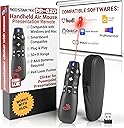
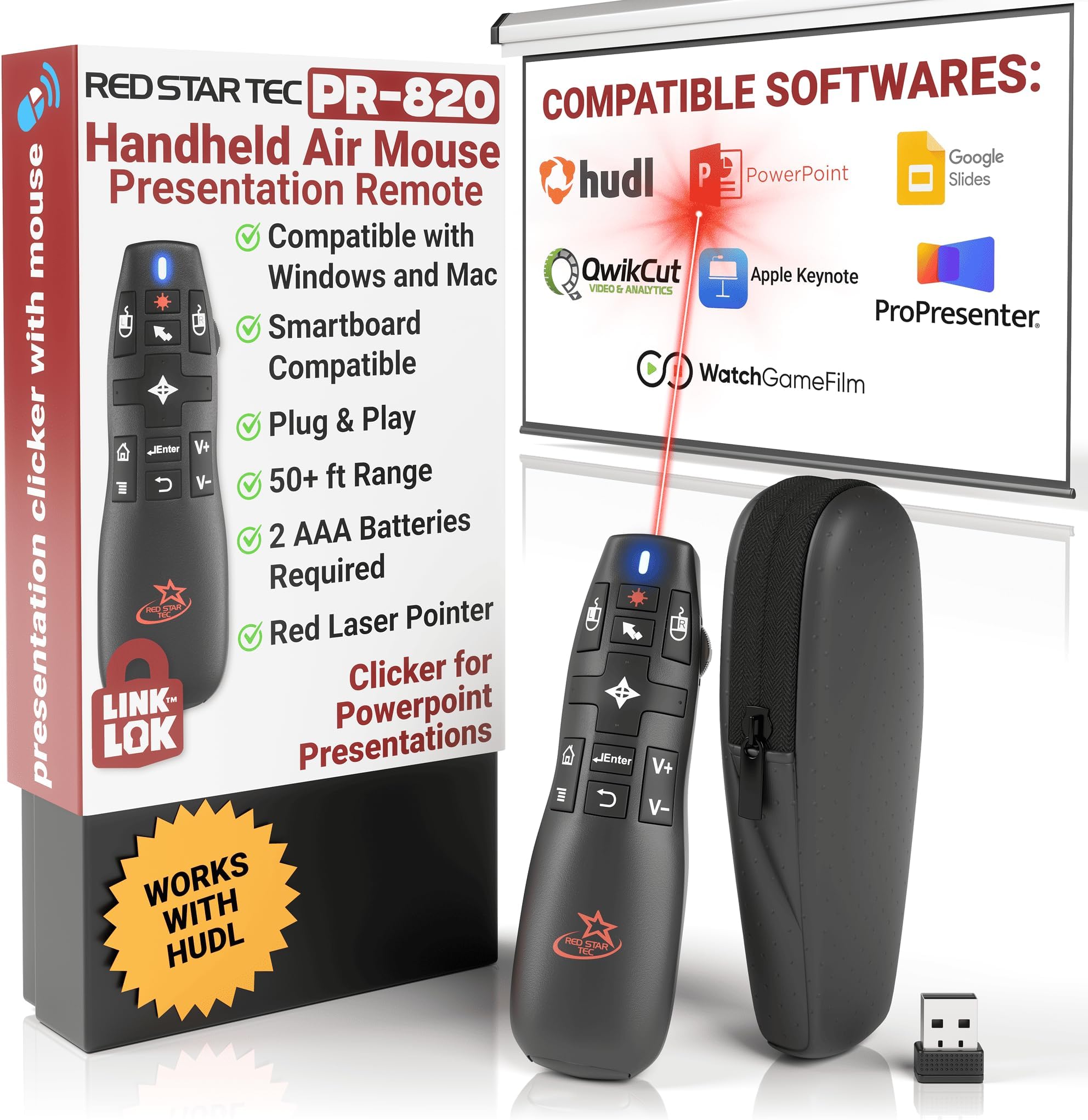
The PR-820 Presentation Clicker is a versatile, plug-and-play remote designed for professionals who demand seamless compatibility across Mac, PC, and Linux platforms. Featuring a robust 50ft RF wireless range, a 6-axis air mouse, and a Class 2 laser pointer, it empowers dynamic presentations without line-of-sight restrictions. Its ergonomic, portable design includes smart USB receiver storage and Link-Lok technology for instant reconnection, making it an essential tool for managers, educators, and speakers aiming to elevate their presentation game.


| ASIN | B01M1I2C2L |
| Additional Features | Universal air mouse |
| Battery Type | Alkaline |
| Best Sellers Rank | #51,402 in Office Products ( See Top 100 in Office Products ) #36 in Office Presentation Remotes |
| Brand | RED STAR TEC |
| Button Quantity | 6 |
| Color | Black |
| Compatible Devices | PC, Mac ,Android Tablets Chromebook, Projector, smartboard |
| Connectivity Technology | Radio Frequency |
| Controller Type | Button Control |
| Customer Reviews | 4.4 out of 5 stars 444 Reviews |
| Item Weight | 55 Grams |
| Manufacturer | Red Star Tec |
| Max Number of Supported Devices | 1 |
| Maximum Number of Supported Devices | 1 |
| Maximum Range | 50 Feet |
| Mfr Part Number | PR-820 |
| Model Name | PR-820 |
| Model Number | PR-820 |
| Number of Batteries | 2 AAA batteries required. |
| Special Feature | Universal air mouse |
| UPC | 787639304647 787639304623 |
| Unit Count | 60.00 Count |
S**4
Works awesome with Hudl
This thing works awesome. I am using for a football presentation but it works great with Hudl(if you're a football coach you know what I mean). Ordering more to give to my staff
J**A
Great value, and great customer service
Excellent product. Long range and great variety of functions to do everything you would need on a projected screen from even a long distance. Had lost the very small USB receiver and the company was incredibly helpful in shipping me a new one, even though it is out of stock on their website. Definitely worth the price.
E**S
Absolutely fantastic!
I'm a preacher who uses PowerPoint in my sermons and services and I have to testify that this is a fantastic remote! It's easy to use and I especially like the fact that it has a built-in mouse and media buttons to control volume when I play music and videos during services. This remote is replacing an old remote that broke (which they still sell on Amazon). I almost bought the old remote again but bought this one instead since it's much cheaper with all the functions from my old remote. In short, this is a great remote and I highly recommend it.
P**.
Functional and feels like decent build quality
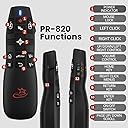
I received mine in good working order. It took me a little bit to figure out the buttons (in particular, the power slider is a bit hard to see, but I got everything working pretty quickly. The unit comes with two USB receivers, one tucked into the base of the "teardrop" and accessible when you take the battery cover off, and another in the box it came in in a little plastic zip lock bag. Having an extra is definitely nice - in theory. Sadly, the receiver found in the base of my unit does not seem to work - while Windows recognizes it, the mouse does not function in any way while (just) that receiver is connected. I am sorely tempted to drop a star from my review because of this, but since I did get a working receiver and I wasn't expecting an extra one, I left it alone. Windows 10 detected the (working) USB receiver it as an "Air Mouse" and installed drivers on its own. All the buttons work fine so far across multiple applications. The laser dot is red and reasonably bright and clear. When the unit is on, there is a slowly blinking blue LED light near the tip of the unit (again on the button side) that makes it clear it's powered on. The actual mouse unit's design has pros and cons. The bottom, where the batteries go, is slightly bulbous and sits well in the palm of your hand. The whole thing is a bit teardrop-shaped, so the tip is a bit narrow. The buttons are towards the narrow end, so they're pretty small. I imagine most folks will press them with their thumb, which could be interesting for folks with big fingers. I feel confident I can get used to the layout, but it's definitely not wildly intuitive. The button layout costs the review one star for me, but I'm not hating it by any means. (If I could knock off half a star, I would do that instead.) There are buttons for each mouse click (left and right), arrow keys (this is a "plus" shaped 4-way rocker) that will control most presentations. There's also a "right click menu" button, an "enter key" button, a "back" button, a "home key" button, volume up and down buttons (which did what they say on Windows), a button for locking the mouse position, and, finally, a button for the laser pointer. The mouse tracking is pretty good in my testing. I've never had an air mouse before, but this one did exactly what I expected. Any fine manipulation of the buttons on things like window menu bars definitely needs the mouse lock engaged, since trying to press buttons is going to move the mouse around a bit. Depending on where your mouse is when the air mouse comes on, the tracking may feel like it has the mouse in the wrong place relative to your hand. You can address this by pressing the lock button, getting the mouse in your hand physically positioned somewhere that "feels right" for where the mouse is on-screen, then unlocking the mouse. The unit is not rechargeable, but takes two replaceable AAA batteries, which go into the bottom of the "bulb" in the teardrop shape. I lack the run-time to yet have a sense of the battery life. If you leave it sitting still for about 30 seconds it will power down. Pressing any buttons will bring it back to life. Finally, the unit comes in a little, soft bag with a zipper. With the unit in that, it seems pretty reasonable to throw the whole thing in a laptop bag, briefcase, etc., though the little bag is probably not going to protect it if you have something heavy or bulky bouncing around against it. I did not get this for presentations, which I do rarely these days, but for controlling my laptop from afar (mostly meaning in bed) when I'm using it as a video source in places like hotels. My testing does show its buttons give me the controls I'd want for this - most of them do just what I need / want in a browser window or disc player software. Overall, I am pleased with the purchase. If anything dramatic goes wrong with its durability or battery life, I'll update this with that info, but so far, so good. Unless you think small, close-together buttons might be a problem for you, I'd recommend it.
M**E
Football coaches
Best remotes for football coaches. Or really anyone who wants to use their laptop from the seat of their own house. Works great with any football software even Hudl. Great customer support as well.
M**T
So many features for a very good price!
I am a high school foreign language teacher; thus, I use the clicker everyday in my class. Although I just received this wireless presenter and I do not know how it will function on the long term, I can safely say that this one has the best features for the best price. I love the mouse feature and the ability to click hyperlinks. I find it very easy to use, just make sure you take a couple of minutes to familiarize yourself with it. In addition, the company has very good and friendly communication with the customers. If I do not update this review in the future, it would mean that the presenter is still working very well.
P**N
Amazing when it is working
I love this clicker, as a Football coach it works well with hudl, and does everything I need it to do. This is the second one I have bought, however, like the first one I purchased it stopped connecting shortly after getting it to work. It connected just fine out of the box and worked for about a week or two and now the blue light just blinks and never connects. I'm at a loss because it was very useful when it was working properly. If anyone can give me advise on how to fix the issue I'm glad to write a new review.
R**Z
ease of purchase and awesome price point
This product is truly in a class of it's own! Not only for the feature rich functions enabling remote presentation and MOUSE controls, as well as ease of use, ease of purchase and awesome price point; but the exceptional customer service and follow up. I have had no issues with the device, and feel it is a must have for all presenters. The firm followed up immediately for customer satisfaction and are easily accessible should any issues arise. Keep up the great work!!!
S**Z
Great presentation tool
Brilliant, although with big hands the small buttons could be a little fiddly, but it does exactly what it says in the tin.
J**L
Awesome! Great purchase!
I am so pleased with this purchase. It is the first presenter remote that I have purchased that actually works as advertised - even with a Mac! I have tried it on my iMac desktop as well as Mac Book Air - and it works perfectly without any set up at all! It truly is plug and play (something that is often advertised, but rarely the reality). I love love love all the features on this remote. The mouse works beautifully, volume controls are excellent, the fact that you can play videos and hyperlinks within your presentations is invaluable. You can actually start the presentation using the remote. I appreciate the power light indicator so that you know you are connected. The light stays solid when you have power and the usb is plugged in. It blinks if you have power but have not yet plugged in the usb dongle, as a nice reminder. It also blinks if your batteries are low, which is a great feature so that you don't just die in the middle of a presentation. The usb dongle tucks away inside the remote (just put it in the correct way or you may have trouble getting it out). The remote has a really nice feel to it and is comfortable in the hand. It comes with a nice case. If I had one feature wish, it would be a button to black out the screen; however, using the mouse feature you can still accomplish this, just not quite as quickly. My only other wish at this point, is that the instruction manual should be written in a size that is readable. I don't know anyone who would actually be able to read that minuscule font size. When the other side of the page is blank, why not use both sides and make it readable? A bit annoying, however I am in love with this product. It is absolutely worth the money. Even though it is more expensive than many others, it is worth every penny for the great features and ease of use! I wouldn't hesitate to recommend this product..
D**E
Facilitators go to for presentations
Love this bad boy. Very easy to connect and use. Comes in a soft pouch and is great for traveling
E**D
Nice gadget
Very nice gadget, easy to use. The only improvement would be to have designed a better storage compartment on the handset for the receiver. Once inserted, it fiddly to get out of the current compartment.
P**E
Does everything you want...plus more!!
This is great, does everything I want and more!!. The air mouse takes a short while to get used to but persevere and you will find it very useful My primary purpose is to control presentations and having something simple like volume control is a real bonus......and it not expensive!!!
Trustpilot
2 months ago
1 week ago