🚀 Elevate your workspace with compact 4K power — don’t get left behind!
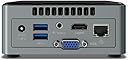
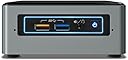
The Intel BOXNUC6CAYH is a compact barebone mini PC kit powered by a quad-core Intel Celeron J3455 processor, featuring integrated Intel HD Graphics 500 with 4K HDMI 2.0 output at 60Hz. It offers flexible customization by allowing users to add their own memory, storage (2.5" SSD/HDD), and OS, making it ideal for media centers, digital signage, or lightweight PC tasks. Connectivity includes HDMI, VGA, and Wi-Fi 802.11ac, complemented by a dual-array microphone and customizable LED ring for a modern, professional setup.


| ASIN | B01MSZTD8N |
| Additional Features | Microphone |
| Aspect Ratio | 16:9 |
| Best Sellers Rank | #104,230 in Computers & Accessories ( See Top 100 in Computers & Accessories ) #3,316 in Mini Computers |
| Brand | Intel |
| Built-In Media | NUC |
| CPU Model Number | Celeron J3455 |
| CPU Model Speed Maximum | 2.3 GHz |
| Cache Memory Installed Size | 2 GB |
| Color | Black |
| Compatible Devices | Monitor, Keyboard, Mouse, External Storage Drive, Headphone, Speaker, Printer, Smartphone, Projector, Touchscreen Device, Microphone |
| Connectivity Technology | Wi-Fi |
| Cooling Method | Air |
| Customer Reviews | 3.8 3.8 out of 5 stars (682) |
| Display Resolution Maximum | 3840 x 2160 pixels |
| Display Type | LCD |
| Global Trade Identification Number | 00675901405904, 00735858320344, 05032037088770 |
| Graphics Card Interface | Integrated |
| Graphics Card Ram | 1 GB |
| Graphics Coprocessor | Intel Integrated Graphics |
| Graphics Description | Integrated |
| Graphics Ram Type | L2 cache |
| Hard Disk Description | SSD |
| Hard Disk Interface | USB 3.0 |
| Hardware Interface | HDMI, VGA |
| Human-Interface Input | Touchscreen |
| Item Dimensions | 4.92 x 3.46 x 5.39 inches |
| Item Type Name | Intel® NUC Kit, NUC6CAYH (no OS) |
| Item Weight | 1.2 Pounds |
| Keyboard Layout | QWERTY |
| Manufacturer | Intel |
| Memory Clock Speed | 1866 MHz |
| Memory Slots Available | 2 |
| Memory Speed | 1866 MHz |
| Memory Storage Capacity | 8 GB |
| Model Name | FBA_BOXNUC6CAYH |
| Model Number | BOXNUC6CAYH |
| Model Year | 2017 |
| Native Resolution | 3840 x 2160 |
| Number of Component Outputs | 2 |
| Operating System | No Operating System (Supports Windows 10) |
| Optical Storage Device | DVD-RW |
| Personal Computer Design Type | Mini PC |
| Power Plug Type | Type A - 2 pin (North American) |
| Processor Brand | Intel |
| Processor Count | 4 |
| Processor Series | Celeron |
| Processor Socket | [LGA 1151, LGA 1200] |
| Processor Speed | 1.5 GHz |
| RAM Memory Installed | 2 GB |
| RAM Memory Technology | DRAM |
| RAM Type | DDR3 SDRAM |
| Ram Memory Maximum Size | 8 GB |
| Resolution | 3840 x 2160 |
| Screen Size | 39.6 Inches |
| Security Features | Basic Windows Security Features |
| Speaker Type | External Speakers Required |
| Specific Uses For Product | personal, gaming, business |
| Style Name | Celeron|Tall |
| Total Usb Ports | 2 |
| UPC | 735858320344 |
| Video Output | HDMI, VGA |
| Video Output Interface | HDMI, VGA |
| Video Processor | Intel |
| Warranty Description | 3-year limited warranty |
| Wireless Compability | 802.11ac |
| Wireless Network Technology | Wi-Fi |
| Wireless Technology | Wi-Fi |
L**Y
Wonderful product for media center use
I wanted to wait until after I had this product for a couple of days to get a feel for it, and that time has now elapsed. I will likely re-visit this review in the future, due to some minor expected issues due to it being a new product. For what this system is, it is incredible. This is a complete system (including windows 10 license), with everything you need to get started. And, it is upgradeable, which for most use cases I would highly recommend pursuing. I was quite surprised at how well the system ran with just the included 2GB of ram. When I had the system connected to a 1080P display, I did not have many complaints with the 2GB, however I could tell some things were a bit sluggish than they otherwise should be and memory usage hovered very close to maximum. Switching over to my 4K tv, though, and I REALLY will need more. (I have placed an order for two 4GB sticks to max this system out while getting the speed advantage of dual-channel. You could also go with a single stick of 8GB for a huge boost, you would just be missing out on the interleaving gains). Basically, when using 4K output, especially when attempting to play videos, I was seeing dropped frames any time I did anything as intensive as moving my mouse. When everything except the video was still, the system was fine, using very little processing power despite playing 4K video. And about that 4K video out. This is a bit of a caveat at present, but in another month or two I expect this to have been resolved. If you use Microsoft's Edge browser, you will have no worries. Hardware accelerated VP9 (youtube) and HEVC (everything else 4K) will work just fine. If you use Chrome, however, you will need to do a workaround to force the browser to use hardware acceleration. I am not going to get into the details of how to do this, but know that there has already been a code commit to unrestrict this, it is just a matter of waiting for it to filter into the released version of the browser. (This restriction on VP9 decoding in Chrome had been put in place from the Skylake generation of CPUs, which for a time supported a hybrid GPU/CPU decode for this codec. It turns out it was very buggy, and so Intel recently removed support for it from the driver, but not before Chrome took their own step of blacklisting accelerated VP9 decode on all Intel graphic chipsets.) It is worth noting that even before I took the steps to force-enable the VP9 decoding in chrome, the system was able to mostly handle up to 1080P 60FPS content with very few drops. 4K, however, definitely required the hardware acceleration for smooth playback. Other than the small amount of included RAM, the other obvious limitation on this system is in the included disk, which is actually effectively seen as an internal MMC card. This means serialized writes and relatively poor performance. I have not benchmarked it specifically, but the flashing activity light was very prolonged in its activity while I had it as my primary storage. I was fairly quick to install a SATA SSD in the system and clone the internal storage to it. Since then, disk activity has gone way down and responsiveness has increased. During my install of the SSD, I ran into an issue that surprised me from an Intel system. Specifically, I was unable to get the BIOS to detect an external USB CD drive as a boot device. Routinely when I use a new system, I will boot to a Linux live cd to clone the disk image for backup purposes. I tried two different optical drives, both of which I have recently used successfully in other systems, and in both cases this new NUC could not see them, despite selecting appropriate BIOS options to enable legacy booting. I ended up using a bootable thumb drive to accomplish my disk cloning task, so the USB booting in general clearly DOES work. I would expect this USB CD boot issue to be resolved with a future BIOS update. (The system as I received it included version 0027, but I upgraded it to the latest 0029. I experienced the CD issue with both releases.) I will revisit this review after I upgrade to dual channel 8GB ram, as I expect that will greatly improve things. My only other experience with NUCs is a skylake-generation i3 NUC (NUC6i3SYH). That NUC clearly has a more powerful processor than this one, as evidenced by it software decoding 1080P 60FPS vp9 with lower than 50% processor usage, whereas this one pegs out and drops a few frames attempting to do the same. (As I mentioned earlier in my review, this won't be an issue anymore in the near future as more programs get updated to take advantage of the hardware accelerated decoding, however it does show a limitation regarding other cpu-intensive tasks.) The included wifi module worked perfectly, seeing both my 5ghz and 2.4ghz networks. For remote control, I paired it with a Logitech Wireless Touch Keyboard K400 Plus Again, I went with 5 stars not because this product is perfect, but because the only issues I have currently experienced are perfectly expected for a system at this price point that is brand new to market. Additionally, I expect the issues that it does have will be addressed in the near future. This is also coming from the perspective of intending to use this system as a media center on a 4K television. If I were expecting to use this system for gaming or as a daily driver, I would likely have come to a different conclusion.
B**E
Worked great for six days, then died.
When it worked, it met my expectations. The most demanding thing I needed it to do was stream HD web content. It did that fine., even with only two gig of ram. Up until it failed, my only beef was that 32gig is not enough to accomplish a windows 10 update. I threw in a spare 100 gig hd, cloned the OS to it and did the update. Once I finished that and got rid of everything I would have needed to revert back to the old version, the OS could fit back on the original HD. When I cloned the OS back to the original drive, it never powered up again. It took ten days to get a refund. By then, it had gone up in price by $24. I decided to buy a different brand with the Celeron J4105 processor, which supports 4k video @ 60fps, twice the storage and 4 gig of DDR4 ram. With the $20 off coupon, it only cost $210. I turns out the failure of the Intel unit was a blessing in disguise.
A**R
Quiet, compact small desktop replacement - modern workstation
What it is: I needed a small form factor computer for amateur radio use and this system is perfect for me, It is silent, only needs a 6 inch by 6 inch footprint, uses a solid state drive and it came with enough RAM (8Gb), to run all of my radio software and it has WiFi and Bluetooth - but no optical drive. It has enough USB ports to add external devices and with a Bluetooth keyboard and mouse you have a very portable system. I use an HDMI 32 inch display which lets me run half a dozen apps on the screen simultaneously or I can easily switch from one to another and monitor several on one screen without having to toggle them - just click on the frame of the screen you want to work. Other features include a laptop style power supply, (but no batteries that wear out and need replacement after they pass their charging cycles threshold like laptops), enough USB 3.0 ports to meet your needs for external devices, a fast SSD, plenty of RAM but not upgradeable in this particular model, preloaded with Windows 10 Pro - not the home version. I have two four port USB 3.0 hubs plugged into it so I can have 8 external devices connected to it and that is a lot of flash memory capability as well as an avenue to add external disk drives and DVD/BluRay drives. This can become a very serious amount of storage that is readily accessible. Need to go somewhere and set up your system? Put it all in a briefcase (except for the display) and off you go with it, simple, lightweight and portable. What it isn't: It isn't a screaming fast gamer's system but there are more powerful NUC platforms available, and as you get more powerful versions there will be some fan noise as these systems all have internal cooling fans - which means eventually it will suck in dust and then it will not be as quiet or run as cool, so the more powerful varieties will need occasional cleaning. Basically even considering the CPU is a middleweight it does a remarkable level of tasks and it does them well. There are more powerful NUC systems from Intel for sale if you need an ultra powerful system however in this case less is more and it does serve the average user's needs very well. Intel did their homework on this one and I have found it to be all I need without going overboard. One reason I think this system is so capable is the small size of the system board - it is a tiny board compared to a laptop or conventional desktop system which has an advantage in that all the components have short paths between them - the smaller the distance the quicker it is covered. Miniaturization at this level means you get the performance of a machine with many times more RAM and a faster clock speed and greater bus capacity in a machine you can put virtually anywhere. Unless you are working on projects that require some extreme level of computing cycles per second , and most of us do not require that level of performance, the NUC6 is a great compact solution, and it is the basic starting point in a family of compact systems that can be 4 times faster, have a more capable CPU offerings, and have many times more storage and RAM in a very minimal space requirement. There are NUC systems that range from the NUC5 to the latest and most powerful NUC10 so there is a range of capability and expense for every need and budget. I worked on computer systems that range from mainframe to midrange, from mini to the earliest PC platforms and have serviced every platform on warranty in the hands of business and individual consumers going back to 1978 and this little NUC platform is one of the most impressive I have ever seen when it comes to value and performance with a minimal volume of space. It even comes with a bracket for mounting it on the back of a display if you want an all-in-one type of system. This is truly the Next Unit of Computing in my opinion.
I**B
Hace mas de un añito que compre esta maravilla de aparato y paso a contar mi experiencia con el. Voy a dividir la reseña en diferentes partes para que todo quede bien claro. He de decir que soy una persona a la que le encanta la informatica y un maniatico de que mis ordenadores vayan como la seda ,pero que nunca habia montado ningun ordenador ,hasta ahora,me decidi por comprarlo y montarlo y la verdad es que no se puede estar mas contento con la compra. -Primera parte: Voy a explicar un poco a a la gente que es este aparato y para que sirve ya que muchos amigos mios que me lo han visto y no tenian claro que es, y a mucha gente le pasara lo mismo, pues este aparato es igual que un ordenador de sobremesa pero muchisimo mas pequeño y muchisimo mas versatil, lo puedes usar como un ordenador normal como cualquier otro conectado a su pantalla de pc, lo puedes usar como sistema multimedia conectado a la tele del salon,ademas se puede colocar justo en la parte de atras de la tele sujeto a ella y usarlo como una smart tv pero infinitamente mejor, y para finalizar lo puedes usar como un portatil mas o menos ya que es tan pequeño ,que te lo puedes llevar y conectarlo donde quieras,que es lo que yo hago, ademas al ser tan pequeño lo puedes meter como lo tengo yo en el mueble de la sala,conectado a la tele y a todo en general y de paso no rompes la estetica del salon con un aparato mas. Aclarado lo que es este aparato decir tambien que al comprarlo viene vacio y tienes que montar tu los componentes que prefieras,para mi eso tambien es una ventaja muy grande ya que cada uno se lo monta dependiendo de sus necesidades y gastandote mas o menos dinero, un 10 en este aspecto. -2ª Parte es comolo uso yo: Pues decir que yo lo uso como centro multimedia en el salon,lo tengo conectado a la tele de la sala y veo peliculas,series o simplemente navego desde el sofa y tambien lo tengo conectado a mi equipo de musica mediante un DAC y desde el sofa pongo la musica que quiero, una autentica maravilla,lo uso con un teclado inhalambrico que a su vez hace de raton que es otra gozada, y para todo esto lo uso yo. -3ª Parte la instalacion: Empiezo por los componentes, yo compre un disco duro Kingston SSD A400 - Disco duro sólido, 2.5", SATA 3, 120 GB y una memoria ram de 8 gigas de crucial, a la hora de montarlo es relativamente facil y yo sin tener practica segui un tutorial en youtube y listo todo a la primera, eso si con un poco de paciencia. El ssd va como la seda y la memoria de 8gigas de crucial pes una garantia total de perfecto funcionamiento,recomiendo comprar unas memorias ram de un buen fabricante y no cualquier cosa, ya que no te van a dar ningun problema de nada ,siguiendo con las memorias para este ordenador en concreto la memoria tiene que tener esta especificacion ( 204-pin SO-DIMM, DDR3L 1.35 voltios ),comprarlas asi y no tendreis problema alguno,Tambien decir que el ordenador viene con 2 ranuras para las memorias y tu lo convinas como quieres , yo por ejemplo solo compre una de 8 gigas y si quiero en el futuro le meto otra de 8, pero puedes metele 4y 4 tambien,cuestion de gustos. -4ª parte Instalacion windows: En el tema de sofware decir que no he tenido el mas minimo problema de verdad, instalar windows 10 es facil, busca algun tutorial ,paciencia y ya esta.Un vez funciona ya el ordenador lo primero que recomiendo hacer es bajar los drivers de la pagina de intel y actualizar tu ordenador para que no tengas problema alguno . Y como dato y para que elordenador fluya de lujo y te dure mcho yolo que tengo hecho es instalar en el ssd solo windows, osea que no hago descargas de musica ni de pelis ni nada en el ssd ,y asi aumento y mucho su durabilidad y rendimiento, las decargas cuando las hago, las descargo a un disco duro externo y ya esta,mas acil y comodo. -5ª Parte Lo que mas me gusta de el: Pues que es una autentica pasada lo rapido que va,arranca windows en nada,y lo cierra mas rapido todavia,abre los programas super rapido,en resumen que es una maravilla. Yo las pelis me las descargo muy pesadas, de mas de 20 gigas y las mueve sin despeinarse,una gozada. 6ª Parte Lo que menos me gusta: Pues que no puede con las pelis de 4K, su procesador y su grafica integrada no pueden con estas pelis, una pena, pero en mi caso me da igual ya que mi tele no es 4K . Y lo que menos me gusta de esta maravilla es que no se porque motivo los ratones y teclados inhalambricos si los conectas directamente a sus entradas usb tienen cortes de señal y no funcionan bien,se atascan y es desesperante, pero tiene una facil solucion,yo tengo conectado un Hub usb 3.0 al ordenador y y en ese hub conecto el transmisor de mi teclado o del raton problema resuelto,todo sin cortes y como la seda, la solucion es no conectar directamente los transmisores al ordenador,se tienen que conectar a un hub o a algun cable alargador usb para que no haga interferencias. En resumen si lo que quieres es un buenisimo ordenador para uso normal,navegar ver pelis, descargas y demas no lo dudes este pequeñin es una autentica maravilla, y una relacion calidad precio genial.
N**N
ベアボーン版には、メモリとSSD、WindowsOSが入っていない。 「あわせて購入」の項目にあるメモリ8GとSSD240Gを追加し、合計27000円ほどで購入。 組み立ては簡単で、プラスドライバーで裏蓋を開けて、メモリとSSDを差し込むだけ。 最後にあらかじめ持っていたWindowsOSをインストールして完成。 CPUは値段の割にはまあまあな Intel Celeron J3455。メモリ8G、SSD240G。静音、省電力、省スペース。日常で使うPCとしては不満なし。 コストパフォーマンスがいいのにIntelのメーカー品で、中華の謎メーカーのようなギャンブル性もなく、安心して買えたのも良かった。
A**R
Preso per farci un media center collegato a tv e impianto home theater, che dire, ottimo ma fa molto di più. Ho montato 2 banchi di ddr3l da 4GB ciascuno della qumox e -al momento- un hdd da 1TB vecchiotto, aperto il NUC togliendo le 4 viti, si alza il "caddy hd", si mette la ram, si infila l'hd che si blocca ad incastro, si richiude ed è pronto, tempo 30 secondi senza nemmeno guardare le istruzioni. Installato win10pro da chiavetta, tutto perfetto, risultavano mancanti solo dei drive aggiornati del bios e della grafica intel, subito aggiornati con la comoda applicazione intel che controlla se ci sono aggiornamenti più recenti. (basta andare sul sito intel) Al momento il sistema è ottimo, perfettamente stabile, unico problema il collo di bottiglia dato dall'hdd che sostituirò quanto prima o con un ssd o con un ibrido tipo il firecuda seagate. Che aggiungere, comodissimo che quando lo accendi accenda anche la tv ad esso collegata, il bios è veramente completo e si può gestire tutto fin troppo, dai led frontali, all'accensione, al tipo di sospensione, a come vuoi che funzioni la ventolina... I video con kodi si vedono e sentono benissimo, l'audio multicanale è gestito perfettamente. Credo che 4GB di ram siano più che sufficienti per qualsiasi cosa ma consiglio un hd recente e veloce o meglio un ssd. Le dimensioni sono veramente contenute anche se il peso è di 700g, segno che il case -anche se esternamente di plastica- è veramente robusto. Esteticamente molto bello da renderlo elegante ovunque. Una delle cose migliori però rimane il fatto che sia un intel, sul sito trovi drive e aggiornamenti per ogni suo componente e credo che il supporto fornito non abbia paragoni visti i loro volumi, qualsiasi problema lo risolvono e aggiornano i drive con costanza. Per i consumi sono di soli 10-11W nell'uso normale che salgono a 13W quando la cpu è molto impegnata, bassissimi, nessun pc nemmeno si avvicina a un tale valore. Spero vi sia stata utile la mia recensione ;)
J**R
Awesome little mini computer. Construction is solid, and anyone knowing how to put ram into a laptop, connect a sata disc drive, and install an operating system can put this together. It's easy. It has a regular HDMI connector (no adapter needed), a VGA video connector, 2 USB3 and 2 USB2 ports in addition to the SD card reader. It is inaudible when running. Although it states it can only support a max of 8gb of ram, I have 12gb installed and recognized and running. I also have two monitors (a regular 24" as well as a Huion pen monitor) operating on it. I use it for video-conferencing on a regular basis, and it works great. i updated the 0064 bios using the F7 bios recovery version to the latest 0066 from the manufacturer's website. The process was simple. I'm running it with a Linux operating system, and it works great. I'm loving this little quad core box. It's quiet, compact, and fast enough for me.
T**F
Ich habe den Medien PC nun eine Zeit lang im Einsatz. Generell nutze ich den NUC als Office Rechner für kleinere Arbeiten, z.B. Fernaufschaltung beim Kunden. Natürlich habe ich ihn auch als Medien PC getestet. Installiert habe ich als Betriebssystem Windows 10, welches auch stabil und flüssig als Office und Medien PC funktioniert. Eingebaut habe ich eine 120GB SSD 2,5" sowie 4GB Arbeitsspeicher. ACHTUNG: Hier sollte man auf JEDEN FALL nachsehen, welcher Arbeitsspeicher von Intel freigegeben ist. Zwei ältere Arbeitsspeicher Module funktionierten bei mir nicht. Das sollte man jedoch bei jedem PC beachten. Den Lüfter höre ich im normalen Office und Medien Aufgaben nicht. Nur, wenn man den Prozessor längere Zeit komplett auslastet, wird er hörbar. Der IR Empfänger arbeitet zuverlässig. Die IR Signale einer Universal Fernbedienung greife ich bei Windows mit einem Programm ab und ordne sie verschiedenen Funktionen oder Tastatur-Eingaben zu. Somit lässt sich Kodi oder auch andere Programme sehr gut bedienen. Es könnte lediglich mehr Apps für Windows geben, die sich durch reine Tastaturbefehle bedienen lassen. Dann könnte man mit der Universal Fernbedienung noch besser alles bedienen. Als Maus- und Tastatureingabe bevorzuge ich Bluetooth deutlich gegenüber meinen vorhandenen Funk Mäusen/Tastaturen mit USB Empfänger, da ich bei letzterem sehr nah an den NUC heran muss, dass keine Signalstörungen auftreten. Bluetooth funktioniert bei mir 5m weit entfernt super. Störsignale in der Umgebung können das Ergebnis je nach Einsatzort natürlich abfälschen. Im BIOS kann man einmal den Powerknopf und auch die leuchtende Umrandung an der Front in verschiedenen Farben, in verschiedenen Helligkeiten leuchten, blinken oder auch "pulsieren" lassen. Die Einstellung kann man je nach Power-Zustand einstellen. Zum Beispiel, wenn der NUC im Standby ist, soll es grün pulsieren und zwar mit nur 30% Leuchtkraft. Wenn der NUC komplett an ist, soll er rot mit einer Leuchtkraft von 80% leuchten. Diese Einstellungen sind wohl eher spielerisch, verleihen dem NUC im Wohnzimmer jedoch einen schönen Eindruck. Ich habe derzeit das Problem, dass der NUC im BIOS von meinem Fernseher nicht erkennt wird und kein Bild erscheint (HDMI). Am PC Display funktioniert es jedoch. Ebenso flimmert ab und an das Bild im unteren Bereich etwas. Das passiert beim Display jedoch ebenso nicht. Wenn ich den NUC am HDCP 2.2 Eingang des AVRs anschließe, fällt das Bild immer wieder für einige Sekunden aus. An den Ports ohne HDCP 2.2 passiert das nicht. Woher das kommt, weiß ich nicht. Da es jedoch beim Display nicht auftritt, tippe ich auf den AVR bzw. das Zusammenspiel des älteren Fernsehers, AVR und NUC. Andere HDMI Kabel brachten keine Besserung. Alternativ zu Windows kann für einen Media PC auch super LibreELEC mit KODI installiert werden. Für das reine Betriebssystem reicht hier sogar locker eine SD Karte aus. Insgesamt bin ich daher sehr sehr zufrieden mit dem NUC und bereue den Kauf keineswegs.
Trustpilot
2 weeks ago
2 weeks ago