


💡 Illuminate your typing, elevate your productivity!
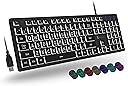
The X9 Large Print Backlit Keyboard is a wired, full-size keyboard featuring oversized keys with large print for enhanced visibility, ideal for seniors and beginners. It offers 7 customizable backlight colors with adjustable brightness, a quiet 104-key layout including 14 shortcut keys, and easy plug-and-play USB-A connectivity compatible with PC and ChromeOS. Designed for accessibility and productivity, it comes with 2 years warranty and responsive customer support.




| ASIN | B09296NQ32 |
| Additional Features | Backlit keys, oversize letters, shortcut keys |
| Antenna Location | Business, Education, Everyday Use, Home, Office, Personal, School, Student |
| Best Sellers Rank | #1,989 in Computer Keyboards |
| Brand | X9 Performance |
| Built-In Media | USB Cable |
| Button Quantity | 104 |
| Color | Black |
| Compatible Devices | Laptop, PC Desktop |
| Compatible Operating System Family | ChromeOS, Linux, Windows |
| Connectivity Technology | USB-A |
| Customer Reviews | 4.2 out of 5 stars 1,557 Reviews |
| Enclosure Material | Rubber |
| Hand Orientation | Ambidextrous |
| Item Dimensions L x W x H | 17.2"L x 4.9"W x 1.2"H |
| Keyboard Backlighting Color Support | RGB |
| Keyboard Description | Large Print Backlit Keyboard |
| Keyboard Layout | QWERTY |
| Manufacturer | X9 Performance |
| Mfr Part Number | Wired Backlight Keyboard |
| Model Name | Wired Backlight Keyboard |
| Model Number | Backlight Wired Keyboard |
| Number of Items | 1 |
| Number of Keys | 104 |
| Number of Packs | 1 |
| Number of Sections | 1 |
| Power Source | DC power supply |
| Recommended Uses For Product | Business, Education, Everyday Use, Home, Office, Personal, School, Student |
| Special Feature | Backlit keys, oversize letters, shortcut keys |
| Style Name | Contemporary |
| Switch Type | Rubber Dome |
| Theme | Accessibility |
| UPC | 701107500126 |
| Unit Count | 1 Count |
E**I
If you have vision difficulties or typing difficulties I HIGHLY recommend you consider this product
I am a 40 year old man with lifelong cerebral palsy. Due to limited motor function I have difficulty typing, my whole life I have used a variety of keyboards and alternatives that function as keyboards. None of them work as well for me as this X9 Performance Large Print Keyboard. I really like the large key caps, they are much easier to press then the caps on a standard keyboard, and they feel a lot nicer to my finger as well. Before finding this product, I had been using an IntelliKeys USB keyboard. Which, for those who may not know, is a fairly large USB device with keyboard layouts that slide in to the board and you tap on the layout to type. Its a device that was really designed for young kids was disabilities to learn to type but if you have motor difficulties, a can be a useful alternative and any age. However, though it functions as a keyboard outside of a Windows or Mac operating system environment with the included driver, it is otherwise useless to the machine and the user. I am a very technical person that's always tweaking things on my computers and any time I need to do anything of side of the operating system I had to switch back to the standard keyboard which is very difficult for me to use. I don't have to do that now after purchasing this product. The large key caps aren't all that much smaller then what was on the layout that I would use with the old device, not to mention that the layout of the old device didn't have a full standard keyboard layout so I would, on occasion miss out on the use of certain functionality. This is no longer an issue. It is also nice that the large key caps combined with the colorful backlight make it much easier to see, even though I have decent vision with by everyday eye glasses. Even when I looked at other large print keyboards, they were much more expensive and the overall size of the keyboards were considerably larger than this device, which I believe is very economically sized for a full size keyboard. This is one of the few times of my life that I found in device for my computer that meets all of my accessibility needs, but is not considered a "specialized" device for people with disabilities, made by a company that focuses on adaptive equipment. This is a mainstream product by a mainstream company, that still addresses specialized needs. Kudos to X9 Performance for creating such a product. I also appreciate that the vendor JukeGear sells the keyboard as a solo item. Even when I go to the manufacturers website, I only find this item currently sold as part of a keyboard and mouse combo, in my particular case, I don't need the mouse as I use another alternative device for that, so thank you JukeGear! I understand that even if this meets my needs very well, then won't be a solution for every situation, however if you are a person with vision difficulties and or typing difficulties, I HIGHLY recommend that you consider this product.
A**P
Initial thoughts are that I like it!
Just received the keyboard yesterday and initial impressions are very good. I like the size, not too big yet full sized keys. I have large, wide hands and I'm very comfortable typing on this keyboard. I'm a classic ASDF JKL; typist and the keys feel very responsive. Lighting: this is the main reason I bought this keyboard as my eyesight is not as it used to be and I was also finding my keyboard very dark early in the morning and late evenings. The keyboard lights up nicely with the keys and the characters on them lighting up vs just the backlight that some keyboards have. This makes it very easy to see the keys without it being too bright. You can change the color of the lighting as well as adjust the brightness. You can also shut off the backlighting. The only two nitpicks I have is 1. It seems that the keys towards the top of the keyboard (numbers and functions keys) have a slight lower brightness vs the rest of the keys. Not a huge deal but just something to note. 2. The keyboard does not come with fold out legs on the back, top to angle it any more than it sits. There is a bard on the back that does provide some include and quite frankly I think its enough for me so not a huge deal. So far so good...I'm really hoping this keyboard has longevity because I really like it!
T**A
Great keyboard
Its hard to find a good backlit keyboard that's not too noisy. I work 60+ hours a week in a job where ferociousness speed typing is an understatement. Not to mention poor lighting. We noticed after clicky keyboards became the rage that the volume of so many people typing at once was starting to interfere with our audio, not to mention when I start typing fast my fingers would trip over the high profile keys, so I made the switch to this one and I have gotten many envious compliments on it. It works great, it feels like a perfect fit for dedicated typers. You get the satisfying sensation that you pressed the key down without noise and finger tripping. The backlight is strong and you can turn off the distracting aura and pulse features for a solid back light. Its plug and play so you don't need to install anything for workplaces with shared terminals that don't allow that. At an amazing price, I love it so much I might buy a few extra in case they stop making them! The only thing I would ask for is a little more lift to angle at the back, I had to buy a 1/4 inch rubber bar and glue it to the back.
G**S
Good for those of us declining vision this helps a bunch
This appear to be a very good quality keyboard and the letters are large and bright enough to help. I do have one complaint and it may just be my eyes and not apply to everyone. The keys are lit in a way the the sides of the keys are illuminated brighter than the letters. It appears to be very cluttered because of that. I have been using a different brand of large key backlit keyboard and with the same brightness it is much easier for me to use because the letters are lit, not the key itself. This X9 keyboard is smaller and takes up much less space on the desk. The X9 also uses the FN (function) key to access the special function. I prefer to have the additional row of keys and not have to worry about kitting the FN key to access them. One additional issue for me with the X9 is no tilt capability. I find that by tiling the keyboard I am far less bothered by the side of the keys being brighter than the letters on the keys. I placed a 1" think high density foam strip on the upper bottom of the keyboard and it is much better for me to use. This may sound like a bunch of whining but I use a keyboard all day long, The X9 is a very good keyboard and will help those who are having vision issues. The size is nice, the keys have a good feel and feedback. The middle brightness rang produces less glare and work better for me. Overall a good keyboard.
M**S
Great 'board for an old man's eyes!
I was looking for a keyboard with large print, to ease eyestrain. CHECK! I also wanted the keys to be backlit, so it would be easy to type at night. CHECK! I love that I can change the colors at will, to go with my mood. It was also important for it to be a full keyboard, so I have the number pad. CHECK! The only thing this didn't have that I was looking for, was for it to be a mechanical tactile and "clicky" keyboard, to be reminiscent of an ancient typewriter. Those keyboards exist, but I chose to prioritize the big, backlit keys over big clicks as I hammer out novels. That's not anything wrong with this keyboard--just a personal preference. The price on this thing was amazing! CHECK! I was looking keyboards in the $150-$200 range, and this bad hammer-jammer was under $30! I've had it for a month, and I love it! I highly recommend it if these features are what you are looking for.
F**D
Getting used to it, a bit glitchy
First, LOVE the oversized keys for my 56 year old eyes. They keys are kind of ... loose. AT first I was put off by the feel, then within half a day I actually preferred it over the stiff Dell and Logitechs. Ocassionally, not often, it looses a keystroke. This is fine for web surfing and stuff, but unacceptable for serious prograsmming development work, where a single character missing can be disasterous. So i love this keyboard for my multimedia Mac and PCs, not to be used professionally.
P**T
Simplest installation ever!
Remove from box, plug into a USB, use. Instant access without syncing or loading drivers. Replaced a wireless Lenovo keyboard (liquid spilled on it) that had a dongle for the mouse. Mouse works with no problem and was not dependent on the keyboard. Gave consideration to having it plugged in all the time but figured you have to plug in the wireless ones to charge them so why bother with batteries etc. Colors are bright and we change from one to the other with ease. This keyboard is so easy to use regarding color and intensity. I agree the keyboard "feels" a little different but after a little use, you don't notice it. You can spend some time just experimenting the the function keys. Nice to have a caps light again. Wish I would have bought this a long time ago. It's great! Be sure to register the keyboard and receive an additional year on the warrenty. System is Windows 10 (with all current updates), running on a Dell Optiplex 9020, Lenovo wireless mouse, Epson XP-410 printer, Samsung LED display and Bose speakers.
N**.
Left shift key keeps getting stuck down.
I am visually impaired and apparently hand position impaired also. I bought this keyboard so I could see where the keys are for positioning my hands for typing. The keyboard was great for a couple of months, The backlighting is good but having the key for turning it off and on/changing the color right next to the right shift key means, I keep turning it off (as much a problem from me as the design). After about 2 months the left shift key began getting stuck in the down position. Saying stuck is possibly the wrong word. The keys are centered in holes on the cover plate for the keyboard. The left shift key is held down because it wiggles so much the edge gets positioned moves under the cover plate so that holds it down. I have to wiggle the key to get it to pop back up. To make this worse, I am a programmer. I am constantly having to use the shift key for special characters like the $ sign, open/close parentheses, plus sign, ... and those I use the most are on the right side of the keyboard requiring use of the left shift key. I would really recommend that NO PROGRAMMER ever purchase this keyboard. I would think it a serious hindrance for anyone that does a lot of typing such as authors or students. It may be acceptable to someone who almost exclusively uses a mouse for browsing and only enters search terms. Over 25% of the time, I use the key it gets stuck. If my fingers do not press directly down on the center of the key, it gets stuck. For normal writing one constantly uses the left shift key for use with any symbol/letter on the right side of the keyboard. I have had to rewrite part of this review because I was typing upper case letters due to the key getting stuck. I am so disgusted with the keyboard, I am looking for an entirely different brand to replace it. Unfortunately there are not many keyboards with both large letters and backlighting.
E**E
Excelente
Solo que hoy vieran un teclado mayormente compatible con iMac, por lo demás excelente
F**G
good
very good
目**ュ
キーの表示が違う
!"#$%&()=等や:の表示位置が、ふつうの並びと違うので、キーボード表示の&(shift+7)を押すと、実際の表示は'となる。 普通のWindowsの並びを考えると'が表示されるのは納得できるが、キーの文字が大きいのでついつられてキーボード表示を押してしまうのでちょっと使いづらい
I**E
Excellent value in a easy to use large key illuminated keyboard. Great customer service
The keys are pleasantly large And well lit in different colors of your choice. It is a compact keyboard at the same time so does not take up excess space. And lastly, i've received excellent customer service after the sale when I had a question. So I do recommend this keyboard
R**C
best keyboard ever
I love how this keyboard lights up. So easy to use in low light in the room. I can choose which color I like to use, and makes using this keyboard a pleasure.
Trustpilot
2 weeks ago
2 weeks ago