


๐ Power, Speed & Style โ The Hub That Keeps You Connected and Ahead
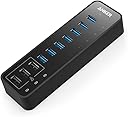
The Anker 10 Port 60W Data Hub combines 7 USB 3.0 ports and 3 PowerIQ charging ports to deliver fast data transfer and smart charging for a wide range of devices including MacBooks, iMacs, Surface Pro, and smartphones. With a sturdy build and 60 watts of power, it supports multiple high-capacity drives and ensures seamless multitasking for professionals seeking a clutter-free, efficient workspace.


| ASIN | B00VDVCQ84 |
| Additional Features | Fast Data Transfer, Charging |
| Best Sellers Rank | #48,889 in Computers ( See Top 100 in Computers ) #789 in USB Hubs |
| Brand | Anker |
| Color | Black |
| Colour | Black |
| Compatible Devices | Laptops, Smartphones, Tablets, USB Flash Drives |
| Compatible devices | Laptops, Smartphones, Tablets, USB Flash Drives |
| Customer Reviews | 4.5 out of 5 stars 5,784 Reviews |
| Data Transfer Rate | 5 Gigabits Per Second |
| Enclosure Material | Plastic |
| Global Trade Identification Number | 00848061073492 |
| Hardware Interface | USB, USB 2.0, USB 3.0 |
| Hardware interface | USB, USB 2.0, USB 3.0 |
| Item Dimensions L x W x H | 14.5L x 4.3W x 2.3H centimeters |
| Item Weight | 485 g |
| Manufacturer | Anker |
| Mfr Part Number | AK-848061073492 |
| Model Number | AK-A7515111 |
| Number of Ports | 10 |
| Operating System | macOS |
| Special features | Fast Data Transfer, Charging |
| Total USB ports | 10 |
| Total Usb Ports | 10 |
| UPC | 848061073492 |
| Unit Count | 10.0 Count |
M**O
Sturdy Device
This is a pricey product but rightly so. Purchased this product after trying out cheaper hubs. 4 x 2tb drives run seamlessly streaming 24 bit FLAC audio. The drives load up fast and playback is smooth. Recommended product.
Y**N
Doesn't come with UK Plug
You'd think paying this price, it would come with a UK plug too - surely that's not an expensive item to include? Haven't been able to use so 1 star it is ๐คทโโ๏ธ
B**.
Speed for days - phenomenal product
INTENDED USE CASE: Utilize the data ports for the following items in order to free up onboard 3.0 ports for my new VR headset: - External hard drive - USB sticks - Keyboard - Webcam - Mouse Utilize the 3 power charging ports for the following: - Charging phones (Samsung Note 8, S9, and Google Pixel 3) - Charging GoPro batteries (3rd party accessories/attachments) - Powering LED strip lights behind monitor and around desk (from Wal-Mart and Amazon) Performance is highest priority. Performance for me is defined as consistent power output, fast read/write (comparable with onboard ports), and enough ports to fit growing accessory pool. PREVIOUS EXPERIENCE: Let me start by saying that I have purchased and used many USB hubs. I have come to learn that if you intent on plugging in any items that need high speed transfer or require significant power to run (external hard drives -- especially if not SSD) you need a hub that is powered externally. The power your motherboard can output and allocate to each port is limited and you will experience lack of performance the more things you plug in. In my experience, a general rule of thumb is to keep solo standing USB hubs to 4 ports or less for best possible performance, and even then keep an eye on the things you plug in. THIS PRODUCT AS A SOLUTION: Perfect. This product met and exceeded my expectations. The read/write speeds for this product are amazing (see image - used usbflashspeed tool), and the charging speed/consistency on my Note 8 was fantastic (see image - used Ampere app). I tested the device with the following plugged in during both the data transfer and charging tests: keyboard (with led), external hard drive, webcam, Cyberpower UPS, Samsung Note 8 (power port, not data). The speed test images show all you need to know. If you are looking for an AMAZING USB hub, look no further. IMPORTANT NOTE: I am currently using the Logitech G602 wireless gaming mouse, which had issues when plugged into the hub. This is NOT a concern for me because most wireless mice have various latency or lag issues with then are plugged into hubs -- externally powered or not. For best results when using wireless mice, especially if you want the accuracy to be crisp and on target, use an onboard port for your receiver.
M**S
Very Smartly crafted product
Something I was looking out to procure since a very long time. Really worth to buy
H**R
Great all round!!
Great product and great service from Anker! Sent an enquiry regarding the product to customer service. They replied promptly and were able to answer all my questions. I have 4 non-powered 5 TB hard drives connected to the hub and it works great. Wanted to connect a 5th drive but ended up using it elsewhere. Highly recommend this product and this company!
M**.
Highly recommmended: compatible, fast and reliable data transfers, good charger ports; avoid USB wireless peripherals
Works great on the USB 3.0 ports on my mid-2012 MacBook Pro with 5 different external hard drives, an external SSD, and an iPhone 6 Plus. Works successfully for fast multi-Gigabyte transfers on all of the following: - 3 Western Digital My Passport Ultra USB 3.0 drives (2 & 4 TB) powered by the hub - a Seagate GoFlex external 3.5" 2TB drive (separate power supply), - iPhone 6 Plus (speed-limited by its USB 2 port), - an old 1 TB WD MyBook AV 3.5" eSATA drive (with external power brick) connected via a Newertech eSATA-to-USB-3.0 adapter cable. - a 960GB SanDisk ExtremePro SSD in a 3.5" NexStar CX USB 3.0 external drive enclosure - an Apple/Toshiba 250 GB 5400 RPM 2.5" laptop drive in a Seagate USB 3.0 2.5" enclosure Results: Fast reliable large and small data transfers with all 7 hub data ports connected simultaneously, powering 3 external 2.5" drives. No data loss, no connectivity glitches so far in 3 weeks of heavy use and daily overnight backups of 50-300GB on each of 2-3 WD and Seagate USB 3.0 drives. Excellent throughput on disk-disk copying. Large external in-line power brick stays cool under moderate load. Sample real-world transfer speeds: cloning changes on the Crucial MX200 SSD in my Macbook to external WD and Seagate USB 3.0 drives through this hub, using Carbon Copy Cloner app (highly recommended to clone drives for daily Mac backups!) on Mac OS El Capitan 10.11.6 with internal SATA-II interface: - 136GB, 9850 files in 30 minutes (75 MBytes/sec) to Seagate GoFlex 3.5" 2TB USB 3.0 drive - 123GB, 1580 files in 41 minutes (50 MBytes/sec) to 2.5" WD 2TB My Passport Ultra USB 3.0 - 42 GB, 11,000 files in 9 1/2 minutes (74 MBytes/sec) from Seagate Momentus XT 2.5" 1TB hybrid drive to Seagate 3.5" external USB 3.0 drive I have a 200 GB Windows 10 Virtual Machine (VM) that I temporarily moved to an external drive, and it runs fine "live" through this hub (not recommended due to the chance of file system corruption if the drive is disconnected while the VM is running). The charging ports on the Ankur hub seem strong; 1 port is delivering 1.02A into my BlackBerry Z10, which maxes out at 1.08A on the best conventional (pre-QuickCharge) USB charger I've ever seen (2A BlackBerry PlayBook charger). Caveat: as expected, wireless peripherals should not be used with USB 3.0 hubs like this one due to radio interference from the USB 3.0 5GHz clock. Instead, am running my Logitech Unifiying Wireless Mouse USB adaptor and the wireless USB base for a MIcrosoft Wireless Keyboard 6000 v2.0 in a separate USB 2.0 hub off the other USB 3 port in my MacBook: a Sabrent Model HB-UMLS 4-port USB 2.0 hub. This has been 100% reliable for over a year, with no loss or delay of keystrokes or mouse gestures through the Sabrent hub, but the same wireless adapters were flakey as expected when I tested them in the Anker USB3 hub. The usual Anker quality is apparent here, and I expect long life from it. "It just works".
Trustpilot
3 weeks ago
1 month ago