Desertcart purchases this item on your behalf and handles shipping, customs, and support to Portugal.
📺 Effortless control, designed for every generation.
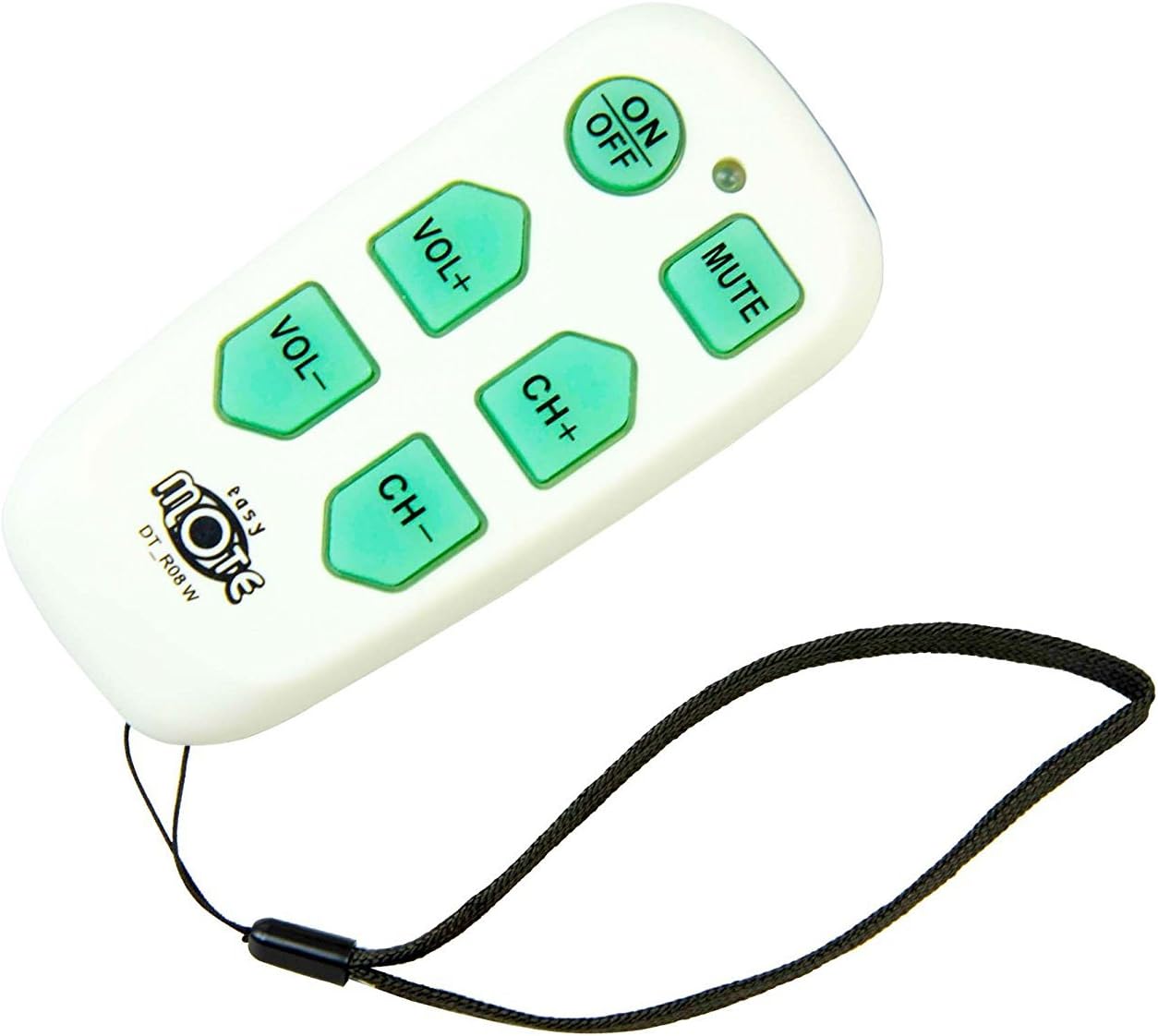
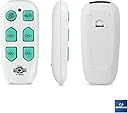
The Universal Big Button TV Remote - EasyMote DT-R08W is a sleek, user-friendly infrared remote that controls both TV and cable box with 6 large backlit buttons. Featuring a smart learning mode for custom commands and a secure wrist strap, it’s ideal for seniors and anyone seeking simplified home entertainment control.


| ASIN | B01M1UV2T2 |
| Additional Features | Universal |
| Battery Type | Alkaline |
| Best Sellers Rank | #49,012 in Electronics ( See Top 100 in Electronics ) #2,455 in Remote Controls (Electronics) |
| Brand | continuus |
| Button Quantity | 6 |
| Color | White |
| Compatible Devices | Set Top Box, Television |
| Connectivity Technology | Infrared |
| Controller Type | Button Control |
| Customer Reviews | 4.2 out of 5 stars 6,221 Reviews |
| Item Dimensions L x W x H | 5"L x 2.25"W x 0.9"H |
| Item Weight | 2.24 ounces |
| Manufacturer | Continu.us |
| Max Number of Supported Devices | 1 |
| Maximum Number of Supported Devices | 1 |
| Maximum Range | 10 feet |
| Mfr Part Number | DT-R08W |
| Model Name | DT-R08W |
| Model Number | DT-R08W |
| Number of Batteries | 2 AA batteries required. |
| Number of Items | 1 |
| Special Feature | Universal |
| UPC | 854343002210 |
| Unit Count | 1 Count |
N**L
Perfect for 93 year old grandma!
Works great for my 93 year old grandma. The buttons are big and easy to see and use. It is bigger than what I thought it would be, but it’s honestly the perfect size. I used the learning mode to program it as she has both a Hisense tv and Spectrum cable box. It was super easy to program for her. The only issue I had is that I can’t get it to learn the command to turn off both the tv and the cable box, so I just programmed it to turn off the tv.
F**S
Easilt programmed
Excellent product. Works exactly as described.
M**.
Great simple remote for young & old
Perfect remote for seniors, especially those who have a hard time with all the tiny buttons on the regular TV remotes and/or memory issues. Would also be good for young children who tend to reprogram the remote eveytime by pushing random buttons. LOL! Easy to program and compatible with different TVs (we've used it on 2 different ones). Love it so much we have actually purchased 3. One broke after being dropped multiple times and one for a gift. The remote itself is a hard slippery plastic. I read another review about putting rubber "nubs" on the back. We did and the remote is much easier to hang on to and does slide of the table.
K**R
Works well on a 5-year old Visio TV; programming may take a little patience
This remote has only 6 large buttons with a bright green back light for all buttons when pressed (i.e., if you press one button all the buttons shine green). You have to press fairly hard and wait for the channels and volume to change. If you press multiple times the lag will finally catch up and moves through the multiple button presses. It's easy to get used to this slight lag and adjust how you press the buttons. I wanted to test this remote to see if it will be usable for my 90 year old mother. So I bought it to try out and then found that I liked this remote for my Vizio TV that has a remote with really small buttons. There are two ways to program this remote and the direct method did not work on my 5-year-old Vizio, but the second method using your current remote to teach this remote did work. This teaching was not seamless but it was manageable. I've tried other universal remotes and they all take a patience. In my case, both the up and down volume and channel buttons programmed very quickly. The mute and on/off buttons took multiple tries before the button flashed with a signal match. The mute took two tries to set the match but the on/off took five tries before I successfully set the button match. For the on/off the match took almost a minute to show up and when the button started flashing, for some reason I could not get the match to stick on the first 4 tries (The first time I pressed the wrong button and I may have not pressed the button hard enough to match the buttons the rest of the time). Others report having problems and you certainly have to read the instructions and don't give up. The written instructions are not great so also look at the You Tube videos available online before you program as I found these very helpful. After I programmed a button I found it was easier to just test that button before moving on to the next button. After setting up this remote for my TV I found it so useful that I decided that I was going to keep it, and use the original Vizio remote as a backup. I also tried this remote on another newer Vizio TV and it worked without any new programming so the programming is brand but not necessarily model specific. If you use the advance buttons, switch source or other features of your remote control frequently this remote will only allow you to turn on/off, mute and change channels or volume but you would have to use the original remote control for any other function. I was finally able to try out this remote on my mother's 25-year-old panosonic TV. Unfortunately her remote would not teach this new one and the remote never recognized any TV output so both methods failed. Her remote is wearing out and she often presses the wrong button that leads to changing screen zoom and other settings. I've tried other universal remotes that had too many small buttons for her and these also could often not be programmed for her old TV. I had her try the remote and she did not like the feel of the buttons. I should have changed out her TV years ago but now she does not want to change so this was a lost cause. I have no regrets with this second purchase as I'm keeping this remote to use with a 10 year old Samsung TV. I highly recommend this remote but if intended for the elderly you may also have to upgrade their TV. It is a real shame that TV manufacturers produce remote controls with such tiny buttons that are a real problem for the elderly. After all, it is the elderly who mostly watch TV in real-time and don't need all the doodads. The elderly and visually impaired are unlikely to want to switch to a new TV because they have a hard time learning a new remote control. A universal remote with large visible buttons is what most of these individuals need, not remotes with tiny buttons.
W**F
Did not work with TV connected directly to coax cable
Purchased two remotes, one for each of 85yo mother's TVs, a Samsung and a Vizio. My sister was the first to try to program via the learning method using the TV remotes, as instructions say the channel detection only works with a cable box. She tried one remote on both TVs with no results. I thought maybe she didn't have enough time to play with it so I tried a day later. I tried programming both remotes side-by-side with the Samsung remote, and also about an inch distance top to top. Neither worked. With one remote, I was able to program the On/Off button, but couldn't get any other buttons to program repeating steps 4 and 5 as instructed. The remote buttons and indicators would stay lit, I think incorrectly, with no reaction whatsoever. I reset the remote to factory settings and tried again. After that, I couldn't even get the On/Off button to program again. Thought maybe something was wrong with that one so tried the second, which wouldn't program at all. I would try to pair buttons with the indicator lit and also wait until the indicator light was off ... nothing, no reaction, no flashing. I tried for nearly an hour and called it quits. So disappointing. The remote layout is so nice. The only "positive" was reading other reviews to find that we are not the only ones dealing with an elderly relative and remote issues, lol. My mom continuously presses the input button then calls me to tell me the TV is "broken" and I have to go fix it. I can't believe there aren't better options out there!!! :(
L**.
works great for weak, arthritic hands plus easy setup
Love it when something works just like it is supposed to work!!! You do have to supply batteries, but it takes just 2 normal AAA batteries. I tried the first set of setup instructions and was beginning to lose hope that I'd have to try the 'learn mode' setup where it learns from your TV's remote, but I hung in there and just another about 25 more tries and VOILA it found my Samsung 2024 TV! I bought this remote for my mom because she has weak hands, essential tremors and poor eyesight. This is so easy for her to move up and down the channels! The light-up feature when powered on also helps her find the buttons, and when it lights up, this remote is brighter in person than I expected. There is even a lanyard so she can't lose it in bed if she puts it on her wrist. EASY PEASY!! LOVE THIS!! On a scale of one to five, this is an ELEVEN for elderly that have poor motion control and need simple.
M**A
It does work as a remote, but has issues
The EasyMote | DT-R08W Universal Big Button TV Remote is a very nice remote replacement for those who need to simplify their TV remotes for any number of reasons. I found the instructions to set up were straightforward but had to be read several times to grasp exactly what is being asked. Setting up the buttons was easy once you figured out that was being asked for. Holding the MUTE and CH+ until the light turns Red will go into programming mode, BUT you have to program the Power button first. Any other button will not begin the programming. I tried most every other button first. Then, you have to press the MUTE and CH+ again for every button you want to program. The button will flash when it is ready or the next button and will stop flashing when the corresponding button has been pressed on the EasyMote. When you are done, holding the MUTE and CH- will go out of programming mode. I do not know if it is an issue with MY particular EasyMote or not, but the VOL+ and VOL- are very slow to come back up after being pressed, particularly the VOL-. There are times I have to wiggle the button side to side to get it to release from the pressed in position and come back up. The good part is that when using the remote with the TV, while the VOL- stays depressed, the volume on the TV only goes down 1 number with each press of the button. With the button in the depressed state, I can press it repeatedly and the volume will go down 1 with each complete press. I was very concerned that the button not returning was going to cause the volume to quickly go to 0 and not be adjustable until the button is moved back up, as this would provide a serious challenge to those with limited dexterity or diminished cognition. We will see how my mother-in-law does with this in her condition. If it is a problem I will be returning it for a replacement as the original TV remote has far too may buttons and options for her at this time.
V**Y
Is great for dementia pal that needs simplified remote to prevent input/source or language changes.
My friend has dementia and is in a memory facility. His disease has progressed to where he can no longer remember to use one remote to turn on/off the TV and another to change channels and adjust the volume. He would simply mash the keys on either remote trying to get something to work. I would visit and his TV (which he loves to watch) would be turned off because he couldn't figure it out and nobody on the staff had the tech savvy or took the time to fix it for him. This remote has saved the day... at least until he no longer understands how to use a remote at all. But even then, the worst that could happen is if he landed on an empty channel. The staff can easily fix that. My hint for Comcast cable users: The instructions with it have you put the remote into a "search" mode and then you click the channel up button until the TV changes channels. Every time you click the Ch-Up button it tries a different code. If you choose one and it doesn't work quite right, you can try again to continue to look for a code that works better. I kept going until I found the code that ran the simple, basic Comcast box... which also has a volume control. Then I used the Learning mode to teach the EasyMote the Power button for the TV. It took me several times before I figured out to alter the angle of the how TV remote (not cable box) was pointing towards the EasyMote while repeatedly pushing the on/off button until the EasyMote light blinked. It was like the ray shooting out of the TV remote didn't come straight out but angles down towards the floor. Now it works great. My friend is no longer stuck watching TV with endless Closed Captions or not being able to watch at all because his TV is waiting for input on HDMI2. Thus far he can adjust volume and change channels and turn his own TV on and off. And even if he gets more confused, the staff will be able to help him. I hid the original remotes just in case I need them but he is good to go.
R**Y
It is exactly as described
My dad has macular degeneration, so is slowly going blind. So the big buttons and illumination is really good for him. Plus there are only the basic buttons, so easy enough to navigate for a 96 year old man. Would highly recommend
A**A
Control perfecto para adultos mayores
Fácil de programar, es un control para que lo puedan utilizar adultos mayores, excelente producto
K**I
Works as promised.
Bought this for my elderly mom in-law who repeatedly hit the channel change button on her new tv remote because it was small and right next to the volume buttons. This would change the source input and give her no signal. Due to vision impairment she would be unable to reset it without assistance. This remote can be programmed so the channel buttons run on the satellite receiver, other buttons control the tv. Perfect solution with the large backlit buttons even she can see them and with the wrist strap she can hang it nearby or pin it to her armchair. Pricey, but for the frustration saved for both her and the family I think it’s worth every penny.
M**E
Great for Seniors/ Dementia or a child
Good instructions, easy to program & use. The buttons light up when touched & there's a soft glow when not in use.
S**Y
A great help for my 87 year old dad who has dimentia
I bought this for my dad because he was unable to use a regular universal remote. Programming was straightforward and I used the old remote with the learning feature to program it. Programming took less Than 5 minutes. It controls a sylvania tv and a shaw cable box without issues.
Trustpilot
3 weeks ago
3 weeks ago