Buy anything from 5,000+ international stores. One checkout price. No surprise fees. Join 2M+ shoppers on Desertcart.
Desertcart purchases this item on your behalf and handles shipping, customs, and support to Portugal.
📡 Double your cordless phone’s range and never miss a moment!
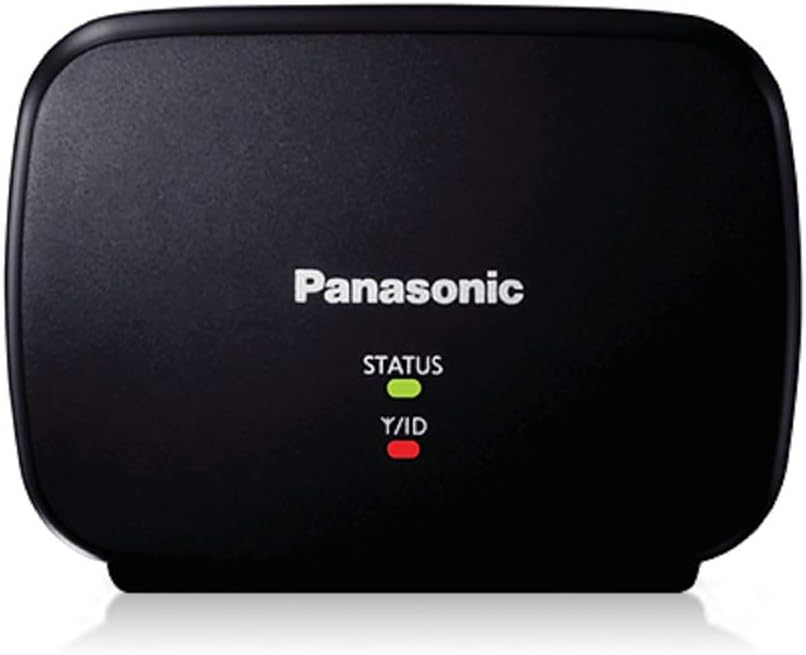
The Panasonic KX-TGA405B Range Extender is a compact, energy-efficient accessory designed to double the transmission distance of select Panasonic DECT 6.0 Plus cordless phone systems. Compatible with KX-TG7500, 6500, and 4000 series, it ensures extended, crystal-clear call coverage across large homes or properties, eliminating dead zones and boosting signal reliability.

| ASIN | B003MOKUIS |
| Best Sellers Rank | #580,627 in Office Products ( See Top 100 in Office Products ) #1,541 in Landline Phones |
| Brand | Panasonic |
| Built-In Media | 1 |
| Color | Black |
| Compatible Devices | Panasonic KX-TG7500, KX-6500 and KX-4000 series cordless phone systems |
| Customer Reviews | 4.2 out of 5 stars 1,732 Reviews |
| Frequency Band Class | Single-Band |
| Frequency Bands Supported | 1.9 GHz |
| Global Trade Identification Number | 00037988482726 |
| Included Components | 1 |
| Item Type Name | Cordless Phone Accessories |
| Item Weight | 200 Grams |
| Manufacturer | Panasonic |
| Mfr Part Number | 8207301 |
| Model Number | KX-TGA405B |
| Range | 100-300 meters meters |
| Smart Home Compatibility | Not Smart Home Compatible |
| Special Feature | HD Voice |
| Special Features | HD Voice |
| UPC | 037988482726 069060169225 777782586656 666661068218 |
| Warranty Description | One year parts and labor |
| Wireless Communication Standard | DECT 6.0 |
| Wireless Compability | DECT 6.0 |
R**D
Really increases signal coverage for select Panasonic Dect 6 Phones
Had the older Panasonic 5.8 DECT phones. They had limited range. Could not get across my property, let alone even talk on the phone while on my deck which is located on the other side of the house. So, recently I purchased the Panasonic Dect 6.0 phones (TG7875s). By themselves, the range of these phones is greatly increased. I can now talk on my deck. However, when walking the dog, I still can't talk across my large property. I took a chance and ordered one of these range extenders. I was a little apprehensive about spending the money because of the mixed Amazon reviews. It's a very tiny device. Getting it to pair was effortless, though Panasonic's documentation is very poor. The best thing I would recommend anyone do is to go to Panasonic's Support site and look at the video tutorial. Hopefully this direct link will work for all of you... http://shop.panasonic.com/shop/model/KX-TGA405B?support=y (Click on HELP & TUTORIALS and then the video link) The pairing can be done in less than two minutes as you watch the video. Placed the Range Extender somewhere in the middle of the house. Was not getting a secondary green signal. Only Amber. Yet, when I tested the phone range across my large property, I was very surprised to find that I had excellent signal strength throughout. Phone calls actually sounded as if I was right next to the base unit. I think, because I did not put the extender closer to the base unit (which is why I get the amber light instead of green), there is an occasional "quick" signal loss, but it's not even worth worrying about. The main thing to be considered is that this range extender works as advertised. I believe you could double the coverage of your Dect 6.0 phone using this device. It's amazing the coverage it gives you. If you need to be out in your yard, working or just walking your dog, this extender will give you the complete signal coverage that you need.
E**Y
After Connected it Works Great! NOTE: The Instructions are Poor - THE FOLLOWING METHOD TO CONNECT WORKS SEAMLESSLY
This unit works well for me, extending the range of my phone system, a Panasonic KX-TG7875S Link2Cell Bluetooth Cordless Phone with 5 handsets. Although I don't think it's fair to remove a star for the poor set of directions, I must admit I was temped. If one doesn't "nail it" on the first try, the setup appears to become corrupted by the attempt and stubbornly refuses to connect no matter how closely one follows the directions provided. I did everything and followed two separate sets of instructions posted in the reviews. I wasn't able to resolve the dilemma until I searched for other instructions to come upon a solution to registering the range extender to Panasonic DECT 6.0 Plus Phones that actually works. For the convenience of those who are struggling to get connected, I will post them, as I believe they address the problem of a 'fumbled first try' that produces a corrupted file in the repeater. One MUST deregister the range extender BEFORE attempting to connect again. I might add that, once I used the following method, I was able to connect on the first try - THIS after at least 20 attempts to connect using the provided instructions, which were of no help at all. Here is the procedure that worked the first time for me: ***** How to De-register the Range Extender: 1. Unplug the AC adapter; 2. Repower the range extender by plugging the power adapter into an AC receptacle while holding the PROGRAM button on the back of the unit; 3. Keep holding the PROGRAM button about 10 seconds until the STATUS light turns from solid to flashing amber then release the PROGRAM button. Your range extender is no longer registered by the phone base. ***** How to Register the Range Extender: 1. Unplug the power adapter of the range extender from AC current. 2. Press and hold the LOCATOR button on the base unit about 5 seconds until a registration tone is heard; 3. Plug the power adapter into an AC receptacle and wait until the STATUS indicator turns green. 4. Press the LOCATOR button on the base unit again to turn off the registration tone. ***** Reference: Search the web for "Panasonic KX-TGA405B Range Extender - How To De-Register and Register," as Amazon won't allow posting of a link here. It worked like a charm for me the very first time.
M**K
Works well but instructions are poor.
I installed the repeater in an unattached garage. I was concerned at first because the signal strength LED was amber rather than green thereby indicating that the repeater was receiving a less than optimal signal from the base. The signal must be sufficient because the coverage area was greatly increased. It is easy for me to believe the claim that the effective transmission distance doubled. As another reviewer mentioned, the instructions are inadequate. I must agree. The instructions state that the repeater must be registered with the base but give no clue as to how to do so. The links to Panasonic's support do not lead to anything that I found to be helpful. The user's manual that came with the cordless phone system describes how to register additional handsets but does not mention the repeater other than to say it must also be registered. To spare others the minor head scratching I went through, here's the way to register the repeater. I recommend that users perform the following steps while the repeater is near the base so that successful registration can be more easily verified. With the repeater connected to its power block plugged into an outlet, find the tiny square button on the back of the repeater. It's below the word 'Program.' (The instructions do not mention the Program button at all! ) Press the button. The two LEDs on the repeater will flash red continuously. At the base, press the 'Locate' for five seconds and release it. Then press it briefly once. Next, press the 'Locate' button again for five seconds and then press it briefly once again. The two LEDs should now show solid green indicating that registration was successful. After the process has been completed, the registered repeater may be relocated to the desired area. If the lower LED remains red, you will have to find another place to put the repeater. A location where the LED is green would be best but mine worked well when it was amber. I took away one rating star because of the poor instructions.
B**A
Did the job just fine and paired in 2 seconds with our base station.
Worked fast and easy. Funny story - I didn't know these existed til I bought a second Panasonic base station to use in the front of the house, and I noticed a tiny paragraph in the dense instruction book about buying an optional repeater TGA405B. So I did, and now I don't need the extra base station in the front of the house. I didn't find instructions confusing. Bring the new 405B device and its cord to the room with your phone base station. Have it ready to plug in. Go to your base station and push the LOCATOR button for several seconds. (I think if you press and quick release, it may make your lost phones beep, but if you hold, it puts the base station into pairing mode.) Now, quickly plug in your Range Extender. If it has never been used, it should automatically be in a blinking, pairing mode. In a moment, its two lights should soon show GREEN (receiving input) and GREEN (sending out radio). Now you can move the station to a different room, within the signal of your base station, and plug it in again. It will BLINK GREEN when a phone is using it. We have a Panasonic phone near the back of the house for the home office, back of house, and back yard. With a Range Extender in the middle of the house, it gives excellent repeated signal into the front of the house. I haven't yet discovered if you can walk across the house and the phone will be smart enough to switch stations or not. Even if not, it's more convenient than two separate phone systems. Note, there is a workaround to re pair: You repeat as above, but you hold a button on the repeater BEFORE, DURING, and AFTER the plug-in step. This puts the repeater into pairing mode as if it was new. [I didn't write down what the pairing mode blinking color is - the manual might be wrong, but it doesn't matter too much.] Before buying, I had some confusion between the TG, TGA, 405, 405B, etc, and also my Panasonic base station wasn't EXACTLY a listed base station compatible number, but it worked fine in 2 seconds.
C**L
SO SIMPLE TO INSTALL AND IT WORKS!!!
My new Panasonic Dect 6 plus KX-TG4744B worked in my apartment for the first few weeks and then I had problems in my second bedroom. Most times I picked up I got "handset not connected to base" This was beyond annoying. I started to miss many calls. It just didn't ring or light up at all in the bedroom. I can't blame my phone as I had this problem with my old set and I'm almost sure it's the wiring in my bedroom. I ordered this based on the favorable reviews. I was afraid to install it as so many people complained about the complicated installation instructions or the lack of them. I actually printed out 3 different sets of intructions from various reviewers. Panassonic must have revised their instruction pamphlet as set up couldn't have been simpler. I will quote and summarize the most important basics from the pamphlet. "Press and hold {LOCATOR}for about 5 seconds. The next step must be completed within 90 seconds. Connect the AC adaptor to a power outlet." That is exactly what I did and the 2 green lights you're supposed to look for flashed immediately and they have been lit ever since. I connected the adaptor to my Belkin surger(that has many outlets already in use)and is right below my phone. This is all situated right next to my computer, printer, Cisco Valet, etc. I say this just to show that all these other connections have not interferred with the operation of the extender. Of course I used the base phone and this is on the other end of my 5 room apartment far from the room I had problems with.. I have not had any problems at all since. I couldn't believe it was so simple to install and I still can't believe it works so perfectly and completely solved my problems.. I paid $10 less on Amazon than the $39.00 Pansonic retail price. That's my story and though I can't guarantee a success story for any one else I would highly recommend you give this a try. I'm in the majority of other reviewers that also recommended this extremely excellent product!!!
B**N
Panasonic doesn't know their own products
I purchased a phone system from Amazon in October, a KX-TGF353N corded base phone with three extensions. I have a ranch, with the home base near the middle, and some distance to the far extensions. I thought I would try a range extender. Looking on the Panasonic website, I identified the KX-TGA407 as the proper range extender. I purchased one. I followed the instructions for registering it with the base. I was never able to get it to connect. Went on a chat with Panasonic support. I was told that the KX-TGA405 was the proper range extender. I told the person that my phone system was not listed as compatible with that device. I also mentioned that in the Amazon Q & A, that specific question had been asked, answered by Panasonic support saying no, 405 was not the proper one, 407 was. The person on the chat would not give me any help technically with the 407, as they insisted there own website was wrong, and that the advice given by the Panasonic support person on Amazon was wrong. I was told I had to get the 405. I did. I had the same problem. It would not register with the phone base. So now I am left with two black plastic discs for flashing green or red lights. The return window for the 407 is gone, but I'm still within 30 days with the 405. Definitely will look beyond Panasonic next time comes for purchase.
S**E
Good product BUT incomplete instructions
I had many of the same problems as others who added the Range Extender to an existing setup. I followed the instructions for registration: Press and hold [Locator] for five seconds, plug extender's AC adapter in, wait for two green lights. This worked fine. The first point of confusion was that I expected the [Status Indicator] to begin blinking -- like a modem or router. It didn't. I thought that meant I had lost registration. So I re-registered the unit. No change. Later, I found out that the [Status Indicator] only blinks if a handset (that is communicating with the Range Extender) is on a call (off-hook). At this point, my handsets had reduced range. I began to wonder if this box was more than just two lights! Now, the "missing link": Think of this as a (specialized) computer. After changes to my computer, it often says that I need to re-boot the computer before the changes can take effect. To "re-boot" each handset (that I wanted to communicate with the Range Extender -- instead of the base unit), I removed (and then re-inserted) the batteries while I was close to the Range Extender. Problem solved. I now saw "ECO" when I was further away from the base station AND I saw the [Status Indicator] (on the Range Extender) blink when I got a dial tone (etc.) P.S. If your Range Extender loses power, the handsets will connect to the base station. After the Range Extender gets power restored, the handsets will ignore it until you "re-boot" them. Summary: Good Product (that I would have rated five stars IF the manufacturer had included the above information).
S**O
Works Extremely Well for Panasonic DECT 6.0 Plus Phones
This Panasonic Range Extender KX-TGA405B works extremely well with the Panasonic DECT 6.0 Plus phones. I bought 2 of these in 2012 to use with the Panasonic DECT 6.0 Link2Cell KX-TG7645M that I got from Amazon.com at that time. They extended the range to about 250ft-300ft from the base in all directions. I had no problems using my Panasonic handsets to make and receive the VoIP and mobile calls outside of my house even in my neighbor's house. I liked them so much that last week I just ordered 2 more for the new Panasonic Link2Cell KX-TGF375S that I recently bought on Amazon.com. They worked great for the KX-TGF375S, too. Registering the Range Extender to the base is very simple and easy. Up to 2 Range Extenders (and 6 handsets in case of my Link2Cell phones) can be used with a Panasonic Dect 6.0 phone that supports this feature. Some reviewers had posted the procedures to register & de-register the KX-TGA405B. I'd like to re-post them here for the folks who can't find them from the 900+ reviews so far: *** De-register: 1.Unplug the AC adapter; 2. Replug the AC adapter while holding the PROGRAM button on the back of the unit; 3. Keep holding the PROGRAM button about 10 seconds until the STATUS light turns from solid to flashing amber then release the PROGRAM button. The unit is now de-registered from any telephone unit. *** Register: 1. Unplug the AC adapter of the extender; 2. Press and hold the LOCATOR button on the base unit about 5 seconds until a registration tone is heard; 3. Plug in the AC adapter and wait till the STATUS indicator turns green. 4. To finish, press the LOCATOR button again to turn off the registration tone. ### Reference: Panasonic KX-TGA405B Range Extender - How To De-Register and Register: ftp://ftp.panasonic.com/telephone/howto/kxtga405b_howtoderegisterandregistertherangeextender_howto.html
H**U
Good range extender for cordless phones.
As advertised, easy to set up.
A**Z
Pude cubrir toda mi casa
Es un tremendo asistente; la clave esta en posicionarlo estratégicamente, de acuerdo a tu necesidad y a la construcción de tu inmueble, qué tanto te permita traspasar tus bardas la señal. Y obvio, teniendo cerca la base.
D**L
Five Stars
Excellent Performance
P**N
Plus Optics
Je ai acheté ce produit de "Plus Optics" et ce était la pire expérience jamais. Ils me ont envoyé un 120v modèle américain qui ne est pas compatible avec 220v en Europe. Je ai porté plainte mais ils ne ont pas répondu!
C**E
Panasonic KX-TGA405B Range Extender for DECT 6.0 Plus Cordless Phone Systems
Funciona muy bien buen equipo se recomienda
Trustpilot
3 weeks ago
2 days ago