Desertcart purchases this item on your behalf and handles shipping, customs, and support to Portugal.
🎥 Nail perfect color balance—because your shots deserve nothing less.
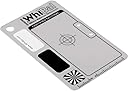
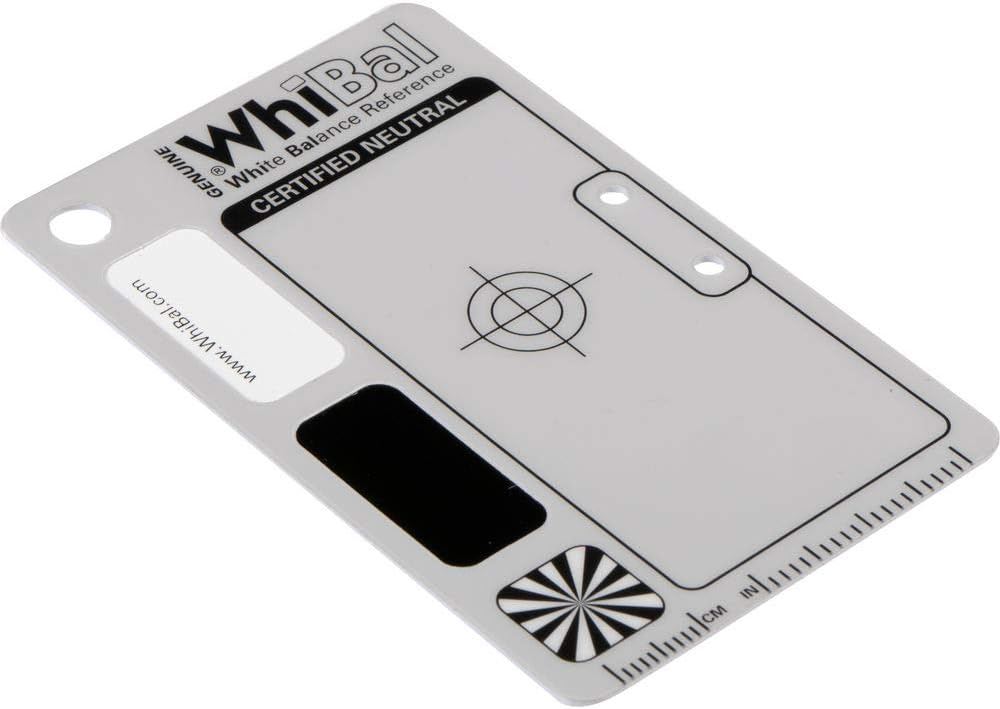
The G7 Certified Neutral White Balance Pocket Card is a precision-measured, durable gray card designed to deliver flawless white balance calibration. Measuring 2.1" x 3.35", it features industry-best ±0.5 a*/b* neutrality, is water and scratch resistant, and integrates seamlessly with major photo editing software. Trusted by over 40,000 professionals, it’s the essential tool for photographers and filmmakers aiming to eliminate color casts and save time in post-production.
| Best Sellers Rank | #4 in Photographic Light Meter Grey Cards |
| Customer Reviews | 4.5 out of 5 stars 778 Reviews |
J**N
WhiBal G7: Getting white balance right with a digital camera
Digital cameras are marvelous devices in that the newer versions often have an automatic white balance feature built in. This is great, until you find that the fantastic photo that you took of someone comes out with a greenish skin cast or make their face look like they had a mild sunburn. Then you have to fiddle with your photo editing software to hopefully correct it, spending valuable time when you could have been doing better things. The WhiBal G7 Certified Neutral White Balance Card is the perfect field tool for this. It's a small keychain card, measuring 1" x 2.2", and is attached to a stainless steel Nite Ize S-Biner #1 that's about 1½ long. It came in a small zip-lock style bag with an explanation card, and listed the Michael Tapes Design site where support information can be found. Though they show it attached to a key ring, I chose to keep it in my camera bag so that I can clip it to a zipper pull when in the field. This simple little product gives the photographer an easy, fast and cost effective way to get accurate color results when shooting with digital cameras. Whether you shoot RAW or JPEG, the WhiBal card is an excellent tool for reproducing accurate color in any shooting situation. This G7 card is waterproof and won't absorb dirt. It can be rinsed off in the sink, and can be cleaned with a non-abrasive glass cleaner if it's gets scruffy in use. If this version is too small, there's also the larger WhiBal G7 Certified Neutral White Balance Card , a pocket card which measures 2.1" x 3.35" which is about the size of a credit card. There are other larger sizes as well. This WhiBal G7 Certified Neutral White Balance Card lives up to the product description, and the Michael Tapes Design support site has excellent info. It's a good asset to have with newer digital cameras, but it's excellent with older ones which may have white balance issues. It's an excellent way of getting white balance right with a digital camera. 4/17/2013
R**O
An ABSOLUTE MUST OWN for Photographers and Especially Filmmakers
This is an ABSOLUTE MUST OWN for photographers and even more so for filmmakers. The quality is excellent. I wish it was double sided but unfortunately it's not. However, it is on textured plastic so it is matte. Therefore, you will not get glare or smears on it which can become an issue when trying to white balance in post. The card itself is credit card sized. If you need a bigger one, which you shouldn't--look for the studio version. It is certified neutral. This is very important especially for film makers because when comparing this to other "18% grey" cards you can instantly tell the other ones are not. If you've ever shot video, especially log or RAW, you'd know using something as a reference for white balance that claims to be grey or neutral will leave your footage either with a slight magenta tint, or everything will look like it is fine but skin tones may look a little red adding more time in post to correct. This is what actually led me to purchase this card. A lot of great cinema cameras do not come with auto white balance (which you shouldn't use anyway) and when shooting in a good codec, log or RAW; most of your white balancing is going to come from post production. If you use Dvinci Resolve as I do (you should be for color correcting if you don't), using the qualifier to select this card as your neutral key will result in excellent balancing every time. Do yourself a favor and skip the ones that are $10 less and get something that's certified. Or else you'll be spending extra time trying to figure out whether your balance or tint is messing up those fine details with an awful hue.
B**N
Effective and easy to use
I'm very happy with this WhiBal card. It's extremely easy to use, portable enough to take anywhere my camera goes, and has made a big difference in color balancing. I used to spend lots of time tweaking in-camera and in post editing to try and match the colors I was seeing before they were shot with my camera. Now, I can honestly say, the time spent doing the above is minimal. There are so many products, from very cheap (from coffee filters to playing "I spy something white") to very expensive contraptions claiming a white balance experience so incredible you'll feel like a York Peppermint Patty from the clean, clear cooling effect. I figured I'd meet somewhere in the middle and invested in a professionally designed device with clear instructions, a professionally presented website, and a lot of positive reviews from people who have actually purchased and used this item. After using the WhiBal card, I am glad I did not over-buy a more sophisticated product that may be excellent, but would be overkill for what I needed. I'm also glad I didn't just settle for utilizing a vagrant white target I could try and balance my colors on. I plan on buying the smaller card I can keep in my wallet for those spontaneous shots my studio card isn't invited to. I haven't been in the dslr arena very long, and I don't profess to know everything about digital photography, but when I do drink beer....I prefer Dos.....Oops....I'll just close by saying this white balance card is excellent, and I couldn't be happier.
J**Y
Seems a bit pricey - but works like a charm!
After 7 years of avid digital SLR photography experience and thinking these things weren't all that useful since you could tweak things post-production, I proved myself wrong. I took some family portraits under some really tricky natural light (dusk) conditions and I just couldn't get the color to my liking, despite messing around for 20 minutes in Lightroom 4. That night, I decided it was time to try a professional gray card and ordered this. Now I make sure I take it with me whenever I'm taking anything more than casual shots. You can use it in one of two ways: 1) Take a picture of it in the same lighting conditions that your subject will be in, and then when you get home and use Lightroom, do an auto-balance on the photo of the card and then copy the same settings to your other photos. It's best to use RAW if you choose this option. or - preferably... 2) Many SLR cameras (I use a Canon 60D) have a menu option for custom while balance - take a picture of the card, go to custom balance menu and display the photo you took of the card on the screen. Confirm your selection. Then all your have to do is go to the white balance menu option and set it to the "custom" mode... it will then apply the settings you previously selected. Sounds confusing - but it's really pretty simple and makes all the difference in the world under tricky lighting conditions. Just remember to adjust again as the lighting changes, or when you go to your next location at a later time. A bit pricey for a thick card that fits in your wallet, but professionally calibrated tools usually are. It's definitely worth it if you do any serious shooting.
T**K
Good tool for post editing, but too small for setting in-camera, custom white balance.
All in all this product will help your photography. It fits into larger pockets easily. It is a great help in setting post production white balance and levels. When shooting candids or fast changing scenes such as children, I find it helpful to come behind and take a quick shot of the WhiBal card in the location of the now finished action. While that may not be a textbook move it gives me a much better stating point reference for post processing. I have been satisfied enough with this card that I am thinking of getting a smaller WhiBal card for my compact camera. For further details read on: The WhiBal G7 is a good tool for post production, software editing. The white and black reference help for adjusting Levels. The neutral color of the card itself is a good enough reference for adjusting midtones. I say "good enough", because midtone adjustment can be very subjective. As for RAW editing of white balance I have found that the eye dropper picks on the card in the same file image will yield different results with each pick. The variance of picks is not huge, but it is something to keep in mind when editing. I don't blame this variance on the card. However, this does make a good lesson for demonstrating the subtle differences in light and the stacking of tolerances between lens, sensor, software, and everything else before, after, and in between. While 3.5" X 6" is a decent size, I usually find it to be too small to fill the frame when attempting to set in-camera, custom white balance without casting a shadow from me or the camera lens. Obviously, this is partly due to the choice of lenses that I use, shooting distance, and light source location. That being said, when I have been in tough lighting situations such as snow, I do my best to get a custom white balance set using the WhiBal, because even though the setting is only good for that one spot at that one time, I believe that I get a closer setting to reality than the camera can get. Also, that custom setting coupled with some WhiBal card shots really speed up post processing.
C**Y
More valuable than the credit card it replaced. Saved me a monitor.
Simply put, I keep this in my wallet. It's a fantastic tool to have on you when taking pictures. Most will probably keep it in their kit but for those of us who just like to pick up our camera and hit the road this is perfectly compact. Usage: Set your camera to manual focus and spot metering. Hold it in one hand a few inches away from your lenses so it fills the shot. Snap a shot and then go into your DSLR menu and find the Custom White Balance option. Select the image you just took (probably some blurry grey shot) and you're all done. Now just set the white balance to "custom" back on your main screen. It really saves a lot of time in post processing. It's not that useful in terms of sunlight shots (the daylight preset WB setting is usually pretty good) but for anything indoors it will help you get that spot on WB. The other helpful part is if you don't use a monitor that is perfectly calibrated for color reproduction. I have some IPS panels that are pretty good but they're not great. This helps alleviate having to sit there and slide a bar back and forth...which I don't miss. Mostly because I will eventually get tired of looking at the same image and all the minor changes will start to blur together. At least using this balance card I can stop worrying about tiring out my eyes on white balance and focus on the other details of the image in post.
A**R
Not Perfect
I've used this card many times over the past two years but it doesn't always work accurately. It's still useful and well needed in many situations, but I was hoping it would give me perfect results. Most of the time, I have to manually adjust the color settings until the card looks close enough, and I tried using this card for both in-camera settings and post-process white balance. The Auto White Balance tool in GIMP usually works better than this card does. $20 for a gray credit card is way too high of a price to begin with. For $5 less, you can buy the DGK color card, which may not be wallet size, but at least it's more useful. I feel kind of robbed with this product, but it's still better than nothing. Even with all of my complaints however, I would still recommend the product more than not recommend the product because it still has its place and time to be very useful. I just wished it actually worked well.
D**C
i got the small one, its tiny but seems to work quite well.
the small card is great to get a good white balance in your editing software, just take a phot or video with the card in it and use the white balance picker in the software to select the card. now if your trying to set the white balance on your camera this might be a bit small without moving the camera really close to the subject, you always want the card to be next to the subject so your getting the light at the subject.. not in front of or behind setting the balance with some cards always gives me a red tint on my sony camera, i see this adjust the white balance and the tint when i use it in camera and it seems to get rid of that red tint
A**ー
WhiBal G7 Pocket Size Neutral White Balance Card
Works great!
O**O
Excelente herramienta para calibrar correctamente el balance de blancos
A pesar de su tamaño la tarjeta cumple con el objetivo perfectamente, permitiendo ajustar la cámara para que capte los colores correctos en distintos escenarios y tipos de luz, es de gran utilidad, lo recomiendo ampliamente. Cuesta un poco hacer el enfoque por el tamaño de la tarjeta, sin embargo, nada extraordinario.
E**W
Sturdy and compact
Sturdy and compact, should last a long while. Pretty pricey for a card though!
M**Y
Five Stars
Recommandation de Ben Long
T**B
Convenient size
Great simple product, fits in my wallet for easy access. Does a great job assigning the right colour temperature in awkward lighting.
Trustpilot
3 weeks ago
2 weeks ago