Buy anything from 5,000+ international stores. One checkout price. No surprise fees. Join 2M+ shoppers on Desertcart.
Desertcart purchases this item on your behalf and handles shipping, customs, and support to Portugal.
๐ Elevate your home network to warp speedโbecause buffering is so last decade!
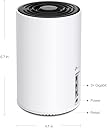
The TP-Link Deco XE75 (3-pack) is a cutting-edge WiFi 6E mesh system designed to deliver tri-band speeds up to 5400 Mbps across 7,200 sq ft. Featuring a powerful 1.7 GHz quad-core CPU, 3 gigabit Ethernet ports per unit, and AI-driven mesh technology, it supports seamless connectivity for up to 200 devices. With the latest 6 GHz band and robust security via TP-Link HomeShield, it ensures fast, reliable, and secure internet throughout your home.


| ASIN | B0B12WYSLD |
| Antenna Location | Home |
| Antenna Type | Fixed |
| Best Sellers Rank | 10,996 in Computers & Accessories ( See Top 100 in Computers & Accessories ) 41 in Whole Home & Mesh Wi-Fi Systems |
| Box Contents | 1 Quick Installation Guide, 1 RJ45 Ethernet cable, 3 Power adapters, Deco XE75(3-pack) |
| Brand | TP-Link |
| Brand Name | TP-Link |
| Colour | White |
| Compatible Devices | Laptop, Personal Computer, Smart Television, Tablet |
| Compatible devices | Laptop, Personal Computer, Smart Television, Tablet |
| Connectivity Protocol | Wi-Fi |
| Connectivity Range | 7200 Square Feet |
| Connectivity Technology | Wi-Fi |
| Control Method | App |
| Controller Type | Switch |
| Country of Origin | China |
| Coverage | 200 mยฒ |
| Customer Reviews | 4.3 out of 5 stars 241 Reviews |
| Data Transfer Rate | 5400 Megabits Per Second |
| Frequency | 6 GHz |
| Frequency Band Class | Tri-Band |
| Frequency band class | Tri-Band |
| Has Internet Connectivity | Yes |
| Is Modem Compatible | Yes |
| Item Dimensions L x W x H | 10.4L x 10.4W x 17H centimetres |
| LAN Port Bandwidth | 1000 Mbps |
| Manufacturer | TP-Link |
| Manufacturer Part Number | Deco XE75(3-pack) |
| Maximum Upstream Data Transfer Rate | 574 Megabits Per Second |
| Model Name | Deco XE75 (paquete de 3) |
| Model Number | Deco XE75(3-pack) |
| Model name | Deco XE75 (paquete de 3) |
| Number of Antennas | 3 |
| Number of Ports | 3 |
| Operating System | Linux |
| Other Special Features of the Product | Access Point Mode |
| Product Warranty | 3 Years |
| RAM Memory Installed | 128 MB |
| Router Network Type | wireless |
| Security Protocol | WPA3 |
| Smart Home Compatibility | Smart Home Compatible |
| Special feature | Access Point Mode |
| Unit Count | 3.0 count |
| Wi-Fi Generation | Wi-Fi 6 |
| Wireless Compability | 2.4 GHz Radio Frequency |
| Wireless communication standard | 2.4 GHz Radio Frequency |
D**B
Superb Domestic Mesh WiFi Network Nodes
Bought these to replace a dated BTWholehome mesh network that was rather intermittent to say the least. We have used a multitude of similar and powerline solutions over the years with little success. This worked straight out of the box, uses recent technology and is faultless. No dead spots anywhere in the house and the WiFi signal is strong and steady everywhere. Works with almost any WiFi provider and glad we upgraded. The nodes have excellent build quality and the associated app is well coded and user friendly. We found that a four node setup was optimal for an awkward, average sized four bed property, but this three node set is likely adequate for almost anything simpler or smaller. By awkward I mean a router positioned in one ground floor corner of the property and a full strength WiFi signal required in the opposite first floor corner of the property with additional coverage required in the garden, garage and driveway. Packs of one, two and three nodes are available to optimise your setup and they all link seamlessly and appear as one homogenous single network.
P**Y
Great upgrade for the cost with good Coverage and Performance across the board
Replaced an ageing Asus Wifi 5 mesh setup that was about 5 years old and hadnt been bad at all. I just noticed a few niggles, needed restarting on occasion and just generally felt an upgrade was due. Did a bit of research and usually I tend to run near the top end of tech but went closer to the middle range I feel with these and they have been faultless. Really easy to setup, great performance and also really good coverage in an old 16th century house. We use 3 to cover the main areas and I then went and purchased a couple of the smaller x10s to give some coverage in the Garden in summer. Not had any dropouts, no need to restart them, really good performance across the board. Ive had a fair few devices connected when friends and family round and never gave any issue. I like the guest network seperate from my office one that was easily setup, for said friends and family as well! The mobile app (Ive only used on iOS) is really well done, gives a good little map of how the meshes are connected which I liked to ensure the setup was working as I thought. I get notifications if other devices connect (thinking about it, I think this is only when Im out and about rather than at the home which is probably a good thing!). Updates have been smooth and pain free as well. Overall really pleased and would look to get other TP-Link products in future and have recommended to others!
J**Y
Connected to my Virgin Business Voom 800 Package - LIGHTNING FAST SPEEDS
I very rarely write Amazon product reviews, but i felt like i had to for this system. I'm on Virgin Business Voom 800 package which gives me a max of 800mb download speed and 80mb upload speed. My WiFi speeds downstairs, near the router would give me roughly 300mb download speed and 50mb upload speed, however, when i was upstairs in my room, i was getting 68mb download speeds and 50mb upload speeds (see picture), upload was good but download speeds were way down... I recently purchased a Macbook M2 Max, which supports WiFi 6e, i made sure that i got a mesh system that had WiFi 6e capability... And the results are simply amazing, i connected to the 6e WiFi on my laptop, and you can now see from the photo, i'm getting 713mb download speeds and 77mb upload speeds, and this is in my room, on a WiFi connection! I haven't even tried using an ethernet yet. Put simply, some of the best money i have ever spent, i was a little sceptical purchasing these as they seemed like a cheaper option that supported WiFi 6e, but it did not disappoint. Set up was super simple too, connected all 3 of the nodes in 15 minutes. I'm a content creator so fast download and upload speeds are crucial, i'm now going to upgrade to Virgins Voom Gig 1 package as i'm so confident this mesh system will get the absolute max speeds out of the WiFi package i have. Couldn't recommend more, i've got super strong WiFi throughout any part of the house, all my smart devices (Alexa, ring doorbell etc) connected just fine too. If you're on Virgin, and you're fed up of calling them because your WiFi speeds are nowhere near where they should be, don't think twice, just buy this system!!!
M**N
Reliably excellent quality!
Outstanding performance, quality, everything you expect from TP-Link. Easy setup, excellent app with additional functionality like a separate IoT network. Also compatible with an older Deco that I retained for the summerhouse.
A**R
Buggy Software Renders DECO XE75 Useless
The signal is very good in all rooms within my 3 floor house. Good speeds, paying for 1gbps and getting 1gbps, reducing down to around 300mbps on the top floor. However despite the signal and speed being relatively good, the actual connection keeps dropping multiple times a day constantly. Have to turn the WiFi on and off on my mobile device to get it working again. Toggled all the extra features on the router such as beam forming, fast roaming, etc nothing improves it. Overall disappointing purchase.
L**O
*UPDATE* BT and DECO WARNING - XE75
*UPDATE* It's been two days and everything has stayed connected. By luck or judgement. I've read before that new networks can need time to "settle", but never really understood the logic behind that, however it seems to be the case here. Luckily I had Ethernet ports plumbed in around the house from new, so have Ethernet cables connecting the units. I'm getting blistering speeds all over the house now, close to the speeds I'm playing BT for, which is just sublime. The app is still a bit ropey, but I'm keeping my fingers crossed that the system stays reliable (I really hope so, as I love seeing the speed checker results!) *End of UPDATE* After another dropped connection in Teams, I decided I had to change from the BT super hub 2. That unit, when hardwired to the modem, and when sat next to it, gave a great signal, but dropped significantly as you went further away. I went for the XE75 WiFi 6e mesh 3 pack. My main unit is connected to the fibre modem. The BT super hub was up for 2 years, no drops. The decos have been up for a day, and have dropped 30 times. The app is connecting to the cloud somewhere, and loses the deco units regularly. I don't know what the problem is, am trying to test, but with constantly dropping off the network, it's hard to change settings on it. I've read elsewhere that IPV6 can cause problems with BT, so I've turned that feature off inside the deco app. Why I'd have to do that on a system worth over ยฃ300 is beyond me. When it was up and running, I was getting excellent speeds throughout the house, which makes the unreliability that much worse to bear. I had looked on BTs forum, and there are quite a few posts about these units and the BT network. I'd followed blindly a couple of suggestions there, and finally had the 3 units up and running, great speeds everywhere and went to sleep happy. Woke up, noticed my phone was no longer connected to the WiFi. Opened the deco app to be met with "couldn't find your deco"..blah blah blah. Heartbroken after hours of trying to set up (as I say, made more difficult when it kicks you off the network/you can't connect to it). Going to give it one more day with IPv6 turned off, see if that may be causing the issue. The reviews you see on Amazon are for several different models, and a lot of people are having great experiences with Virgin media as the provider. Not sure if I am unlucky with the combo of my model and ISP (I suspect not), whether it's BT not playing nice with the decos, or the decos not playing nice with BT. Not sure if it's because I turned on Fast Roaming or not. Not sure if it's because I'd turned on IPv6 or not (I had ipv6 on the BT super hub for 2 years, no trouble at all), so I'm thinking it's these Deco units.
J**B
So easy to set up and great coverage
Arrived well on time and very well packaged. 5 stars at this time for delivery,ease of set up and coverage, so will update later should things change. Having a Virginmedia Hub 3 (sorry I mean a Chocolate Teapot) and being fed up with drop outs and generally poor coverage in a 5 bedroom house with seven TVs constantly freezing or dropping off was extremely frustrating. At the hub I was getting speed I paid for which is basic 136mps enough for good quality streaming. Looked at many mesh systems and more than a few reviews always mention set up being problematic. I opted for the TP-Link Deco XE75 AXE5400 Whole Home Mesh Wi-Fi 6E System as the majority of reviews were fairly positive. Ok believe what you beleive but there is always a trend. Took the plunge and I actually gave it to my wife (could not be more non-tech savvy by her own admision) who without any assistance had all three untis up and running within 20 miniutes which included plugging in and placing the two sattelite pods. I kid you not. Speed test in every room is same as incoming at 136mps. TVs happy I am happy family happy. Entire house is covered. End of 200ft garden less so around 40mps but ample for phones etc. The app is so simple to use with good reporting and network graphic depiction showing speeds of every device connected. Notifications given if any device connects to network, Can give priotity to individual devices. Guest wifi is a godsend as we have quite a few visitors. The functional led on the front of each unit is unobtrusive and very helpful should there be an issue. Have not tried parential settings as not required at this time. I have dropped power to each pod in turn and all restarted and reconnected in around two minites. Same for the main hub and total power outages for all thee simultaneously all came back within two minutes. So my set up was to put Chocolate teapot into Modem mode and then my wife followed the app instructions. My only guidance was to allow the app to default to DHCP auto. I set the SSID to the same as the origonal wifi and same password and all devices connected seamlessly.
R**M
Worth every cent! Best in the market for 6E networks.
This is absolute sorcery. Went from having connection dropping everywhere across the house to having powerful signal with 500MB/S download in every nook and cranny of this house. Sky should partner with this company for complete coverage. Because that nonsense they charge people ยฃ4 a month for is a joke. At least I get to keep this even if I switch providers. Worth every penny spent. Easy to configure and worked straight out of the box.
F**I
ุฃุฑูุน ุฌูุงุฒ ู ูุด
ู ู ุฃุฑูุน ุงุฌูุฒุฉ ุงูู ูุด ูู ุงูุฃุฏุงุก ู ุจุฑูุงู ุฌ ุงูุฅุนุฏุงุฏ ูุงูุฎูุงุฑุงุช ุงูุชู ููุฏู ูุง ู ุน ุงูุณุนุฑ ุงูู ูุงุณุจ ุงุดุชุฑูุช ู ูู ูฆ ูุทุน ุชุบุทู ุซูุงุซ ุดูู ุจุดูู ู ู ุชุงุฒ
S**V
Does as advertised minus one minor flaw.
Looked to upgrade the old Mesh router system as it was not capable of running the gigabit speed connection we have. For starters the setup is really simple and unlike our previous device any of the routers can become a primary router. The ports on the back are a similar story in that you can connect to any port as an input and not worry on having to connect to the right one. The app can be a hard to understand at first but once you get used to it things get easier. Had a massive bump from about 250mbps to about 800mbps (31MB/s to 100MB/s) in download speeds while upload speeds were the same (we are at the limit already). To add to that any WiFi 6/6E device gets its little bump in connectivity, performance and range so things felt that slight bit quicker. Where the old system had dead zones this one does not and if anything doubles the signal strength in places compared to the old system. My only negative is not having rubber feet for grip. It is very easy to push the router around and it can fall off an edge easily if you hit it or pull a cable by accident. With rubber feet it would be less prone to moving around and would feel more secure. Sure you could just keep it hidden away but for those that cannot do so would need to be careful with placement or you could drop it and end up breaking the thing.
A**N
Quick Set Up and Works Brilliantly
This unit provides WiFi access to all corners of our house. Best system we've ever installed
D**9
Perfection ๐ ๐
Fanless design and doesn't get hot at all, For home users, no need for Wi-Fi 7. 6E is perfect.
J**M
The worst router ever
The most useless piece of equipment I have ever purchased! I bought a set of 3 mesh routers of this model before this order, and they stopped working within a month. They were replaced with another set, and I have been having constant issues with the routers with pathetic internet speed and the LEDs turning red even when the router is working (which is not often). When I searched the internet, I found that this is a very common issue with this product. I have to restart these routers multiple times every day, and many times it would just refuse to connect to the internet. The mistake I made was to buy these from Amazon UK as I was tempted by the better price. TP-LINK refused to help me despite having presence worldwide, including Australia. I guess it is easy to hide behind geographical boundaries when you are selling a dud product.
Trustpilot
1 week ago
5 days ago