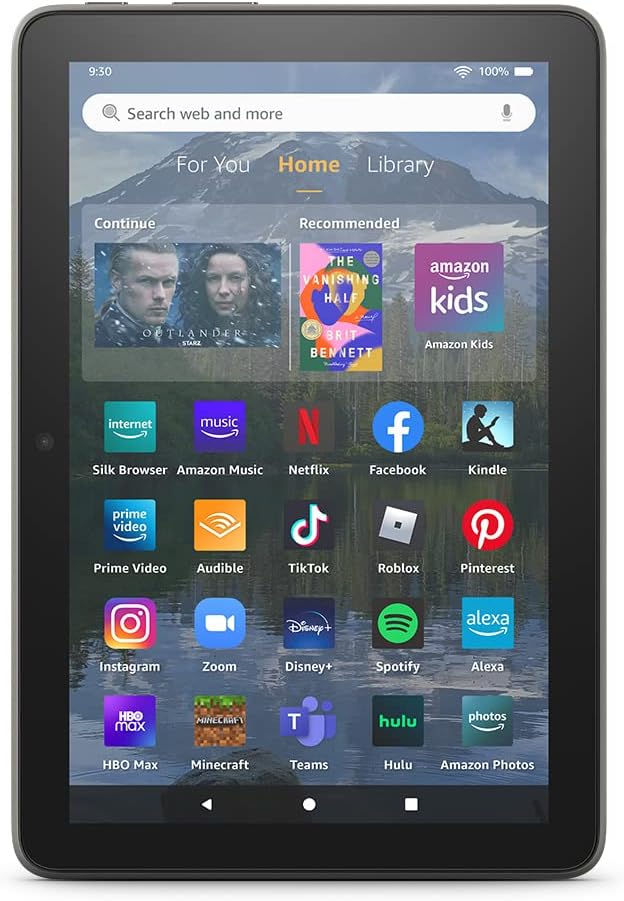

🔥 Elevate your hustle with the Fire HD 8 Plus—power, style, and freedom in your hands!
The Fire HD 8 Plus (2022) is a sleek 8-inch HD tablet featuring a 30% faster hexa-core processor, 3GB RAM, and up to 13 hours of battery life. It supports Qi wireless charging, dual-band WiFi, Bluetooth 5.2, and expandable storage up to 1TB. With a durable aluminosilicate glass screen and lightweight design, it’s built for professionals who demand performance and portability.
| Display | 8” high-definition touchscreen; 1280 x 800 resolution at 189 ppi, HD video playback, with IPS (in-plane switching) technology |
| Size | 7.94” x 5.40” x 0.37” (201.90mm x 137.34 mm x 9.60 mm) |
| Weight | 12.06 ounces (342 grams). Actual size and weight may vary by configuration and manufacturing process |
| CPU & RAM | Hexa-core 2.0 GHz with 3 GB of RAM |
| Storage | 32 GB (25.2 GB available to user) or 64 GB (54.5 GB available to user) of internal storage. Add microSD slot for up to 1 TB of additional storage. Some apps may require that they are installed on internal storage. App or feature updates may impact available storage. |
| Battery | All-day battery life - Up to 13 hours of reading, browsing the web, watching videos, and listening to music. Battery life will vary based on device settings, usage, and other factors such as web browsing and downloading content. Certain software features or apps may reduce battery life. |
| Charge time | Fully charge in approximately 3 hours with 9W power adapter included in the box. Fully charges in approximately 3 hours using the 10W ANGREAT wireless charging dock (sold separately). |
| Wireless charging | Fire HD 8 Plus is compatible with Qi-certified wireless chargers. Check if your wireless charger is compatible with Fire HD 10 Plus. |
| wifi connectivity | Dual-band wifi. Supports public and private wifi networks or hotspots that use the dual-band 802.11a/b/g/n/ac standards with support for security standard of WEP, WPA3 OWE, WPA/WPA2/WPA3 Personal and WPA/WPA2/WPA3 Enterprise. Wi-Fi 6 (802.11 ax) is currently not supported. |
| Ports | USB-C (2.0) connector for charging; microSD slot for external storage. |
| Audio | 3.5 mm stereo jack and integrated speakers; external volume controls |
| Sensors | Accelerometer, ambient light sensor |
| Camera specs | 2 MP front-facing with 720p HD video recording and 5 MP rear-facing with 1080p HD video recording |
| Location Services | Location-based services via wifi |
| Available colors | Gray |
| Bluetooth | Built-in Bluetooth 5.2 with support for A2DP compatible stereo headphones, speakers, microphone, and LE accessories support |
| Accessibility features | To enable features that personalize Alexa to your abilities, go to Settings → Accessibility. • VoiceView screen reader enables access for customers who are blind or visually impaired. • Screen Magnifier enables customers to zoom in/out, and pan around the screen. • Tap to Alexa enables access to Alexa via touch, instead of speech, through on-screen tiles or a keyboard, including the ability to save your favorite actions. • Switch Access enables access for customers who have motor impairments, and are unable to touch the screen, via compatible Bluetooth devices. • Kindle Read Aloud will have Alexa read your Kindle books aloud. • Fire tablet Accessibility features also include settings for Closed Captioning, Font Size, Display Size, High Contrast Text, Color Inversion, Color Correction, and Convert Stereo to Mono audio. (Captions are not available for all content.) |
| Warranty and service | 90-day limited warranty and service included. Optional 1-year, 2-year, and 3-year extended warranty available for U.S. customers sold separately. Use of Fire HD 8 tablet is subject to Amazon's Conditions of Use and these terms. |
| Included in the box | Fire HD 8 Plus tablet, USB-C (2.0) cable, 9W power adapter, and Quick Start Guide |
| Generation | 12th generation - 2022 release |
| Software Security Updates | Learn more about these software security updates.} If you already own a Fire tablet, visit Manage Your Content and Devices for information specific to your device. |
A**.
Better Than A Big Name Brand Tablet!
This Kindle performs great compared to the old Kindles! They have really amped up their devices, and they really have kept them versatile, super fast, and modern. With the easy to use Android OS, there's really nothing you can't do on these things because you have every app available from the Google Play Store. They are no longer an eReader, but a complete tablet, now. The screen on these things is really outstanding, and images are so crystal clear that its hard to imagine one thats better. If you're considering purchasing a tablet for a kid, don't waste your money on some outrageously expensive tablet that wouldn't perform as well as this tablet would. As someone who has a Samsung tablet and a Kindle, the Kindle is just as good, if not better, than my Samsung. It is enough for any person who uses their tablet to surf, shop, game, and conference. It really is that good! These things are most certainly worth the money!
L**R
Great tablet
Third tablet after previous died. Nice size and updated features.
S**S
One of the best tablets for the price
I already own multiple iPads and higher end Android tablets. Why did I end up buying the Amazon Fire HD 8 Plus and give it a 5 star rating? This tablet simply exceeded my expectations. I was in the market for a smaller lighter tablet to read books and manga. As good as my other tablets are, they are not easy to hold for multiple hours of reading. Holding a metal and glass tablet with a 10.6 inch screen gets tiring over a few hours. The screen on this Amazon tablet is more than adequate for reading books from the Kindle app. This is near perfect for manga since the screen size is similar to paper manga. Images and text appear nice and clear. Installing the Google Play store was easy. I need apps like Google Home, Keep, Drive, and GBoard. YouTube works just fine. My use case is rather easy to handle. I let my kids test this tablet. If it can keep up with my kids, then it can handle what I need a tablet for. When I handed this off to my kids, they just went overboard on games. They couldn't find all of the games they play in the Amazon shop store, so I'll be referencing some games from the Google Play store. Roblox is a popular app for my kids. The overall performance was good. It really depends on which game they are playing from Roblox. Piggy ran well. Broken Bones was very jittery but playable. Yeet-a-friend plays well if you disable some of the extra options for the game itself. Cookie Swirl C World is playable, but was not the smoothest. Spray Paint played well. Spider also played well. Random OBEEs splayed well. Here is the pattern I noticed with Roblox. If the game supports a large lobby, then there is a greater chance that the game runs a bit slower. I noticed that the large lobby games are running a bit slow, but my kids didn't care. They were still happily playing and winning without issues. Granny Chapter 1 and 2 play well. Gacha Life and Gacha Club ran well. Among Us ran well. They were playing more games, but I couldn't keep up with their long list. Overall, this tablet can run games well enough. It won't be as smooth as a higher end tablet, but I didn't notice any random crashes. My kids would have definitely complained about it. If you are considering this tablet for your kids to play games, you need to consider which games they are playing. Surprisingly TikTok worked well. When swiping through videos, it may take a second to load before it plays. I don't notice that issue on my other tablets. After the initial pause, the videos play well. Since reading and productivity were my main concern, it's a 5 star tablet for the price. Games are just the icing on the cake. Since I don't play them often it would not have been a concern for me. Now I have another device to hand off to my kids in those just in case situations.
K**E
Very functional - with workarounds
This tablet is pretty good for what it is. It works well, the Plus version with 3G Ram and new processor handles multitasking and app switching quite nicely, with no time wasting performance lags. My story is that I bought this to replace a three year old Kindle Fire 7 that was just slow. As Amazon updated the Fire OS over the last three years, this fire 7 just got slower and slower, so I wanted something that could keep up. This little Fire 7 worked perfectly, except that it was bogged down and slow whenever there were stuff updating in the background or if I wanted to briefly switch between apps. The Fire 8 Plus solved my issues with the old Fire 7. No lags, no delays! I'm sure that the 3G of RAM makes a difference here. The included apps on the Fire 8 such as mail, calendar, browser, are functional but limiting. Out of the box, it could install and run Netflix, Prime Video, Kindle reader and has a built in Amazon Shop app, so that's a good start. Alexa is not required, and can be disabled/bypassed, but it cannot be uninstalled. Perfect for me because I don't use Alexa, nor do I want it listening to me. All the other amazon apps I'm not interested in using, and there is also no way to uninstall them... so there's a bunch of junk apps and shortcuts that I will ignore and will just take up space forever and never be used. So, moving on... I was able to install the Google Play store and got it to work. Now this opened up a large multitude of additional apps that can run on this device without any problems. GMail, Chrome, Contacts, Maps, Facebook, YoutubeTV, Youtube, Podcasts, Games, Calculator, Banking Apps, Gboard, OneDrive, OneNote, Outlook, ToDo, Word, Excel, AdobePdf, Roku, MyRadar, Pandora, Mlb. All working quite nicely, installed from the Play store and the Play store is keeping them updated. NICE! I was able to set Chrome as my default browser, and GBoard as my default keyboard. NICE! Google calendar would install, but I could not get it to work. I can live with that as I use outlook for my calendar. YoutubeTV works well, but I could not get the floating picture to work when switching apps. I'm not a big fan of this feature in YTV, so I can live without that. Now, there are a few apps that the Play store just will not install on this device. But that does not mean that those apps won't work, just that the Play store can't install and update them. So far, the two that I have run into are the Royal Caribbean app and the Giant food stores app. I could download the APKs from apkmirror and they worked perfectly. Good enough for me. I use these apps infrequently, so I created a chrome bookmark to the apkmirror links so that I can manually update them periodically. One downside is the physical size - I'm still getting used to it. I was used to the smaller size of the Fire 7 - it fit well in my hand and was compact enough to carry in a large pocket. Unfortunately, the current F7 does not have as much RAM, which is needed for multitasking and fast app switching. The Fire 8 Plus is about 3/4 inch wider and taller. Thickness is the same. The size is clunky and edges curved and smooth, so when using one-handed and I was afraid I would drop it while I waited for the case that I ordered. Once I got the case... ahhhh... I felt more comfortable holding it, and the size is less of an issue. Although the F8 is too big to fit easilly in a pocket. Another downside is the launcher. It is not possible to change the default app launcher, so you are stuck with the super simple one provided by Amazon. Every installed app appears on the home page, so it can get large and crowded. But it does allow me to arrange my apps in named groups, so it can be organized. It is basic and functional, so it will do. So far - so good. For an inexpensive tablet, the workarounds for the Google apps are good and worth it. Hope it stays this way.
K**R
Kindle Fire HD 8 Plus Review: Affordable Performance with a Few Trade-offs
The Kindle Fire HD 8 Plus is Amazon’s value-driven tablet that punches above its weight class in several key areas—especially price. Designed for casual media consumption, light productivity, and Alexa integration, this tablet finds a sweet spot for budget-conscious users. 🔹 Pros: + Great Value: At under $120, the Fire HD 8 Plus offers a solid feature set that rivals tablets twice its price. It’s a perfect entry-level option or secondary device. + Solid Build Quality: Despite the plastic shell, the tablet feels durable and sturdy in hand. It’s compact and lightweight, making it ideal for travel or kids. + Improved Performance: With 3GB RAM (an upgrade from the standard Fire HD 8’s 2GB), the Plus model handles multitasking and app switching better. For casual use—streaming, reading, browsing—it performs smoothly. + Wireless Charging & USB-C: Wireless charging support is a standout feature in this price range. USB-C also means faster charging and modern compatibility. + Alexa Show Mode: Turns the tablet into a smart display, essentially giving you an Echo Show experience when docked or placed on a stand. 🔸 Cons: – Fire OS Limitations: Fire OS is essentially a modified Android, and it heavily pushes Amazon’s ecosystem. Without the Google Play Store (unless you sideload it), app selection is limited. – Display Quality: The 8" HD screen is serviceable, but not remarkable. It’s a bit reflective, with modest resolution (1280x800), which can feel dated compared to modern tablets. – Camera and Speakers: The 2MP front and rear cameras are basic, best used for quick video calls or scanning documents. Speakers are average—fine for personal listening, but nothing immersive. 🔹 Best For: Casual users who want a reliable tablet for streaming, eBooks, light browsing Amazon Prime members who can maximize integration Parents looking for a kid-friendly device (with optional Kids+ subscription) Budget shoppers who don’t need flagship specs Verdict: The Kindle Fire HD 8 Plus offers excellent value for its price, especially if you’re already in the Amazon ecosystem. It’s not a productivity powerhouse, but for media, reading, and light apps, it does the job admirably. The wireless charging and added RAM make it a worthy upgrade over the base model.
A**T
Good budget tablet
If you need a tablet for professional use or heavy gaming, you're probably better off with an iPad or a less budget-friendly Android tablet. But if you're looking for something to serve as an entertainment device to watch videos, scroll through social media or news apps, and play the occasional casual game, then this tablet is close to perfect for the price. I bought mine during the July Prime sales because I wanted something other than my phone for watching videos. I don't mind watching videos on my phone, but I don't want to waste recharging cycles and wear out my phone battery for the sake of indulging in YouTube or binge-watching Only Murders in the Building! I occasionally used my late mother's old Fire from 2018, but I didn't love it; it felt laggy. So I crossed my fingers and bought the HD 8 Plus. I'm very pleased with it. It's much snappier than the old Fire, and I think having the extra RAM really helps. When both the regular and the Plus versions are on sale, the Plus isn't that much more expensive. It's been great for watching videos and doing some other basic internet stuff. I put the play store on just to download a couple of apps that the Amazon app store doesn't have, and that's worked smoothly. As an entertainment device or as a backup to your phone or a more powerful tablet, this is great. You can use most of the basic communication and social media aps and watch videos from all of the major streaming services. It's also not bad for Kindle books, especially ones with illustrations or color photos, though I still prefer my regular Kindle for reading text. The only thing that I really don't like is the feel of the touch screen. It works just fine, but all of my phones and my earlier tablets had gorilla glass, so I guess I'm spoiled by that. In terms of design, I think that the Amazon "skin" over the android os is particularly useful for young kids and for less tech-savvy adults who can take advantage of the straightforward presentation of apps and content, especially if your household uses the Amazon ecosystem for other things, such as Ring doorbells, Alexa, Kindle, Prime, etc. That said, there's quite a bit of content "suggested" to you by Amazon (advertised), and if you're an impulse buyer, that might not be good! I haven't needed to set up parental controls, but they are there, so parents can customize what their kids can do with the tablet, which is a nice feature. Oh, he my mom's old tablet has found a new role as an ersatz Echo, plugged in in our living room with Alexa on show mode. Works great!
B**Z
Update 6/15/24
I have had this tablet for about a year now. At first their were some growing pains due to the UI that Amazon installs over stock android. Lack of app compatibility even though the specs support it and just the outright absence of apps that Amazon doesn't want us to have. I considered rooting it with stock android but didn't want to violate the warranty/user agreement. After some deep diving on reddit I found work around for 90% of the troubles I had after receiving it. Once I did that I purchased some official accessories made for it such as the case cover, the dock that charges it wirelessly and turns it into an echo show, and a screen protector. Adding all that to the work around and it has turned into my ideal 8in tablet. Perfect for email, web browsing, reading, music, light gaming, and streaming services. It has held up well over the almost year I have had it. No significant damage after a couple drops, even when I didn't have a case. Now with all the ad ons I got it made what I paid for it a steal. Purchased during one of Amazon's!many sale events. If your like me and want a jack of all trades tablet that does a lot very well with only minor annoyances this is a perfect choice for kids or adults/elderly folks. I tried the newer 10in hd fire tablet and immediately gave it to my brother and went back to using this. By the way battery life is phenomenal. Just !y rather lengthy 2 cents. I normally don't gush over stuff in reviews but this is a fantastic device...also pay for the one without ads. It's worth every penny and IRS only an extra 15 bucks...
X**N
Very much underpowered
The tablet works well for reading books, but for anything else it is under-powered. I installed google play store and services on this and use it for very light web browsing and watching youtube videos but mostly reading. For anything but reading books it is just too slow. Battery life is OK - used about 10% in hour when browsing web and less when reading. The problem with this tablet is absence of even basic apps in the Amazon app store. It does not even have digital clock widget built in or in the app store. Maintaining google play is quite a chore as it becomes corrupted on occasion and must be re-authenticated. It is cheap for the 8" tablet but this is the last Amazon tablet for me. I would just spend more money and get a better device with normal Google Play. I paid for 3GB of RAM expecting it to be faster but that is not happening. If you want Google Play this is a waste of money.
Trustpilot
3 weeks ago
1 month ago