Desertcart purchases this item on your behalf and handles shipping, customs, and support to Portugal.
🎥 Elevate your studio game—control everything, miss nothing.
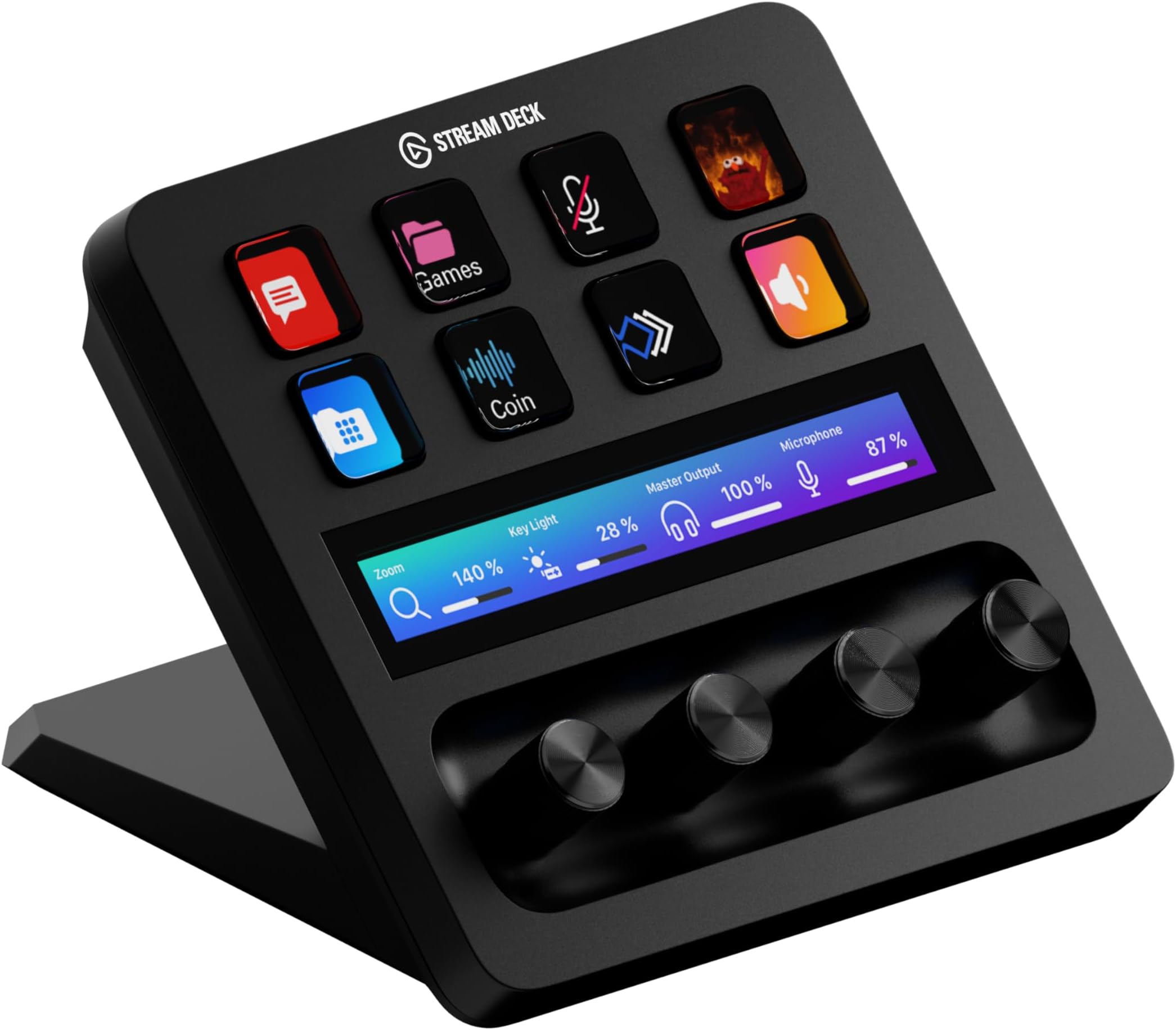
The Elgato Stream Deck + is a professional-grade, fully customizable control surface featuring 15 tactile LCD keys, a touch strip, and dials for precise management of audio, video, lighting, and more. It supports USB-C connectivity and XLR inputs, integrates seamlessly with popular streaming and production software, and offers AI-enhanced audio tools like Voice Focus. Designed for creators who demand efficiency and versatility, it comes with a robust plugin ecosystem and regular updates to future-proof your creative workflow.


| Asin | B0BJL8SJ59 |
| Audio Input | USB-C |
| Brand Name | Elgato |
| Connectivity Technology | USB |
| Country Of Origin | Taiwan |
| Customer Reviews | 4.6 4.6 out of 5 stars (4,526) 4.6 out of 5 stars |
| Frequency | 20 KHz |
| Included Components | USB Cable |
| Item Dimensions D X W X H | 14D x 13.8W x 11H centimetres |
| Item Weight | 470 Grams |
| Manufacturer | Corsair |
| Manufacturer Part Number | 20GBD9901 |
| Model Number | 20GBD9901 |
| Number Of Items | 1 |
| Output Connector Type | XLR, 1/4" TRS, RCA |
| Power Source | Corded Electric |
| Product Warranty | 2 year manufacturer. |
| Upc | 840006645146 |
| Voltage | 1 Volts |
R**Y
Love it!
A small in size product with a giant sized impact. I am no streamer but this still gives so much value to any PC user as it's super flexible and can be used for a whole range of things. Is really easy and simple to set up, using it is an absolute breeze and the quality of it's casing/body along with its controls feel high and sleek. The screen on each button and above the dials is bright and crisp, you can customize the picture on each to youyr desire, me personally I like to ditch the labelling feature as I do think the text can be a little small purely because of the size of the buttons but I am almost obsessed with adding cool little pictures that represents my controls, I just source these from google images so really you can place whatever you like or even go for a theme. You can do simple things at a touch of a button such as load up your favourite web pages, I have certain programmes set up like emails, or specific launchers I use to play the old call of duty games on, you can actually clean up your desktop of all your shortcuts and just use this instead which is neat. If you are more creative than me I am sure there are all kinds of smart things you can do, I actually have mive game/chat volume mixed onto one dial so I can simutaneously increase one and decrease tohe other so it's really handy for all purposes. I have the fear that this is a device that will make you appreaciate it even more when it's taken away from you or removed from your set up. The only gripe I have is that everytime I try to sign in on the stream deck app, it takes me to the webpage where I log-in and for some reason it comes up with an error everytime. So for now I download any plug-ins on the webpage then have to run the file and install it on the stream deck app seperately. I am sure there will be a fix around for this but I just have not found it yet. All in all, a great purchase for anyone looking to improve their gaming, streaming or casual pc set up.
K**N
Top Quality
The Elgato Stream Deck + in White is an absolute upgrade for anyone who wants more intuitive control over their workflow. The build quality is top-notch as always solid, premium, and the white finish looks stunning on a clean desk setup. The combination of customizable buttons, touch strip, and rotary dials makes it incredibly versatile. Assigning actions is super easy through the Elgato software, and the dials are surprisingly useful for adjusting volume, switching scenes, or controlling lighting with real-time precision. Everything feels smooth and responsive. What I really appreciate is how well it integrates with OBS, audio mixers, and productivity apps. Whether you're streaming, video editing, or just want quick shortcuts for daily tasks, it adds genuine efficiency. A bit pricey, yes but you can feel where the money goes. If you want both functionality and aesthetics, this is one of the best tools you can put on your desk. Highly recommended.
M**5
Huge Potential – Even as a Complete Beginner
I am relatively new to the Elgato Stream Deck + and, if I am completely honest, I don’t think I have even scratched the surface of what this thing is capable of yet. What I really like about it is the concept and the sheer amount of possibilities available once you start properly setting it up around your own workflow. The combination of buttons, dials and the touchscreen gives you so many options for creating shortcuts and speeding up repetitive tasks. The ecosystem is probably one of its biggest strengths. There are loads of plugins, icon packs and integrations available, with a huge amount of additional content created by the community. Everything feels very mature and well supported rather than like a product that has been released and forgotten about. I actually purchased the Logitech MX Creative Console before this, and for my needs the Stream Deck + is in a completely different league. I found the Logitech extremely restrictive outside of its Adobe integrations. If you primarily work within Adobe’s ecosystem then I can see the appeal, but once I wanted to do more with it, I quickly started hitting limitations. The Stream Deck + feels far more open and adaptable because I can configure it around the way I work rather than having to adapt my workflow around the hardware. One of the coolest things I have discovered is the ability to create your own custom plugins. I actually had an idea for my own branded plugin and, despite not being a developer, managed to create it with the help of AI to do the coding for me. Being able to take an idea in my head and turn it into something that actually works on the Stream Deck + has completely changed how I look at the device and its potential. There is definitely a learning curve, particularly if you want to go beyond simple shortcuts, and I still have a lot to figure out. However, I actually see that as part of the appeal because the more I learn about it, the more things I realise it can do. Overall, I would highly recommend the Stream Deck + to anyone looking to improve their productivity and speed up their workflow. Whether you just want convenient shortcuts or eventually want to build something completely customised around the way you work, there is a huge amount of potential here. For me, this is what I hoped the Logitech MX Creative Console would be. The freedom and customisation of the Stream Deck + make it a much better product for my needs, and I’m looking forward to seeing what else I can make it do!
T**Z
Perfect.
Game changer. It's not cheap but it's the most well known brand for this type of product and it has a great compatability with a wide array of software that you can control from the buttons and dials. The virtual stream deck software works really well too. I use mine to control my input and outputs. I also use it to control Spotify. It's so handy as you can record macros etc and once you've set it up it just works every time.
F**S
The new is not always the best
I stream a lot and use these EVERY SINGLE TIME. Firstly I use both of them together, and they work together seamlessly, as shown in my photo, I have an older model, and the current model this review is based on. As I can only compare for these, I will: The newer model only has about half as many buttons (8 Vs 15) but it does have 4 rotation knobs instead, and they can also be pushed inwards, so you could argue it has 4 more "hidden" buttons. The performance in the newer streamdeck this is about, is much faster. When you press buttons, the response is slicker, the update is slicker, this isn't really something your audience will notice, but you will notice it. Vs the older streamdeck (picture left) I sometimes wonder if I pressed the button or not (for a split second - but during a stream, it feels much longer!) The rotation knobs are really designed to control volume, which is kinda useless to me, as I have a dedicated audio controller to do this with built in compressors and what not, and for the money it costs, I do begin to wonder exactly who are they aiming this for? You either have the desire to spend the money and get the dedicated gear, or you don't, and get the cheaper option, but to pay for audio sliders minus any of the EQ and compression is a mystery, at least to me. I got the newer stream deck thinking I could use those knobs to actually control the rate at which other things happened, for example the changing of scenes etc, but I was disappointed. Aside from all the volume controls you could shake a stick at, and I already had a big stick, the only thing you could do was adjust the brightness of the streamdeck (pointless use of a dial). It also let you bind it to a keyboard - for example turn right +(plus) key, turn left -(minus) key. I found this useful to scrob through replays in a more natural way. Overall my experience is very good, and I certainly find it a brilliant companion if you already owned the older streamdeck. If you own neither, then it really comes down to the question, do you already have a way to control your audio levels? If yes, buy the old one, you get so many more buttons for so much cheaper. If you don't have a way to control your audio volumes, then really think about it... Do you really want to spend this much, to control ONLY volume levels, and next week be watching "how to make audio sound better" videos, or is it perhaps worth your while, to save the extra cost, buy the older setup, with extra buttons, take the savings and put them towards a dedicated audio controller that comes with all the bells and whistles you need to sound better, already built in? I'm sure given time, and a few good plugins, the newer streamdeck reviewed here will make better use of the control dials, and make my review worth updating, until then, I can't recommend it unless you already have the old one, and need more.
J**T
Really great tool, helped speed up my workflow. It feels robust and easy to setup!
Benefits for Video Editing: Efficiency: Video editors can dramatically speed up their workflow by assigning common tasks to the Stream Deck+ buttons and dials, cutting down the time spent navigating menus or remembering keyboard shortcuts. Tactile Feedback: The physical buttons and dials provide a satisfying tactile experience that keyboard shortcuts lack. This allows editors to focus more on their project and less on hunting for commands or settings. Multi-functionality: The ability to customize each key and dial for specific software allows editors to create highly specialized setups, saving time and ensuring that all necessary tools are readily available. Enhanced Focus: By centralizing control on a single device, editors can maintain focus on the creative aspects of video production without being distracted by software navigation. Conclusion: The Elgato Stream Deck+ is a valuable asset for video editors, offering a high degree of customization and control. Its integration with popular editing software, combined with its tactile input options, makes it a powerful tool to enhance workflow, save time, and improve precision in editing tasks. Whether you're an amateur or a professional, the Stream Deck+ can significantly elevate your editing efficiency and creativity.
R**B
A must for streamers. Solid kit.
I used Stream Deck before getting the +. If you stream this is a must. I'd tell anyone who's looking to buy a Stream Deck to just pay the extra cost and get the +. Great bit of kit.
A**R
Not Just For Streamers
I bought this as a bit of a project to tinker with. I don’t stream but I do play games and particularly MS Flight Simulator and so was won over by the 4 twist knobs and the potential to assign these to autopilot functions such as altitude, heading and airspeed. As yet I’ve not done this, but I have assigned to other sim type games that use hot keys and love the way you can create your own icons to display on the buttons. I’ve also used it to define Windows shortcuts. The software is simple to use and there are tons of templates that people have developed if you don’t want to make your own. So far Ive really enjoyed exploring it as a bit of kit, I think when I eventually get around to setting up flight sim is when I’ll see its full capabilities.
W**R
Éra o Produto esperado
Chegou antes do praso funcionando perfeitamente
A**E
Great Addition to your Set up
This has been one of my best purchase in 2025, I bought this primarily for my MSFS and have enjoyed using it too for other apps. Fully customizable buttons, touchscreen and dials a must have for productivity and gaming enthusiasts.
W**S
Works PErfectly and really Helpful
Arrived perfectly and it's been my main tool since, I have multiple monitors so it saves me time on switching or searching tabs just to mute a microphone or do an automated action!
S**.
Un peu cher mais super quali !
Top
V**L
A Must-Have Tool for Streamers, Content Creators, and Power Users!
The Elgato Stream Deck + is a game-changer for anyone serious about streaming, content creation, or just looking to enhance their computer setup with more buttons and dials. This device is incredibly versatile and easy to set up, making it an essential part of my daily workflow. The customizable buttons and knobs allow for endless possibilities, from launching apps and controlling audio to automating complex tasks with just a tap. The build quality is top-notch, with responsive buttons and a sleek design that looks great on any desk. The added touchscreen and rotary knobs are a fantastic addition, giving you more control and customization options than ever before. It’s especially useful if you’ve ever wished you had more physical controls at your fingertips, whether for streaming, video editing, or just managing multiple tasks on your computer. It integrates seamlessly with popular streaming software like OBS and Twitch, and also works great with tools like Photoshop, Premiere Pro, and even basic desktop functions. The Stream Deck + has saved me so much time during streams and editing sessions, and it’s a joy to use for day-to-day tasks as well. Whether you’re a seasoned pro, a content creator, or simply someone who wants more buttons and dials to streamline your computer use, this is a tool that will elevate your setup and make your work so much easier. Highly recommended!
Trustpilot
2 months ago
2 weeks ago