Buy anything from 5,000+ international stores. One checkout price. No surprise fees. Join 2M+ shoppers on Desertcart.
Desertcart purchases this item on your behalf and handles shipping, customs, and support to Portugal.
🚀 Triple your screens, not your desk clutter!
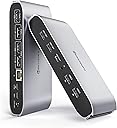
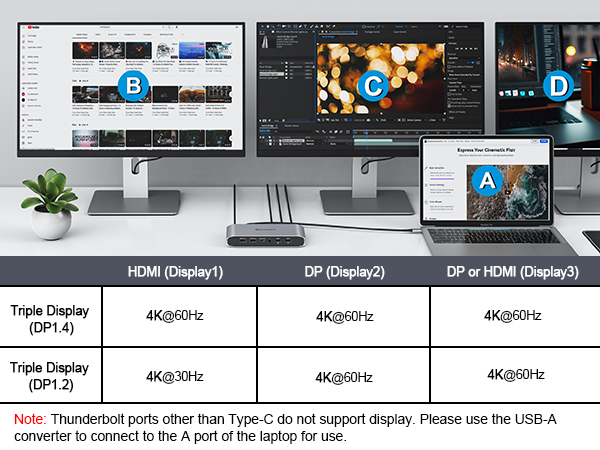
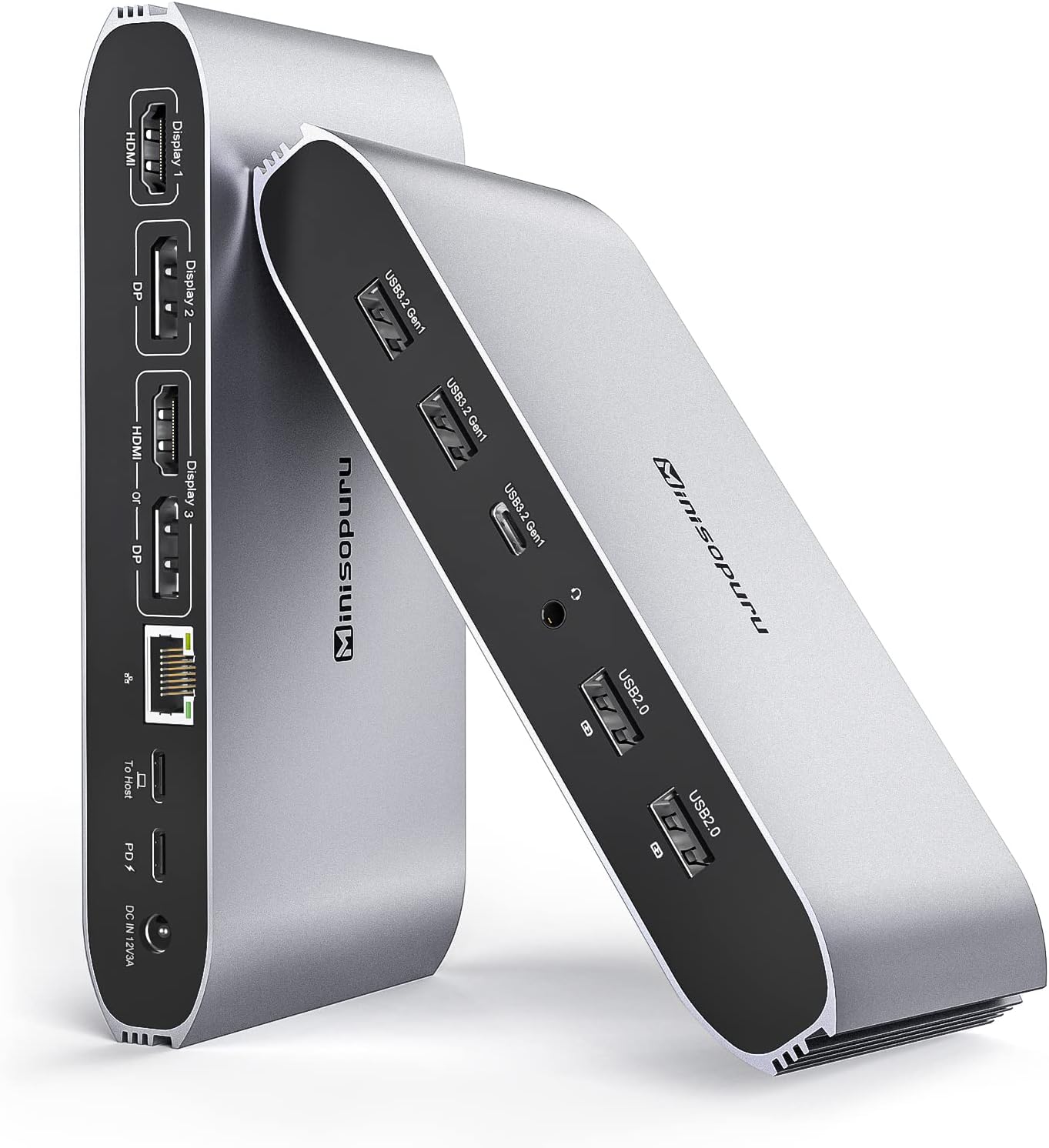
The Minisopuru DisplayLink Triple Display Docking Station is a powerhouse accessory designed for MacBook M1/M2/M3/M4 and Windows laptops. It overcomes native display limitations by enabling up to three simultaneous 4K@60Hz external monitors via 2 HDMI and 2 DisplayPort outputs. Equipped with 13 ports including USB-A, USB-C data, Ethernet, and audio jack, plus 100W USB-C charging, it’s a comprehensive hub that streamlines connectivity and boosts productivity for professionals craving a sleek, multi-display workspace.


| ASIN | B0BJ28RQ2N |
| Best Sellers Rank | #16,545 in Electronics ( See Top 100 in Electronics ) #270 in Laptop Docking Stations |
| Brand | minisopuru |
| Color | Silver |
| Compatible Devices | MacBook Pro,MacBook Air ,MacBook M1,MacBook M2 MacBook M3 MacBook M4 etc Macbook; iMAC 24 inch, iMac M3 iMac M4 etc iMAC; Mac Mini 2018 Later & Mac Mini M4 Compatible Devices MacBook Pro,MacBook Air ,MacBook M1,MacBook M2 MacBook M3 MacBook M4 etc Macbook; iMAC 24 inch, iMac M3 iMac M4 etc iMAC; Mac Mini 2018 Later & Mac Mini M4 See more |
| Customer Reviews | 4.2 out of 5 stars 755 Reviews |
| Hardware Interface | 3.5mm Audio, DisplayPort , Ethernet, HDMI , USB 3.0, USB 3.2 Gen 1, USB Type C |
| Input Voltage | 36 Volts (DC) |
| Item Dimensions L x W x H | 6.61"L x 3.15"W x 1.06"H |
| Item Type Name | DS808 Displaylink docking station |
| Item Weight | 520 Grams |
| Manufacturer | minisopuru |
| Model Number | DS808 |
| Number of Ports | 13 |
| Product Dimensions | 6.61"L x 3.15"W x 1.06"H |
| Smart Home Compatibility | Not Smart Home Compatible |
| Total Number of HDMI Ports | 2 |
| Total USB Ports | 7 |
| Total Usb Ports | 7 |
| Warranty Description | 2 year |
| Wattage | 100.00 |
M**K
Excellent Docking Station – Triple Display Works Perfectly!
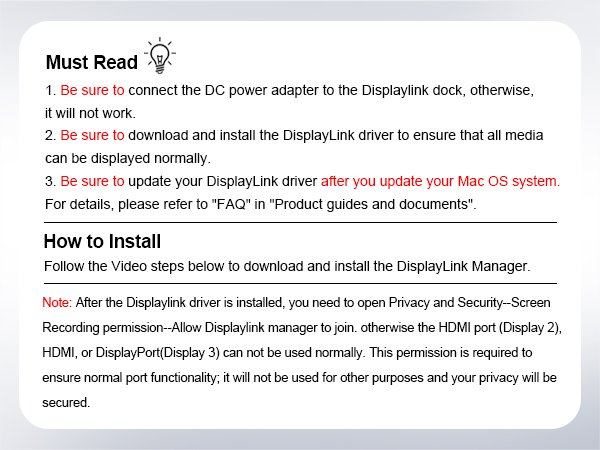
I've been using the Minisopuru DisplayLink Triple Display Docking Station with my MacBook and Steamdeck and it's been fantastic. I was initially skeptical because Macs—especially the M1 and M2 chips—are notoriously tricky when it comes to supporting multiple external displays, but this docking station completely solves that issue. Setup was straightforward. After installing the DisplayLink driver (which the included instructions walk you through), everything connected seamlessly. I now run three external monitors using the combination of 2 HDMI and 2 DisplayPort options, and all displays are crisp, lag-free, and stable. This dock also gives me tons of connectivity: 100W charging keeps my MacBook powered without needing a separate charger. The USB-C and four USB-A ports are super handy for accessories. Ethernet connection is solid for when I need a more stable network. Even the audio jack is a nice touch for quick headphone plug-in. I use this for both work and creative projects, and it’s streamlined my whole setup. The build feels solid, and everything works as expected. Highly recommend this for anyone looking to expand their MacBook's capabilities—especially if you're aiming for triple displays. Totally worth it!
C**G
Works Perfectly for My M1 MacBook
I recently received the Minisopuru DisplayLink Triple Display Docking Station, and I’m thoroughly impressed. It arrived quickly and was securely packaged, and the setup was very straightforward. I’m using it with my MacBook M1, and it solved one of the biggest pain points—external display limitations. This dock allows me to connect three external monitors seamlessly via DisplayLink, and all of them work flawlessly. No lag, no disconnects, and it supports high resolution with crisp visuals. The build quality is solid—feels premium and sturdy—and it doesn’t take up much desk space. The extra USB ports and Ethernet are super handy, and it’s really streamlined my work setup. Highly recommend this if you’re a Mac user looking for a powerful and compact docking solution. Definitely worth the price.
L**'
Compatible with Macbook Air M2!
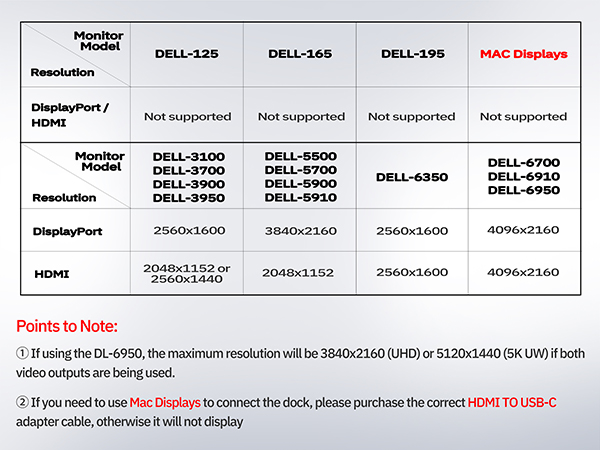
This was a great purchase! Price is good compared to other docking stations and it works for my Macbook Air M2 laptop. I have two older Dell model monitors that does not have HDMI, it only has VGA and DP. I needed a docking stations with at least 2 Dport ports or VGA and Dport. This has two DP ports, my monitors work great and I can use my dual monitors no problem! The dock also has many USB ports so I was able to hook up my camera, Logitech mouse and Logitech keyboard. Im not a fan of the apple keyboard or apple magic mouse so I like that I’m able to use my previous PC accessories. There is no lag and good quality. Definitely recommend if you’re looking for something affordable and compatible for your macbook.
C**S
Unreliable & VERY Glitchy - Buyer BEWARE
I purchased this Minispuru DS808 DisplayLink docking station at the end of May 2023. It barely lasted a year before the display out ports started to fail on the back. I thought perhaps it was the cables, but despite trying different brand new HDMI cables, and even trying different monitors, the display out functions started to intermittently fail until they stopped working all together in December of 2024. I filed a support claim, and their customer support is atrocious. I had to send REPEATED emails to get their attention, and then once they agreed to replace the unit (only after I sent my defective one back mind you)… I never got any tracking numbers OR any confirmation emails saying that they sent it out! I had to email bombard them after not receiving anything for weeks until I FINALLY got a confirmation that they’d not forgotten about my replacement. I finally received the second unit, and then starting in August of 2025, one of my two displays started cutting out again and everything would default back to one display! RIDICULOUS. I am now starting the painful process of getting it replaced, although I have half a mind to dispense with Minisopuru all together for literally any other option. For those wondering, yes, I’ve always made sure my computer OS was up-to-date, AND that I downloaded and had installed the latest version of the DisplayLink drivers. These units are built poorly, the performance is even worse, and the Minisopuru Customer Service is ABYSMAL.
J**O
Almost Perfect
This dock is almost perfect. It was easy to setup and has a useful number of ports. It worked cleanly to power two monitors from my MacBook using DisplayPorts. I do occasionally have trouble with it properly connecting to my 3.5mm speaker. Because the included power adapter is only 35w, It does not change the laptop through the 'host' USB-C unless you additionally plug the power charging cable into the PD port. This is both positive and negative. There isn't a large transform to power the dock but also feels like this is a missing feature.
M**S
Amazing Docking Station to portray your Monitors!
Amazing Docking Station! Bought this to connect 4 monitors - 3 via HDMI, 1 by DP. After downloading and installing the graphics display, works perfectly to link all 4 monitors to my MacBook. The setup was very easy to follow and the items that came with the product were useful as well. Great quality for a reasonable price! Decent amount of ports available and charges good, too. Very happy with my purchase!!!
S**G
Solves multiple monitor issue for MacBook M2 series eliminating hubs, connectors, and cables
Great product, able to remove jerry-rigged kluge of hubs, connectors, cables to setup 3 external monitors for MacBook M2. Had to download the driver, and bought a DisplayLink connector to HDMI after using the 2 build-in HDMI slots.
C**D
Works great and easy to set up
I had this DS808 plugged in and was using it with three monitors within 10 minutes of it arriving at my house. Very easy set up, very nice packaging. Instructions are very well written including the additional USB flash drive that includes drivers. The provided cables seem to be a very, very good quality. My favorite part (other than being able to connect three monitors) is that because it is powered I can use it to charge my watch, phone and anything else that just needs a USB connection. I bought this because my company is going remote and they are providing us with MacBooks to use at home. I’ve never liked working off a single laptop screen so having multiple monitors was a must. Why did you pick this product vs others?: I felt the price was good. And I had coworkers that had also bought one of the earlier versions and they spoke highly of it.
T**F
Display Link! Can run off of USB A - Fully functional, but otherwise mediocre.
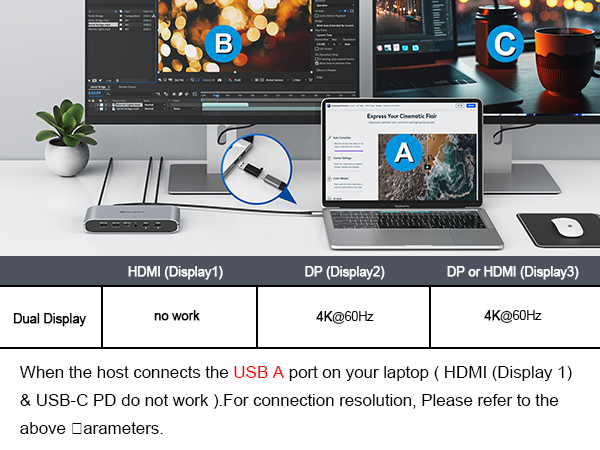
So there are a few docking stations listed on this ad currently - this review is for the 13 in 1, that doesn’t say it’s display link, but it is in the title. I’d assume it applies to the display link one too, but, I’m not 100% certain. This is a hybrid display link docking station. 1 video output isn’t display link at all - which allows you to use it without the drivers. This also allows it to be used with your phone - and boot up samsung DEX, or just have a larger screen with a keyboard and mouse. At least one of the other two outputs do use display link, and as such you need to install the drivers for it. The great thing about display link is that it works like an external graphics card. This means it’s not loading up your usb c port, and also means you can run that video output off of a USB A for these displays. The third great thing is for the Mac guys that can’t run different things on multiple displays. If you don’t need display link for one of these reasons, then you should be saving yourself $100+ and buying something else. I do love that the guides and manuals are listed in the ad and can be downloaded prior to purchase. I wish more companies did that! The unit itself is solid and has some weight behind it. It’s just a little bigger than my cell phone and about twice as thick. It comes with it’s own power supply, which needs to be used, but powers the unit only. USB charging your laptop requires a second power supply - which worked fine for my computers that draw 65w (rated at 100W). The unit itself draws about 2.2W when not in use, and about 3.3 when it is. It does get a little warm, but definitely not hot. I love that it comes with the necessary drivers on a USB key - and it also includes a usb A to USB c adapter if you are using it with an older computer (like I am). On that note - I used the drivers, and everything worked - except if the computer went to sleep I would get no monitors when it turned back on. I’d have to do a hard reset. Even after unplugging it I had the same issue. This was with windows 11, however a system restore fixed it back up (temporarily I just had to do a hard reset). The next time I used the display link drivers found on the internet and didn’t have that issue. It may have been a one off, or unrelated, but I would still suggest using the ones online, and they do direct you there in the literature as I don’t think I’m supposed to/allowed to endorse/link other websites in a review. Like I said in the title - nothing fancy about it - it just works. Using USB A I did get a max of 4k at 30Hz, so I went to 2k at 60 Hz. This restriction doesn’t apply to usb C applications. It included everything I needed - the usb c double ended cord, USB A to C adapter, and the required 12V 3A power supply with barrel connector.
D**R
Endlich drei externe Monitore am MacBook M4 – funktioniert einwandfrei!
Nach langem Suchen nach einer Lösung, die wirklich drei unabhängige 4K-Bildschirme an meinem MacBook Pro M4 ermöglicht, bin ich bei dieser Dockingstation gelandet – und ich bereue keine Sekunde. Die Installation des DisplayLink-Treibers war in unter fünf Minuten erledigt, danach liefen sofort alle drei Monitore (2 × HDMI + 1 × DisplayPort) mit flüssigen 4K@60Hz und komplett unabhängigen Desktops. Kein Mirror-Modus mehr, endlich echtes Extended Display auf allen drei Bildschirmen – genau das, was Apple mit seinen Chips sonst verhindert. Die Bildqualität ist hervorragend: scharfe Farben, keine Latenz beim Bewegen von Fenstern und selbst bei Videobearbeitung oder mehreren 4K-YouTube-Streams gleichzeitig bleibt alles butterweich. Auch unter Windows 11 an meinem zweiten Laptop funktioniert die Triple-Display-Funktion ohne weitere Treiberinstallation sofort – plug-and-play in Reinform. Die Anschlussvielfalt ist ein Traum: Fünf USB-Ports (davon zwei schnelle 5 Gbps und zwei mit Ladefunktion für Maus, Tastatur und Smartphone), Gigabit-Ethernet, das stabil und schnell läuft, sowie ein kombinierter 3,5-mm-Klinkenanschluss für Headset. Besonders praktisch: Das 100-W-PD-Laden versorgt mein MacBook gleichzeitig mit voller Leistung, selbst wenn alle Ports belegt sind – kein Akkuverlust mehr bei intensiver Nutzung. Verarbeitung und Design sind top: Das Gehäuse aus Aluminium fühlt sich wertig an, wird kaum warm und steht dank Gummifüßen bombenfest auf dem Schreibtisch. Die Status-LEDs sind dezent und nicht nervig hell. Kurz gesagt: Wer mit einem M1/M2/M3/M4-MacBook oder einem Windows-Laptop ernsthaft produktiv mit drei externen Monitoren arbeiten möchte, bekommt hier eine absolut zuverlässige, zukunftssichere Lösung, die hält, was sie verspricht. Für mich das beste Dock, das ich je hatte – klare Kaufempfehlung für jeden, der seine Multi-Monitor-Träume endlich wahr machen will!
S**H
Usefull Docking Station for 3 Displays Output for Mac M1/M2 Device
Nice Docking Station for multiple display output from Apple M1 /M2 chip devices or windows using DiplayLink Driver Software where only one external display given. It can output 3 external monitors. But I bought it little costly as now it is cheaper .Overall nice product and easy to use using manual .
D**O
Buen producto para Macbook Pro M2
Excelente hub funciona perfectamente tengo una macbook pro M2 y pude conectar 2 displays externos independientes, solo se necesita instalar el driver de displaylink, pense que tendria un retraso pero me sorprendio que funciona perfectamente, definitivamente lo recomiendo
A**O
hat mir allgemein gut gefallen ...
Ich habe die Dockingstation von Minisopuru nun einige Wochen im Einsatz und bin insgesamt positiv überrascht. Die Verarbeitung ist wirklich sehr gut, das Metallfinish wirkt hochwertig und das ovale Design hebt sich von vielen anderen Modellen angenehm ab. Besonders praktisch finde ich die Möglichkeit, mehrere Bildschirme anzuschließen. Ich nutze ein MacBook Pro mit M1-Chip und betreibe daran zwei selbst gebaute 5K-Displays – das funktioniert problemlos und ohne Verzögerungen. Ein großer Pluspunkt ist außerdem, dass ein Netzteil inkludiert ist, das das MacBook mit Strom versorgt. Laut Produktbeschreibung sollen 100 Watt bereitgestellt werden, tatsächlich kommen bei mir allerdings nur rund 85 Watt an. Vermutlich benötigt die Dockingstation selbst auch etwas Leistung, aber da die M1-Prozessoren sehr energieeffizient sind, reicht die Stromversorgung dennoch aus. Einen kleinen Kritikpunkt habe ich: Mir fehlen einige USB-C-Anschlüsse mit hoher Datenrate (10 Gigabit). Gerade bei einer Dockingstation mit mehreren USB-C-Ports wäre es angenehm, wenn diese direkt an der Station vorhanden wären. Wer also auf viele schnelle USB-C-Anschlüsse angewiesen ist, sollte sich nach Alternativen umsehen. Für alle, die vor allem eine solide und einfach zu nutzende Dockingstation für mehrere externe Bildschirme suchen, ist dieses Modell aber eine gute Wahl. Insgesamt gebe ich vier von fünf Sternen.
Trustpilot
1 month ago
5 days ago