Buy anything from 5,000+ international stores. One checkout price. No surprise fees. Join 2M+ shoppers on Desertcart.
Desertcart purchases this item on your behalf and handles shipping, customs, and support to Portugal.
🚀 Master your dual-monitor domain with power, speed, and style!
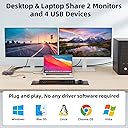
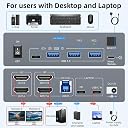
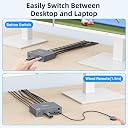
The Camgeet USB-C HDMI Dual Monitor KVM Switch enables seamless control of two computers using one keyboard and mouse, supporting dual 4K@60Hz displays and ultra-fast USB 3.0 data transfer. With 80W USB-C power delivery, wired remote switching, and broad OS compatibility, it’s designed for professionals seeking efficient, clutter-free multi-device management.


| ASIN | B0DXBY14R9 |
| Actuator Type | Push Button |
| Best Sellers Rank | #274 in KVM Switches |
| Brand | camgeet |
| Brand Name | camgeet |
| Circuit Type | 2-way |
| Color | black |
| Compatible Devices | laptop, desktop, TV Box, Windows, Mac OS, Linux, Chrome OS (with USB-C or HDMI ports) |
| Connectivity Protocol | USB-C and HDMI |
| Connector Type | Plug In |
| Contact Material | Aluminum |
| Contact Type | Normally Open |
| Control Method | Remote |
| Control Type | Remote |
| Controller Type | Push Button |
| Current Rating | 2 Amps |
| Customer Reviews | 4.0 out of 5 stars 653 Reviews |
| Included Components | 1*KVM switch; 1*USB C Cable;1*USB A-B Cable; 1*Wired Remote; 1*Power adapter. |
| International Protection Rating | IP54 |
| Item Dimensions | 4.61 x 3.54 x 1.3 inches |
| Item Weight | 250 Grams |
| Manufacturer | camgeet |
| Material Type | Metal |
| Model | KC-202CH |
| Mounting Type | Panel Mount |
| Number of Items | 1 |
| Number of Positions | 2 |
| Operating Voltage | 12 Volts |
| Operation Mode | ON-OFF |
| Part Number | USB C+ HDMI KVM Switch |
| Smart Home Compatibility | Not Smart Home Compatible |
| Specification Met | CE |
| Switch Type | Push Button |
| Terminal | Solder |
| UPC | 014679211582 |
| Unit Count | 1.0 Count |
| Upper Temperature Rating | 70 Degrees Celsius |
| Wattage | 80 watts |
D**R
Nice for multi stations
Does what it should. USB takes a couple seconds to take when flipping. Little controller line is nice. Needs usb-c for display
G**3
Where have you been?
Ok, this is gonna sound lame but it's a kvm switch... Bruh...where have u been for the past 4 years? It's compact, solid...works...what more can u ask for? Not sure what issues others have had. I have 1 cable pair going to a Dell power edge 720, using a HDMI to vga adapter, 1 cable pair to my work laptop, 1 pair to a Dell power edge 620, HDMI to vga adaptor, and my 4th pair as extra for my Alienware laptop... I used a wireless mouse dongle - works, a USB extension cable for console access to some switches, and key board. Plug and play...works from the start...couldn't be happier.
B**W
Quirky but works
Quirky, but can work. I have an M4 Mac Min, a Dell Inspiron running Linux, and a home assembled Windows machine all running 3 displays (one DP at 4k, one HDMI at 1440 vertically, one HDMI at 1080) with Keyboard+Mouse+Webcam running through the USB. Once everything is set up, it works really well! But it took quite a bit of troubleshooting and quirks to work through. Originally when only the M4 Mac Mini was plugged in, the 1080 monitor was correctly recognized. Then after working in the second machine (Linux), it lost the recognization and seemed to maybe default to a "GSV 55" 4K display? Something was weird. So unplugging everything and replugging it in seemed to work. Then I got the Windows machine all plugged in and it lost the 1080 recognition... again. It seemingly thought it was that weird 4K display. Unplugging+plugging in all sorts of combinations *eventually* worked. Now I have all three plugged in and working! Now... MacOS doesn't like getting switched from and to. Not sure why. Linux and Windows work great getting switched from and to. All the monitors are recognized and kick on. MacOS? Well, it knows it has three displays, but only the 4K DP pops up an image. The other three show up in the Display settings but don't kick on. Restarting MacOS kicks everything into gear and then all three monitors work. Because of the restart, I suspect this is more a MacOS issue than an issue with this KVM. At the end of the day tho, I like it. I've had a KVM quit on me before, so I might revisit this after several months to comment on its longevity. In the meantime, it seems to fit the bill after working through the quirks.
T**M
This KVN causes the display signal to drop and USB Devices to Disconnect
This is a simple review: I had a Greathtek 4 to 1 HDMI (2.0) KVM to connect 3 total computers to one 1440P Viewsonic. According to my purchase history, that setup has worked fine for 2 1/2 years with no issues. Why change it? I wanted to upgrade to a high-refresh rate monitor at 120 Hz. I also wanted the ability to extract sound from the HDMI signal and send it to my speakers rather than a monitor. Finally, I wanted the USB 3.0 upgrade this would bring over the 2.0 the current one is limited to. Setup is simple: plug move the HDMI cables over from the old KVM 1:1, plug in power, plug in speakers, turn it on and press the input to see an perfectly-suitable picture. *ZERO* HDMI cables are included (most KVMs include 1, 2, as many inputs as they have, or as many inputs as they have plus however many outputs they have.) Working in IT during college, I installed maybe 40 KVMs. I've never seen one not include display cables. It does include 4 USB 3.0 cables, though. Okay, job done... and the picture just went out. Fantastic. Check the cables, everything is firmly in... oh, it's back. 2 more minutes of use... and it's black -> picture -> black annnd it's gone. Well, maybe it's installing a driver or something? Nah. It will picture cycle as long as you have something plugged in. Time to try another input. Same thing. Another computer... with a different graphics card type (Nvidia Quadro T600 vs 5060Ti 16GB)? Same thing. So, either 3 inputs are broken or two computers / the monitor that worked fine just randomly died. I keep hearing the USB disconnect and reconnect sound. Computers love it when you connect and disconnect 4 devices over and over. (They do not.) The devices: Logitech Unify receiver, mechanical keyboard (backlighting off), Laser Printer (off). It's not a power issue. For general troubleshooting, I did the obvious: reinstall the monitor driver, reinstall graphics card drivers, removing the monitor through Device Manager, etc. It's only an 8-bit monitor at 2560x1440 at 60Hz. This devices advertises 7680 x 4320 at 60Hz. I should be *well* within the limits. Curiosities from the included manual: it states that there might be power issues if you don't have 4 computers and connected and 4 USB 3.0 cables connected (presumably, one to each computer.) It would make sense to require a USB connection for power delivery (And to... make the keyboard and mouse work...), but... 4? Would all 4 PCs have to be on for it to work? Also, if it requires 4 USB 3.0 inputs for power, then what is the 12v power adapter for? (My old one required one USB 2.0 [half an amp standard or 2.5 watts] connection with no external power. This, according to the manual, requires a 12 watt dedicated power adapter plus 4x .9 amp at 5 volts or... 30? watts total? What?) I also saw that you can disable EDID (Extended Display Identification Data) by pressing and holding input 1 for 3 seconds until the light goes off. Still flashing and dropping out... I'm over it. Endless power cycles, driver reinstalls, etc. later I finally gave up and replaced it with the old KVM. 3 hours later... no signal drops. 2 days later... old one still works fine. Back to Amazon this thing goes. Finally, the site is asking me to review the look/design and value for money: It's small, black rectangular prism. It looks fine and feels like a quality product (provided it's off). It has a negative value for money as it wasted a ton of time for no benefit.
S**B
Allows keyboard/mouse sharing to up to 4 devices with four button remote
This works perfectly using one keyboard and mouse with 4 computers. Super useful as I have PCs, a laptop, and a SBC test desk. Have been using this for months and the durability and design have been great.
O**S
Perfect solution
I was looking for a way to handle a home desktop and work Laptop on a single switchable unit, interfacing with 2 monitors, a keyboard, and mouse. While the second screen does not work on the desktop (it wasn't going to) it worked really well with the laptop. Works great.
A**R
Works Great - Would Recommend
Simple to set up and works great. I like how compact it is, but note this means the cables in the back are close together. You may need to connect in a certain order to ensure they fit if you have thicker cable ends. Isn't really an issue, but I could see someone with fine motor issues or arthritis struggling. Once you take your time to get everything plugged in and connected, this KVM works great. Very rarely when hitting the switch, one of the monitors may not 'connect'. Hitting the switch two more times (going back to 1, then going to 2 again) has always fixed it first try. Nearing 3 months of use and this has only happened twice. Computer 1's light is Blue and Computer 2's light is Green if that is important to you. Lights are bright and clear to see when on.
J**V
Works, but finnicky
When I first received the unit, it worked like a charm. I had no issues with the PCs and Laptops it was connected to, everything worked as expected. About a month in, I built a new PC with W10 and nothing outrageous HW wise, and around 2 weeks later I started to see some odd issues with stuttering. Things would disconnect and reconnect sometimes, but mostly the mouse and keyboard would just stop responding for 1/4s-2s and then return. At first I blamed the PC, so I plugged it into the old PC and the same issue came up after a few days. I then pointed to possible power issues, but it was already connected to a line conditioner, so I moved it to the UPS, one step further, the issue came back up a week later. The issue wasn't limited to 1 PC though, it also occurred on another laptop, but I still had 1 PC and 1 Laptop that it never happened on (A Macbook M1 and a Linux Mint system). It's likely the issue is limited to my Windows PCs, but it's a major issue no less. Powering the unit off and back on typically fixes it, but lately even that hasn't been working. I confirmed the issue was specific to the KVM by connecting a second Keyboard and Mouse to the PC, and when the stuttering occurred, I was able to use the second keyboard and mouse without issue, meanwhile the KVM unit stuttered when I would go back to it. This test was for about 2 minutes each time, using one for the time, then the other, just to make sure it was KVM specific. Overall, the unit is a great price for what you get, but clearly there's some flaws in my specific unit that is causing it to lag inputs. I'm not sure what the cause is and I haven't contacted support as of yet, but it's something worth noting. It also seems specific to my W10 instances, and not to the Macbook or Linux systems, but I'm not going to spend a ton of time trying to pin down what that might be.
M**A
Simples e fácil de colocar no setup
Serviu muito bem para o propósito! Eu tenho um notebook corporativo em que não posso instalar absolutamente software nenhum, e queria usar meu teclado, mouse, 2 telas, webcam e fone de ouvido na mesma mesa sem a necessidade de ficar trocando milhares de fios! O switch alterna rapidamente entre as duas maquinas, questao de 5 segundos! Tentei ao máximo deixar os cabos organizados, mas seria ideal ter uma mini prateleira para deixa o switch e os cabos escondidos, apenas deixando o botao dele a mostra(vem com um cabo usb com um botao tambem!)
A**R
Does what it says on the box
So far so good. Setup was pretty easy (bonus points for providing USB cables with the unit) and it operates as I would expect for a KVM. More bonus points for it acting as a USB hub instead of just supporting keyboards and mice. I noticed a couple of reviews mentioning problems around the 4 month mark. Fingers crossed I won't be reconsidering this review in a couple months.
L**B
Share one mouse and keyboard to many computers
The 4 port USB switch hub saves a lot of space and a lot of fuffing around. Just one button click and I can control a different machine. I use this to share my Logitech Mouse and Keyboard amongst many computers. 2 PCs and 1 Mac. With an additional slot to spare for another computer. It works fine. I like the remote control. There's a 1 second delay when switching as the computers re-detect the USB. I dont mind that.
U**R
Mala compra
En el segundo mes utilizando el dispositivo, dejó de funcionar un puerto de puertos de entrada. Reconecté el dispositivo en otro puerto. Despues de unos 5 meses que lo he usado el puerto 4 de salida ya no funciona. Tuve que reconectar el cable correspondiente al puerto 2, ahora en el puerto 3. Considero que el termino dispositivo de "mala calidad" se queda corto. Casi catalogaria este dispsitivo, virtualmente como "una estafa". Es el dispositivo de mas baja calidad que he comprado en mi vida. He comprado dispositivos que no funcionan desde que llegan. Pero eso es menos peor porque puedo regresarlo. Pero este empezo a fallar cuando el tiempo para devolver el producto (30 dias) ya habia expirado.
S**U
3x2 dual monitor KVM
Works without any issues with 3 computers and two monitors, using all four usb inputs.
Trustpilot
1 month ago
3 weeks ago