🚀 Elevate your network game with silent, smart, multi-gig power!
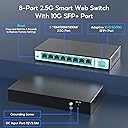
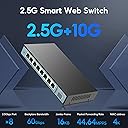
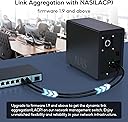
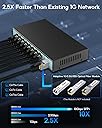
The SODOLA 9 Port 2.5Gb Smart Web Ethernet Switch delivers 8x 2.5G RJ45 ports plus a 10G SFP slot, enabling blazing-fast multi-gigabit connectivity. Its fanless metal design ensures silent, durable operation while advanced features like Link Aggregation, VLAN, QoS, and IGMP support provide professional-grade network management through a user-friendly web interface. Perfect for upgrading home labs or small business networks, it offers seamless compatibility with modern 2.5G devices and a robust 60Gbps switching capacity to handle heavy data loads with zero latency.


| ASIN | B0CFQKYDRM |
| Best Sellers Rank | #1,001 in Computer Networking Switches |
| Case Material | Metal |
| Customer Reviews | 4.1 4.1 out of 5 stars (224) |
| Data Transfer Rate | 2500 Megabytes Per Second |
| Date First Available | August 23, 2023 |
| Interface Type | RJ45, SFP |
| Item Weight | 1.45 pounds |
| Item model number | 8*2.5G+10G SFP(Managed) |
| Manufacturer | Shenzhen hongyavision Technology Co.,Ltd. |
| Product Dimensions | 7.48"L x 3.94"W x 1.1"H |
I**E
Very impressive managed Switch
Edit: As of late Oct 2024, the switches have performed wonderfully. It logged 2 bad packets coming from a device on port #5 (whatever device that might be, I don't really care) out of multiple terabytes of transferred data. One thing I did note is when the switch is on DHCP, it works great, then after a few months you go back and find it offline. So where did it go? Back to 192.168.2.1, it's default. Easy fix, simply take it off DHCP and assign it a static and ensure you SAVE it which is on a different page. Just wanted to let you all know. Still very happy. EDIT: As of Feb 2024, the switches have been passing a humongous amount of traffic while running flawlessly. According to the switches internal monitoring log there are NO bad packets sent or received on any port since installed in early Dec 2023. I recently had an intermittent issue where a cable leading to the router wasn't fully plugged in (somehow) so I received many Port #1 is down event messages in my router. Is a switch port going bad? I was lifting the switch up to read a non-existent serial number off the bottom label and noticed the router to switch RJ45 connection light extinguish. After I reseating the cable, the light returned and all was well thereafter. In a nutshell, no problems from the switch, even after hundreds of TB's of transferred data. I would ask that you don't buy this switch though. I've now bought a total of 4 and would like the units to be in stock for my clients when I need them, and if you guys buy them out, what am I going to do? :-) All kidding aside, Do what you have to do. NOTE: After reading quite a few negative comments, I've come to the conclusion based on their content that those reviews are not refering to the same Soldola switches. There are NO fans in this unit. Some people returned the units because upon power loss it reverted to factory settings. I address and solve this very minor issue below. I've edited this review only because I'm back here to buy another two units. I really should buy ten of them at once, maybe next time. Lastly, firmware. The units ship with firmware version 1.7, but I have somehow acquired version 1.9, which adds a couple options in some section. If you want version 1.9, give me a shout at tech-so-easy-AT-Outlook-com and I'll help you out (remove all dashes). Have a great day guys. --------------------------------Original comment-------------------------------------------------------- Bought two 2.5g 9 port managed Sodola switches (SL-SWTGW218AS), the ninth port being the backplane 10g SFP+ port. All other ports being 2.5g standard ethernet RJ45 jacks. From a professional installer of networking, $99 for each 9 port 2.5g managed switch didn't leave me much confidence, that is until they arrived, plugged in and started working their high speed magic. Random notes: The switch is clad with a metal exterior and two underside nail slots to hang the unit. A flathead nail or a really flat headed screw is about all it will accept without drilling. No side mount screw holes to attach ears for rack use, but it'll sit quite happily on a shelf for you. I stacked both atop each other with some full length velcro to keep them together and to provide some air flow between, then inserted the shortest length SFP+ copper cable I could find (ASIN: B09F6DJQ12) in both 10G joy ports. The switches co-joined in an instant. Note that the switches default to 192.168.2.1 which you can change or allow your DHCP router/server to address, but you must save the configuration on a different page or it will default to factory after power loss. No real problem but just a heads up. User name and password to web management is on a label underneath. Honestly, I expected some glitches, some snafus, some of something bad, but it never arrived. Everything worked as expected and despite the austere web management interface, it does hold a lot of options. In my case, I wanted to aggregate (trunk) two ports at the switch and trunk two ports on my NAS to receive a 2Gbps transfer rate. The switch functions for that is easy, choose configuration, trunk group, choose two ports and hit Add. It supports both 802.1Q Vlan (tagged/untagged/no member) and 802.1Q VID for your port setup, can even lock out certain types of frames per port. Also supports QoS options per each port. One feature I like to turn OFF is Spanning Tree Protocol, other wise called Loop in the switch and it features STP options I've never seen in a budget switch, like Path Cost, Priority, P2P, Edge, etc, for those real business use cases. IGMP snooping is there and so is Port based mirroring and Port isolation. And there are even more options, probably the most option packed budget switch I've ever encountered. The manual is a single page fold out with really nothing but technical data lists. If you already know what you are doing it's really not an issue. If you don't know what you are doing, there is always "reset". Lastly, performance. On a 5ghz wireless computer trying to copy a 96GB single file to the NAS on my old gigabit setup took 2.5 hours. On the exact same setup with the two new switches and port trunking, reduced the full delivery to 30 minutes and 40 seconds, and that is on WIRELESS 802.11ac. Imagine if I had a 2.5g wired network card. There are no fans and no noise on the units I bought. The front yellow lights are quite bright but my basement doesn't care. You might opt for black electrical tape. It uses a 12v plug in adapter for power with a cord length of maybe 3 to 4 ft? Sorry for the scattered review this time. Hope this helps someone take the plunge.
K**S
Great little managed switch
Picked up this switch as I'm upgrading my homelab to 2.5G network. One of the things I needed to do was to create different vlans using Opnsense to separate my lab from the rest of the network as I'm running a lot of multicast video. Good news: - It works, and its fast I'm able to transfer full line rate - Makes almost no noise - Dosent seem to have a large power draw Meh news: The UI is very simple but setting up a vlan is a little trick you need to configure 2 parts. Lets say your vlan is vlan50 be sure to assign your untagged port to the vlan in Configuration > Vlan > 802.1Q Vlan. The next step which took me forever to figure out is ALSO go in to Configuration > Vlan > 802.1Q VlD and add the same ports to match the VID. Or else you'll never get the port on the vlan. Some obscure googling on a random comment lead me to find this solution. Posting it here for the next person, hope it saves sometime. overall besides the issue which has a solution, its a great price for a managed switch that works great at 2.5G (havent tested 10G but I have no reason to think it doesnt work well)
S**D
Great cheap switches. Few problems quickly fixed.
Purchased 3x of these switches, from SOLDA to upgrade my home network. I got 2x 6 port with 2 SFP+ and one of the 8 port with 1 SFP+. I have most 2.5G RJ45 ports with cat5e on 2.5G and 1G. One of the switches tied into existing network that uses using 2x SFP+. It runs super cool compared to any other SFP switch I own. Overall the price is an excellent value saving me hundreds of dollars over name brand (for managed 2.5G switches). I have an existing Unifi network and didn't want to spend $200 more per 2.5G Unifi switch or wire in additional networking into my home. Speed: Iperf test TCP with 2 devices with 9k MTU on different ports in parallel for 30 seconds. 2.44Gb/s on one device, 2.46Gb/s on the other. UDP iperf tests showed 0% packet loss, 0.007ms jitter. Features: I am using the following features. All work well with minimal issues. VLANs tagged, native (PVID), and untagged. Jumbo frames at 9k. IGMP Snooping. 3x port LACP Trunk. RSTP with one SODOLA switch as root worked great and without any issues. QOS on Ports. Issues I faced: 1. Admin interface was at 192.168.2.1 and I am under a different subnet. I first plugged it into my PC and setup DHCP and then moved it into desired room. One thing the interface doesn't tell you is you have to go to Tools -> Save to store settings when power cycles. Lost settings a few times before realizing it. 2. My network doesn't have loops, but it went down multiple times during setup. What I found is that STP or RSTP must be enabled. 3. Don't send ICMPs to the switch. I sent 9k ICMPs to test jumbo frames and every time it crashes the management interface and has to be power cycled. All issues were very minor with workarounds.
L**.
Lo switch SODOLA 9 porte 2.5G si presenta come una soluzione di networking di fascia superiore, offrendo una potente connettività a 2.5 gigabit al secondo per ogni porta oltre ad una porta SFP+ 10 Gb. Questo dispositivo si è dimostrato una risorsa preziosa per ottimizzare la mia rete domestica o professionale, fornendo una piattaforma affidabile e ad alte prestazioni. La compatibilità con lo standard IEEE 802.3bz per la velocità di trasmissione dati 2.5GBase-T rappresenta un vantaggio significativo, permettendo il supporto di dispositivi abilitati a questa velocità senza compromettere la compatibilità con standard precedenti come il Gigabit Ethernet. La gestione intelligente del traffico attraverso funzionalità quali il Quality of Service (QoS) e il VLAN tagging ha consentito una distribuzione ottimale della larghezza di banda, prioritizzando il traffico critico e garantendo una fluida comunicazione tra i dispositivi con necessità diverse. La configurazione avanzata e flessibile ha permesso la personalizzazione delle impostazioni di rete, inclusa la segmentazione della LAN per migliorare la sicurezza e l'efficienza nella gestione dei dati. Inoltre, l'interfaccia utente intuitiva ha reso agevole la gestione delle opzioni di configurazione anche per gli utenti meno esperti. La costruzione robusta dello switch, con un design che favorisce il raffreddamento e una dissipazione efficiente del calore, ha contribuito alla sua affidabilità nel mantenere alte prestazioni anche in condizioni di carico di lavoro elevate. In conclusione, lo switch SODOLA 9 porte 2.5G si distingue come una soluzione di rete avanzata, offrendo prestazioni di trasmissione dati elevate, una gestione flessibile e una robusta affidabilità, il tutto con una configurazione avanzata che soddisferà le esigenze degli utenti più tecnici e esigenti.
S**E
J'ai acheté ce Switch il y a quelques semaines maintenant et je dois dire que je suis très satisfait. Je l'ai acheté car mon NAS est en 2.5G et mes PC aussi. Le Switch est passif, de bonne qualité en aluminium il ne chauffe pas beaucoup et pourtant j'ai 6 sur 8 ports de connectés en permanence. Il est arrivé avec la version 1.7 d'octobre 23 qui est stable, je n'ai eu aucun soucis de configuration ni de fonctionnement. J'ai configuré 3 VLAN et cela fonctionne parfaitement avec mon LAN et mes caméras. je n'ai eu aucune pertes de paquets depuis qu'il est installé. Je n'utilise pas l’agrégation pour mon NAS, en 2.5G cela suffit pour nos besoins. Le menu est simple mais fonctionnel, pas de chichi toutes les fonctions sont disponibles. Je vais du coup en prendre un 2e afin de les raccorder avec une liaison SFP. Excellent rapport qualité prix, je recommande!
G**Y
Great way to upgrade your network at value, its even got a 10sfp+ port !
'**Y
Perfect once you finally work it out. I bought this as my file server (movies) and fire stick was complaining about “source bring too slow”. That was with a 1gig bonded LAG (2 x 1gb cat6). So I upgraded to a 10g single cat 6 backhaul, from 10g switch upstairs (very cheap Brocade ICX 7250), to this 10g switch. Not one complaint since. Mine has a VLAN trunk tagged and untagged as well, easy to set up once I had played string a while. I’m using a single 10Gbe sfp+, and it gets HOT! Pro: Fast, quiet, does s the job. Good price point Con: Mine is forever losing its IP address and defaulting back to 192.168.2.1. Still fully functional but it’s getting a bit tedious. SFP+ RJ45 gets very HOT
A**S
J'ai fait l'acquisition de ce produit pour compléter mon installation. Il est administrable depuis un navigateur. L'interface ne vaut pas celles des Switch professionnels mais est suffisante. J'ai réalisé une mise à jour du firmware en version 1.9, récupéré sur le site de SODOLA, ce qui m'a permis de bénéficier de nouvelles fonctions en particulier de configurer deux trunks (agrégation de canaux) en mode LACP. - 2 ports 2,5 G pour un serveur PROXMOX - 4 ports 2,5 G pour un NAS QNAP Le tout remonte en 10 G optique sur la FREEBOX. Il est silencieux, pas de ventilateur.
Trustpilot
1 week ago
2 days ago