Desertcart purchases this item on your behalf and handles shipping, customs, and support to Portugal.
🚀 Elevate your DIY projects with vibrant touch precision and seamless Arduino synergy!
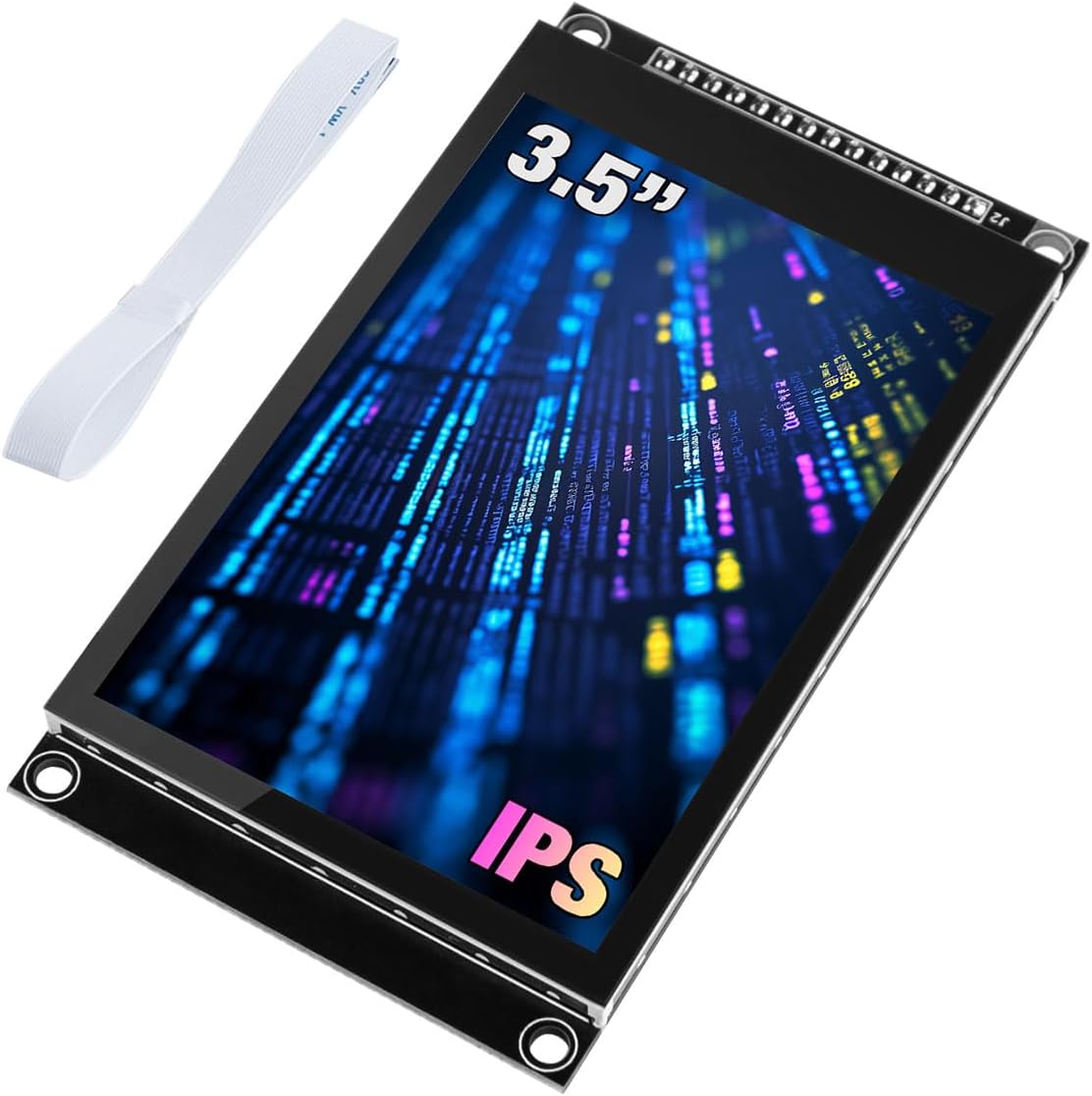
The Hosyond 3.5-inch IPS Capacitive Touch Screen LCD Module features a 320x480 resolution with 16.7 million colors on an ultra-wide viewing IPS panel. It uses a sensitive capacitive touch interface and a 4-wire SPI serial bus to save I/O pins. Compatible with popular microcontrollers like Arduino R3/Mega2560, ESP32, and STM32, it includes onboard level shifting for 3.3V/5V compatibility, multiple interface options, and a micro TF card slot for storage expansion, making it ideal for advanced DIY electronics and prototyping.


| ASIN | B0CMD7Y55M |
| Best Sellers Rank | #23,699 in Electronics ( See Top 100 in Electronics ) #665 in Computer Monitors |
| Brand | Hosyond |
| Built-In Media | 1 x 3.5 inch touch screen, FPC cables, Plastic protective box |
| CPU Manufacturer | Raspberry Pi |
| Compatible Devices | Arduino R3/Mega2560, ESP32, STM32 |
| Connectivity Technology | I2C |
| Customer Reviews | 3.9 out of 5 stars 124 Reviews |
| Included Components | 1 x 3.5 inch touch screen, FPC cables, Plastic protective box |
| Item Dimensions L x W x H | 3.85"L x 2.18"W x 0.51"H |
| Item Weight | 3.5 ounces |
| Manufacturer | Hosyond |
| Mfr Part Number | H029-A |
| Number of Items | 1 |
| Operating System | ESP32 |
| Processor Brand | Raspberry Pi |
| Processor Count | 4 |
| RAM Memory Technology | LPDDR3 |
| Total Usb Ports | 1 |
| UPC | 741421390461 |
| Wireless Communication Standard | 802.11bgn |
| Wireless Compability | 802.11bgn |
S**.
Recommended Drivers Work
This is for the 4" 320x480 capacitive touch display with ST7796s. I first tested out the display itself, and found the TFT_eSPI to work well. For reading the touchscreen, I only really tested position and haven't looked into gestures yet, but I found that both RAK14014-FT6336U and the Arduino-FT6336U libraries worked equally well for what I tested. The RAK library actually used up a bit more program memory, about 240 bytes more, so if your processor is small in that department, might consider that. Here are some tidbits that I needed to learn through experimentation that might help others get running quicker: 1) SPI interface to the display runs well at 80MHz. I used ESP32 DEV, so no problem. 2) On ESP32, use default SPI pins in order to use hardware driver, which is fastest. 3) On I2C interface for touchpad, use default pins for SDA and SCLK. Easiest way to check which pins these are is to print out SDA and SCLK to the serial port. 4) The FT6336U interrupt pin is mostly useful to wake up the processor while in a sleep state. During normal operation, interrupts constantly come in and cannot easily be used to determine when a touch has happened. Need to poll the TD_STATUS register to see if non-zero and not use the interrupt line in normal operation. 5) TFT_eSPI is a very inclusive library, but you will need to alter it unless you have a board and pin setup combo that matches one of the many examples. This is not documented well. I recommend taking the SetupX_Template.h file in the User_Setups folder, configure it according to the comments in the file, save it as a new filename, and then you only need to change a single line in the standard library files from that point onwards, even if this library gets updated in the future. Then you can either copy this custom name file to the User_Setup.h file and overwrite the original. Or, everytime a new library version comes out, just edit the User_Setup_Select.h file to comment out the User_Setup.h and add a line to use the new file you created. Both ways work well. But expect that you will need to do this bit of customization to the library. 6) I2C address for the touchpad is as in the FT6336U library, address 0x38. You can also find example scanner sketches online which will confirm your board's touchpad I2C address. Overall, the display is a great value - nice and bright, large, and with a capacitive touchscreen that pretty much works out of the box without calibration.
D**H
Nice display
Nice display well made. Sharp characters. I did have some problems with the tutorial but figured it out in a few hours.
A**R
Misleading Product - Not a True SPI ST7796S Display
This display is advertised as an SPI‑driven ST7796S module, but the unit I received does not behave like a real SPI device. The pins are labeled for SPI, yet the controller never responds to SPI commands from an ESP32‑S3 or ESP32. There is no documentation, no schematic, and no configuration pads to confirm the interface mode. After extensive testing, it appears the SPI pins are not actually connected to the controller, making the display unusable for any SPI project. If you need a reliable SPI TFT for ESP32 development, look elsewhere.
J**H
Great little display module!
This is a very nice display. It is bright and crisp. Colors look really good. When it arrived I was pleasantly surprised to find that it already had the header soldered on! It worked right out of the box. I used an ESP32 MCU to drive the display. I used the Adafruit_GFX and Adafruit_ILI9341 libraries in the Arduino IDE and they worked perfectly. The only issue I had was, as a couple other reviews have mentioned, the colors were inverted. However this was easily remedied using the tft.invertDisplay(true) command that is found in the Adafruit_ILI9341 library. I tested it with several different programs. One simply displayed a full screen photo-realistic image, one was an ioT project that pulled weather data from online and displayed it on the TFT, one was another ioT project that read the time from a time server and displayed it as an analog clock. The last one was a test of the touch screen. It uses an FT6336 chip to drive the touch screen and I2C for the touch screen communication. I used a library I found called FT6336U to interface with the touch screen. The library expects the display to be in portrait mode ( 240 W X 320 H). I use mine in landscape mode (320 W and 240 H) so I had to do a few code tweaks to get it to work in landscape mode. Once they were done the touch screen functioned perfectly. It was accurate and responsive. I really like this display and would recommend it to anyone who needs a cool display to go along with their projects.
J**C
Inexpensive capacitive touch. Beautiful color.
Works great with LovyanGFX. Easy to set up and works right the first time. Not so much with TFT_eSPY. His display uses I2s for the touch controller, and eSPY is not easy to configure for i2s touch. But it can be done.
N**O
Great Display, just takes tweeking
These are very nice displays. I was able to use the Adafruit ST7789 library on the Mega but had to make a few strange tweeks. -------------------------------------------------------------------------- ISSUE 1) My colors were totally wrong Colors were off so had to: BGR() macro on all colors in my config (like this) // This display swaps R and B channels. Macro corrects all color values. // RGB565 format: RRRRR GGGGGG BBBBB #define BGR(c) ( ((c & 0xF800) >> 11) | (c & 0x07E0) | ((c & 0x001F) << 11) ) // ── Papyrus palette (RGB565, BGR-corrected) ─────────────────────────────────── #define COL_PAPYRUS BGR(0xF5E6) // warm tan background #define COL_INK BGR(0x2A05) // dark brown ink #define COL_GOLD BGR(0xFEA0) // amber/gold accents #define COL_DARKGOLD BGR(0xCA40) // deeper gold for borders #define COL_RED_INK BGR(0x9000) // terracotta red for errors #define COL_SUCCESS BGR(0x0600) // dark green for solved state #define COL_DIMINK BGR(0x8C6B) // faded ink for inactive elements #define COL_STONE BGR(0xC5A3) // mid-tone stone for borders -------------------------------------------------------------------------- ISSUE 2) all my text was inverted (like i was looking in a mirror) I was using tft.setRotation(2); in my startup, so.... in the actual Adafruit_ST7789.cpp file of the library I had to modify case 2 (2 in my case because that was my rotation) and add ST77XX_MADCTL_MX in that setRotation function Like this: case 2: madctl = ST77XX_MADCTL_MX | ST77XX_MADCTL_RGB; _xstart = _colstart2; _ystart = _rowstart2; _width = windowWidth; _height = windowHeight; break; -------------------------------------------------------------------------- I suggest using AI (like Claude) to help you configure. It ultimately helped me sort all this out. Hope this helps someone else. (terrable pic attached, but supper clear in real life)
S**.
Great display once it's working
The doc is useless as are the libraries and samples. I'm running this on a teensy 3.2 and it finally works well. I'm using ILI9341_t3 library but took a few hours of playing and searching to figure out that i had to add tft.invertDisplay(1) to get the colors to be correct. The doc from the manufacture is terrible. The examples from the manufacture don't work and the libraries from the manufacture don't work. There are many typos in both and are not worth even looking at. At this point I'm not using the touch part of the screen and I am only just starting to play with the SD card
K**?
Bright and colorful works with esp32
Worked with ESP32-S3-R8N16 using TFT_eSPI.h family and the User_Setup.h settings below. It's an ST7796 screen but the config works with the ILI9488 driver. I'm using it to animate some dials and it refreshes the bitmap's well with good colors. I think it runs at 30hz but I'm not sure. Make sure all the pins are connected to the board. RST goes to the board's RST pin. This screen RST pin must be connected to the controller's RST pin, or you'll get white screen. LED/backlight is always on so LED pin is not necessary. The SD card works by simply connecting the SD pin. It's a microSD card which is excellent! Some other ones use a standard SD card. Spacing and quality of the pins are acceptable. The added ribbon cable is a nice addition but I have no use for it. I didn't try the touch. #define ILI9488_DRIVER // #define ST7796_DRIVER #define TFT_CS 5 #define TFT_DC 18 #define TFT_RST -1 #define TFT_MOSI 13 #define TFT_SCLK 14 #define TFT_MISO 12 #define SPI_FREQUENCY 40000000 #define SPI_READ_FREQUENCY 20000000 #define LOAD_GLCD #define LOAD_FONT2 #define LOAD_FONT4 #define LOAD_FONT6 #define LOAD_FONT7 #define LOAD_FONT8 #define LOAD_GFXFF #define SMOOTH_FONT #define USE_HSPI_PORT
D**N
clear display, ok documentation but some easily corrected issues
Using it with Mega2560. The display is crisp and clear. The website for this product has some of the best documentation I've seen. Physical drawings, libraries, example programs, connection diagrams, technical specs, etc. Very happy with it but a couple of little issues to get it going... Issue #1: the demo programs declare either my_lcd or mylcd. Either spelling is fine, but they try to use both in the same sketch causing errors at compile. Edit the demo programs so you have either my_lcd or mylcd, not both. Issue #2 In each demo there are lines similar to this at the beginning. //LCDWIKI_SPI mylcd(130,130,10,9,8,A3); . You need to "uncomment" (remove the two slashes at the beginning of the line) ONE of those lines. For the 4.0 inch, I used the line where it says the module is not known and edited it to LCDWIKI_SPI mylcd(320,480,10,9,8,A3); Issue #3 The line in issue #2 assigns the LED control to pin A3 (assuming you are setting up for a Mega2560) but the library needs a uint_8 (8 bit unsigned integer) and does not understand what A3 means. If you follow the wiring connections in the file 4.0inch_SPI_MSP4030_MSP4031_UNO_Mega2560_Demo_Instructions_EN.pdf that comes with their demo package the LED control is connected to pin 5, so edit the line to read LCDWIKI_SPI mylcd(320,480,10,9,8,5); and everything works great. Issue #4 The Demo Instructions list Mega2560 pins A4 and A5 for the touch screen I2C connections, These are pin numbers for Arduino Uno and won't work on the 2560. Connect CTP_SCL to pin 21 and CTP_SDA to pin 20 on the Mega2560
E**N
TFT à toucher capacitif, c'est merveilleux
Fonctionne parfaitement, toucher sensible et parfaitement opérationnel image parfaite
P**L
Good screen but bad SD slot
Unfortunately, the SD slot is instable and causing issue on this product. The screen is great though.
B**Y
Not an ILI19341 this is an ILI19488, Listing needs correcting
Was going crazy trying to figure out why I couldn’t get this thing going. This thing has the newer ILI19488 chipset, eSPI_TFT has a profile for it. Follow the pin mapping in the profile preset, it works. To the seller: Seriously, update the listing, you wasted too much of my time. Screen looks great, documentation exists, the touchscreen seems to be hard to deal with, though i may have gotten a bad unit
A**R
great spi screen
work as expected
Trustpilot
5 days ago
2 months ago