Review: Everything works great, but there's zero documentation - There are no manuals, no drivers, no links, not even a pinout. In the Arduino IDE you must select NodeMCU 1.0 ESP-12E module. The pinout matches the NodeMCU ESP-12E pinout. After that, everything is a breeze. Everything works, wifi works, pins work (although there are fewer actually usable pins than you think, look into NodeMCU pinout to be sure you know what you are getting). A+ product. Review: Size and Wi-Fi Capability Awesome - I recently learned how to connect a variety of different types of inexpensive sensors to a NodeMCU ESP8266 and use its Wi-Fi capabilities to transmit sensor information to other Wi-Fi connected operating systems like Android and Windows etc. These little NodeMCUs are awesome and have been very reliable. I have used at least a dozen of them in different small hardware projects. None of these MCUs have failed yet. Some of the projects that I have used them in include: 1. Use a motion sensor to automatically turn my desk fan on and off when I sit down or leave my desk area. That project used NodeMCU, heat sensor, relay, fan, lcd display 2. Use a DC volt sensor and NodeMCU to send messages to my cell phone when my car battery is weak. That project used DC voltage senso, NodeMCU, IFTTT technology to get text msg to my cell phone. 3. Use switch and NodeMCU to send message to my cell phone when yard gate is opened and closed. 4. Used weight scale sensor with NodeMCU to weight items ranging from cotton ball to bowling ball. 5. Used Text-to-Speech module with NodeMCU to create a Voice Server so my various NodeMCU projects can use Wi-Fi to send messages to the Voice Server to speak. 6. Use temperature probe and NodeMCU to create a thermo logger that records temperature changes on a microSD memory card and can transmit the temperatures in a web page etc. It is fun and fairly easy to create a variety of different types of smart switches using different sensors, relays and these NodeMCU ESP8266 chips.




| ASIN | B07HF44GBT |
| Brand | KeeYees |
| Brand Name | KeeYees |
| CPU Manufacturer | Espressif |
| CPU Speed | 80 MHz |
| Connectivity Technology | Wi-Fi |
| Customer Reviews | 4.6 out of 5 stars 1,392 Reviews |
| External Testing Certification | Nรฃo aplicรกvel |
| Manufacturer Part Number | Na |
| Model Number | 8541549622 |
| Network Connectivity Technology | Wi-Fi |
| Processor Brand | Espressif |
| Processor Count | 1 |
| Processor Speed | 80 MHz |
| Total USB Ports | 1 |
| UPC | 705883356144 |
| Wireless Communication Standard | 802.11b |
| Wireless Compability | 802.11b |
A**N
Everything works great, but there's zero documentation
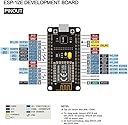
There are no manuals, no drivers, no links, not even a pinout. In the Arduino IDE you must select NodeMCU 1.0 ESP-12E module. The pinout matches the NodeMCU ESP-12E pinout. After that, everything is a breeze. Everything works, wifi works, pins work (although there are fewer actually usable pins than you think, look into NodeMCU pinout to be sure you know what you are getting). A+ product.
L**N
Size and Wi-Fi Capability Awesome
I recently learned how to connect a variety of different types of inexpensive sensors to a NodeMCU ESP8266 and use its Wi-Fi capabilities to transmit sensor information to other Wi-Fi connected operating systems like Android and Windows etc. These little NodeMCUs are awesome and have been very reliable. I have used at least a dozen of them in different small hardware projects. None of these MCUs have failed yet. Some of the projects that I have used them in include: 1. Use a motion sensor to automatically turn my desk fan on and off when I sit down or leave my desk area. That project used NodeMCU, heat sensor, relay, fan, lcd display 2. Use a DC volt sensor and NodeMCU to send messages to my cell phone when my car battery is weak. That project used DC voltage senso, NodeMCU, IFTTT technology to get text msg to my cell phone. 3. Use switch and NodeMCU to send message to my cell phone when yard gate is opened and closed. 4. Used weight scale sensor with NodeMCU to weight items ranging from cotton ball to bowling ball. 5. Used Text-to-Speech module with NodeMCU to create a Voice Server so my various NodeMCU projects can use Wi-Fi to send messages to the Voice Server to speak. 6. Use temperature probe and NodeMCU to create a thermo logger that records temperature changes on a microSD memory card and can transmit the temperatures in a web page etc. It is fun and fairly easy to create a variety of different types of smart switches using different sensors, relays and these NodeMCU ESP8266 chips.
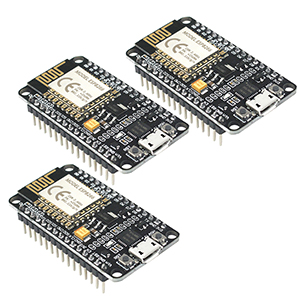
B**N
solid built 8266 12-E boards
These 8266 12-5 Node-EMCU boards are a great buy for the price. These allowed me to get a few IoT projects off the ground. As I get deeper into the project I am looking into switching to the V1 8266 boards as they are smaller and would probably be more then sufficient for this project. The Pros - These boards are easy to set up, configure, and get working for ESP-8266 projects. Easy to use, headers already installed. The Cons - The board seems with be missing a clear layout guide. The top and bottom have different pin names. I was able to figure it out but a clearer pinout on the board would be helpful. Over all I would recommend these boards for anyone looking to get into Ardunio and or IoT projects that require wifi.
M**T
One of three units is DOA.
This is an excellent product. I ordered a kit of three - the first two I happened to use work fine. Yesterday I tried to flash ESPHome on the 3rd, however the product is dead. Return & support dates have since passed. Do I have any chance of getting a replacement or partial credit? I am planning to order another kit of 3 of these. Thanks for anyone with Amazon who cares to respond. MV, Montreal, Canada
J**F
No COM No problem!
Hello, if you are not seeing the COM appear when programming in Arduino IDE, follow online instructions, you may also need to check device manager to see if you have correct driver. I needed to download and install a driver from silicone labs.
Trustpilot
1 week ago
1 month ago