Buy anything from 5,000+ international stores. One checkout price. No surprise fees. Join 2M+ shoppers on Desertcart.
Desertcart purchases this item on your behalf and handles shipping, customs, and support to Portugal.
๐ Elevate your workspace โ the multi-device mouse that works as hard as you do!
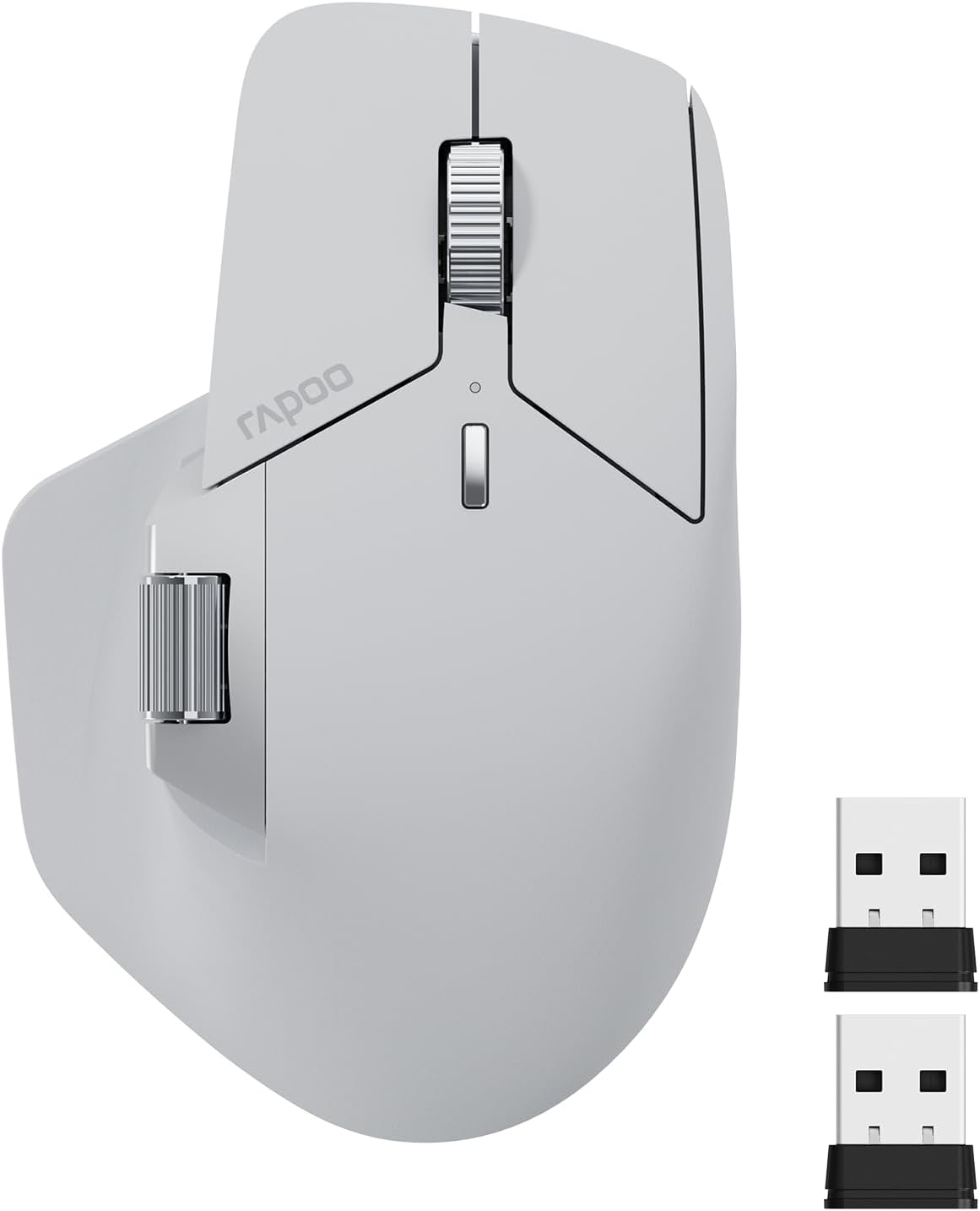
The Rapoo MT760 is a versatile wireless mouse engineered for the modern professional. Featuring Bluetooth 5.0 and 2.4GHz multi-mode connectivity, it supports seamless switching across up to 4 devices. With 7 adjustable DPI levels up to 4000, an ergonomic design tailored for comfort, 11 programmable buttons, and an impressive 90-day battery life with USB-C quick charging, itโs built to boost productivity and streamline multitasking in any office environment.


| ASIN | B0CMZ1PQV6 |
| Additional Features | 7 Adjustable DPI, 90 Days Battery Life, Ergonomic Design, Wireless Charging Enabled, Programmable Buttons, Up to 4 Devices, M+ Cross-Computer Technology |
| Antenna Location | Office |
| Are Batteries Included | Yes |
| Are Batteries Required | Yes |
| Battery Average Life | 90 days |
| Best Sellers Rank | #154 in Computer Mice |
| Brand | Rapoo |
| Built-In Media | 1 x USB-C Charging Cable (USB-A to USB-C), 1 x User Manual, 1 x Wireless Mouse, 2 x USB Dongles |
| Button Quantity | 11 |
| Color | Light Grey |
| Compatible Devices | Personal Computer, Tablet |
| Connectivity Technology | Bluetooth, Radio Frequency |
| Customer Reviews | 4.4 out of 5 stars 769 Reviews |
| Enclosure Material | Plastic |
| Finish | Matte |
| Hand Orientation | Right |
| Hardware Platform | Linux, Mac, PC |
| Item Dimensions L x W | 4.85"L x 2.13"W |
| Item Weight | 110 Grams |
| Manufacturer | Shenzhen Rapoo Technology Co., Ltd. |
| Mfr Part Number | MT760 |
| Minimum Required Operating System Version | Windows XP |
| Model Name | MT760 |
| Model Number | MT760 |
| Mouse Maximum Sensitivity | 4000 Dots per Inch |
| Movement Detection | Optical |
| Movement Detection Technology | Optical |
| Number of Batteries | 1 D batteries required. (included) |
| Number of Buttons | 11 |
| Operating System | Linux, Mac, Windows |
| Power Source | Battery Powered |
| Special Feature | 7 Adjustable DPI, 90 Days Battery Life, Ergonomic Design, Wireless Charging Enabled, Programmable Buttons, Up to 4 Devices, M+ Cross-Computer Technology Special Feature 7 Adjustable DPI, 90 Days Battery Life, Ergonomic Design, Wireless Charging Enabled, Programmable Buttons, Up to 4 Devices, M+ Cross-Computer Technology See more |
| Style Name | MT760 |
| Theme | OFFICE |
| Unit Count | 1.0 Count |
| Warranty Description | 1 year warranty |
R**F
Needs two features and it will dominate the productivity mouse market!
I really, really wanted to like this mouse. It was exactly what I was looking for. I compared it against the Logi MX Master 3S, Citlla Pro MXE510 and Tecknet MS029. This was the most comfortable mouse and has amazing button placement. The side scroll wheel is placed perfectly above and between the forward and back buttons, allowing you to use the pad of your thumb to go forward, your knuckle to go back and then with a slight lift, your knuckle would be on the side scroll wheel. No lifting your fingers or thumbs off the mouse to reposition. The build quality was on par with the Logi device. It connects quickly over Bluetooth, and I did not see any lag during use. However, it was missing two features that the Citlla & Logi have. They each have a thumb button that would minimize all windows and return you to the desktop. This is a cool feature with nosey neighbors around or if you are searching through numerous open windows or documents. Most importantly, the Logi & Citlla have a smoother scroll wheel (magnetic, I think) that allows for precise one to three lines scrolling or super speed when you give it a spin. The Rapoo has a click-click-click type scroll wheel. If they only changed the scroll wheel, this would be the best office productivity mouse on the market, besting anything Logi is producing right now. Adding both features, would corner the market and dominate. I ended up keeping the Citlla and returning the rest (same price as the Rapoo, $45). The Tecknet is not worth the $15 price, the Logi is not worth the $90 price (and it was sold as new but was actually used).
J**F
really great mouse
I love everything about this mouse. feels great. The buttons work well, and there's the "right" set on this mouse. The horizontal scroll wheel is fantastic. Battery life is great, and bluetooth worked perfectly with Windows 11. One minor issue is that I installed the rapoo software to do custom configuration for an app I use and I couldn't figure out how to do that, and I'm a techie. I couldn't find any manual, but I haven't checked youtube yet. Price is fantastic as well.
D**X
Recommended mouse to replace logitech for office work. Gaming probably look elsewhere.
I bought this on recommendation from a coworker. It is actually a very nice mouse. I use it with bluetooth. The scroll wheel (both the middle wheel and the thumb wheel) have nice actuation with nice feedback. The buttons are responsive and easy to push without accidentally pushing them. Ergonomics is fine for office work. I use it for 10+ hours a day in the office and have no issues or pain in my hands. Battery life is unreal. I havent had to charge it yet since i bought it. Last time i checked the battery was at 60%. My hands are not small but not large either. This mouse fits just fine. Pros: very versatile connectivity options. Bluetooth just works as well as the included 2.4Ghz dongle. USB-C can be used also. Charging is through the usb-c connection. I have yet to charge it since i bought it months ago. For office work, it is very nice and easy to use. Cons: Gaming is a different story. The lag is just too great for gaming. Overall: I highly recommend this mouse instead of logitech which this mouse replaced. The price is very nice for what you get.
K**O
Great budget option
Great Purchase! Itโs worth every penny. It works perfectly for office or home office work and fits my hand perfectly too. I love how it looks and how it feels. It connects to Mac easily. I not a heavy user but definitely use it a lot for excel work and I think I donโt need any other mouse than this one!
A**N
Just because it isn't an MX Master replacement, that doesn't mean its bad
I'm a lifelong palm grip guy, so I tend to gravitate towards mice that work well with that grip. After trying the MX Master 2 for productivity at home (I do photo/video editing on the side), I decided to transfer that mouse over to my office day job to see how it would fare. It worked pretty well, but ended up leaving a void at home for when I wanted to work from home or do something other than game. There was no way I was going to spend over $100 to get the MX Master 3 for home, so I started looking at this Rapoo. For my hands and my grip, the Rapoo was a great fit. The ergonomics really allow me to rest my entire palm on the back of the mouse. I'm sure a lot of people are like me and are looking for an MX Master alternative/replacement. While similar, I wouldn't consider this a replacement. Here are some things that each one does better than the other. MX Master: - Infinite scroll is a nice feature - Horizontal scroll is in a better spot if you work with a lot of spreadsheets - The thumb click button is a nice if you can map it to something useful - The clicks from the left/right buttons are much more tactile Rapoo: - Instead of infinite scroll, you get a DPI switcher. Useful if you occasionally game, but also useful for if you do photo editing and need finer control - While the horizontal scroll is in a little more of an awkward spot, the back/forward buttons are in a much better spot. I use those way more often than I use horizontal scroll. - The unit comes with a USB dongle which gives you an additional method of connectivity. Very useful if you often have to switch to devices that may not have BT built in. - The left/right buttons are way quieter. They still give positive feedback, but there is some tactility loss due to the damping. This is a compromise I'll gladly take when working in an office environment. As a result, the Rapoo is now my work mouse and I moved the MX Master 2 back to home.
C**S
Good mouse, but less functionality and fit than MX Master 2S
I bought this mouse on sale during Prime Days with consideration given to the reviews saying this mouse was as good as the MX Master 3s. Itโs not, and it has less functionality than the MX Master 2S while not meeting the ergonomics of either. I have three complaints. Placement if the horizontal scroll wheel and forward/backward buttons, no thumb button that brings up the Windows โpeekโ view, and overall ergonomics that donโt conform as well to the shape of my hand and thumb as the MX Master 2S. The H.Scroll wheel and fwd/bck buttons donโt work where they are in relation to the MX Master series. With the MX mouse, the scroll wheel and buttons are exactly where you need them, with minimal movement. On the Rapoo, the scroll wheel is mounted too high requiring the user to lift their thumb, same for the fwd/back buttons. On the MX, their vertical placement is highly intuitive and again, requires far less movement - really just a โrollโ of my thumb to touch the buttons and Iโm good. Not so with the Rapoo, due to their horizontal alignment, the user has to shift their hand for the thumb to hit the forward most button. YMMV of course with the size of your hands and thumbs, but I consider myself to have an average size hand size and found it annoying. On the MX Series you have a thumb button that lies in the โwingโ where you rest your thumb. On Windows, this brings up the โPeekโ view that allows the user to see all open windows and mouse over to click and select one. I find it useful when I have more pdfs, email drafts, documents, and file folders open and I donโt want to mouse over each icon in my start tray. The MX 2S has a more firm button where the MX 3S improves on this feature with a far easier press. The Rapoo mouse doesnโt have this feature at all. Finally, the ergonomics. This is down to personal preference, but I found it to be less than ideal. Especially in the thumb โnookโ where there are 3 buttons and a scroll wheel on the MX 2S/3S, and 2 buttons for the Rapoo. You can see in the pictures the nook on the Rapoo is more sharp, defined, and doesnโt flow as well as the same area on the MX series. Where the Rapoo has an almost โhardโ feel, the MX flows with the natural curvature of the thumb. I donโt feel any โpainโ points with the MX series. The Rapoo isnโt a bad mouse, itโs just not an MX Series competitor. It may look a liitle like it and have similar buttons, but itโs a far cry from why the Logi MX Series mice are so nice and in my opinion, well worth the money. Iโm returning the mouse because it doesnโt meet my expectations and lack of functionality Iโve grown used to and implemented in my workflow. If youโve never used an MX Series mouse, then this mouse is a *very* good mouse. But donโt go buying this mouse thinking itโs going to replace your MX Series 2S or rival the 3S at a fraction of the cost. Because it wonโt.
S**T
Worth it!!
This mouse works great! The buttons are responsive and programable. For some reason I couldnt get Rapooโs software to work on my computer, but I found another program that let me customize the buttons. I mainly use it with the usb, but bluetooth mode works great as well. Overall, it feels great in hand. This is my second time purchasing this mouse, one for my desktop and the other for on the go traveling.
P**8
Great mouse even better company!
This mouse just looks awesome first of all. Second it functions almost exactly like it's mate at a fraction of the cost. Scroll wheels are both very nice and functional. Side scroll is smooth while main scroll has notches which I prefer. Plenty of options to connect to multiple devices and you just can't beat it for the price. Battery has lasted a few weeks so far and still going strong. Type-c charging makes it very convenient to charge as I have a cable already at my desk for my phone. The first one I received the left click was super loud and it drove me nuts. I emailed Rapoo and told them about this and they immediately sent me another one. The second one was silent like the listing says it is. Great experience overall and will definitely be using this mouse for years to come. And the next time I need a mouse I know which company I'm looking at first. Thanks Rapoo!
A**Y
ู ู ุชุงุฒ ุงูุตุญ ุจู
ุดุฑูู ุฑุงุจู ุบููู ุนู ุงูุชุนุฑูู ุงูู ุงูุณ ุดูู ูููู ุฌุฏุง ุฌุฏุง ูููู ูููู ููุณ ุงุจูุถ ูุงุตุน ูุดุจู ุงูููู ุงูุงุจูุถ ู ุน ุงููุฑุฏู ููููุง ูููู ุงูู ุงูุณ ู ุญุชุฑู ุฌุฏุง ุฌุฏุง
S**D
Great
Nice mouse in the price range of 1800 EGP. As described.
B**N
Amazing, as long as you aren't trying to replace an MX Master
This mouse is honestly amazing for the price and as long as you are looking for a simple mouse, this will fulfil 99% of the requirements. Build quality: 9/10, the only reason I deducted a mark is because it does look a little cheap, got some rough edges but other than that in the hands it feels great. How it feels: The clicks aren't your typical cheap mouse clicks, they feel solid but also don't make a snappy click sound, but rather a dampened "thump" sound/feel. I say sound, but in reality it's dead quiet and perfect for the office. Some people have said that the middle mouse button is easy to press and I will slightly agree with them. It is not light enough that you would accidentally trigger it and you may get used to it very quickly however it could be a bit light for some people. Side buttons feel a bit mushy but are okay. The side scroll wheel is amazing. Driver: The driver is truly atrocious, the UI even looks bad. Don't expect much from the macros, you can only bind simple things that combine ctrl, or shift, or alt, or win, PLUS one other key. This means you can't create any complex macros like you could in Logitech, so this is definitely not going to be a powerhouse users. As an engineer, this is fine for me. As a video editor this may not be fine for you. Features: This does feature bluetooth connectivity as well as the ability to move your cursor between two completely different devices if you have both of them plugged into the same LAN network and have a usb receiver in both of them. Additionally, it has 1000hz polling and the sensor feels extremely responsive. Cons: This does not have the free scroll that the mx master has, depending on your profession this could be a deal breaker. For me, it is fine to not have it. All in all, I would have given it a 4/5 if this was any more expensive than it is, but for the price, you are getting a solid piece of kit as long as you aren't expecting it to be an MX Master. If you want an MX Master, simply get an MX Master, you will be severely disappointed if you get this mouse.
I**L
not bad
rubber white colour changed and weras off , but the mouse is very smooth and nice
A**O
Responsive and easy to connect via Bluetooth.
From my perspective, It's worth investing in this mouse; its appearance rivals that of major brands. DESIGN: It's lightweight and well-made, with two scroll wheels and undo/redo buttons directly on the mouse. These features offer many utilities that you might not be used to, but in the two weeks I've been using them, I've adapted to them, and I really enjoy having them available. FUNCTIONALITY: it's very quiet, the buttons are smooth, and I can easily connect it via Bluetooth to different devices, which I love. Compared to other mice I've used, this one responds simultaneously and hasn't frozen at any point. As I mentioned, I've only been using it for two weeks, but so far, I've loved it. If anything changes, I will update the review.
Trustpilot
3 weeks ago
1 month ago