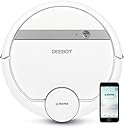
🚀 Elevate your cleaning game with smart power and effortless control!
The Ecovacs Deebot 900 is a smart robotic vacuum designed for carpets and bare floors, featuring advanced mapping technology, enhanced suction power, and seamless WiFi connectivity. Compatible with Alexa and Google Assistant, it offers hands-free operation and efficient cleaning, especially effective for pet hair removal.
| ASIN | B079C6TTKM |
| Battery Life | 110 minutes |
| Battery Type | NiMH |
| Best Sellers Rank | #975,379 in Home & Kitchen ( See Top 100 in Home & Kitchen ) #493 in Robotic Vacuums |
| Brand | ECOVACS |
| Brand Name | ECOVACS |
| Color | White |
| Compatible Devices | Amazon Echo, Google Home |
| Control Method | Voice |
| Controller Type | amazon_alexa, google_assistant, vera |
| Customer Reviews | 3.6 out of 5 stars 260 Reviews |
| Filter Type | Cartridge |
| Form Factor | Robotic |
| Global Trade Identification Number | 00856560007290 |
| Included Components | robot^charging dock^main brush (2)^side brushes (4)^ air filter (2)^ |
| Indoor Outdoor Usage | Indoor |
| Item Type Name | DEEBOT 900 Robotic Vacuums |
| Item Weight | 7.7 pounds |
| Lithium Battery Voltage | 12 volts |
| Manufacturer | Ecovacs Robotics |
| Manufacturer Part Number | D35G |
| Model Name | DEEBOT 900 |
| Model Number | D35G |
| Number of Items | 1 |
| Number of Packs | 1 |
| Other Special Features of the Product | Anti-Collision |
| Power Source | Battery Powered |
| Recommended Uses For Product | vacuuming |
| Special Feature | Anti-Collision |
| Surface Recommendation | Bare Floors,Carpets,Floors |
| UPC | 856560007290 |
| Unit Count | 1 Count |
| Voltage | 12 volts |
G**L
Updated 11/25/18: Read this if you intend to use this product in a multi-level home
****Updated 11/25/2018*** I am upgrading my review to 5 stars after about five months of using the Deebot 900 on all hardwood (okay, laminate) floors with a few low-pile rugs. Through firmware and updates, ECOVACS has improved Deebot's navigation, map retention (i.e. not randomly dumping the map), and map restoration process.. For several months now, the only time I generally need to restore the map is after using Deebot on a different floor. I was hesitant to give Deebot 5 stars (4.5 was my instinct) but after thinking about it, I concluded that Deebot achieved what I look for in a smart home gadget: the time spent enjoying its vastly outweighs the time spent troubleshooting and maintaining it. (Keep in mind, though, that robot vacs require more attention than your typical smart home gadget since you have to empty the bin, clean/replace brushes, etc.) In addition to restoring the map now being a simple, reliable process, navigation has definitely improved, particularly the vacuum's ability to re-orient itself after getting disoriented. For example, I am convinced that my cats drag out their mice on a string which I put away prior to vacuuming for the explicit purpose of sabotaging the Deebot. The ever thorough, methodical Deebot inevitably runs over the mouse and gets the string wrapped around the main brush, stopping the vacuum. Originally, this usually meant having to take the Deebot back to its charger to restore the map and start its vacuuming job all over again. However, I've noticed now that I can pick up the Deebot, fix the malfunction, put it down in roughly the same spot and orientation where I found it, and then press the Auto button to have it resume cleaning. It will realize it is lost and start re-orienting itself (I think it gives an announcement to this effect) by driving around in circles, etc. It usually is able to successfully re-orient itself and pick up vacuuming where it left off. Scheduling. I would like to see some more powerful scheduling in the ECOVACS app or better yet, integration with IFTTT, Stringify, Smartthings, etc. I would like the ability to schedule different areas at different times. For example, I would like to schedule the laundry room where it lives twice a day to pickup the cat litter that our cats track out of their litterbox, the kitchen nightly, and the whole house several times per week. It would also be nice to use triggers to start the vacuum (e.g. my smart hub goes into away mode, etc.). These aren't deal-breakers but it would really polish the user experience for me. Also, cats. One of my cats loves to attack the Deebot: his preferred tactic is a frontal ambush where he lays in front of Deebot and chews on the side brushes. Well, he has figured out how to start the Deebot when it's on the charger, I think by bumping the sensor on the front of the Deebot which causes it to back off the charger and start driving around, looking for the charger again while the cat continues to attack it. I don't fault ECOVACS for my hostile cat's actions but it would be nice if whatever sensor(s) the cat is hitting were disabled while the the Deebot is on the charger. ***Updated 07/15/18*** Significant update on the multi-floor vacuuming front. As I mentioned in my original review, our Deebot 900 lives on the first of our house and I was frustrated by the Deebot forgetting the map of the first floor whenever I carried it upstairs to vacuum. Well, I figured out that it is possible to use the Deebot 900 in another unmapped area (e.g. another floor) and then have it restore the map afterward. 1. Carry the vacuum to the new area and hit auto. Don't move the charger, obviously. 2. The vacuum will forget the stored map and then proceed to map and clean the new area. Once the vacuum finishes cleaning, it will park itself wherever you started it. 3. Lift the cover and turn the power switch off. 4. Return it to the charger. Once it is seated on the charger properly, the vacuum will say "restoring map" and tell you to turn the power on. 5. Turn on the power switch. You'll then see the original map restored on the app. I'm not totally sure if it's necessary to turn off the power switch but I didn't have very good luck before with just leaving the power on and carrying the Deebot back to its charger. This will also be the drill I use whenever I have to save the Deebot from a snag, stoppage, navigation issue, etc. Deebot should really add this to their FAQs on their website because I know this is an issue for many people. ***Original Review*** I'll front-load this review with how the Deebot 900/901 handles multi-level homes because I couldn't find much info about this topic before purchasing my Deebot. Our Deebot lives on the first floor of our two-story home so it has the first floor mapped out. If I take it upstairs (i.e. a new, unmapped area), drop it on the floor, and press "auto", it will wipe out the existing map of the first floor, map and systematically vacuum the second floor, and then return to the spot where it started when done (since the dock is still downstairs). So on the positive side, you can drop this thing anywhere and will automatically map and systematically clean the area until it's done. However, it forgets the all-important map which many of the bells and whistles of the Deebot 900/901 are based upon. I love that I can summon my Deebot to clean specific areas in the house. However, if I take the Deebot upstairs to vacuum, the map gets wiped and I can't use these features until I let it map the first floor again. This is definitely worth knowing if you intend to use it in a multi-level house. As for the rest of my review... Pros: - Cleaning: Most importantly, this thing cleans well. Our house is all laminate or tile flooring with a few low-pile area rugs. We do not have any carpet. We also have two short-haired cats. We love that this thing keeps our floors clean to the touch of our bare feet. We also love that it can constantly police the area around our cats' litter boxes where they track litter onto the floor. - Navigation: I will distinguish "navigation" from "mapping". Navigation, which I define as the ability of the Deebot to systematically clean your house without getting lost, is pretty good. I will discuss mapping in the "Cons" section. If your floorplan is large enough that you can't expect one of the cheaper robot vacs to cover it all in one cleaning with it's random cleaning pattern, navigation is essential. This thing reliably maps out where it needs to clean and then systematically vacuums the area until it's done. If a recharge is required, it will top itself off and then pick up where it left off. The Deebot has been pretty good about not getting lost. I've had a few occasions where it got disoriented when I summoned it from the dock to spot clean on the other side of the house and I had to carry it back to its dock. However, once it remapped the house again (because it forgot the map), it hasn't gotten lost. For a multi-room home, I would never consider buying a robot vac that lacks navigation. I think the "random" robot vacuums should be reserved for simpler floor-plans. - Noise: Quieter than I expected. - Value: With an Amazon coupon, I got this thing for around $325 but even at MSRP, the Deebot 900/901 seems to be loaded with features usually found on much more expensive robot vacuums. Cons: - Setup: Unboxing the Deebot and getting it physically setup was easy. However, connecting it to my WiFi was clunky even though my router and its setup complied with the Deebot's requirements (e.g. 2.4 GHz et al). After messing with changing my router's 2.4 GHz channel from auto to specifically 802.11g or 802.11b, it finally connected after a 20-minute delay. Once I finally got it connected to my WiFi, I switched my router back to auto and it hasn't had any further connection issues. - Mapping: The Deebot's mapping is noteworthy because it doesn't simply give you a map to demonstrate where it has cleaned; it also retains that map and allows you to use it to control the Deebot by specifying where or where not to clean. It's great when it works but unfortunately it's easy for this thing to dump the map. If that happens, you'll lose the ability to direct it to a certain area, setup geofences, etc. until you let it map the entire area again. In addition to dumping the map after taking it to a different floor (discussed at the beginning of this review), I've also had it forget the map after it encountered a problem I had to save it from, e.g. vacuuming up a cat toy, getting snagged on a cord, etc. Sometimes I've been lucky and it retained the map after being rescued; other times, not so much. Deebot needs to work on this. In my opinion, the Deebot should ask before dumping an established map that includes it's docking station. Also, I should know that should the Deebot encounter a navigation issue, I can always resort to carrying it back the docking station (which hasn't moved) knowing that it will recognize it is home again and reload the existing map. - Making Your First Map: Deebot has an article on their website titled "Making your first map with DEEBOT 900 / 901" which says it will take 5 to 20 minutes to map my home. Yeah, right. The app and the Deebot's firmware is up-to-date and I haven't seen this behavior that suggests the Deebot will breeze through your house first to establish a map. No, mine does a detailed cleaning to establish the map. Therefore, if it loses the map, it's a half-day process to restore it because my Deebot requires 120+ minutes of vacuuming with a recharge in between. - Scheduling: It's too simplistic. It's easy to tell it to clean your whole house on certain days at certain times which is helpful. However, you can't do more detailed scheduling. For example, I would like to have my Deebot clean the area around my cats' litter boxes twice a day and then have it clean the whole house several times per week. It won't support that sort of detailed schedule. - No IFTTT or Stringify support. This would open up a lot of scheduling and automation options. - Small dustbin. - No dust bin full sensor. - The "eye" on the top of the Deebot provides an opportunity to snag on things. The Deebot can hook a cord, etc., between the top of the "eye" and the top of the Deebot. It's mainly just something to keep in mind when you're prepping your house to run the Deebot but I think this snag hazard could have been avoided in the first place. Despite my ample criticism above, I am still very happy with my purchase. While the Deebot 900/901 has various bugs and annoyances with its bells and whistles, it does a good job at its core function: reliably cleaning my house in a systematic and thorough manner. The more advanced, networked, app-based features are great when they work but like most smart home devices, they can be buggy. My general outlook on the current state of smart home devices is that genuinely polished, worry-free user experiences are rare. If you want to enjoy the conveniences of smart devices, you have to have the patience to deal with bugs and other shortfalls as the technology progresses. The Deebot 900/901 is no exception.
W**G
Runtime , navigation
I'd never dealt with cleaning Robert or any other robotic vacuum before this one. I have to say I'm blown away by how well this little guy cleans and navigates, both on hardwood and carpet. It won't replace your normal vacuum, but it'll definitely keep the floors cleaner between normal vacuuming. Setting up the vacuum was a pretty simple process - you plug in the base station, charge the vacuum for a few hours, then connect it to WiFi via the app. Cleaning can be initiated via the button on the vacuum or the app. You can also enter a schedule for cleaning via the app. It’s also compatible with other apps, so if you have one of those you can control it that way as well. Once the setup was done I ran it on the first floor of my house. I live in a two-story town home. My first floor is all laminate hardwood and consists of a hallway, kitchen, dining area, and living area. No doors separate these areas, but it is sort of an odd shape, so I was curious to see how the ECOVACS would handle this. I am pleased to say that it was able to navigate and clean the whole area in about 25-30 minutes. The pattern it follows seemed a little random, but the more I watched it and the adjustments it made the more impressed I was. It was able to drive itself under couches, tables, a kitchen island, and many other spaces that were hardly bigger than the vacuum itself. It go into corners and crevices I could never get to with my normal upright vacuum. Not only that, it was able to drive itself out of those spaces with no problem at all. In the time I have used it hasn't gotten itself stuck once. It picked up a ton of dust as well - about as much as I would get using my normal upright vacuum. It ended filling the whole dust bin in the vacuum. The dust bin seems to be on the small side in my opinion, but with the size of the vacuum there isn't a whole lot that can be done about that. Next I tried my second floor, which is carpet and consists of 3 bedrooms, a hallway, and 2 bathrooms. I started ECOVACS in the hallway and it was able to navigate itself in and out of each room, albeit the process and progression from room to room took much longer. I also had to empty the dust-bin a few times along the way. I know there are higher-end Roomba models that are made specifically for multi-room navigation, but this one got the job done. The job the ECOVACS did downstairs was evident, but I wanted to see how much dust it had left behind in my carpet, so I ran my upright vacuum upstairs afterwards. My upright is Shark Rocket that I've been happy with for a while. It's a stick vacuum, so the canister is smaller than other regular vacuums. I normally fill my Shark 2-3 times vacuuming the second floor. Following the Roomba, I only had to empty the canister on my Shark one time, which I consider a win for the Roomba since it was able to pick up 60-70% of the dirt my normal vacuum could - far more than I was expecting considering its size. The runtime for Deebot is great, which in my use seemed about right. I think maybe I could get it to run a bit longer on hardwood where there isn’t as much resistance. As I understand the Ecovacs will navigate itself back to the dock when the battery gets low, but I always ended my cleaning jobs before that. Still, I have witnessed the ECOVACS make its way back to the dock a few times with no problem. Overall I’m extremely impressed with this vacuum. It’s not going to completely eliminate my Shark, but it does so much more than I ever expected it to. I would highly recommend this to anyone interested in a robotic vacuum.
R**S
Piece of crap. Buyer beware!! Don't buy this vacuum!!
I have literally been waiting and waiting for this vacuum to go on sale. I have wanted one with an app for ages and this one seemed like the best one for the price. I should have trusted the reviews though.....so so many said that the app is crap and yep....they were absolutely right. I was hoping it was just user error and since I am pretty tech savvy I figured it would be fine. Boy was I wrong!! There really are no directions for the app in the manual, which I read from cover to cover. I downloaded it, and proceeded to map my house. I have a fairly large main floor and it took most of the afternoon to map it after it stopped to charge half way through. Thought I was done and in the morning would be able to use my awesome new vacuum....nope. The map magically disappeared when I opened the app in the morning. So I tried again. It took less time this time so I figured the battery must not have been fully charged or something. It was able to map it in one pass without charging. Good! but wait.....a few hours later I decided I wanted to try having it clean one area of my house because this was the whole reason I wanted this vac. Well.....in the process of cleaning that one area it somehow couldn't figure out where it was in the map and proceeded to map a new area of my house that does not exist. And somehow managed to move the docking station into this non existent area. Then whenever I tried to start it, it said it couldn't clean because the cleaning path was blocked....because it had virtually walled itself in on the app with no way out. So how do you fix this? Erase the map and start over. Seriously?? There has to be a better way. I definitely do not want to have to remap my house every. single. day. when this thing glitches. Its a huge project when you have 4 kids and mapping the house requires all doors to be open and the floor to be clear in your main living space. The vacuum itself seemed fine, but not great. The suction was not super good. I have all hard floors on the floor I was cleaning and it struggled to pick up cereal that my kids dropped on the floor. My bottom of the barrel Rumba vacuum....the cheapest one that bounces around like a pinball with no control whatsoever....had better suction than this vacuum. I sent this hunk of junk back. I think I will save some money and pray that Rumba will soon come out with an app mapping function that doesn't require you to have physical virtual walls that have to be set up and I'll drop the $1000 it will cost for one of those instead. Don't buy this....just don't do it. You will only be setting yourself up for disappointment.
V**N
Annoying map, cannot update map after initial run.
Update: This robot should have the random navigation mode as well. If the robot misses a room during the first run, it won't be able to update the map. It's terrible. If you pick it up off the floor and put it near the room that it missed on its map, it reset the entire map and you'll have to rescan your entire home again. That's freaking annoying. Lowered it to 3 stars Original review: The bad reviews here scared me a little bit. However, after watching the YouTube review from Vacuum Wars and using both the Roomba 985 which costs 600$ or so from Costco (returned) and the Deebot N79S (also returned - I don't understand why it costs 250$ for a random-navigation robot vacuum such as N79S) , I decided to buy the Deebot 900. After 2 weeks of using it, it's been working really well. The Deebot app offers great features like virtual boundaries (where you don't want the robot to go) - the expensive Roomba doesn't have this and the Roomba has to use a physical laser (battery powered) to create a virtual boundary. The suction is strong (standard and Max). I found out that the Deebot 900 ($245) , 901 (around $280) or 907 ($370 at Costco) are the same and they just look different in color. Beside the low price and the great app that goes with Deebot 900, I also really like how it has smart navigation using laser instead of cameras and lights like those expensive Roomba (985 the Costco version, for example). When there is no light and your curtains are closed in the morning, the Roomba 985 will be stuck and just stop there and let th battery die. With laser navigation, it maps the house faster and can operate in the dark! One drawback I can see is that If you have a big mirror door, the laser will think it's a room and map the area behind as a room. The robot will try to go through and bumps into it, but it'll detect it after bumping and clean along (but it doesn't redraw the map on the app)
T**E
Lasted almost exactly 13 months
TLDR: The brush bar drive has failed. I have experienced this failure on another model from Deebot (the M80) as well, and no longer trust their durability. This was a great vacuum while it lasted. However I can no longer recommend Deebot in general because of multiple failures. I bought this vac based on reviews from Vacuum Wars on YouTube. The review was accurate, the mapping was excellent, the suction was very good, picking up dog hair from two labs generally in one pass, certainly in two passes. One of the comments in the review was essentially, the reviewer couldn't understand how Deebot was able to provide so much for such a low price. Well, I can answer that now. Cheap parts. I have purchased three Deebot vacuums, two M80 models, and this one. I bought the two M80 models because of our two story house, and they also generally worked well, but our bottom floor is fairly complex, and the "hockey puck" method of navigation left some areas well vacuumed, and other areas untouched. I decided to upgrade to this model to fix that navigation problem - and it did just that. This vac can navigated nearly anything! Not long after the upgrade, and just after warranty expiration, one of the M80 models started making extreme noise while vacuuming. The brush bar gears apparently failed, causing noise and shaking. I dismissed this as a fluke, and put the second one to use (good thing I had a spare!) Recently, almost exactly 30 days after the warranty expiration for this unit, the SAME THING IS HAPPENING. When the brush bar spins, unholy racket emits while the vac shakes bad enough to feel vibration in the carpet. Removal of the brush bar helps, but no brush bar makes it essentially useless on carpet. Changing the brush bar did not help. That now makes similar failures on two out of three units. I do not abuse them, I just ask them to vacuum. I regularly inspected the bottoms, and cleaned hair, dust, debris and everything else collected from the brush bar area. My second M80 unit is still going in the same areas and conditions that the first one failed in, so I do not believe it is something I am doing or that the conditions are beyond what a robot vac should be able to endure. I just think that the price is kept down by using cheaper plastic gears and parts. Maybe you'll get lucky, maybe you won't. I see the price has dropped to ~$200.00 now instead of the $299.00 I paid in November of 2018. This price drop may make taking a chance on these more acceptable, as there really is a lot of tech in this for essentially ~$200/yr. I would be completely satisfied with this one if not for the brush bar failure. I think I am going to move on to other brands though, even with the price drop.
M**.
Great and affordable robot vacuum. But make sure you clean the laser optics!
I have had my two Deebot 900's for about two months now, and previously I had a Roomba 980. First of all the price point, ~349 dollars, is great when you compare it to the Roombas and other big name brands like Samsung. This thing is less than half the price of the Roomba 980 which I had before my two Deebot 900's, and secondly they are significantly better than the Roomba 980, which I had numerous issues with (like mapping, obstacle avoidance and rugs) but nothing major enough to be a warranty issue. The Deebot 900's are much better, and half the price. With all this said though, the Deebot 900's are not perfect. A majority of the issues I have had and read about are related to the app, which is great when it works.. but does not always work. The app is honestly quite buggy, and lacks features it should have. As a tech-savvy person I have always been able to figure these small bugs and issues out so for me it hasn't been a dealbreaker, but for someone who is not tech-savvy at all the issues might be more frustration than its worth. And don't count on EcoVacs' tech support helping you - it is quite simply awful. As for the actual cleaning, the Deebot 900 does a significantly better job than the Roomba 980 I had before it. It cleans better, it cleans faster, it handles rugs and carpet better and the battery lasts slightly longer. It covers the floor area better, whereas the Roomba 980 would routinely skip certain areas, even ones without any obstructions at all, for unknown reasons. Downside of the Deebot 900 is the kinda small dust bin, which has to be emptied out quite frequently. Now for the most major issue, which I mention in the title: the laser optics (that round little disc on top of the Deebot 900) needs to be cleaned once in a while. I run my upstairs Deebot 900 once a day and when you use it that often the microscopic dust in the air will slowly build up and eventually it will make the Deebot 900 seemingly lose its mind. It will start spinning in circles, not knowing where it is, the mapping feature which draws a map of your floor plan will get messed up eventually the vacuum will simply stop and say it needs help. It simply will not work as a robo vacuum anymore. If/when this happens (it's happened to me twice in two months - once for each Deebot 900) all you have to do is turn the Deebot 900 off (the switch is under the lid to the dust bin), get a q-tip out and gently clean the laser optics which are located just below the round disc on top of the vacuum. You might have to use a moist q-tip if it's really dirty but I just used a dry one. The optics/mirror may not look dirty to the naked eye, but clean them anyway. It took me a lot of trial and error to figure this out, but now that I know it's literally less than a one minute job to fix once the vacuum starts acting weird again. Overall I definitely recommend this robo vacuum, but only if you are somewhat tech savvy. If you want a robo vac that does not require any tinkering, this one is probably not for you. And after all the issues I had with my Roomba, I don't know that they are any less troublesome either. PROS: * Great price! * Good cleaning, good floor mapping, good obstacle avoidance. * Handles rugs and carpets much better than Roomba 980. * Fairly low profile, fits under most of our furniture such as dressers, couches, beds. CONS: * App is buggy and somewhat annoying at times. * Laser optics require occasional cleaning, or the vacuum might simply stop working and one might think the vac is broken. * The spinning brushes sometimes get tangled in lose/messy cords. It forced me to redo a lot of cords (which I previously had been too lazy to run properly). TL/DR: Very good and affordable laser mapping robot vacuum, but it has flaws that require a somewhat handy/savvy person to figure out. If you're not afraid of figuring things out once in a while, and cleaning the laser optics, then this is probably the best robot vacuum in the price range, next to the Xiaomi Mi Robot Vaccum which is also around 350 dollars.
A**R
Great choice
I like this robot cleanser very much! I really do not want to do cleaning after a long day of work, so I wanted to buy a robot cleanser for a long time. After comparing many brands and models, I choose this one as it is affordable and has all the functionalities that I need, and I am happy with it so far. It maps my apartment the first time I ran it, and it allows me to modify the map and personalize the cleaning very easily through the app. I can specify a area for it to clean, and also set a routine or specific time for it to clean. It takes about 40 min to clean the whole apartment(1b1b), and it is very precise. It will slow down when it detects a blocker in front of it, and turn around when it meets the blocker. It allows you to connect to the robot distantly through the app, I always ask it to clean my living room on my way back home so that when I arrived my apt is clean and I will do no more cleaning! Given the price and all functionalities of this robot cleanser, I think it is a great choice for a first robot cleanser, and it is good-looking!
T**D
Great floor cleaner - Good price - Is it worth buying reconditioned ? ABSOLUTELY
I have to give credit where it's due. I was skeptical and COVID caused delays, however, the end result was that my Robot was sent back for warranty repair and I was sent an upgraded NEW model as a replacement. I wasn't expecting it and did not ask for it, but I am very happy with the outcome and the DEEBOT OZMO 937 is doing a really great job of keeping our floors clean. ********** The Jury is still out on this. This is the first time I have purchased a reconditioned product from "The Restored Store" As of this day, I am only giving TWO stars as the Robot stopped working about 2 months ago. That's only four months since the delivery date. It worked great for a few months, however, now the battery will not stay charged. Either it's a bad charging station or bad batter possibly both? This is not y first Ecovac. My First one the battery lasted over 2 years of almost daily usage before I had to replace it. I have just submitted a repair replace request and will update this review as to the timeless of tech support on my request for assistance.
A**·
Works great, great value for the advanced functions
It works great, I used the brush to deep clean my second floor and from the dirt it collects every time I can tell it does a great job on the mats. For my hardwood first floor, mostly I use the strong vacuum and once a while use the brush. Great job. Compare to my previous clean robot, I like the way it does the cleaning, line by line, area by area, not like my previous one which runs randomly. Had some problem with the mapping function because I have two floors to remember the map. Figured it out eventually. Overall this is better than I expected, great value for all the functions you get.
C**N
La Mejor que he Comprado
Excelente aspiradora... Una vez que termino la primera limpieza hizo un mapa detallado de la casa.. Perfecta sincronización, la pongo a trabajar en areas especificas desde mi trabajo.. Muy buena compra. Funciona perfecto.
A**Z
Buena producto pero hay mejores opciones
Buen producto pero con ciertos problemas con los mapas. Creo que hubiera sido mejor comprar por el mismo precio un robot con aditamento de trapeo aunque fuera sin mapas.
I**S
Do not buy
Worse robot vacuum I ever purchased never charges when it goes back home I have to keep putting it back to its place even then takes like 10 tries for it to start charging. It’s always goes offline once gone back home so how can I start this machine if I’m not home. Do not buy this I will never Recomend this to my worse enemy even. Last thing it’s not good for tight places like other models because the scanner stand out of its body they should have thought about having this like other models where the scanner goes back inside once done scanning.
S**E
Love the mapping software
It works great for dog hair, but wish the wheels were better designed as sometimes it gets stuck on the vents
Trustpilot
2 months ago
2 months ago