
Desertcart purchases this item on your behalf and handles shipping, customs, and support to Portugal.
🔥 Dominate your desk with precision, power, and style 🎮
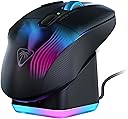
The Kone XP Air Wireless RGB Gaming Mouse combines a high-precision 19,000 DPI Owl-Eye optical sensor with a robust 100-hour rechargeable battery and 29 programmable inputs, all wrapped in an ergonomic design. Featuring dual wireless connectivity (2.4GHz and Bluetooth), a rapid charge dock with RGB lighting, and NVIDIA Reflex compatibility, it’s engineered for professional-grade performance and immersive gaming experiences.
| ASIN | B0D1CTCP8D |
| Additional Features | LED Lights, Programmable Buttons, Rechargeable, Wireless |
| Antenna Location | Gaming |
| Battery Average Life | 100 hours |
| Brand | Turtle Beach |
| Button Quantity | 10 |
| Color | Black |
| Compatible Devices | Personal Computer |
| Connectivity Technology | Bluetooth, Radio Frequency |
| Customer Reviews | 3.8 out of 5 stars 386 Reviews |
| Enclosure Material | Plastic |
| Global Trade Identification Number | 00731855711000 |
| Hand Orientation | Right |
| Included Components | Charging Dock, Kone XP Air, PhantomFlex Charging Cable, Wireless Dongle |
| Item Dimensions L x W | 7.09"L x 4.92"W |
| Item Weight | 3.52 ounces |
| Manufacturer | Turtle Beach |
| Mfr Part Number | TBM-1101-05 |
| Minimum Required Operating System Version | Windows 10 |
| Model Name | Kone XP Air Black |
| Model Number | TBM-1101-05 |
| Mouse Maximum Sensitivity | 19000 dots_per_inch |
| Movement Detection | Optical |
| Movement Detection Technology | Optical |
| Number of Batteries | 1 Lithium Polymer batteries required. (included) |
| Number of Buttons | 10 |
| Operating System | Windows 10, Windows 11 |
| Power Source | Battery Powered |
| Range | 10 |
| Special Feature | LED Lights, Programmable Buttons, Rechargeable, Wireless |
| Style Name | Modern |
| Theme | Video Game |
| UPC | 731855711000 |
| Unit Count | 3.49 Ounce |
| Warranty Description | 1 year manufacturer |
A**R
Reasonable alternative to Logitech G700s and G604
I am a long time user of the Logitech G700s and the G604. I never want to use another mouse, but they are getting more and more expensive to find on ebay, refurbished etc.... and so for years I have had a long term search for a potential replacement. I looked at this mouse many times when it was made under Roccat. Recently, when my G604 began having sticky clicking issues again, I knew it was time to at least try this mouse out. I've only had this mouse for a few days, but will update if this changes. Out of the box I found it very comfortable in my hand and familiar to the grip of the Logitech mice. Initially, I had a lot of trouble with the setup and almost returned it within the first 30 minutes. I connected the mouse via Bluetooth and I found I couldn't access any of the customization options in the Swarm II software. Several YouTube videos later, I decided to try the USB dongle connection - this instantly unlocked all of the customization options in the software. I have not switched back to bluetooth yet to see if the USB connection is necessary for this to stay in place. I prefer Bluetooth since computers have fewer and fewer USB ports. Once I was able to customize the mouse - learning that the 'Hot Key' and not 'Macro' option was a better setting for my needs (I just want to be able to click a button and have something specific happen, usually tied to a keystroke) It took some experimenting but I think I have it the way I like it. The switches feel much better on this mouse - I know the quality of them is higher than Logitech which is why those mice keep dying. I do find the side switches on the scroll wheel to be a little stiffer and require more force to wheel click left and right - but this is likely only an issue for some people. If you are a die hard Logitech G700 or G604 lover and are searching for a future alternative, I would consider this a very reasonable alternative. The form and function are similar enough. I wish it had 6 side buttons instead of 4. I still haven't put the side 'shift' button to the test and while I appreciate the expanded functions, I'm not convinced it will be useful for my work or play style. I don't want to have to think about what mode I'm in or what a button will do now. Like many people, I rely on muscle memory. I still hold out hope that Logitech will someday recreate these mice with the quality they deserve. The number of used, refurbished mice from those models and they prices they sell for should tell Logitech that there is a group of consumers with very strong preferences for those mice and features. MMO keypads and 20 buttons on the side does not work for me. My thumb doesn't have time or energy for that many blind buttons to navigate. I am hopeful that this mouse will last longer than Logitech does for me, and I am pleased that after years of searching, I have found something close.
K**K
G502 Killer
This is the G502 killer! lag-free wireless flawless sensor, flawless switches even at 0ms debounce setting, and even more buttons. The charging dock makes charging a breeze and the mouse sits upon it securely. The software is fully functional from macros to surface tuning and rebinding every button to keyboard keys or functions like play rewind delete or launching a program etc. The only nitrpick is that the software on first use isnt as intuitive as it could be but once you unbderstand where to look for the keybinds you dont forget. The core of this shape is the mx500/mx518/G5/G400/G500 etc shape but with a wing thumbrest and way more buttons so a proven legendary shape thats been modernized. The weight at 90 grams is around 30-40 grams lighter than the G502 depending on the model and weights added. The scroll wheel has well defined steps, for you scroll jumpers, and left and right button actuation in addition to the typical press fuction. This is the ideal jack of all trades gaming mouse with its swiss army knife of buttons and functions making it suitable for demanding games with many abilities or weapons allowing for easy quick switching by binding those to the extra buttons or to the macro heavy RTS and moba games. At $65, half the price of a G502, I have even more functionality and features out of the Kone XP Air Wireless. I couldnt be more happy to main this mouse.
M**N
Garbage
EDIT: Changing score to 1 star (would give 0 if could). After less than 6 (SIX!!!!) months, this POS quit charging on the dock. Of course it's too late to return or exchange it now. Bought this to replace the ROCCAT LEADR that broke after seven years of heavy (ab)use (not surprising really). What WAS surprising however was the fact that ROCCAT was bought out by Turtle Beach, and the LEADR mouse was discontinued. I tried other multi-button mice and hated them all. LEADR's arrangement was ingenious for building muscle memory and worked perfectly. Kone offers something similar but with two extra side buttons instead of the paddle, only two auxiliary buttons on LMB, and none on RMB. The layout is similar enough to LEADR that I was able to adapt to it quickly, though I miss the auxiliary buttons on RMB and the extra thumb buttons are less intuitive than the up-down motion of LEADR's paddle. The mouse is also pleasantly large without being overly huge, and fills my palm nicely and comfortably, though again not quite as well as LEADR did. The charging dock is more reliable than that of the LEADR and is also smaller, which is good; and Turtle Beach's SWARM seems a lot less problematic than ROCCAT's version. So, for those looking to replace the broken down LEADR, this is probably your best bet to get something familiar and mostly similar. The mouse is also fairly reasonably priced, so there's that.
F**N
Very good wireless mouse. Minus only 1 star.
Great mouse. Im not a huge keyboard and mouse gamer so wide ranges of dpi doesnt quite interest me. With that being said this mouse definitely hits my dpi sweet spot. Its not completely wireless. You need to plug in a usb dongle. Some may think its bluetooth but its not. I enjoy the colors and the contour of the mouse is very comfortable and not obtrusive. The price is very steep for a mouse. Theres not alot of reasons why a mouse should be this expensive. But I replace mice only perhaps once a decade so its an ok expenditure. I dont use the turtle beach native software (Is there any lol) I use Signal RGB software to handle all my rgb periphery. The mouse itself is quite light. Feels like a toy. Scroll wheel is up to my standards and has no problems. Also the battery doesn't last insanely long. I found it dying on me once. So now I'm quite diligent in charging it. Minus 1 star for the high price and shorter charge life. I still recommend this mouse for sure.
J**N
Finally a replacement for the G700
I've been bouncing from mouse to mouse for years, chasing the form factor and side buttons of the G700 to no avail. Finally somebody made one. Weight is decent and the shape is good. It even has mouse wheel left and right tilts. The things that I wish were different/better: - Mouse Wheel. Ratchets just a bit slower than I'd prefer. - Batteries. Wish it had a compartment for replaceable rechargeable batteries like the G700 had. When the internal dies you're probably boned. - Side buttons. I wish the bottom 2 were ridged slightly more like the top 2 are, and that they were just slightly less easy to press. The software has been fine so far, and easy to use. The "Easy-Shift" seems largely useless unless you wanted to use it with a top key since you have to hold it down while pressing the other button. It was easy enough to just rebind that to a different keystroke, though. I can't speak to battery life/charging/wireless connectivity as I only plan to use it wired. Despite a couple nitpicks, I'm finally happy with a mouse again.
D**N
The best mouse I have ever purchased!
This has slowly become one of my favorite mice. I use this for everyday use and gaming. Mostly for gaming. This mouse gives me a ton of button options. It has great light effects and the ability to switch from wired to wireless seamlessly. The charging dock has its weird moments with loss of connection when I switch from wired to wireless, but it's probably a software or user issue. In some cases, I lose the ability to "click" things after I disconnect from wired to wireless (using the dock). A simple sign out of my window fixes this issue. This mouse is amazing if you play MMO, FPS, or RPG games with its many button options.
Z**Z
A beautiful shame
A white wireless mouse with lots of buttons, scroll wheel tilt, AND super comfortable and light? An actual dream come true for me. The buttons all feel incredible to click and I never had any issues with misclicks. I'm generally a claw grip but I think you could genuinely get away with any grip style here. The mouse was too big for me at first, but after using my g305 for years, I quickly adapted and preferred it. Also, it's pretty light! I had no issue using it on my couch without a mouse pad. However, the issues outweigh the the positives of this mouse and I sadly had to return it. The software is insanely difficult to deal with. I tried reinstalling the software on Windows, reinstalling the mouse to the computer itself, not using the software, removing profiles and re-adding them from saved files, and it just didn't fix any of the issues. There are two versions of the Swarm software: Swarm and Swarm II. Neither of these fixed the problems of the software. You'll set profiles for them to eventually reset. The buttons will randomly switch. If you delete the extra profiles to just have 2 instead of 5, it'll eventually reset to 5. It only autoswitches between profiles about half the time and then you'll have to do it manually on the mouse. Sometimes in the middle of using an app, the profiles will autoswitch. If you reverse search the mouse name + fix or issue online, there will be dozens of un-answered results. It doesn't show the battery percentage correctly on the app. It almost always shows 50% but occasionally will show 90%, 100%, or even over 100% at one point. It crashes frequently and generally, when you "un-minimize?" the application, it doesn't detect the mouse unless you turn it off and on again. The last straw was when the left click and scroll wheel stopped working altogether about two weeks into having it. Such a shame as, on paper, it's my favorite mouse I've ever owned. No joke! I was even considering just ignoring the software issues entirely because the mouse was incredible when it worked. I would highly advise you all to not make the same mistake I did. Not only did the software and hardware cause me a ton of trouble, but returning it was even harder. I would do pretty much anything for a functional mouse like this. Turtle Beach and Roccat used to have great products in the early to mid 2010s and I was looking forward to trying their products again.
S**K
Easy-Shift must be held down to use.
I had high hopes for this mouse, but was let down quickly. The 4 buttons under the thumb are easily reached as well as the two up by the left click. The Easy-Shift button sounds like a great idea to allow additional macros to be set for each button. What isn't made clear is that you must hold it down to use it. So using it and any of the side buttons is an absolute chore. If it worked like a Caps-Lock button, that would be a great improvement. The scroll wheel for me is just too ratched/clicky. The lift-off distance, or Distance Control Unit/DCU as Turtle Beach calls it, is either 1mm or 2mm. Which is less than what I'm used to with my previous mice. The lighting shut off completely after using the mouse for about 10 minutes. The only way for it to come back on was powering off/on the mouse. Once powered back on, it was stuck on a solid color and could no longer be changed via the Swarm II app. No idea on battery life, I'm sending it back at 96% battery.
A**N
⭐ Excellente souris gaming sans fil 🎮
J’ai installé la Turtle Beach Kone XP Air sur mon PC gaming et j’en suis vraiment très satisfait 🎮👍 Le design est ergonomique et confortable, même après plusieurs heures de jeu. La prise en main est excellente, ce qui améliore vraiment le confort pendant les sessions longues. La connexion sans fil est stable et réactive, et l’autonomie est impressionnante — 🔋 Le capteur optique 19 000 PPP est précis et performant, parfait pour les jeux FPS comme pour les titres plus techniques. La personnalisation RGB avec l’éclairage AIMO est un plus esthétique qui s’intègre bien à mon setup ✨ La station de charge est pratique et évite d’avoir à brancher la souris à chaque fois, ce qui rend l’utilisation encore plus fluide. Très bon rapport qualité/prix pour une souris gaming sans fil haut de gamme 👌 Je recommande sans hésiter cette souris si tu veux un combo confort, performance et autonomie 💯
N**S
Instabil mjukvara
Mycket trevlig mus men mjukvaran är lite ostabil så spara alla inställningar till backup så det är lätt att återställa då dessa försvinner emellanåt utan anledning
P**X
Excellent
Très bonne souris RGB rechargeable via USB ou base
S**E
Liegt bei der Arbeit und beim Gaming gut in der Hand.
Design und Verarbeitung Die Turtle Beach Kone XP Air überzeugt mit ihrem auffälligen, transparenten Design und einer eindrucksvollen RGB-Beleuchtung, die für ein echtes Highlight auf jedem Gaming-Desk sorgt. Die Maus liegt angenehm in der Hand und bietet mit ihren großen, wärmebehandelten PTFE-Gleitfüßen ein sehr geschmeidiges Gleiten – ideal für schnelle und präzise Bewegungen im Spiel. Leistung und Features Mit dem präzisen 19.000-DPI-Owl-Eye™-Sensor und den zuverlässigen optischen TITAN-Switches ist die Kone XP Air bestens für anspruchsvolles Gaming gerüstet. Besonders hervorzuheben sind die 29 programmierbaren Eingabemöglichkeiten, die durch das innovative 4D-Mausrad und die Easy-Shift[+]™-Taste ermöglicht werden – perfekt für MMO-Gamer und Power-User. Die kabellose Verbindung über 2,4 GHz oder Bluetooth funktioniert verzögerungsfrei, und die praktische Ladestation sorgt für einfaches Aufladen und setzt zusätzlich optische Akzente am Arbeitsplatz. Akkulaufzeit und Alltagstauglichkeit Die Akkulaufzeit ist mit bis zu 100 Stunden im kabellosen Betrieb beeindruckend. Dank Schnellladefunktion reichen 10 Minuten an der Ladestation für bis zu fünf Stunden Spielzeit – ideal für lange Gaming-Sessions. Die Maus ist ergonomisch geformt und bietet auch bei längerer Nutzung hohen Komfort. Fazit Die Turtle Beach Kone XP Air ist eine hervorragende Wahl für Gamer, die Wert auf Individualisierung, starke Performance und stylishes Design legen. Mit zahlreichen programmierbaren Tasten, präzisem Sensor, langer Akkulaufzeit und praktischer Ladestation bietet sie alles, was das Gaming-Herz begehrt.
J**K
best mouse i have owned for BF6.
best mouse i have owned for BF6. with 5 side buttons it makes selecting different weapon's easy.
Trustpilot
1 week ago
3 weeks ago