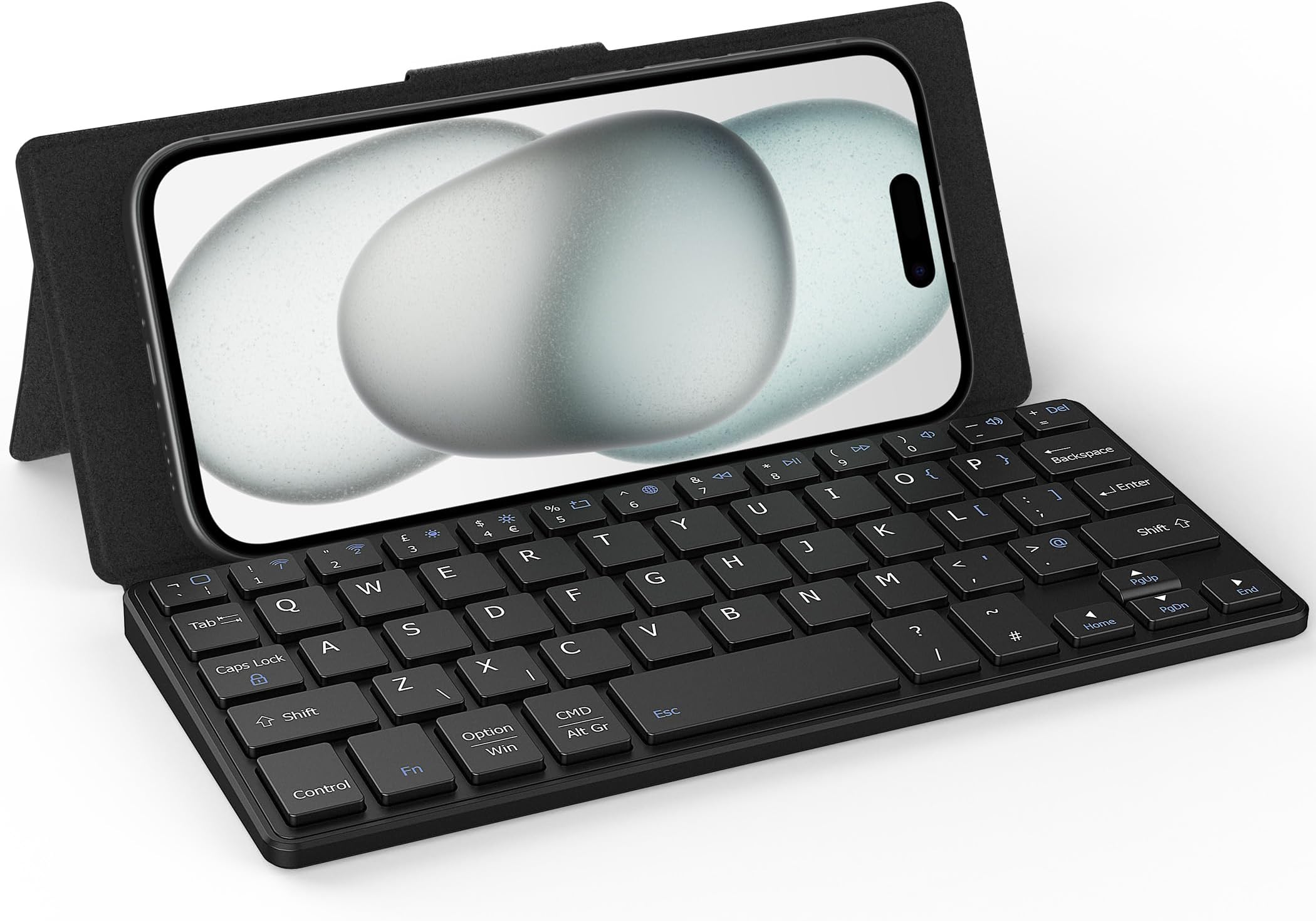
⌨️ Fold, connect, conquer: your ultra-portable typing sidekick
The CACOE Dual-Channel Bluetooth Mini Keyboard is an ultra-thin, foldable wireless keyboard weighing just 196 grams. It features dual Bluetooth channels for seamless switching between two devices, broad compatibility with iOS, Android, and Windows systems, and an adjustable stand for flexible viewing angles. Designed for professionals on the move, it folds to the size of a smartphone, fits easily in pockets or bags, and charges via universal USB-C for hassle-free power management.


| ASIN | B0D62X7BGS |
| Antenna Location | Everyday Use |
| Best Sellers Rank | 5,137 in Computers & Accessories ( See Top 100 in Computers & Accessories ) 76 in Tablet Keyboards |
| Box Contents | Mini Keyboard |
| Brand Name | CACOE |
| Button Quantity | 59 |
| Colour | Black |
| Compatible Devices | Laptop, PC, Smartphone, Tablet |
| Connectivity Technology | Bluetooth |
| Country of Origin | China |
| Customer Reviews | 4.2 4.2 out of 5 stars (124) |
| Enclosure Material | Acrylonitrile Butadiene Styrene |
| Hand Orientation | Ambidextrous |
| Item Dimensions L x W x H | 19.5L x 8.5W x 1.5H centimetres |
| Item Weight | 196 Grams |
| Keyboard Backlighting Color Support | Single Color |
| Keyboard Description | Flexible |
| Keyboard Layout | QWERTY |
| Language | English |
| Manufacturer | CACOE |
| Model Name | 02CUNMNC2+BFKBUK |
| Model Number | X62 |
| Number of Keys | 59 |
| Number of Sections | 1 |
| Power Source | Battery Powered |
| Product Features | Foldable, Lightweight |
| Series Number | 62 |
| Style Name | Modern |
| Switch Type | Membrane |
| Unit Count | 1.0 count |
P**H
Inexpensive but it works really well
Really cool little keyboard with a kickstand that makes use with my iPhone 17 Pro Max easy. Pairs quickly - no disconnects so far. No noticeable lag Typing experience is OK - what I would expect from such a small form factor and @ less than £22 who is going to complain. As other reviewers have pointed out - on the iphone you should (in the UK) have: General - Settings - Keyboard - Keyboards - English UK General - Settings - Keyboards - Hardware Keyboard - English (UK) British - PC Then the function key symbols will map correctly
U**R
A good product
Surprisingly well made. Keys have a lot of give making each click feel good. When slanted it can support any phone, as well as a tablet. I tested it with an ipad and it held together nicely. The keyboard stays in place while used and I did not experience any give from the hinges that hold the back support in place. I can comfortably say that the typing experience is good and this product is great if you're someone who would like a small portable keyboard on the go. Personally, the size and key placement will take some getting used to since I normally use normal sized keyboards but this is just part of having something that is less than half the size of a normal keyboard. Not a fault of the product itself. I did not experience any lag or connectivity issues. The type-c charger is a great. Using this charging standard allows you to get away with only carrying a single cable to charge your phone, keyboard, tablet and other devices. A lot of cheaper products will require micro USB which not only requires more charge time but also adds the inconvenience of needing to carry a micro USB cable. Not very convenient, given that usb-c is a universal standard these days. I think this product is very useful for people who don't have a keyboard for their tablet or people who would like to use their phone for long typing or essay writing. The small form factor means that it won't take up much space within bags and can even be fit into your pockets.
O**Y
Could be better
Update: Well after speaking to a lovely person via email called Fennie, the issue with the keyboard having the wrong symbol inserts is actually reliant on what iOS you’ve got. On my iPod Touch (series 7) so not that old, it’s running iOS 15.8 compared to the iPhone which is iOS 17 + . When you’ve connected via Bluetooth the keyboard and selected it, then go to “General / Keyboards” and make sure it’s on “English-UK” and then lick out of that and there’s a new option called “Hardware Keyboard” - click in there and select the “British-PC” version and it will make the keyboard and all the stem old work correctly. On the iPhone the “British-PC” is there but on the older iOS iPod Touch, it isn’t so that’s why it doesn’t work properly, so that’s not really the keyboard, more the iOS. But it could still do with a backlight so i’m keeping it at 4 stars. …………………. Original review …………. Well its ok but could be improved by a couple of things I’ve noticed, first its better than the last one i had of a different make because when connected to my iphone you didn’t have the ability to BackSace or Enter, which meant you had to keep flicking between screen keyboard and the separate keyboard. This one however works fine with my iphone but, needs a keyboard backlight because you can’t see the keys unless in the light and also the @ symbols is where the . Is by pressing the SHIFT button and 2 and the “ symbol is where the . Is by pressing the blue FN key first. Pretty confusing and no idea why they can’t check these things before they release them. Connectivity is easy and its got a useful case with kickback stand to put your device on. But needs those keys sorted and a backlight to see the keys.
S**A
Pocket size and very functional
This pocket size keyboard is a great device. Can connect to two different devices and you can swap them as you wish. Strogly recommend.
K**H
Great keyboard !
Wonderful gadget,great little keyboard, Compact enough to carry in handbag / jacket pocket yet big enough to comfortably used with phone/ ipad whether you are at home or travelling on the train or as a passenger in a car, it connects easily to the blue tooth and stays connected, however initially I struggled as I’m not tech savvy but I headed to the Vicle store support online via the support link on Amazon and was incredibly Impressed , I received prompt , friendly and helpful support from Chelsea via the message portal, she is incredibly knowledgeable and patient , together we resolved my query Thank you
T**D
Illegible / absent documentation renders this device useless.
1. Instruction book in tiny print that I cannot read. 2. No URL anywhere so I could view and download a legible user guide. 3. "Press Fn and the System Key..." to switch from iOS to Android and Windows, but which key is the system key? 4. Absent the information on the Amazon product page telling you how to pair it, you would have zero chance of making this device work. 5. Instruction manual: " *** This feature is important " followed by incredibly feint print that I cannot read. If it's so important, please print it legibly. 6. The manufacturers web site has no support information. I am sure this is a well engineered product, but I cannot understand why they have obviously spent a lot of money developing it, and almost zero money documenting it and making it useable.
M**D
Worth every penny
Perfect keyboard connection is fast and easy it's saving time when need it to setup iptv on apple tv box and android work with both ios and android definitely recommending
R**S
Incorrect key mapping requires 'British-PC' and not 'British'
Rattly keys and mixed up key mapping. I got a UK keyboard but discovered that @ and “ are swapped over. Hash is missing giving a \ instead. And where tilde should come up I get a | I corresponded with the seller via Amazon reviews, and they recommended I set the keyboard layout to 'British-PC' and NOT 'British' - who'd have thunk it? This fixed the problem with mapping. As getting the mapping right is essential to the keyboard's usability, it should be mentioned in the documentation. Or somewhere...
Trustpilot
1 day ago
2 days ago