Buy anything from 5,000+ international stores. One checkout price. No surprise fees. Join 2M+ shoppers on Desertcart.
Desertcart purchases this item on your behalf and handles shipping, customs, and support to Portugal.
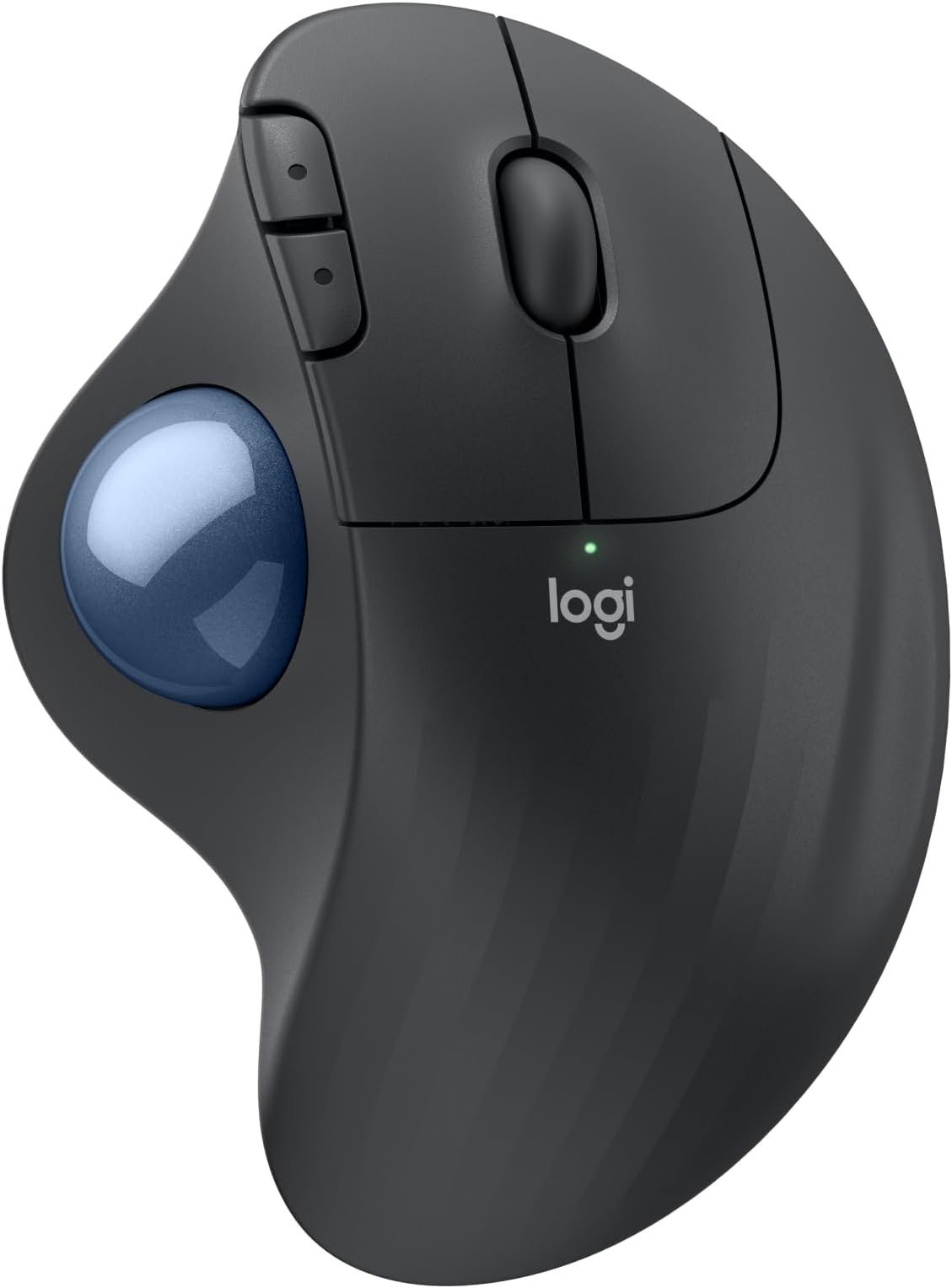
🖐️ Work smarter, not harder — the trackball that keeps you in the flow
The Logitech Ergo M575S is a wireless ergonomic trackball mouse designed to reduce forearm strain by 25%, featuring precise 2000 DPI optical tracking and whisper-quiet clicks. It offers versatile connectivity with Bluetooth and a Logi Bolt USB receiver, delivering up to 18 months of battery life. Made with up to 52% recycled plastic, it’s a sustainable choice for professionals seeking comfort, control, and eco-conscious style in compact workspaces.


| ASIN | B0BBQ3ZYNY |
| Additional Features | Lightweight, Portable, Wireless |
| Antenna Location | Gaming, Office |
| Are Batteries Included | Yes |
| Are Batteries Required | Yes |
| Battery Average Life | 18 months |
| Best Sellers Rank | #21 in Computer Mice |
| Brand | Logitech |
| Button Quantity | 2 |
| Color | Graphite + Blue Ball |
| Compatible Devices | Personal Computer, Tablet |
| Connectivity Technology | Bluetooth, USB |
| Customer Reviews | 4.6 out of 5 stars 1,996 Reviews |
| Enclosure Material | Plastic |
| Global Trade Identification Number | 00097855186744 |
| Hand Orientation | Right |
| Hardware Platform | PC |
| Manufacturer | Logitech |
| Mfr Part Number | 910-007027 |
| Model Name | ERGO M575s |
| Model Number | 910-007027 |
| Mouse Maximum Sensitivity | 2000 Dots per Inch |
| Movement Detection | Optical |
| Movement Detection Technology | Optical |
| Number of Buttons | 2 |
| Operating System | Windows, macOS |
| Power Source | Battery Powered |
| Range | 100 millimeters |
| Special Feature | Lightweight, Portable, Wireless |
| Style Name | Modern |
| UPC | 097855186744 |
| Unit Count | 1.0 Count |
| Warranty Description | 1 Year limited Hardware Warranty |
T**N
A familiar favorite with a much quieter click
I picked up this Logitech trackball to pair with a new Windows machine, and it has integrated into my workflow perfectly. Having used the previous version for over five years, I already knew the ergonomics were top-tier, but the improvements here are immediately noticeable. The most significant change is how quiet the clicks are—they are almost completely silent, which is a great touch for a focused workspace. What makes this a powerhouse for my desk is the connectivity. I switch between systems seamlessly by pairing via Bluetooth to my Mac and using the 2.4GHz dongle for my PC. I’ve even moved my older trackball over to my iPad; using it with the newer "desktop-style" iPadOS layout makes the tablet much more user-friendly and precise. This is a highly reliable tool that stays comfortable through long hours of use. It is definitely worth the price of admission, especially if you can catch it on sale. Whether you are upgrading from an older model or starting fresh, it’s a fantastic investment.
S**7
Must have! Worth the price vs cheap junk
Arrived as advertised in two days, perfect conditions. The usb was secured inside the bottom and will stay in slot when stored without making a lot of noise if banging around inside. The ball is good! After returning a couple Knock offs, I truly understand why this one twice the price as those. It’s good product, reliable, and smooth quiet rolling ball. Now it takes time to get used to it if you are doing digital artwork and stuff, but I would definitely recommend this brand to everyone.
M**Z
The greatest trackball Mouse products in my opinion.
I’m am always pleased with Logitech products, and this mouse is no difference. It’s compatible with my laptop and my iPad. I like its fluidity more on my laptop, on the iPad it seems to go across slowly. The setup was quite easy as usual, the size is perfect for allowing her hands to stay comfortable. I’m always satisfied with the price I pay for these items and I think they’re worth it.
Z**N
Great Mouse!
Product works great! Bought it for my wife’s office set up and once she got used to it she keeps mentioning how easy it is to use and how it helps with stopping her wrist from hurting! Definitely look to add this to your office set up!
N**B
Love this type of mouse
I have purchased different Logitech trackball mouse items over the years. This one was the most recent purchase. I gave 4 stars rather than 5 due to the connection difficulty (USB dongle and Bluetooth both had issues with connectivity where in the past the connection was instant no matter which was used) and the smoothness of the roller ball (seems to stick a little at first but that evens out with use). The scrolling speed is good and the click sound is exceptionally quiet - my keyboard clicks are much louder after experiencing this. When you are working in a quiet environment, every noise stands out so this mouse makes a big difference. This is my preferred mouse because if you have limited desk space or are working on the go, you do not need additional space to maneuver the mouse. This is a benefit for those like me who do not like using the mousepad on a laptop, it is just not as fluid for me as a separate mouse. Typically, I have found that the battery lasts for at least a year depending on use and when the one that came with it drains, I will switch to the lithium which lasts even longer. There is a rechargeable version, but if you have to use a cord anyway, you might as well get the corded mouse rather than the battery one. The fit to me is great - whether I am using this or my husband is, there is no issue. The fact that the mouse is ergonomic is a bonus as well, at least for someone who is right-handed - if you are left-handed, you may have issues with this particular design. You can find other brands that are less expensive, but I have found that those you have to make changes in the computer settings to mouse click speed, etc. This brand offers an accuracy with click and scrolling speeds from the factory. I am very pleased with the value and quality.
H**E
New and improved (so far).
I had a predecessor model of this mouse that saw heavy use for years. I had it for so long that it started to fail slowly. The ball sensors got less and less responsive, and before I finally consigned it to my electronics salvage pile, the buttons, particularly the left click button, started to "bounce" (the switch's contacts would only intermittently touch) before outright failing. The trackball sensors also glitched with each click attempt. But the mouse still functioned. I did consider some trackball mice from other, lesser known brands, but in the end I paid a couple dollars more for this model. So far, I don't regret it. This mouse works just as well as my now-defunct old one, but better. The buttons still give a satisfying tactile clicking feel, but with marked less noise. This to me makes my clicks feel more planted, more direct. Not much to note on the trackball as it feels as good as my old one back in it's heyday, but I see that as a good thing. All that remains to be seen is longevity. I got 10 years out of my old model, and this one is going on 5 or 6 months. So, as mentioned in the review title, this model is new and improved... so far. I hope it lasts at least as long as it's predecessor did!
A**R
Woks perfectly. Warranty cut from 3 to 1 year.
I've been using Logitech since the wired mouse/keyboard days, switching to wireless in 2012 along with moving from mice to trackballs to conserve desk space (and easy use at home on my recliner's armrest). Like a microwave: once you go trackball (and develop some muscle memory in your thumb) you'll never go back to a mouse you have to move your whole arm around to move a cursor. This review was done only a few days into using this new M575S Reliability? I've only had one Logitech failure in 2018 - 2 months before the 3 year warranty expired. Logitech promptly replaced it without my incurring shipping charges. Was disappointed, and a little nervous, when I finally saw on the box for this M575S (in VERY small print) that the warranty has gone from 3 to one year since my last purchase in 2022. So... has the quality gone down too??? Only time will tell. Right now, after reading reviews for cheaper M570 trackball knockoffs of unreliability and flaky behavior I don't mind paying more for a time-tested trackball. The M575S works as a trackball with expected basic functions out of the box (like every Logitech product I've purchased -- 15 of them for my business and home. Just plug in the USB receiver and pull the battery connection paper tab to connect it. After downloading Logi Options+ app (and a PC restart. It won't load without a restart) I could reassign buttons the way I am used to. The Logi Options+ app has been updated sometime last year I think, because it now works without the serious glitches it previously had disconnecting or not starting at all, or misbehaving inside the app. Works perfectly now. For another PC that I use for gaming I love the ability to make app specific trackball changes for a particular gaming app (or any app), like speeding up the trackball pointer just for that app to get across the screen without a thumb reset -- then going back to a word processing app having it slow back down for cursor placement without having to reset cursor speed. For internet or word processing I like resetting the forward and backward keys to Copy and Paste. Just use the app to assign Ctrl+C and Crtl+V. I've found that very, very useful over the years. My only [small] complaint is that if you have a perfectly good Logitech K270 keyboard [ that has been around for years and working perfectly] that you cannot use with this M575S as the M575S uses the newer "BOLT" USB receiver. The work-around so you CAN use that older keyboard is to use both the old "Unifying" USB receiver that came with your K270 keyboard and the "BOLT" USB receiver at the same time. So, you use up 2 USB A ports -- better than buying a new keyboard. It is GOOD, however that the same "Logi Options+" software will recognize both USB receivers and allow cursor speed,pointer & button programming so you don't have to run 2 different apps. That's not much of a problem with most PC's coming with more than one USB A port even though most peripherals have moved to USB C. Like almost all mice and trackballs nowadays this one has a very high resolution ball for smooth scrolling and precise cursor placement. Battery life: I get about three months out of a fresh Duracell with heavy use out of my older M570's and my M575 Pro. I've stopped using generic and rechargeable batteries. I DO always turn it off at night, weekends. You should too. And for devices that really last a long time like Logitech keyboards or less used mice or trackballs change the batteries at least once a year to forestall the formation of corrosion of battery terminals from batteries that are nearing end of life. Logitech devices have a pretty darn good coating on those battery connection terminal compared to many other battery-run devices, and I've only had one trackball (the 2012 one - Yes, still working!) start corroding. A visit to my workshop to fix it and it's back in service. The weight is irrelevant to me since it sits in one place on a desk or leather armrest and is far less muscle/tendon strain than a moving mouse. The shape is very comfortable to the hand causing no pain at all after hours of continuous work, and the buttons are still working perfectly on all 15 of my M570 and M575S and Pro trackballs. If anything goes wrong with this M575S I'll update this review. Right now I'm happy that I only spent 5 minutes installing and optionally programming the buttons and cursor speed for a game. If you don't require that optional programming then your time will be less than 1 minute to use it.
C**C
Best OFFICE wireless trackball mouse I have EVER used. GET IT and save your wrist.
Purchased this after a mouse I've had for over 9 years and decided to stay with the Logitech brand. This is an even better mouse than the one I had previously. You can connect this to several devices if needed. Buttons are VERY easy to use and very quick. You can select from the different colors, I just selected the one that was the cheapest at the time and am still liking this mouse. I HIGHLY RECOMMEND it
A**R
Takes like a day to get used to
I really like this mouse! There's an adjustment period when you're starting out (I kept wanting to switch back to my regular mouse when using it) but by the second day I'd gotten a lot more comfortable using it. While it's still not as easy to navigate as with a traditional mouse, my hand doesn't hurt nearly as much after using it for long periods. In fact, it doesn't hurt at all. I thought my thumb would tire out on the trackball, but it doesn't. I can't attest to its ability in gaming since I use a controller. Precise movement is more difficult so I imagine it's not great for that. You can adjust the tracking speed though and set one of the extra buttons to toggle between speeds. I find the default 50 speed a little too slow so I raised it to 60, and I have a button to switch to a much lower speed when I need the precision. Really minor, but I wasn't expecting the buttons to be so quiet. It's actually pretty nice. Overall, really happy with this mouse. It's comfortable and easy to use once you get the hang of it.
C**N
Great upgrade from the older M570 trackball
I've used the older M570 for well over 10 years and it had a problem with buttons wearing out and double clicking, and I had it replacement more than once under warranty. Near the end when the warranty was up I learned how to replace the switches on my own, but eventually I just couldn't fix them anymore. SO I'm off to buy something new, which lead me to this. This new M757S trackball is almost the same as the older M570, but slightly different shape, but generally feels the same in my hand. The added bluetooth option is a nice addition, but if you already have a bunch of Logitech unifying receivers, this one uses the newer bolt receiver and is not compatible; no problem for me since I use bluetooth now, but if you have an older keyboard you love and don't have bluetooth you'll need to have both an old and new receiver plugged in using up an additional port. No problem having two, but just be aware if you're limited on ports. Base on past history, I've also had good luck with Logitech devices. Great support, great quality (previous trackball excluded, but the warranty was exceptional), fantastic compatibility over the years.
S**O
Optical mice don't work at all for me, so this is the greatest.
Please never stop making this. I can't use any other mouse and I love this one. You could put out other models, prettier ones or less clunky ones, maybe? But don't stop making trackballs. Please.
J**D
This is a good modern version of the classic Logitech trackball
I have been struggling to keep my original 3-button PS/2 Logitech trackball workable, but with cables and adapters it's clumsy. This is modern version is about as close as I can get to that (though I do bemoan the loss of a proper middle button). Works perfectly right out of the box. It comes paired with a USB dongle so it doesn't need pairing (but the instructions do state how to pair it if desired).
J**S
Stopped Working Twice Within 6 Months – Very Frustrating Warranty Experience
I’m very disappointed with this mouse. It stopped working in less than 6 months — completely dead, no light, no response, even after replacing the battery. What’s worse is that this is already the second time I’ve had issues with it. The biggest frustration is the warranty process. It is extremely difficult and inconvenient. I was asked to ship the defective product to the US, which is already unreasonable for a Canadian customer. After I shipped it, it was returned to me asking for an invoice. I provided the invoice, but the process still didn’t move forward. It’s been a waste of time and effort. Overall: - Poor product reliability - Extremely frustrating warranty/return process - Not worth the hassle I expected much better quality and support from Logitech. Unfortunately, this experience has been very disappointing.
Trustpilot
2 days ago
2 months ago