Desertcart purchases this item on your behalf and handles shipping, customs, and support to Portugal.
⌨️ Elevate your desk game with the ultra-slim, ultra-smart Keychron K5 Max!
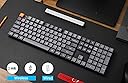
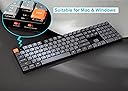
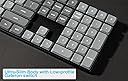
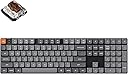
The Keychron K5 Max is a cutting-edge ultra-slim mechanical keyboard featuring 3-mode connectivity (Bluetooth 5.1, 2.4 GHz wireless, and wired USB-C) with a rapid 1000 Hz polling rate. It boasts fully programmable QMK/VIA support, premium PBT keycaps, and tactile Gateron Brown switches enhanced by acoustic foam for quiet, comfortable typing. Designed for Mac, Windows, and Linux professionals, it combines sleek aluminum build quality with versatile functionality to boost productivity and style.


| ASIN | B0D5V7NKF7 |
| Additional Features | Backlit |
| Antenna Location | Office |
| Best Sellers Rank | #621 in Computer Keyboards |
| Brand | Keychron |
| Built-In Media | USB Cable |
| Button Quantity | 108 |
| Color | Gateron Brown Switch |
| Compatible Devices | Laptop, PC, Smartphone, Tablet |
| Compatible Operating System Family | Linux, MacOS, Windows |
| Compatible Tablet Computer Models | AAUB P30 |
| Connectivity Technology | USB-C |
| Customer Reviews | 4.2 out of 5 stars 43 Reviews |
| Enclosure Material | Polybutylene Glycol |
| Generation | 3rd Generation |
| Hand Orientation | Ambidextrous |
| Keyboard Backlighting Color Support | RGB |
| Keyboard Description | Bluetooth |
| Keyboard Layout | QWERTY |
| Keyboard Plate Material | Aluminum |
| Manufacturer | Keychron |
| Mechanical Keyboard Switch Model | Gateron Brown Switch |
| Mfr Part Number | K5MB3 |
| Model Name | Keychron K5 Max |
| Model Number | K5MB3 |
| Number of Batteries Required | 2 |
| Number of Items | 1 |
| Number of Keys | 84 |
| Number of Packs | 1 |
| Number of Sections | 1 |
| Recommended Uses For Product | Office |
| Series Number | 3 |
| Special Feature | Backlit |
| Style Name | Contemporary |
| Switch Type | Tactile |
| Theme | Minimalist |
| Unit Count | 1 Count |
H**N
Love at first type...
This was not the keyboard that I was looking for when I started my search, but man am I glad it's the one that I ended up with. I love the slim look and the sound and feel of the keys right out of the box. I bought this for my office and will be looking at adding one to my home set-up at some point. I would highly recommend this keyboard to anyone who has to type A LOT for their 9 to 5.
J**K
Awesome Keyboard
Awesome keyboard, been buying Keychrons for a while now and I love them
C**S
Excellent low-profile wireless mechanical keyboard
I really like the low-profile, yet near full size shape of this keyboard. The mechanical feel is just right, while staying fairly quiet. I got the brown switches which are nearly silent, but you can feel the click just a bit. Perfect. Why isn't it 5 stars? There weren't a lot of choices in the slim low profile keyboards and this seemed the closest to what I wanted. The layout feels a bit cramped. The function keys and other special keys are kind of jammed close together. However it's much better than the similar Logitech I used to use and it's basically fine. I got used to touch typing on a model M big IBM keyboard. I doubt the layout would bother most people at all. Also I wish it had a dedicated volume control like my wired Das Keyboard. There are utilities to remap the keyboard which generally work great but there's no way to totally remap the special keys above the number pad to be volume controls. That said, you can do a bunch of other things with those keys so if you have a need for 4 extra assignable function keys this keyboard has them. If you don't care about over-sized layout or volume you can consider it a 5. I've used it heavily daily for six months with no issues.
S**.
Suits my needs
This is my work keyboard at the office. I also have one for home.
C**Y
Nice, But Flawed
Maybe it's just because this is my first mechanical keyboard, and the low profile fits me better than I've found with standard-sized mechanical KBs, but I generally like this keyboard. It's got a pretty solid build quality and it's weighty but not heavy. I like the multiple types of connections I have available to me, though I'm admittedly using it wired for primary computer. The QMK/VIA aspect is very handy and I've already seen at least one firmware update, which included additional features, since I bought it. Now, for the downsides: Maybe you can overlook each of them as small, but all of them together had me really debating whether I'd return it. The North-facing RGB is almost completely obscured by the keys, so it's almost pointless to us it unless you're in a very dark room. The RGB really drains the battery as well, even in splash mode (only lighting when you type), which is why I'm keeping mine wired for now. There are virtually NO replacement keycaps available for those who would want transparent/translucent keys to see the RGB more clearly, and there are very few alternative symbol/function caps that come with the board. You'd think there would be more considering how highly customizable this thing is (and that it's intended for both Mac and Win). Lastly, the REALLY frustrating bit: The spacebar is TOO easy to mistakenly hit--over and over and over again--and there's no lip below it to rest your thumbs like I had with my former keyboard. I bought a wrist rest to give my thumbs a spot to rest, hoping that would help. It did, but only slightly. I originally went with the brown switches (and hotswappable, just in case) over blue or red because I wanted feedback and some resistance without clickiness. That was good, but I'd heard the banana switches were better and the Max version doesn't offer them preinstalled. I ended up buying a few banana switches because I wanted more resistance on the spacebar without it being clicky and the low profile only allowed for the 4 choices of Gateron switches (maybe others are compatible, but I went with the sure thing). I really liked the added resistance and only slightly clickier sound. So, I bought enough to swap out all the keys. IT FEELS WONDERFUL, now... except for the spacebar, still. So, I now have mine rigged up with all banana and a single blue switch for the spacebar. It's helped a lot with regard to reducing mistaken spaces, but it's still not perfect and it sounds a bit weird that there's a loud click only when I'm hitting space. I've gotten used to it, but I can't say if my coworkers have or not. All in all, I'd like to see a LOT of improvements from Keychron's low-profile 100% option, but this was a relatively low cost start compared to others out there and core functionality is generally acceptable.
D**P
Keychron K5 over Logitech
I just got in my Keychron K5 Max and love it. I was trying to decided between spending the money on another Logitech MX Mechanical or the Keychron. If you are trying to decided which keyboard to get, get the Keychron!
M**K
Major disappointment!
Major disappointment. Failing after 40 days of useee. Some of my switches doesn't release, so I end up with multiple characters. Obviously this is not usable/acceptable. And since this version is not a hot-swapable the keyboard is now bricked. For a guy who types a lot and codes a lot this is kind of a big deal since I have to weed out all the double-characters. This occurs on both Windows and Linux, and on both BT and cable. I almost can't make myself throw this in the bin, as I bought it to have a trusted keyboard that was both pleasant to use and repairable. Ordered 12. November, received mid December (black week chaos I am told), barely used in January, dust-collector since February 16. If anyone can recommend a better option (price doesn't matter) I am all ears. No response from Keychron.
R**I
Awesome feels, great build quality
Writing a review with great typing feel of Keychron K5 Max keyboard brown switch. I did some research before purchase this one. Excellent feel while typing, low noise, many options on connects to PC, build quality is super, This is my first keychron keyboard after using logitech for long time.
S**M
Low Profile muss man wollen
Leider erkauft man sich hier wie bei allen anderen LP-Switches die schlanke Silhouette mit einem Verlust an Tippkomfort und Präzision.
D**O
I feel like a hacker from the 90s
Click clack clickity clack. If you don't like the sound of an old school keyboard don't get it. I for one love it. It's a softer clack than you might expect but generally it feels robust and smooth. I will be taking this around the world so will see how it fairswith travelling. It's not slim or lightweight but better than the built in keyboard on my macbook
Trustpilot
1 week ago
3 days ago