Buy anything from 5,000+ international stores. One checkout price. No surprise fees. Join 2M+ shoppers on Desertcart.
Desertcart purchases this item on your behalf and handles shipping, customs, and support to Portugal.
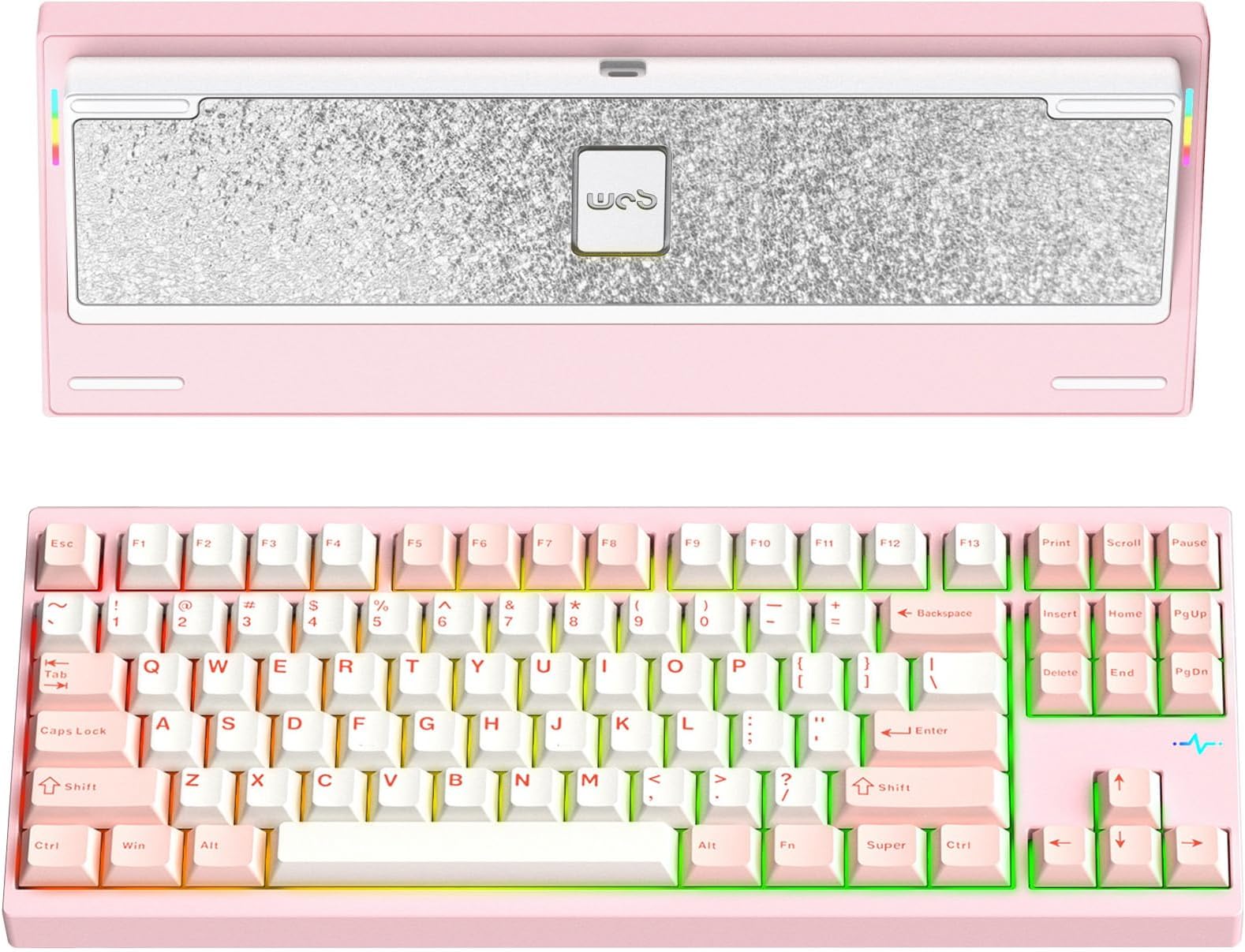
Product description Is this a customizable mechanical keyboard? Yes. It supports hot-swappable sockets and a quick-disassembly structure for easy switch, plate, and sound tuning customization. Is this a customizable mechanical keyboard? Yes. It supports hot-swappable sockets and a quick-disassembly structure for easy switch, plate, and sound tuning customization. What materials is this keyboard made of? CNC-machined aluminum case with anodizing or electrophoresis finish for durability and premium feel. What materials is this keyboard made of? CNC-machined aluminum case with anodizing or electrophoresis finish for durability and premium feel. How do I adjust the RGB lighting? Use shortcut keys (see manual) to adjust brightness and speed. For advanced control, use VIA software. Note: Lite version does not support RGB lighting. How do I adjust the RGB lighting? Use shortcut keys (see manual) to adjust brightness and speed. For advanced control, use VIA software. Note: Lite version does not support RGB lighting. How do I switch between wired and wireless modes? - Power ON (switch under Caps Lock) - Press Fn + Tab to switch modes - 4$ blinks = 2.4G mode - 1-3 blinks = Wireless device connected - USB-C plugged = Wired mode How do I switch between wired and wireless modes? - Power ON (switch under Caps Lock) - Press Fn + Tab to switch modes - 4$ blinks = 2.4G mode - 1-3 blinks = Wireless device connected - USB-C plugged = Wired mode Check product condition (New / Renewed)? - New: Includes full accessories - Renewed: May lack some non-essential items All versions are eligible for 6-month after-sales support Check product condition (New / Renewed)? - New: Includes full accessories - Renewed: May lack some non-essential items All versions are eligible for 6-month after-sales support Review: A Better Value than the Rainy 75 and one of the best TKL boards on the market - Okay, so I'm going to separate this review into a few different categories. I also own the Rainy75 (essentially the smaller sibling of the Crush 80 and still made by Wobkey) so I'm going to be comparing the two a lot. To quickly summarize my opinion though, I think the Crush 80 is a phenomenal board at this price and I think, in general, it's a better value purchase than the Rainy 75. Build Quality and Features: This keyboard has most if not all of the premium features you expect out of a good keyboard in 2025. It's got tri-mode connectivity (Wired, Wireless, Bluetooth), it's got RGB, It's got quality of life features like ball catch closure and pogo pin connectors. As far as quality, the Crush 80 feels very, very premium. It's made of CNC aluminum and it is very heavy. I believe it weighs around 2.4 kg or 5.4 lb. This keyboard is chunky and on the larger side, being a TKL (80%). The rubber feet, side RGB, RGB ECG feature, etc are all great. I think the navy blue one I got is anodized too, which in my opinion feels more premium than my spray coated blue Rainy 75. The magnetic ball catch case is so nice to have if you plan on modding this. Essentially, the case and assembly still feels very solid but when taking the keyboard apart to mod, you do not need any tools. There are no screws to handle unless you're fiddling with the bottom weight specifically. It takes 2 seconds to open this keyboard up. With the rainy 75, you have to take out 12 keycaps, which will reveal screws that, when taken out, will finally allow you to take the top of the case off. The Crush 80 is so much more convenient to mod. Another QOL feature is the POGO pin connectors. Instead of having a cable that connects the battery/case to the PCB, it's a simple contact-based magnetic connector. This means there is no cable to unplug and potentially break. You can just lift the PCB assembly right out of the case without unplugging anything internally. This is also a feature that the Rainy 75 is lacking. The Crush80 has some nice RGB accents on it aside from the key lighting. It's got an RGB heart ECG design that is above the arrow keys as well as two downward-facing RGBs; one on either side that will shine some light on your desk. Interestingly, I have not found an option to turn these off. Even when I turn the key backlights off (Fn+backspace) these accent RGB lights stay on. This doesn't bother me much though. Edit: I found out how to turn the accessory RGB off, itโs just a different key combo from the key backlights. The power switch for this keyboard is under the caps lock key. This means that just to toggle the keyboards power, you need a keycap puller. To use the keyboard in wired mode, power can be off. This is personally a non-issue for me as I just use this keyboard in wired mode. I'm not going to be traveling with this 5 and a half pound keyboard, so I personally don't have a reason to use the switch ever. One other thing this has that the rainy doesn't is a spot on the keyboard to store the wireless USB dongle. On the Crush 80, there's a little magnetic "hatch". If you remove the little cover, you'll see a spot to store the dongle. The rainy 75 has nowhere to store the dongle, meaning you will need to keep track of it. As far as sound and feel go, it's been an absolute privilege to type on this keyboard. It's marbly and creamy. The stock experience out of the box is wonderful. The keyboard is very loud though. I don't think this would be appropriate for an office setting at all. With this being a hotswap board though, it's easy to change out the switches for something quieter. If you do want a silent keyboard, swapping out the Kailh Cocoa switches on this for silent-oriented switches would make a massive difference. This is what I did to my Rainy75 and now itโs as quiet as a membrane or chiclet keyboard. The Crush 80 also comes with more accessories than the Rainy 75. You get a solid, premium-feeling case, a microfiber keyboard sleeve, a decent braided (non-coiled) USB-c cable, and an average keycap/switch puller. You also get parts like extra switches, extra rubber feet, extra gaskets and screws. They even provide an aluminum plate in case you want to swap out the FR4 plate, and they include additional poron foam that you can put in the keyboard. The Rainy 75 is still a very well-designed and functional keyboard, but I think that the Crush 80 is a better value with its features and included accessories. At the time of this review, the Crush80 Reboot Pro is only $21 more than the Rainy75 Pro. The crush 80 is even less expensive from other vendors, but buying from desertcart provides that peace of mind when it comes to delivery and returns. Wobkey themselves (The manufacturer of this and the Rainy75) do not have the best track record so being able to order this through desertcart is really nice. There have been many bad experiences reported with trying to get product support when issues arise, whether itโs lack of a response or just unwillingness to do an exchange. Thatโs why buying from desertcart is the safer (albeit more expensive) option as you have more flexibility for returns or exchanges. Review: Great keeb - Love this thing. It's a bit loud if you switch the included metal plate but the keyboard just generally sounds great with no modifications. I changed all the switches because I prefer tactiles, and everything sounds great. The stabs are only snap ins but the spacebar needed no modifications to remove any sort of rattle. Insanely easy to open this thing up, cover just pops right up. Everything is friction fit so you can change the acoustic layers pretty much instantly. Case feels really well machined and it just looks beautiful. 10/10 keyboard I love this thing. The only comp I own price-wise is a Keychron Q5 and if I had to pick between both boards I'd go with this one all day.


| ASIN | B0DJ7B2G3W |
| Additional Features | Hot-Swappable, Programmable Keys |
| Antenna Location | Gaming, Office |
| Best Sellers Rank | #2,364 in Video Games ( See Top 100 in Video Games ) #195 in PC Gaming Keyboards |
| Brand | KEEBMONKEY |
| Compatible Devices | PC |
| Compatible Tablet Computer Models | Samsung Galaxy Tab S7 FE 12.4" |
| Connectivity Technology | USB-C |
| Customer Reviews | 4.5 out of 5 stars 245 Reviews |
| Enclosure Material | Aluminum |
| Hand Orientation | Ambidextrous |
| Item Dimensions L x W x H | 14"L x 5.6"W x 0.9"H |
| Item Weight | 2380 Grams |
| Keyboard Description | Mechanical |
| Keyboard Layout | QWERTY |
| Manufacturer | KEEBMONKEY |
| Mfr Part Number | Pro Pink |
| Model Name | Pro Pink |
| Model Number | Pro Pink |
| Number of Batteries Required | 1 |
| Number of Keys | 88 |
| Number of Sections | 1 |
| Power Source | Battery Powered |
| Recommended Uses For Product | Gaming, Office |
| Special Feature | Hot-Swappable , Programmable Keys |
| Switch Type | Mechanical |
| UPC | 677899897228 |
| Unit Count | 1.0 Count |
| Warranty Description | 7 Days |
N**K
A Better Value than the Rainy 75 and one of the best TKL boards on the market
Okay, so I'm going to separate this review into a few different categories. I also own the Rainy75 (essentially the smaller sibling of the Crush 80 and still made by Wobkey) so I'm going to be comparing the two a lot. To quickly summarize my opinion though, I think the Crush 80 is a phenomenal board at this price and I think, in general, it's a better value purchase than the Rainy 75. Build Quality and Features: This keyboard has most if not all of the premium features you expect out of a good keyboard in 2025. It's got tri-mode connectivity (Wired, Wireless, Bluetooth), it's got RGB, It's got quality of life features like ball catch closure and pogo pin connectors. As far as quality, the Crush 80 feels very, very premium. It's made of CNC aluminum and it is very heavy. I believe it weighs around 2.4 kg or 5.4 lb. This keyboard is chunky and on the larger side, being a TKL (80%). The rubber feet, side RGB, RGB ECG feature, etc are all great. I think the navy blue one I got is anodized too, which in my opinion feels more premium than my spray coated blue Rainy 75. The magnetic ball catch case is so nice to have if you plan on modding this. Essentially, the case and assembly still feels very solid but when taking the keyboard apart to mod, you do not need any tools. There are no screws to handle unless you're fiddling with the bottom weight specifically. It takes 2 seconds to open this keyboard up. With the rainy 75, you have to take out 12 keycaps, which will reveal screws that, when taken out, will finally allow you to take the top of the case off. The Crush 80 is so much more convenient to mod. Another QOL feature is the POGO pin connectors. Instead of having a cable that connects the battery/case to the PCB, it's a simple contact-based magnetic connector. This means there is no cable to unplug and potentially break. You can just lift the PCB assembly right out of the case without unplugging anything internally. This is also a feature that the Rainy 75 is lacking. The Crush80 has some nice RGB accents on it aside from the key lighting. It's got an RGB heart ECG design that is above the arrow keys as well as two downward-facing RGBs; one on either side that will shine some light on your desk. Interestingly, I have not found an option to turn these off. Even when I turn the key backlights off (Fn+backspace) these accent RGB lights stay on. This doesn't bother me much though. Edit: I found out how to turn the accessory RGB off, itโs just a different key combo from the key backlights. The power switch for this keyboard is under the caps lock key. This means that just to toggle the keyboards power, you need a keycap puller. To use the keyboard in wired mode, power can be off. This is personally a non-issue for me as I just use this keyboard in wired mode. I'm not going to be traveling with this 5 and a half pound keyboard, so I personally don't have a reason to use the switch ever. One other thing this has that the rainy doesn't is a spot on the keyboard to store the wireless USB dongle. On the Crush 80, there's a little magnetic "hatch". If you remove the little cover, you'll see a spot to store the dongle. The rainy 75 has nowhere to store the dongle, meaning you will need to keep track of it. As far as sound and feel go, it's been an absolute privilege to type on this keyboard. It's marbly and creamy. The stock experience out of the box is wonderful. The keyboard is very loud though. I don't think this would be appropriate for an office setting at all. With this being a hotswap board though, it's easy to change out the switches for something quieter. If you do want a silent keyboard, swapping out the Kailh Cocoa switches on this for silent-oriented switches would make a massive difference. This is what I did to my Rainy75 and now itโs as quiet as a membrane or chiclet keyboard. The Crush 80 also comes with more accessories than the Rainy 75. You get a solid, premium-feeling case, a microfiber keyboard sleeve, a decent braided (non-coiled) USB-c cable, and an average keycap/switch puller. You also get parts like extra switches, extra rubber feet, extra gaskets and screws. They even provide an aluminum plate in case you want to swap out the FR4 plate, and they include additional poron foam that you can put in the keyboard. The Rainy 75 is still a very well-designed and functional keyboard, but I think that the Crush 80 is a better value with its features and included accessories. At the time of this review, the Crush80 Reboot Pro is only $21 more than the Rainy75 Pro. The crush 80 is even less expensive from other vendors, but buying from Amazon provides that peace of mind when it comes to delivery and returns. Wobkey themselves (The manufacturer of this and the Rainy75) do not have the best track record so being able to order this through Amazon is really nice. There have been many bad experiences reported with trying to get product support when issues arise, whether itโs lack of a response or just unwillingness to do an exchange. Thatโs why buying from Amazon is the safer (albeit more expensive) option as you have more flexibility for returns or exchanges.
S**N
Great keeb
Love this thing. It's a bit loud if you switch the included metal plate but the keyboard just generally sounds great with no modifications. I changed all the switches because I prefer tactiles, and everything sounds great. The stabs are only snap ins but the spacebar needed no modifications to remove any sort of rattle. Insanely easy to open this thing up, cover just pops right up. Everything is friction fit so you can change the acoustic layers pretty much instantly. Case feels really well machined and it just looks beautiful. 10/10 keyboard I love this thing. The only comp I own price-wise is a Keychron Q5 and if I had to pick between both boards I'd go with this one all day.
M**A
Amazing keyboard!
This keyboard has been treating me well over the past couple months, I haven't even needed to charge it yet, but keep in mind I don't use the RGB lighting so this makes the battery just last significantly longer, the quality of the keyboard is superb, it's heavy, sturdy and especially doesn't sound hollow due to the mods this board comes with, it has gaskets for a soft typing feel that doesn't feel too mushy but doesn't feel too stiff either, the board also comes pre-installed with a force break mod so that it doesn't sound hollow, the switches it comes with are rather good! But for me the lightweight switches weren't up my alley, I swapped them out for gateron milky yellow pro v2's and it's made the board feel significantly pleasant to use, I love the magnetic ball latch system for ease of access on the internals it allows me to install mods easily as well so if your a big keyboard modder this might be the board for you! All in all I recommend this keyboard to those who really want the "end game" of keyboards I might say!
S**D
Unbelievably good value!
Genuinely a little blown away by this keyboard. Everything is basically perfect. The stabilizers are incredibly well tuned, the switches are smooth and nice sounding, the board is HEAVY at nearly 5.5 lbs, and it just looks beautiful. The build quality is what surprised me the most. The machining is really well done and the weight on the back is super nicely polished. For the price, it genuinely makes me wonder why anyone would spend $300+ on other customs when this thing is so good straight out the box. This is miles better than the Evo80 and my old Mode Sonnet in terms of build quality, sound, feel, and looks.
V**N
An amazingly well-built keyboard, just not one for me
I am impressed with the super high quality fit and finish of this keyboard. It is substantial and weighty and it looks great. It's OK for casual typing, although it doesn't excel at that. What really blows me away is the attention to detail with this board that most manufacturers don't think about, like the POGO pin connectors for the batteries that sit in their sculpted compartments, and the beautiful attention to cosmetic detail everywhere on this board. The storage space for the 2.4gHz dongle is a nice touch. The board's weight gives it a very satisfying feel. The keys have a buttery smooth and effortless actuation, but they bottom out effortlessly too, and they have no feedback at all, save for bottoming. I'm not sure what kind of keyboard user the Kailh Cocoa switches are targeted at, but it is for sure not targeted toward typists. You can't select alternative switches when you buy, but that is not a big problem because the board is hot-swappable. I can install switches that suit me. I knew that before I made my purchase, and I'm fine with it. I am not fond of RGB lighting or south-facing LEDs. I like north-facing white LEDs. It's nearly impossible to find a board with those characteristics today that also has support for swappable key switches. Keychron has some, but they are never in stock. So I bought this Crush 80 Reboot board anyway because of the build quality, the great reviews, and because being able to swap key switches is more important to me than the cardinal orientation of the LEDs or their color. The compromise of RBG color and south-facing LED was one I was willing to accept Another compromise I made was the support for wireless modes. I don't care about that. I only use wired mode, ever. I will never use this or any other board in wireless mode. (Honestly, I don't think very many people want that, but for some reason manufacturers think they do.) I am sure that if I keep this board, I will remove and recycle the batteries so I don't have to worry about their inevitable eventual degradation. But again, it's hard to find high-end boards that don't offer these undesirable wireless connectivity features. Now I want to explain why I'm rating this truly handsome and well-built board only 4 out of 5. It is because of F13. It is my fault that I didn't notice the existence of this made-up key in advance. I most certainly would not have purchased this board, no matter how many other desirable characteristics it had, if I had just been observant enough to notice that key. To be clear, the real F13 is Shift+F1. There is no such thing as a standalone F13 key, like this board so very weirdly sports. There is no reason for it to exist. It's only purpose is to make this board unsuitable for touch typists. The bizarre F13 key is positioned where the F12 key should be, with its right edge lined up with the right edge of the backspace key. F12, which should be in that position, is offset one key to the left. And every other F-key down through F5 is similarly misplaced. Only F1 through F4 are where they should be. The addition of the F13 key with the concomitant F-key misalignment is a serious flaw that makes the Crush 80 Reboot an entirely unsuitable board for a touch-typist. The only reason I didn't give it a lower rating is because this is an incredibly well-made board in all other respects, and I recognize that not everyone is a typist. All that said, I'm not willing to try to adapt my touch typing to accommodate that weird F13 key, since doing so would likely compromise my ability to type well on almost any other TKL board in existence. So I'll probably just sell this one on ebay and look for something else that suits me better. Maybe I can get my old WASD Code v1 board with Cherry MX Green switches working smoothly again. It's hard not to like the positive qualities of this board. It's a fine board in many ways. It's just not one for me.
M**G
So great, except the power switch. Worth it.
Premium build. Great weight. Solid. Other than the power switch placed under the caps lock itโs fantastic. But keep your key puller nearby if you have a cat that likes sitting on everything nice that you have. Adorable battery drain.
D**D
Best keyboard I've owned so far
Very heavy and solid feeling keyboard. Battery lasts forever. The key switches sound amazing when typing. My wife wanted her own keyboard after hearing mine. I haven't had any issues when gaming, wired or wireless. Remembering all the keyboard shortcuts for controlling the lights, switching modes and showing battery life has been difficult but it beats having to install a heavy application like iCue or Razer Synapse. The web UI for configuration is a bit confusing at first but I learned how to use it. Taking apart the keyboard without any tools has made cleaning it so much easier! I can never go back to regular brand keyboards after owning this.
D**.
Function before fashion.
Ordered the red pro version. Unboxed and everything looked great from packaging side, included case, keyboard was wrapped in cloth, spare parts. Loved the red color, quality of the aluminum case and weight. Sound was ok, I could make it more quieter. Then came connecting to my PC with included USB-C cable. All lights turned on and I was excited to try it. Tried logging into my PC and nothing was typing on my screen, tried it again as I thought I was just imagining it. Still nothing, plugged my other keyboard in and logged into my PC, no problem. Started going through the manual - "fn"+"tab" since noticed when plugged-in, led light under ley "4" kept blinking. Nothing happened, plugged-in included 2.4GHz dongle. Blinking LED light went away, keyboard started working (YAY). Then would notice same LED would blink and whatever I was typing would end up with double, triple letters or at times a jargon of letters as wireless would disconnect and miss spacebar strokes (this is why I don't like wireless, as I have many wireless gadgets around my PC). Tried holding down "fn"+"Esc" keys and still nothing. Went to wobkey website and downloaded JSON files for 2.4 and USB version. Went to usevia.app>settings>(enabled)Show design tab. Uploaded 2.4 version first, then "Configure" tab and authorized device. Sees keyboard as an 18 key and 1 knob "Wireless Gaming Keyboard". Also unable to update firmware as it needs to be on wired connection to perform update. E-mailed support, opened-up keyboard just for the benefit, even though I know keyboard was working as it charges in wireless mode and works ok-ish except for the signal interferance from other electronic devices that i am working on. Anyways, I really loved the look and feel of this keyboard but quality control and VIA compatibilty is so half baked into this keyboard. 1. - Will go for a QMK device next time. 2. - Just make a physical switch for tri-mode feature instead of a keyboard combo. 3. - hard reset switch to facotry default keyboard. BTW, you cannot assign an LED color per key and upon closer inspection of the switches, 3 keys were in different orientation. Still have 2-3 weeks to troubleshoot keyboard with support. I will edit and update my ratings if things happen positively. I really want to keep this keyboard but we'll see. UPDATE: Returned keyboard as support didn't say anything about troubleshooting anymore. Very disappointed, looking elsewhere.
A**A
๐
Royal Mail decided to delay my package, but the support from ComputerOrbit assured me everything was going to arrive fine, it also arrived in pristine condition all while being worth my money
M**W
Unbelievable Value
Incredible pre-built aluminum mechanical keyboard for the money. Better than anything you could get from the likes of bib brands like Logitech, Razer or Corsair. Sounds and feels great out of the box with loads of foams and it's really easy to disassemble the keyboard due to the presence of the latch system. Comes with 2 plates in the box: 1x FR4 (comes pre-installed) and 1x alu plate. Build quality punches way above the price class into custom keyboard level quality. CNC machining is well done and anodized red color looks fantastic. I have been running the board with Akko Cilantros and Gatero Type Rs and it sounds fantastic. Really good board for clacky switches. Wireless can be spotty if there's no direct line of sight with the adapter. Battery life is great when RGB is turned off (lasts about a month on wifi) All in all, it's an Incredible keyboard.
D**8
pretty good
the keyboards quality is great and it sounds quite nice, i had no problems or issues when opening it after it shipped
A**N
Built like a tank, sounds like music.
Beautiful keyboard. Sounds delicious. Delivery was done on time, product had no issues. Small cons: 1. The power button under Capslock is kinda annoying. 2. Backlight not being see through kind of makes it hard to see in dark if you rely on it.
B**.
Stunning Quality
Having gone through more than a few mechanical keyboards that did not live up to my admittedly high standards, I have finally decided to take the plunge and get this highly-acclaimed keyboard. Its reputation is richly deserved - the build quality and the quality of metal finishing is absolutely spectacular in comparison to other aluminum keyboards in $150-$200 range. I know this keyboard is more expensive than those boards, but it is fairly obvious that the quality control on it is much higher than that of its competitors. In terms of actual functionality, RGB is perfect, switches sound and feel amazing and are medium-weight linears which I personally enjoy a lot. Stabilizers are lubricated properly. Keycaps are dualshot PBT with sharp legends and feel fairly smooth to touch - I do prefer slightly more coarse surface of dye-sub PBT keycaps, but the legends on those are not as sharp. Wifi performance is flawless, but I personally use it in purely wired mode, so I simply disconnected both batteries. The packaging is also spectacular as the keyboard comes in its own carry zippered case inside a carboard box. Extra switches gaskets and other trinkets are included. Crush 80 is also toolfree disassembly and is super easy to mod. The only exception is the battery compartment which has 6 screws that are large and made of very strong metal, so they are not easy to strip. If you are a mechanical keyboard connoisseur, this keyboard is worth is massive weight in gold. It will save you a lot of time and headache in the long run.
Trustpilot
4 days ago
3 weeks ago