Buy anything from 5,000+ international stores. One checkout price. No surprise fees. Join 2M+ shoppers on Desertcart.
Desertcart purchases this item on your behalf and handles shipping, customs, and support to Portugal.
🎞️ Relive & Digitize Your Memories in Stunning HD — Don’t Let Nostalgia Fade!
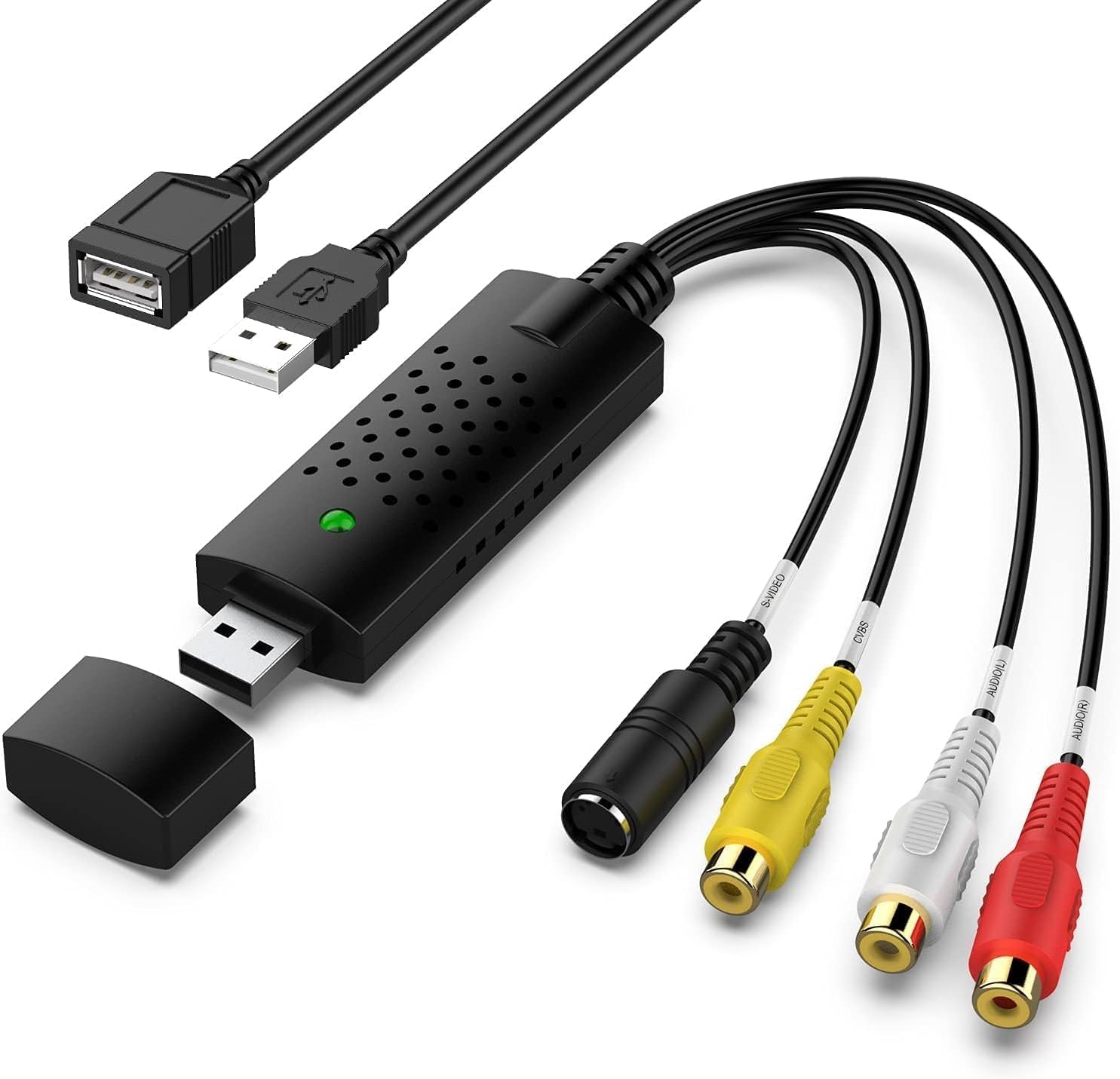
The VIXLW Video Capture Card is a compact, USB 2.0 device that converts analog video from VHS, VCR, Hi8, MiniDV, and DVD sources into 720P HD digital files. Compatible with both Windows and Mac OS, it supports RCA and S-Video inputs and offers plug-and-play ease without external power. Advanced signal processing delivers vibrant video and audio capture, while user controls allow fine-tuning of image quality. Ideal for preserving old media with professional-grade precision.


| ASIN | B0D9NHFJ9V |
| AV Output | USB |
| Antenna Location | Video Recording |
| Best Sellers Rank | #31 in Internal TV Tuner & Video Capture Cards |
| Brand | VIXLW |
| Customer Reviews | 4.1 out of 5 stars 422 Reviews |
| Hardware Interface | USB 2.0 |
| Item Weight | 0.03 Kilograms |
| Manufacturer | VIXLW |
| Mfr Part Number | BR116 |
| Minimum System Requirements | Minimum system requirements: Windows operating system, 2 GHz processor, 2 GB RAM, available disk space for software installation and video storage. |
| Model Name | BR116 |
| Model Number | BR116 |
| Operating System | Windows |
| Other Special Features of the Product | Powerful RCA to USB Video Capture and Conversion Capability |
| Recommended Uses For Product | Video Recording |
| Special Feature | Powerful RCA to USB Video Capture and Conversion Capability |
| Tuner Type | NTSC, PAL |
| UPC | 797422758823 |
S**Y
Worked Fine With Win 11 - No New Software Needed
Plugged it into my PC, plugged it into the VCR, fired up OBS Studio and it worked without a problem. Win 11 compatible out of the box. Copied a tape without issue. Worked fine for me. Thank you!
M**E
Miracle device for my use case
MJPEG AND YUV422 outputs. HDCP is not giving me trouble (even without a splitter). Latency is extremely low (guessing around 50ms at 1080p 30fps). Because it's MS2130, no drivers needed for Linux Driver Info: Driver name : uvcvideo Card type : USB3.0 Video: USB3.0 Video Bus info : usb-xhci-hcd.1-1 Driver version : 6.12.47 Capabilities : 0x84a00001 Video Capture Metadata Capture Streaming Extended Pix Format Device Capabilities Device Caps : 0x04200001 Video Capture Streaming Extended Pix Format Media Driver Info: Driver name : uvcvideo Model : USB3.0 Video: USB3.0 Video Serial : 20210623 Bus info : usb-xhci-hcd.1-1 Media version : 6.12.47 Hardware revision: 0x00003100 (12544) Driver version : 6.12.47 Interface Info: ID : 0x03000002 Type : V4L Video Entity Info: ID : 0x00000001 (1) Name : USB3.0 Video: USB3.0 Video Function : V4L2 I/O Flags : default Pad 0x01000007 : 0: Sink Link 0x0200000d: from remote pad 0x100000a of entity 'Processing 2' (Video Pixel Formatter): Data, Enabled, Immutable Priority: 2 Video input : 0 (Camera 1: ok) Format Video Capture: Width/Height : 1920/1080 Pixel Format : 'YUYV' (YUYV 4:2:2) Field : None Bytes per Line : 3840 Size Image : 4147200 Colorspace : sRGB Transfer Function : Rec. 709 YCbCr/HSV Encoding: ITU-R 601 Quantization : Default (maps to Limited Range) Flags : Crop Capability Video Capture: Bounds : Left 0, Top 0, Width 1920, Height 1080 Default : Left 0, Top 0, Width 1920, Height 1080 Pixel Aspect: 1/1 Selection Video Capture: crop_default, Left 0, Top 0, Width 1920, Height 1080, Flags: Selection Video Capture: crop_bounds, Left 0, Top 0, Width 1920, Height 1080, Flags: Streaming Parameters Video Capture: Capabilities : timeperframe Frames per second: 30.000 (30/1) Read buffers : 0 User Controls brightness 0x00980900 (int) : min=0 max=100 step=1 default=50 value=50 contrast 0x00980901 (int) : min=0 max=100 step=1 default=50 value=50 saturation 0x00980902 (int) : min=0 max=100 step=1 default=50 value=50 hue 0x00980903 (int) : min=0 max=100 step=1 default=50 value=50
E**.
Works as expected. Pretty easy to use.
Pretty much plug and play. Used with Quicktime on an Imac and just needed a couple setting in Quicktime to pull video from the USB and to pull Audio from USB. then it was hit record, then hit play. It will not compress anything for you or make your end resolution any better. But you are normally pulling from an analog old technology so that is to be expected.
A**G
Very misleading product. No audio captured at all
I bought this USB VHS capture device expecting to digitize old tapes with both video and audio, as the listing implies. In practice, the video works, but no audio is captured at all using any software, on Linux or Windows. After troubleshooting at the system level, I confirmed that the device is internally a MacroSilicon MS210x series USB video grabber, which only presents a UVC video interface and does not expose any USB audio device. The red and white RCA jacks appear to be audio inputs, but they are not connected internally. This product is video only. If you need audio with your VHS transfers, this unit will not work regardless of drivers or operating system. I wasted time and money and now have to use a separate audio interface just to capture sound. Very disappointed with the misleading description. Do not buy if you need audio.
M**.
Works!
Easy to use, does fine with VHS to digital transfers
M**S
Funciona perfecto para una Play4
Muy excelente prodcuto cumple su funcion y tiene buena calidad, lo compre apra una Play 4 y funciona a la perfección. Y el envio rápido.
Y**G
Sadly no Work 4 Me
I really wished it worked for me, but never did. Tested with PC, and Laptop, on Windows 11 with no success. Tried everything Google could possibly recommend and still nothing. But I've read from others they had no issues Its a great looking product, and well built, but sadly can't give it a 5 star. Wish you the best though!
O**N
Great device once you take the time to learn how to use it
This Capture Device works really well once you take the time to learn how to use it. Have transferred many cassette videos from a Sony handy cam from the ‘90s and they came out great, but there is a definite learning curve. I first tried using it on an older Windows 10 system and was not having much luck. Then I installed it on a Windows 11 operating system and it worked right away. I then used the OBS System download recommended with the capture device instructions and with some patience and using the OBS troubleshooting forums got it recording perfectly. My difficulty was with the audio recording on the capture and took some time to figure it out, but if I can do it, anyone can! Am in my 70’s and am definitely no computer expert! Great device if you take the time to figure it out! Highly recommended.
M**A
Perfect for a beginner to digitize old Hi8 tapes!
Keep in mind that I'm only digitizing short 1-2 hour long family Hi8 tapes from the 90s to maintain the basic quality they were shot in and not doing anything more involved than that. Previously, I have used a different setup when digitizing old Hi8 tapes but there were significant drops in audio. This capture card works perfectly so far for what I need it to do. I will update my review if I encounter any problems but so far it's worked perfectly! You'll need an additional RCA cable (male to male) and a camcorder that can do playback and then just plug them all together and use a capture program like OBS (it' free) and you're good to go! There was no need to download any additional drivers to get my PC to recognize it. It also has the option to use an s-video cable but that is not necessary for the connectivity of the device to computer. I like that it has a dongle as the USB that's directly on it is rather wide and blocks other USB ports on my PC, whereas the dongle is more like a typical USB size. It also has a small light that lights up to show that it's plugged in and connected. Not necessary, but nice.
S**L
Fonctionne parfaitement bien de ma vieille camera video des années 90 à la prise usb de mon ordi
J’ai utilisé cet adaptateur pour connecter une caméra vidéo des années 90 à mon ordinateur portable. Je voulais transférer les vidéos sur des vieilles cassettes en format numérique. Cela a très bien fonctionné. J’ai pu faire le transfert en utilisant le logiciel gratuit OBS studio (et l’IA pour savoir comment l’utiliser et le paramétrer 😉).
R**B
Worth the $11! Works great on my 2021 Macbook Pro!
Used it on my 2021 Macbook Pro. Totally worth the $11 ! Neat to be able to watch and digitize VHS home movies from 30+ years ago, without a TV! Cons: Only fickle is sometimes the videos showed in black and white, so I would take out the vhs, put it back in, sometimes I would have to do it one more time and then it would show up in colour. Not sure if it is the converter or my VCR acting up. You'll need to get a RCA cord (male red, white, yellow on each end) if you don't have one already. Male RCA goes into VCR. Other end of RCA goes into the matching colours on this converter. USB goes into computer. Short Female/Male USB is just an extender. Works with and without it. I used Quicktime, followed the instructions on the photos. (File-New Movie Recording-Turn up volume and hit the record button). SO EASY! (The sound in the video sounds a lot better; the ride we were on had an announcer)
M**H
underwater camera to pc
I am having trouble getting OBS to access it for calibration, but the programs DO recognize it immediately.
D**F
as advertized
works as advertised, converts super 8 analog video and sound to a digital input
Trustpilot
2 months ago
1 week ago