![OMOTON Keyboard for Surface Pro 11/10/9/8/X, [13 inch], Bluetooth Type Cover for Surface Pro, 7-Color Backlit, Ultra-Slim Wireless Keyboard with Touchpad & Pencil Holder, Built-in Rechargeable Battery](/_next/image?url=https%3A%2F%2Fm.media-amazon.com%2Fimages%2FI%2F71N0tYNbgHL.jpg&w=3840&q=75)


⌨️ Elevate your Surface Pro game with style and wireless freedom!
The OMOTON Bluetooth Keyboard is a sleek, ultra-slim wireless type cover designed exclusively for Surface Pro 11/10/9/8/X models. Featuring a vibrant 7-color backlit keyboard, a high-precision touchpad, and a built-in rechargeable 750mAh battery offering up to 50 hours of use, it enhances productivity with seamless Bluetooth connectivity. Its integrated pencil holder keeps your Surface Pen secure, making it the perfect accessory for millennial professionals seeking style, convenience, and efficiency.


| ASIN | B0D4LQQYT4 |
| Additional Features | Backlit, Rechargeable |
| Antenna Location | Everyday Use |
| Brand | Omoton |
| Built-In Media | USB Cable |
| Button Quantity | 78 |
| Color | Deep Grey |
| Compatible Devices | Tablet |
| Connectivity Technology | Bluetooth |
| Customer Reviews | 4.0 4.0 out of 5 stars (114) |
| Enclosure Material | Acrylonitrile Butadiene Styrene |
| Hand Orientation | Ambidextrous |
| Item Dimensions L x W x H | 29L x 22.6W x 0.9H centimeters |
| Keyboard Backlighting Color Support | RGB |
| Keyboard Description | Multimedia |
| Keyboard Layout | QWERTY |
| Manufacturer | OMOTON |
| Model Name | Surface pro 11/10/9/8/X |
| Model Number | Surface pro 11/10/9/8/X |
| Number of Batteries Required | 1 |
| Number of Keys | 78 |
| Power Source | Battery Powered |
| Style Name | Modern |
| Switch Type | Tactile |
D**I
My son's OEM keyboard on his surface pro 8 crapped out. This was a reasonably priced replacement, and it works perfectly. He also LOVES the fact that he can use this keyboard even while it is NOT snapped in place with the computer itself. That's helpful if you pass the monitor part of the surface to someone that you want to demonstrate/show something to; you can still control it while someone else is holding it. Don't know how often that comes into play for other people, but my son enjoys this. Snaps into place perfectly. Battery life seems pretty solid, so if you need to take this to class to take notes, it's going to function. Nice feel to the keys; he likes tht it is backlit
N**S
Edit: after reaching a resolution with the vendor I have decided to rate them 5 stars based on their service and dedication to the consumer 🙂 Devices I've used this with: - surface pro 9 - desktop PC (windows) - LG TV I was hoping this would be the "unicorn" of the seemingly identical 3rd party surface pro keyboards, but nothing stands out in any particular way. It's a decent little keyboard, but the Bluetooth connectivity is buggy in that it requires "re-adding" the keyboard "Bluetooth keyboard" each time I need to pair with another device. i.e. if I for some reason want to use it my other PC, I have to pair it again as though it's a new device, leaving multiple "Bluetooth keyboard" options on my PC. Same thing happens on my surface. Construction wise, it seems about average when comparing it to another 3rd party keyboard of similar design. I don't have a pen for the surface so I can't comment on how well it holds that in place, but I can say that the magnetic connection to the surface is about the same strength as the surface pro keyboard by Microsoft and another 3rd party one that I own. It wouldn't be fair to say it feels cheap. In my opinion, every single keyboard for the surface I've used (including the Microsoft one I bought at best buy) is going to feel cheap due to the intended design. Despite the general design flaws (if you consider them to be that way as I do), it's a little bit thicker than the Microsoft version and therefore does feel a little bit more sturdy. It falls short however in the track pad quality. (I will occasionally experience unintentional disruption in tracking. Dirt, hair, clothing, etc can throw it off, and the "tap to click" is very lacking.) The keys are a little bit less "tactile" in their engagement compared to the partially mechanical feel of the OEM keyboard keys, but I have not had any major complaints that I can think of, and that may be a plus for some. Having more backlight options and the ability to use it as standalone device (disconnected from the Surface Pro) however are probably the main selling point of any of these 3rd party options, which it does provide at a fraction of the cost of finally released OEM keyboards with disconnected capabilities. It is slight step up from the only other 3rd party surface pro keyboard I own, but a step down from the official MS branded keyboard overall. Considering the price however, it's a much better value than the OEM keyboard(s) for purchase from Microsoft.
D**T
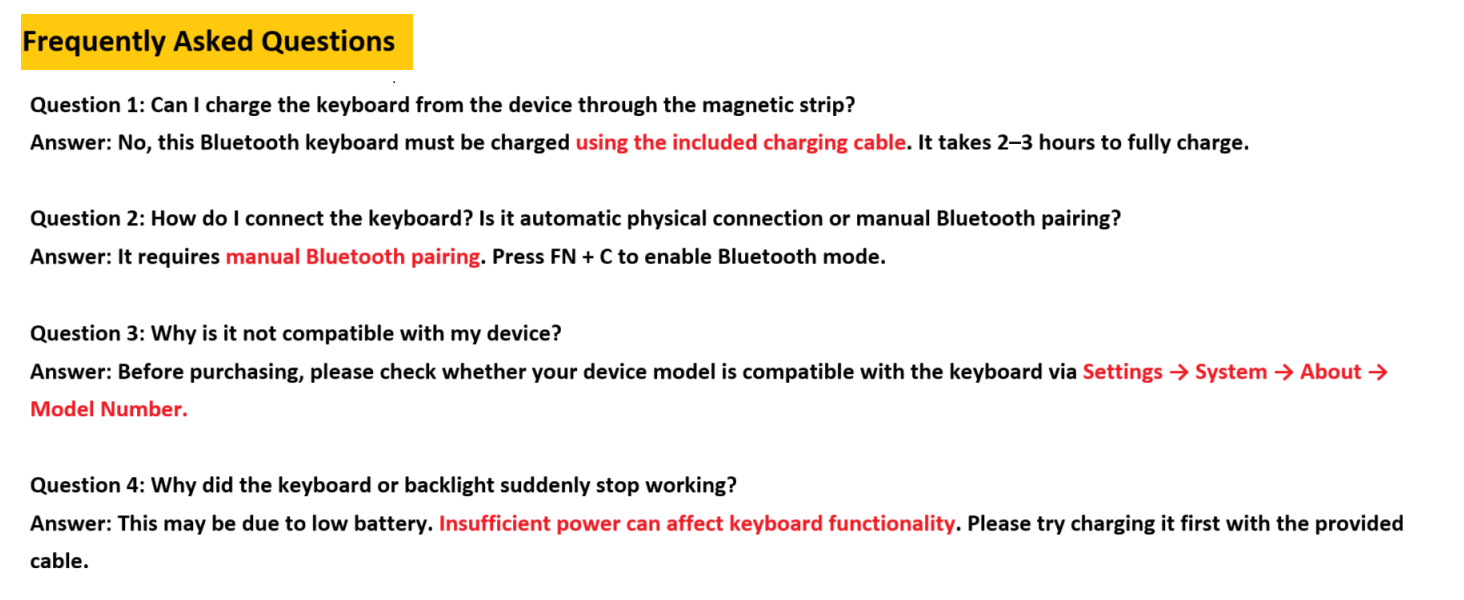
My used Microsoft Surface did not come with a keyboard, so I bought this. It looks great, I love the light up keyboard function, and it magnetically "snaps" into place. You can change the led color of the keys, and a charge lasts quite a while. I just wish it recharged through the magnetic snap connection as an OEM version would. This is a minor issue, you can just use the USB cable it comes with and plug it directly into the Microsoft Surface while you are charging it to also charge the keyboard.
C**E
Beware! This keyboard is bluetooth and will not connect to your surface pro. The wireless keyboard is not easily searchable.
A**J
Working great with my Microsoft Surface Pro 11. The battery lasts for a long time, they claim 50 hours, and I suspect that's 50 hours of use, since I only charge it about once a month (I have shut it off a couple times when I think of it). I have a Surface Pro 6 and bought the MS Surface Pro keyboard, and this one seems about the same in quality and functionality. The bluetooth connection has been flawless, but it does seem to take 1-2 seconds after you power up the Surface to connect up to the keyboard (also, I am not switching this keyboard to other computers, just the one and leaving it there).
Trustpilot
1 day ago
1 week ago