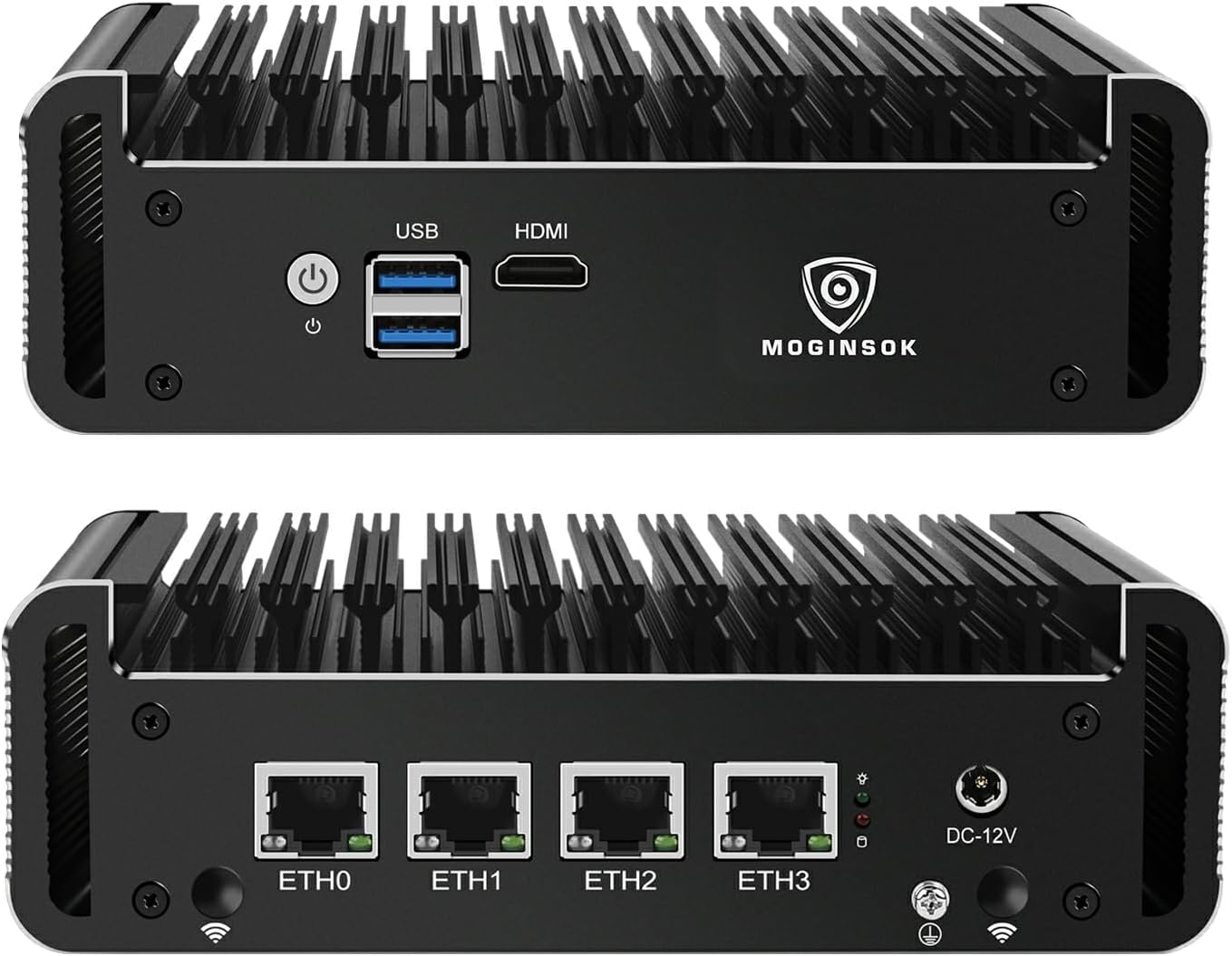
🚀 Elevate your network game with silent speed and pro-grade power!
The MOGINSOK MGCN50N Firewall Appliance is a fanless mini PC featuring an 11th Gen Intel Celeron N5095 quad-core CPU, 8GB DDR4 RAM, and 128GB NVMe SSD. Equipped with four Intel I225-V 2.5GbE LAN ports, it delivers ultra-fast, secure networking ideal for professional firewall and VPN setups. Its silent, fanless design ensures noise-free operation, while expandable RAM and storage slots provide customization flexibility. Compatible with pfSense, OPNsense, and other professional OSes, this compact powerhouse is built for millennial managers demanding reliable, high-performance network security.


| ASIN | B0DLLC232N |
| Best Sellers Rank | #6,183 in Computers & Accessories ( See Top 100 in Computers & Accessories ) #234 in Mini Computers |
| Brand | MOGINSOK |
| Card Description | Dedicated |
| Chipset Brand | Intel |
| Color | Black |
| Computer Memory Type | DDR4 SDRAM |
| Customer Reviews | 4.0 4.0 out of 5 stars (150) |
| Date First Available | October 31, 2024 |
| Graphics Coprocessor | Intel UHD Graphics |
| Hard Drive | 128 SSHD |
| Hard Drive Interface | Solid State |
| Item Weight | 3.41 pounds |
| Item model number | MGCN50N |
| Max Screen Resolution | 1920x1080 |
| Memory Speed | 2933 MHz |
| Number of Processors | 4 |
| Number of USB 3.0 Ports | 2 |
| Operating System | Linux |
| Package Dimensions | 10.51 x 9.8 x 3.5 inches |
| Processor | 2 GHz mobile_celeron |
| Processor Brand | Intel |
| RAM | 8 GB DDR4 |
| Screen Resolution | 1920 x 1080 |
| Series | MGCN50N |
S**S
Nice unit with a few minor glitches
This is a very nice little box. The designers should be proud. I had no problem loading and running FreeBSD 12.3-RELEASE (the unit comes with pfSense on FreeBSD 12.3-STABLE.) I vaguely remember booting Fedora 37 on it from a USB drive. I did not try Windows 10 or 11. I've gotten used to powering devices via USB-C. This platform uses a 36W power brick. It has the fairly recent Intel I225-V network interfaces - those can ramp all the way up to 2.5G. It's taken a while for Linux and FreeBSD to get drivers for this NIC, but they are there now. It is easy to remove the bottom cover plate and get to the M-SATA SSD and the memory. I preserved the original pfSense M-Sata drive and replaced it with one that I could play with. (If you do this yourself, make sure you get an "M-SATA" SSD, not an M.2 SSD.) The issues I found are these: 1. There is a long (up to 30 delay) during booting while it asks whether you want to enter Setup - even if you've set that delay to 1 second. Entering Setup also takes many seconds. Once booted it runs quite well. 2. I have not found a boot-device selection menu - I often boot from USB "live" drives - and going into Setup to do this is a bother. 3. The documentation has errors - such as conflating the LEDs on the left/right sides of the ethernet ports (the Intel i225 nics seem to have tripped a lot of designers on this.) 4. The USB ports are upside down - not that most people will notice or care, but the USB spec does specify which way is supposed to be "up". (I wish this platform had USB-C, including being powered via USB-C.) 5. I saw no way to update the BIOS. I could only boot from USB with drives inserted directly rather than via a USB-3 hub. That's an annoyance for me, but I doubt that many people would even notice. The box is almost all heat sink - but I've never yet felt it more than slightly warm to the touch. There is so much heat sink that there's not much roon to attach an external label.
J**N
Great little pfsense box
Been using this for a little under a month (uptime is 28 Days, 17 Hours, 45 Minutes) at time of writing this. No issues with hardware stability using pfsense v2.6.0 since getting this mini PC it has been rock solid and running on average around 46c as per the Dashboard temp gauge. Purchased the version with the 8Gb RAM and 128Gb SSD which is way more than enough for a pfsense appliance. Currently my setup is using this as an edge firewall with snort, pfblocker-NG and a couple other Packages to make sure it's secure with an SSL cert. Placement is Modem>Pfsense>Switch>router>wifi mesh network Have Spectrums 1Gb down 40Mbps up and achieve those speeds across the network with any wired device, on wireless it's average around 600Mbps down and 35Mbps up which is not bad at all and am able to run multiple client devices at the same time streaming 4k video, gaming (Little more on this further down), work from home using multiple VMs and VPN connections without issue. As for the gaming not willing to use UPnP but don't play online multiplayer games so it's not something we need, if needed you can make a VLAN and segregate the consoles. If you are looking to use this and game you will have to configure the NAT settings, by default NAT is restricted on all gaming consoles. The 2.5Gb ports are nice to have but if your other network devices don't support 2.5Gb then you'll be using the lowest speed of those ports. A great youtube channel to follow for some configurations and helpful explanations is TheTecknowledge other wise known as Lawrence Systems. One thing that took me a little longer to figure out (first time having more than a modem/router) was make sure that during the setup your other network hardware has DHCP and NAT off and just let this pfsense box do it, double NAT was a headache and DHCP conflicts can make it hard for RDP or other client share settings to be seen. Set DHCP on AP to disabled if you can and use the LAN ports to connect between each device. If you do connect this to your modem make sure to power down the modem then connect it to the WAN on this box then power modem on, power on pfsense, etc... one at a time so that it can receive the new DHCP lease. Overall this is an awesome device and out of the box is great if you get the pre-installed version. If not would assume you can make it whatever you want by installing a Linux distro, haven't tried that yet.
C**T
El equipo llegó a tiempo y cumple con las especificaciones que se ofrecen
Trustpilot
3 weeks ago
5 days ago