Buy anything from 5,000+ international stores. One checkout price. No surprise fees. Join 2M+ shoppers on Desertcart.
Desertcart purchases this item on your behalf and handles shipping, customs, and support to Portugal.
⌨️ Elevate your desk game with Flow Lite — where sleek meets smart.
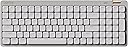
The LOFREE Flow Lite100 is a stylish low-profile mechanical keyboard featuring 100 linear switches optimized for comfort and reduced fatigue. It offers versatile 3-mode connectivity (2.4GHz wireless, Bluetooth, and wired USB-C), a robust 3000mAh battery delivering up to 100 hours of use, and durable PBT double-shot keycaps with backlighting. Designed for professionals seeking ergonomic precision and customizable controls, it includes a built-in kickstand and volume roller for enhanced usability.


| ASIN | B0DP33XH4X |
| Antenna Location | Business, Education, Everyday Use, Personal |
| Best Sellers Rank | 14,750 in Computers & Accessories ( See Top 100 in Computers & Accessories ) 210 in Keyboards (Computers & Accessories) |
| Box Contents | USB Cable |
| Brand | LOFREE |
| Brand Name | LOFREE |
| Button Quantity | 1 |
| Colour | Marble |
| Compatible Devices | Laptop, PC |
| Compatible Operating System Family | Windows |
| Compatible Tablet Computer Models | AAUB P30 |
| Compatible devices | Laptop, PC |
| Connectivity Technology | Bluetooth, USB-C, Wi-Fi |
| Connectivity technology | Bluetooth, USB-C, Wi-Fi |
| Country of Origin | China |
| Customer Reviews | 4.3 out of 5 stars 706 Reviews |
| Enclosure Material | Acrylonitrile Butadiene Styrene |
| Hand Orientation | Ambidextrous |
| Is Electric | Yes |
| Item Dimensions L x W x H | 37.4L x 13.8W x 2.4H centimetres |
| Keyboard Backlighting Color Support | Single Color |
| Keyboard Description | Mechanical |
| Keyboard Layout | QWERTY |
| Keyboard Plate Material | ABS |
| Keyboard description | Mechanical |
| Manufacturer | LOFREE |
| Manufacturer Part Number | OE922 |
| Model Name | FLOW LITE |
| Model Number | OE922 |
| Number of Batteries | 1 |
| Number of Keys | 100 |
| Number of Sections | 1 |
| Power Source | Battery Powered |
| Product Features | Backlit, Hot-Swappable, Hotkeys and Media Keys, Low-Profile Key, Volume Roller |
| Product Warranty | 1 Year Warranty |
| Recommended uses for product | Business, Education, Everyday Use, Personal |
| Series Number | 922 |
| Special feature | Backlit, Hot-Swappable , Hotkeys and Media Keys , Low-Profile Key, Volume Roller |
| Style Name | Lite |
| Switch Type | Linear |
| Theme | Lite |
| Unit Count | 1.0 count |
| Water Resistance Level | Not Water Resistant |
K**R
Lovely keyboard
It's a really nice keyboard, I've been using it for a couple weeks now and it's really nice to use. It takes a little to get used to where the buttons are light with not much resistance so sometimes I don't realise I have pressed a button. It has a really nice sound when typing.
N**W
As described
As described in the listing, I’m super happy with my purchase. Lovely to type on and easy to set up. Managed to purchase during BF meaning I’m pleased with the deal I got.
C**M
Low Profile Good Option
I have heard a lot about this brand and wanted to give a shot. As these days we are getting more low profile keyboards which is nice and healthier.. This is one of the most favourite keyboard I have ever tried! 1. What I like about this * It is very low profile which is very comfortable for all day. * The switches and keypads feels incredible nice which is POM and PBT high quality. * It has nice creamy/thock sound which is very rare on low profile mechanical keyboards. * The keyboard has good quality and white colour is looking good. * Multiple connection options are available which is most important Wifi 2.4Ghz most reliable option. (I do not like bluetooth ever) * The stabilisers are fine for this money. * The volume roller nice. What I did not like * The build quality for this price feels a bit cheaper. * I was expecting some RBG lights for this price.
V**S
Best keyboard I’ve ever used
Why did you choose this product over others?: Great keyboard. Highly recommend!
N**9
Quite a nice portable keyboard
In short, this is a pretty nice keyboard with the only real drawback is that it is in the US ANSI layout which can cause some keys to not produce the characters you expect on a system configured to UK / British. The overall build quality is pretty good, and the body of the keyboard is made from plastic. As a result, the weight is kept down. The keyboard offers tri-mode connectivity using either wired, Bluetooth or 2.4G using an included dongle. The overall profile of the keyboard is very low however it is still classed as a customisable mechanical keyboard as the keycaps and key switches are removable. The default keycaps are PBT and uncommonly have shine through to take full advantage of the keyboards backlight. In terms of typing sound and feel both are pretty decent. The included keys witches are quite poppy and the keyboard errs toward being thocky. I did change some of the keycaps to regular cherry MX keycaps and they seemed to work okay. The typing angle is quite low and although there is a kick out leg it still remains low. I was able to place the keyboard over the keyboard of my MacBook Pro and it did not interfere with the Macs keyboard or track pad. Overall, I was pretty impressed by the keyboard, mainly from the typing feel and sound given that the keyboard profile is so low. It is very much perfect to use out of the box and I really like the shine through keycaps. For the price (£119.99 at the time of review) it is pricey but I think the overall quality of the components are reflected in this. I just wish it came in a UK ISO layout as it would be my perfect carry around keyboard. It stands above alternative low profile keyboards at this price.
R**I
Good quality, but not for me
Great quality keyboard, the elevation is not sufficient for me. It could be much more ergonomic if it had additional elevation range.
M**F
Impressed!
I've been using this keyboard for a few days now and like it! The main thing that shines out for me is the sound.. the only way I feel I can describe it is creamy?! It's a smooth typing experience and almost quite therapeutic in a way. I like its low-profile style, and the two stands make it a perfect size for typing away at work. The box itself comes with a main wire so you can use this wired or use the 2.4ghz USB connecter it has in the back. I prefer wireless so use that more often than not. Downsides: One of the downsides is size. It's a super compact keyboard so some of the keys you're probably used to pressing have moved and it's quite tricky to get used to. Things like the page up/down and delete button are now in the top right rather than central right - it did take me a few days to get used to it (so worth it). The other thing is the instructions are all in Chinese... The main manual doesn't have an English page so let's hope there isn't anything else important other than connecting wirelessly when you first power on (you have to press the Fn and 4$ keys simultaneously to connect.) Other than that, I'm super happy with this keyboard and would recommend it!
C**R
Why I'm Now a Convert to Mechanical Keyboards
As someone who spends a lot of time typing, I was curious to try a mechanical keyboard for the first time, and I have to say, the Flow Lite100 has completely won me over. What I love about it is that it doesn't have the overly bulky, clunky look of some other mechanical keyboards. It's sleek, compact, and yet offers full-size keys and a numeric keypad. In fact, I had previously switched to a smaller keyboard without a numeric keypad because my old one with the keypad felt a bit too large for my desk space. But at times I did miss having the numeric keypad, so I was delighted to find that this mechanical keyboard is considerably narrower, fitting my desk space perfectly while still providing the full functionality I wanted. Since switching to this keyboard, I've noticed two key benefits: speed and accuracy. My typing is noticeably faster and more accurate, and I think the tactile response is what makes the difference. The keys are surprisingly sensitive, so I don't have to press them all the way down to get a response, which is great. Plus, I've found that typing on the Flow Lite100 feels more satisfying - there's a certain sound and action to the keys that makes the whole experience more enjoyable. What surprised me the most was how comfortable typing on a mechanical keyboard actually is. I was a little concerned that it might be tiring or too physically demanding, but in fact, it's the opposite. I find that I'm less fatigued, and I feel more engaged. The design is sleek and minimalist, and I'm particularly fond of the backlighting. The keys light up in a beautiful wave from the centre, which is a lovely touch. The case, though plastic, feels premium, and I love the metal volume scroll wheel, which has been incredibly handy for my YouTube viewing, where volume levels are often inconsistent between videos. The only issue I've had is that sometimes I accidentally press keyboard shortcuts, which can result in losing text or opening new documents by mistake. I don't think it's a problem with the keyboard itself, though - more that I just need to adjust my hand position to get used to typing on a mechanical keyboard. As I get more used to adjusting my hand position, these little mistakes are happening less and less. It's probably a good thing in the long run, as it could mean my hands weren't ideally positioned for touch typing before. In conclusion, the Flow Lite100 is an outstanding keyboard. It's a premium product at a fair price, and I'm now fully converted to using mechanical keyboards.
M**Q
Lofree 100 Lite
Good product.
J**A
If you're on the fence, GET IT - you won't regret it!
I could not be happier with this purchase. I am a keyboard junkie. I have always been on the hunt for the right sound, feel and ease of use. This one checks all of the boxes. One thing in particular that I look for is how it feels when I type. I have long nails and my long nail girlies know, if the keys are too stiff, not the right height, etc, it can be very uncomfortable to type all day. I have an office job that requires me to be on the computer all day and this is the one. The keys are low profile, but have enough give that it feels satisfying to type. The clicks are there both audibly and when you press on the keys (you can feel it), but it is not one of those loud clackers that you see online that will drive your co-workers nuts. It has some weight to it where as it does not feel cheap, but is not overtly heavy. It is compact, so it doesn't take a lot of room up on my desk which I love, and has a very sleek and modern look to it. It takes a minute to get used to the layout of the keys being all so close together, but now I have no issues. The only thing I have noticed is that the backspace key feels a bit different and more stiff than the rest of the keys, which are so reactive and that is the one thing that annoys me. You can choose to have the backlit light on or off. I appreciate that it does not have a ton of wacky colors, and instead is a soft white glow that is easy on the eyes and adds a nice look to an already sleek looking keyboard. I feel like the hunt for the perfect office keyboard is officially done! I think Loffree makes some great looking and quality keyboards, but the price always feels a bit too high. Seeing as this checks off all of my boxes, I'll let it go and am still very happy with my purchase.
K**K
いいキーボード。
打ち心地最高です。もう一生このキーボード使うんじゃないかな。。
E**.
muy bueno
muy bueno, mejor de lo que esperaba
N**E
Très silencieux avec les switchs Hades
Le clavier est de très bonne qualité. Il n'est pas très bruyant comparé à d'autres clavier mécaniques, mais il était encore trop bruyant pour mon usage, alors j'ai remplacé les switchs par les Hades et maintenant il est extrêmement silencieux. Je l'utilise tous les jours pour le travail et j'en suis vraiment satisfaite. Le seul défaut, c'est qu'il n'est pas en format ISO. Je m'était dit que les noms des touches ne sont pas très importantes, puisque je les connais par cœur. Mais dans le format ISO, il y a une touche supplémentaire, la touche "<" et ">" à coté de Shift. J'ai du créer un layout custom pour mettre ces caractères sur Algr+W et Algr+X, mais c'est pas idéal.
Trustpilot
1 month ago
1 week ago