


Desertcart purchases this item on your behalf and handles shipping, customs, and support to Portugal.
🚀 Elevate Your Storage Game!
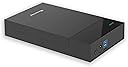
The 3.5" Hard Drive Enclosure is a versatile and efficient solution for connecting your SATA HDD/SSD to any computer via USB 3.0. With a maximum capacity of 6TB and lightning-fast transfer speeds of up to 5 Gbps, this tool-free enclosure is perfect for professionals on the move. Its compact design ensures portability, making it an essential accessory for business trips or remote work.


| ASIN | B078NLCKWW |
| Best Sellers Rank | #917 in Enclosures |
| Brand | Mackertop |
| Built-In Media | Enclosure |
| Color | Black |
| Compatible Devices | Laptop |
| Connectivity Technology | USB |
| Customer Reviews | 4.4 out of 5 stars 427 Reviews |
| Data Transfer Rate | 5 gigabits_per_second |
| Enclosure Material | Plastic |
| Hard Disk Form Factor | 3.5 inches |
| Hardware Interface | SATA 6.0 Gb/s |
| Hardware Platform | Windows |
| Item Dimensions L x W x H | 7.68"L x 4.53"W x 1.34"H |
| Item Weight | 0.47 kg |
| Manufacturer | Mackertop |
| Material | Plastic |
| Mfr Part Number | MT-0037 |
| Model Number | 8541665018 |
| Number of Items | 1 |
| Product Dimensions | 7.68"L x 4.53"W x 1.34"H |
| Supported Devices Quantity | 1 |
| Unit Count | 1 Count |
| Warranty Description | 12 months |
P**R
Worked out of the box, no instructions needed
Smooth transition of hard drive from a failed laptop into this enclosures. Plenty of room for bigger HDs, but more than adequate for the 1TB HD from an older laptop. Sad to see that laptop go, but now during transition of files the drive is a champ ready for future use. It does require the supplied power adapter for use. Most likely as the drive could be used for an older power hungry one or one of the newer SSD, low-power consumption drives. This adaptability makes it all the more useful.
M**.
Very basic but works
Really quick, simple installation of the drive. The case just slides open, the drive sits in the case and just push it up against the SATA connector at the back of the case, and slide the lid back on. No tools needed, no screws used. Took maybe 10 seconds to install the drive and close the box. However, the drive rattled around significantly inside the box, it was quite a bit thinner than the inside of the box. I had to stack a few self-adhesive felt discs on the drive to hold it in place so it didn't rattle around. It connected to the PC quickly, at first the PC didn't recognize the drive, I turned the drive off and on again, and then the PC saw it and I was able to transfer files to and from the drive easily. I used a WD 1tb 3.5" SATA hard drive. There are no noticeable vent holes in the case, and no fan. I suspect if the drive is used for longer periods, such as backing up an entire drive, the drive and case may get somewhat warm. I used it for 5 minutes and it didn't warm up at all, but I'm not sure how it would do after an hour or two. Probably best used for quick file transfers where it's not running for long periods. Overall it's pretty quick and easy to use and it works.
M**Y
Super handy!
I love this! Having the ability to swap M.2s without opening up the machine is awesome. The connection is firm without wondering if I'm going to break my drive or worrying that it might fall out. It's also very solid. I'm not concerned that it will easily topple over. Even the 'interesting' English in the instructions is above average and easy to understand. I'm probably going to get a few more of these. Definitely recommend!!
M**S
Quality build
Great table top access to use for external hard drives or migrating files and software.
B**S
Design issues.
These enclosures have one major flaw - the power switch is a momentary contact instead of a toggle. This means that if the power goes out and comes back on, your drive will remain off until you physically push the power button again. If your computer is set to power on during a power-restore, then it will do so without access to the drive in this enclosure. You'll also want good airflow around the enclosure as there are no heat dissipating features and drives inside will get hot.
P**K
Durable appearing case that has some potential issues to be aware of.
The product arrived promptly and matched the written description (the "slots" seen on the product photos were cosmetic and were not really vent slots). The enclosure appears to be reasonably rugged. The enclosure does not have any side to side play or any significant end to end play, but it has about 1/4 inch of space/play between the hard drive and the top cover, so if the enclosure is held on its side or if it is inverted while being moved to a new location, the disc can move and put a strain on the SATA connection. Thus, you probably want to keep the enclosure flat in use and while being carried, if you don't want to glue a small 1/4 inch shim under the top cover on the end opposite the SATA connector to remove the play. There are actually only a few, tiny vent holes, and the enclosure is plastic which it doesn't conduct heat well. After 2 hrs, my hard drive was running at 44 degrees C with a room temperature of just over 20 deg. When I opened the cover by 1/2" the hard drive temperature dropped to 42 degrees. If you live in a hot climate or like to keep your disk drive cooler than that, you may want to remove the top cover and/or add a laptop fan while your external drive is in use. I have a couple of factory desktop drives, and a couple of hard drives in plastic or aluminum enclosures that also run this warm without a fan, so this seems to be a common issue that the user just needs to be aware of.
D**E
Great
Really good way to salvage old hard drives and turn them into data drives.
S**1
Easy to use.
It's incredibly easy to use. I just slid off the top, added the drive, hooked it up, and it worked. It's great, honestly. It was brought to my attention that the listing was changed. I purchased an external 3.5" hard drive caddy, not the currently shown m.2 SSD adapter. I wouldn't buy that adapter because I am accident prone and that looks like a disaster waiting to happen. Get a proper enclosure unless you plan to use it as a means to verify an SSD before putting it to long term use.
N**.
Excellent drive caddy, but ignore the instructions supplied!
For me, one of the selling-points of this hard drive enclosure is that you don't need a screwdriver to insert a drive into it. When mine arrived the little instruction sheet clearly said to use screws to attach the drive to the chassis, then there's another set of screws to close the lid. Not so, this device has no need for screws or screwdrivers at all. You literally slide the lid back and off (mine was a bit stiff but I'll get used to it), and then you simply lay the drive in the space and push it forward until it docks with the receptor pins. That's it. Attach the included power supply, connect the caddy with your computer with the supplied USB3 cable, and you're up and running. You should then see the drive you've just connected in Finder / Windows Explorer etc. You don't even need to re-attach the enclosure lid if you're only going to be looking at the drive briefly! This is a perfect way of quickly sorting through old drives if you've got a stack of them like I have. I'm using mine on macOS 10.15 Catalina, but I'm sure it'll work with other platforms as well. Drivers don't seem to be required with modern OS's, I certainly didn't need one for my Mac. The description says it works with Windows and Linux too. For under twenty quid it's proving extremely handy, and I'm very pleased with it.
S**W
Robust and Easy to Use.
I wanted an enclosure for a 1.5TB SATA drive from a failed MyBook backup enclosure. I also wanted it to be cheap and to work fast. It was the price that determined I chose this unit; that and the apparent ease of use. It works very well in both respects. My drive dropped right in (the lid slides to open, the drive inserts into the SATA connection, close the lid, plug it in, and off to the races. I love that it's USB 3.0 and backwards compatible. It's not slim or particularly compact but that's irrelevant to me. I just need it to work. It has three pretty LEDs and has permitted me to access a heck of a lot of important files. I use a Mac and it works equally well with that and a Windows 10 PC I occasionally use. I am happy to recommend this unit based on my experience.
A**E
transfert de donées entre disque et pc
A usage technique car le disque dur est bien installé dans le boitier mais ce n'est pas une situation a faire durer; neanmoins c'est fort pratique !
M**G
High performance open SSD enclosure for NVMe or SATA drives
This Mackertop M.2 SSD enclosure is an open dock that is plug & play with SATA and NVMe disks. Not only does it look great in space grey aluminum but has a low profile 2.75" diameter size and connects over USB Type C or Type A. // Performance Benchmarking on NVMe drives the SSD dock delivers outstanding throughput performance of nearly 1.0 GB/s read and 900 MB/s write speeds sustained with 100 MB blocks. This does decrease significantly depending on which drive is connected to the port, either SATA capping out at 450-500MB/s R/W or NVMe with caching optimizations. The dual use SSD connection port is what makes this docking station stand apart by plugging in SATA or NVMe. Key spacing on internal connector is also compatible with B & M type traditional NGFF solid state disks or just newer generation M key PCI-E drives. Plugged into Linux, it connects as a PCI-E to USB 3.1 bridge device running at either 5.0 GB/s or 10 GB/s throughput speeds over Type A/C connectors depending on individual machines. Internally it uses a Realtek based RTL9210B controller but firmware natively does not enable SATA or advanced power user commands making it limited to transferring data read & write without modes like disk erasure or viewing drive metrics. // Design This SSD dock is built out of a chunk of space grey aluminum giving it heft when placed on a desk with rounded silicone feet preventing it from sliding around. Drives are cooled passively without fans but heatsinks on chipsets can fit using this dock since it only requires clearance space for NVMe/SATA connector making it easier to use higher tier enterprise level SSDs externally. One caveat with an open SSD enclosure is that drives plugged into connectors will be fully exposed to elements and plugs can be easily damaged if bent or twisted while inserting & removing SSDs. The limitation is acceptable since I'm going to be using it stationary on a desk plugged into my PC. On the other hand it makes hot swapping between ssds much quicker without having to remove screws or open up enclosures. Note that its an enclosure for drives and does not come with any SSDs. Cable is USB Type C to C and Type A converter on PC end but is rather small measuring 10" inches and isn't lengthy enough to reach a PC except when I put it directly on top of an ATX tower case next to IO ports. Solid docking station overall with cutting edge USB 3.1 Gen 2 speeds of 10 GBps that consistently outputs 950 MB/s to 1GB/s R/W speeds in a simple to configure chipset.
H**S
Prima product en makkelijk manier om schijf te installeren
Deze behuizing is prima en van goede kwaliteit. De HDD is zo gemonteerd zonder schroeven of iets dergelijks. Beslist een aanrader en nog voordelig ook.
Trustpilot
5 days ago
2 weeks ago