Desertcart purchases this item on your behalf and handles shipping, customs, and support to Portugal.
🚀 Mini PC, Major Impact: Power, Speed & Style in One Compact Package
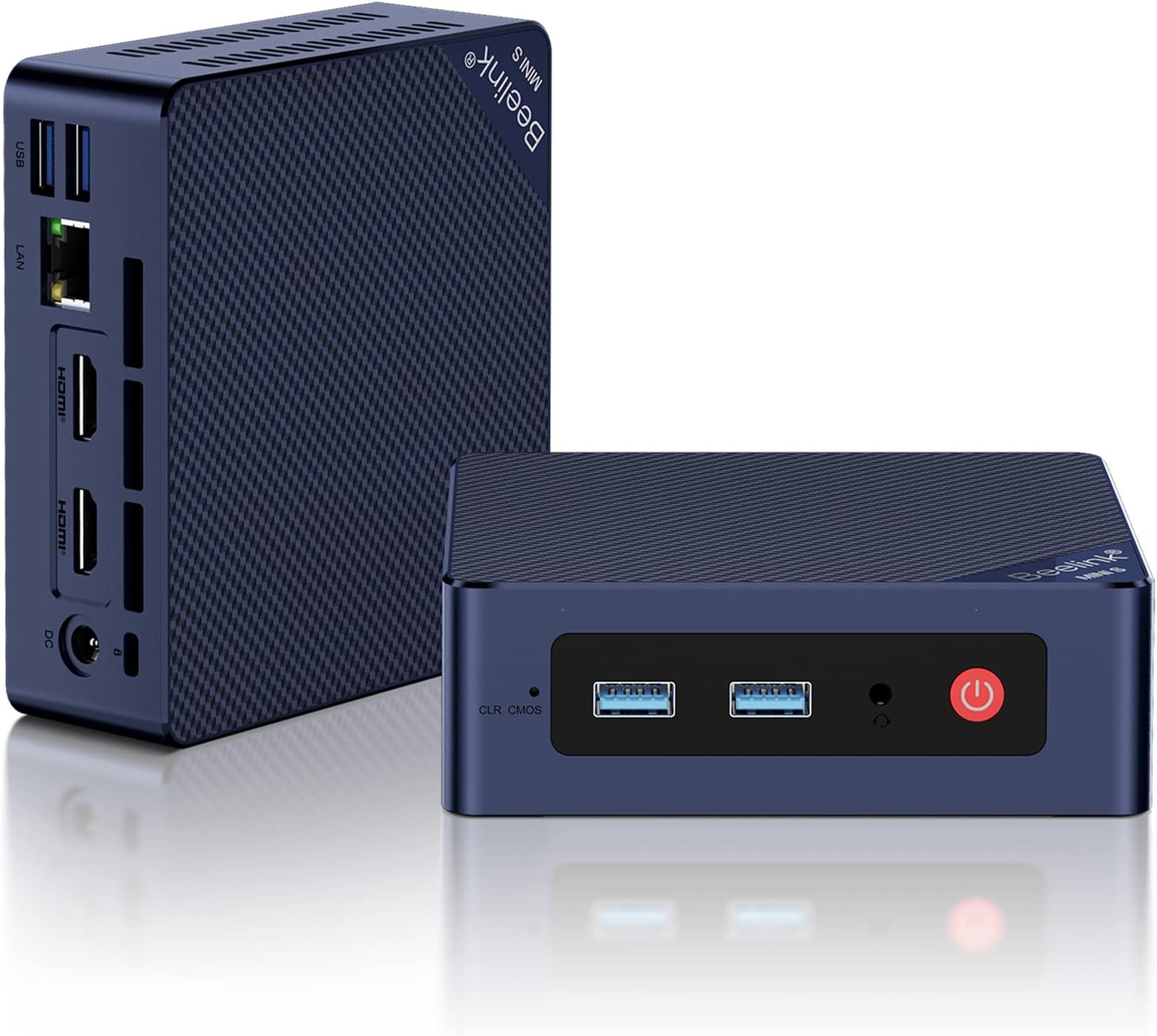
The Beelink Mini S12 is a cutting-edge mini PC powered by the 12th Gen Intel Alder Lake-N95 processor (4 cores, up to 3.4GHz) with 8GB DDR4 RAM and a 256GB M.2 SSD, expandable to 4TB. It supports dual 4K@60Hz displays via HDMI, features USB 3.2 Gen2, WiFi 6, Bluetooth 5.2, and a 2.5GB LAN port. Designed for professionals seeking a compact, high-performance desktop solution with advanced cooling and versatile connectivity for home or office use.


| ASIN | B0BVFVRDXN |
| Additional Features | Mini pc |
| Aspect Ratio | 16:9 |
| Best Sellers Rank | #3,610 in Computers & Accessories ( See Top 100 in Computers & Accessories ) #114 in Mini Computers |
| Brand | Beelink |
| Built-In Media | 1 x Intel 12th N95 Mini PC, 1 x Power Adapter, 1 x User Manual, 1 x Vesa Mount with Screws, 2 x HDMI Cable (100CM & 20CM) |
| CPU Model | Intel N95 |
| CPU Model Number | Intel Alder Lake-N N95 |
| CPU Model Speed Maximum | 3.4 GHz |
| CPU Speed | 1.7 GHz |
| Cache Memory Installed Size | 6 |
| Cache Size | 6 |
| Color | Navy Blue |
| Compatible Devices | Headphone, Keyboard, Projector, Television |
| Connectivity Technology | HDMI |
| Cooling Method | Fan |
| Customer Reviews | 4.3 out of 5 stars 433 Reviews |
| Display Resolution Maximum | 3840x2160 |
| Display Type | LCD or LED |
| Graphics Card Description | Integrated |
| Graphics Card Interface | Integrated |
| Graphics Card Ram | 1199.99 MB |
| Graphics Coprocessor | Intel UHD Graphics |
| Graphics Description | Integrated |
| Graphics Ram Type | Shared |
| Hard Disk Description | SSD |
| Hard Disk Interface | Serial ATA |
| Hardware Interface | 3.5mm Audio, Bluetooth, HDMI, Headphone, PCI Express 3.0 |
| Human-Interface Input | Keyboard |
| Item Dimensions | 4.88 x 4.45 x 1.65 inches |
| Item Weight | 0.66 kg |
| Keyboard Description | Standard USB Keyboard |
| Keyboard Layout | QWERTY |
| Manufacturer | Shenzhen AZW Technology Co., Ltd. |
| Memory Slots Available | 2 |
| Memory Speed | 3200 MHz |
| Memory Storage Capacity | 256 GB |
| Model Name | Mini S12 |
| Model Number | MINIS |
| Model Year | 2024 |
| Native Resolution | 3840 x 2160 |
| Number of Component Outputs | 2 |
| Operating System | Windows 11 Home |
| Optical Storage Device | 256 Gb |
| Personal Computer Design Type | Mini PC |
| Power Consumption | 15 watts |
| Power Plug Type | Type A - 2 pin (North American) |
| Processor Brand | Intel |
| Processor Count | 4 |
| Processor Series | Intel N95 |
| Processor Socket | BGA 413 |
| Processor Speed | 1.7 GHz |
| RAM Memory Installed | 8 GB |
| RAM Memory Technology | DDR4 |
| RAM Type | DDR4 SDRAM |
| Ram Memory Maximum Size | 16 GB |
| Resolution | 3840 x 2160 |
| Specific Uses For Product | Everyday Use |
| Style Name | Minimalist |
| Total Expansion Slots Quantity | 2 |
| Total Number of HDMI Ports | 2 |
| Total Thunderbolt Ports | 2 |
| Total Usb Ports | 4 |
| UPC | 810056048549 810056049829 |
| Video Output | HDMI |
| Video Output Interface | HDMI |
| Video Processor | Intel |
| Warranty Description | 1 year |
| Wireless Compability | 802.11ax, Bluetooth |
| Wireless Network Technology | Wi-Fi |
| Wireless Technology | Bluetooth, Wi-Fi |
E**K
Good mini-PC. Some NVME sticks may get too hot in a dual-stick configuration
The small format and capabilities of this S13 Mini PC make it a fairly versatile option for a wide range of small server applications. It shipped with 1 500MB NVME & 16GB of RAM. It can support up to 2 NVME sticks - and I later needed that. I skipped the included Window 11 Pro, and installed what I needed for the project: Ubuntu Server. No issues for the install & Ubuntu Server runs fine on the S13. Boots Linux amazingly fast. For a project, I needed two 1TB NVME drives. So, I upgraded the storage to two 1TB WD Black SN7100s. Yikes! When just idling, the NVME temps climbed beyond 70C. So the issue is the bottom compartment of the S13 case is where the DRAM & NVMEs are installed. Air ventilation there is inadequate for dual SN7100s - in my opinion. So I scrapped the standard S13 base and created a replacement base and printed it on a 3D printer. The design includes a small 5V Noctua fan (60mm x 15mm) that plugs into one of the USB ports. The fan adds a bit of noise but I doesn't seem too loud to me. The fan blows directly on the NVME sticks. I also attached thin heatsinks to the NVMEs. I found heatsinks 6mm thick (or less) will fit. Anything thicker surely won't. But keep in mind: this is with my custom baseplate. Also, getting the heatsinks to fit best did require some fiddling with the NVME mounting hardware. The S13 has some jumpers in the bottom compartment that control when the USB ports are powered. Either always on (even powered down) or only on when powered up. I chose the latter. Anyway, this keeps the NVME sticks around 38-42C. Much better. But please consider: the standard 1 stick setup ran fine as the single NVME stick stayed well below 60C at idle. All-in-all I love these things as mini servers. I believe the graphics are probably good enough for a HTPC or a simple desktop PC.
M**T
Fantastic value, highly recommend! Power numbers in review.
This thing is awesome! The value is fantastic, with such good performance for the price. I opened it up, and the construction is top notch. I'm using this a a dedicated computer for running Home Assistant. It couldn't have been easier to install Home Assistant on it, and it works like a charm! It does have a fan that runs all the time (I was hoping the fan would turn off when the CPU isn't under load), but maybe the CPU needs active cooling even when not under load. I didn't have the ability to load test, but the most power I saw during boot was 12W. When idling with Home Assistant running, it only consumes 8-9W. These numbers are AC input into AC adapter. I don't know the efficiency of the adapter so wanted to also measure the DC input with a benchtop supply, but I couldn't find a suitable DC jack. It has an unusually large center pin on the power input, so pay attention to that if you power from another source. While the AC adapter input is 8-9W, it's 17VA so power factor is only about 0.51. Not very good! So best if you have a very high PF 12V supply in your system to hook this into. One nice thing about the low power consumption is that it can be powered by a PoE adapter that splits out Ethernet / DC power. I was leaning towards a Raspberry Pi 5 for this application to keep power consumption low, but so glad I went this route since it's also very low power consumption, but much better value when you figure in the more powerful processor, memory, and SSD. Note that it does not have a USB-C port, but luckily I don't need one for my application so would hate for the cost to be driven up to add one.
M**R
Amazing! How can they do this at this price?
Since I'm the "computer guy" amongst my friends, one asked me to get an inexpensive computer that he could both use for everyday tasks at home and also to help him run his small business. So far this is everything that we both could have hoped for. He got a new monitor that had a standard VESA mount on the back and also a standard base. He's using the base on his desk and so I used the small bracket that is included with this computer to mount it directly to the back of the monitor. The kit also included a short HDMI cable to run from the computer to the monitor so that I didn't have to bundle up extra wire. The PC was super simple to get up and running. We literally mounted the PC to the monitor, connected the HDMI cable, the power cable, his wired keyboard and mouse and connected the ethernet cable to his router, turned it on, logged in to his Microsoft and Google accounts, performed the Windows updates and he was up and running. I don't know how you could get a much simpler process with everything going so smoothly. Everything seems to be exactly as advertised as far as specs and there were absolutely no issues using the preinstalled version of Windows 11 Pro. While I only used the computer a short while during the setup and configuration process, I was amazed at both how cool the box remained and how silent it was. This was an excellent purchase that I will probably be repeating for another friend who needs a basic system to replace an ancient behemoth of a PC that they're currently using and can't really update anymore. Very happy with this little box.
S**A
Great small PC for running Home Assistant
I bought the Beelink Mini S13 Mini PC with the Intel N150 to use as my Home Assistant machine, and so far it has been a good small PC for that job. The size is one of the best parts. It does not take up much room, which makes it easy to place in a network closet, office, server rack area, or wherever you keep your smart home equipment. For a Home Assistant setup, I like having something small that can just sit there and run without needing a full-size desktop. Performance has been good for my use. It handles Home Assistant well, and I have not had any major complaints so far. Setup was straightforward, and it feels like a good option if you want a dedicated little machine for smart home control instead of relying on something underpowered. The build quality feels decent for the price, and the value for money is good if you need a compact PC for Home Assistant, light server use, basic automation, or small always-on projects. It is not a gaming PC, but that is not what I bought it for. Would I buy it again? Yes. For Home Assistant, it is a good small PC and does exactly what I needed.
R**C
Great for the Price
For a small box this is a very fast and quite powerful pc. I only wish I had bought a 1TB unit but this one suits my purposes. I really love it.
M**K
NO, NO, NO, don't waste your money!
I bought this and it worked for 31 days, just long enough for the 30 days return Amazon return window to expire. So, I emailed the company's tech support people for help. Although they responded to my inquiries promptly, they were no help. They would give me directions to go to this setting then click on this option and make sure a certain option was checked or whatever. The problem was that most of the time what they told me to do wasn't laid out that way on my computer. It was almost like I had Windows 11, and they were using Windows 10. So, this is very frustrating emailing back and forth once a day, and it went on for about 9 or 10 days and there is no improvement in the computer. In fact, it got to the point where the PC was unusable. So finally, after prying them they agreed to send me a new computer, but I had to send them the old one first. A copy of my Amazon invoice was not proof enough that I had purchased one of their computers. I was supposed to get another unit sent to me after they received my PC. So, a week after FedEx delivered it to them, I emailed to ask when I might receive the new PC. I was told, our overseas warehouse manager is very busy filling orders, and I would get it in order of the orders placed. It's funny when I ordered it the first time, I got it in two days, but it's been now 26 days since it was delivered to them, and I've not heard a word from them. I'm not expecting that I ever will either. The shame of it is that I actually liked that little unit, and it performed ok for what it was needed for, (except they took me for $180). It certainly would not have been good to edit large photo or video files but to search the web and keep track of finances it worked OK. So, save your money, there are other companies selling very similar small computers online, try someone else.
L**A
Perfect.
I waited until I used it for a while to write my review. FYI: although I use it a lot every day, it's just for my everyday needs; email, browsing my favorite sites, educational lectures, videos, etc. No gaming other than an occasional FB game. I just love this little computer! I remember having to pay over $500 for my first computer over 25 years ago. This tiny box is fast, and does all I need for less than $150. It sits right on my desk, out of the way. My monitor connects via HDMI cable. The only drawback, for some, might be that there is no CD/DVD player. You could of course buy one and add it when needed. It comes with Win 11. As with all new computers, you will need to spend time updating after you turn it on. Great buy. I did some research and Bee Link seems to be well thought of for reliability.
V**T
Great computer for regular home and work use
I love the space savings and processor and the included memory and SSD. The SSD is faster than a SATA III SSD by about 20%. It's ingenious actually, it's Nvme single channel (instead of the usual 4 channels). It allows the use of normal M2Nvme 2280 drive to upgrade with but at the same time allows these machines to be built at lower cost and they are plenty fast for anyone but power users. I believe they use a pcie 4 channel. The machine boots from bios screen to windows sign-in screen in a bout 10-15 seconds. The processor is the N95 Alder lake which has 4 cores/threads and runs at 1.7 Ghz with boost up to 3.4 Ghz. Great performance considering the 4 cores are Alder lake's "efficiency" cores. Intel says this chip is about equivalent to full desktop Skylake processors at the same speeds. I do know that it's noticeably faster than the Haswell core i5 4590 that I was using previous to this machine. It's got a single SODIMM slot with a DDR4-3200 that can be upgraded to 16 GB (I've heard of rumors of these taking 32 GB SODIMMs, but Beelink support says 16. I've got two of these (one for my wife and one for me). Her's is an 8GB/256GB and mine is the 16GB/500GB model. It also has a drive bay for a 2.5" x 7mm SATA drive up to 2TB. I've been thinking about putting an old Samsung 860 EVO 256GB drive in there.
D**U
Tasarımı ve güç tüketimi çok iyi
Ev kullanımı için çok ideal.Düşük güç tüketimi sessiz
M**L
Good
Works great, I recommend
R**F
Duro muy poco tiempo
Dejo de encender después de año y medio de uso.
S**R
Working smoothly..
Working smoothly and no issues..
M**I
يوجد عيب في النظام
حبيت ان اجرب الجهاز
Trustpilot
3 weeks ago
1 month ago