


Desertcart purchases this item on your behalf and handles shipping, customs, and support to Portugal.
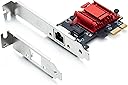
Buy 10Gtek Intel I210 Chip Gigabit Ethernet Network Card NIC Single Copper RJ45 Port PCI Express 2.1 X1 Same as I210-T1 Intel I210 Chip (1 x RJ45 port) online at low price in India on desertcart.in. Check out 10Gtek Intel I210 Chip Gigabit Ethernet Network Card NIC Single Copper RJ45 Port PCI Express 2.1 X1 Same as I210-T1 Intel I210 Chip (1 x RJ45 port) reviews, ratings, features, specifications and browse more 10Gtek products online at best prices on desertcart.in. Review: WOL on FreeBSD - It works with WOL. Review: Happy so far with my little tiny Intel I210 NIC - I 'm using an old 4th Dell Optiplex for a home Linux project, but more I started to bog down it's built in "Intel I217-LM" Ethernet, the more often the whole adapter would eventually crash completely. I asked AI of course, and it suggested I get a new NIC that uses a different driver. I'm not sure why, but it's AI. You just do what it says and don't question it. The Built-in Ethernet used an "e1000e" driver, while this product uses an "igb" driver. Now I can't say I know for sure why that other adapter was failing, or if the driver has anything to do with it. It was honestly easier to bypass it than troubleshoot it. This new adapter works perfectly so far. 100% stable. Problem solved. Just to clear up any confusion from other reviews. This IS an adapter that uses an Intel I210 chip (Ethernet controller [0200]: Intel Corporation I210 Gigabit Network Connection [8086:1533] (rev 03)). As such it is an Intel "based" 3rd party adapter. It is not an official "Intel Network Adapter" in the sense that the entire product is manufactured and marketed by Intel. You can get those if you want to pay 5+ times as much. But when you plug it into your PC, it's an Intel I210 adapter, period. It's not Asmedia, Realtek, etc., though if you're not careful some of the other similar looking variants listed by the seller as alternatives are different chipsets. Description Accuracy: One image on the product page that indicates that you will randomly receive one of two different products: (Old Version) or (New Version). Old version being a larger looking green PCB board with no heat-sink, while every other image in the listing shows a cool looking little black card with a big red anodized heatsink. I'll just say flat out, I think it's deceptive to list one product and hide an image that suggests you might get a substitute, even if it's the same chip, and I think there's better ways for the seller to clear out that old stock. It also makes it impossible to trust reviews because you can't be sure what card they're describing. Fortunately, I got the one I expected to get when I ordered, the one with the red heat-sink, or it was going to get returned. Now...the product itself still gets 5 stars, because it's affordable, functional, *genuine*, and has exhibited exactly ZERO errors since being installed. I hope the seller will clear up ambiguity though. Here's some of the network statistics since I installed it a couple days ago. It's not a stress test, but it's been fairly busy: --- (sudo ethtool -S enp1s0 | grep -Ei 'rx_bytes|tx_bytes|rx_packets|tx_packets|rx_errors|tx_errors|rx_dropped|tx_dropped|rx_crc_errors|rx_missed_errors') rx_packets: 14895029 tx_packets: 20732530 rx_bytes: 9638752735 tx_bytes: 18997563185 rx_crc_errors: 0 rx_missed_errors: 0 rx_errors: 0 tx_errors: 0 tx_dropped: 0 --- Here's it's capabilities and other useful stats: --- 01:00.0 Ethernet controller: Intel Corporation I210 Gigabit Network Connection (rev 03) Control: I/O+ Mem+ BusMaster+ SpecCycle- MemWINV- VGASnoop- ParErr- Stepping- SERR- FastB2B- DisINTx+ Status: Cap+ 66MHz- UDF- FastB2B- ParErr- DEVSEL=fast >TAbort- SERR- <PERR- INTx- Latency: 0, Cache Line Size: 64 bytes Interrupt: pin A routed to IRQ 16 IOMMU group: 2 Region 0: Memory at f7900000 (32-bit, non-prefetchable) [size=1M] Region 2: I/O ports at e000 [size=32] Region 3: Memory at f7a00000 (32-bit, non-prefetchable) [size=16K] Expansion ROM at f7800000 [disabled] [size=1M] Capabilities: [40] Power Management version 3 Flags: PMEClk- DSI+ D1- D2- AuxCurrent=0mA PME(D0+,D1-,D2-,D3hot+,D3cold+) Status: D0 NoSoftRst+ PME-Enable- DSel=0 DScale=1 PME- Capabilities: [50] MSI: Enable- Count=1/1 Maskable+ 64bit+ Address: 0000000000000000 Data: 0000 Masking: 00000000 Pending: 00000000 Capabilities: [70] MSI-X: Enable+ Count=5 Masked- Vector table: BAR=3 offset=00000000 PBA: BAR=3 offset=00002000 Capabilities: [a0] Express (v2) Endpoint, MSI 00 DevCap: MaxPayload 512 bytes, PhantFunc 0, Latency L0s <512ns, L1 <64us ExtTag- AttnBtn- AttnInd- PwrInd- RBE+ FLReset+ SlotPowerLimit 0W DevCtl: CorrErr+ NonFatalErr+ FatalErr+ UnsupReq+ RlxdOrd- ExtTag- PhantFunc- AuxPwr- NoSnoop+ FLReset- MaxPayload 128 bytes, MaxReadReq 512 bytes DevSta: CorrErr+ NonFatalErr- FatalErr- UnsupReq+ AuxPwr+ TransPend- LnkCap: Port #0, Speed 2.5GT/s, Width x1, ASPM L0s L1, Exit Latency L0s <2us, L1 <16us ClockPM- Surprise- LLActRep- BwNot- ASPMOptComp+ LnkCtl: ASPM L1 Enabled; RCB 64 bytes, Disabled- CommClk+ ExtSynch- ClockPM- AutWidDis- BWInt- AutBWInt- LnkSta: Speed 2.5GT/s, Width x1 TrErr- Train- SlotClk+ DLActive- BWMgmt- ABWMgmt- DevCap2: Completion Timeout: Range ABCD, TimeoutDis+ NROPrPrP- LTR- 10BitTagComp- 10BitTagReq- OBFF Not Supported, ExtFmt- EETLPPrefix- EmergencyPowerReduction Not Supported, EmergencyPowerReductionInit- FRS- TPHComp- ExtTPHComp- AtomicOpsCap: 32bit- 64bit- 128bitCAS- DevCtl2: Completion Timeout: 50us to 50ms, TimeoutDis- LTR- 10BitTagReq- OBFF Disabled, AtomicOpsCtl: ReqEn- LnkCtl2: Target Link Speed: 2.5GT/s, EnterCompliance- SpeedDis- Transmit Margin: Normal Operating Range, EnterModifiedCompliance- ComplianceSOS- Compliance Preset/De-emphasis: -6dB de-emphasis, 0dB preshoot LnkSta2: Current De-emphasis Level: -3.5dB, EqualizationComplete- EqualizationPhase1- EqualizationPhase2- EqualizationPhase3- LinkEqualizationRequest- Retimer- 2Retimers- CrosslinkRes: unsupported Capabilities: [100 v2] Advanced Error Reporting UESta: DLP- SDES- TLP- FCP- CmpltTO- CmpltAbrt- UnxCmplt- RxOF- MalfTLP- ECRC- UnsupReq- ACSViol- UEMsk: DLP- SDES- TLP- FCP- CmpltTO- CmpltAbrt- UnxCmplt- RxOF- MalfTLP- ECRC- UnsupReq- ACSViol- UESvrt: DLP+ SDES+ TLP- FCP+ CmpltTO- CmpltAbrt- UnxCmplt- RxOF+ MalfTLP+ ECRC- UnsupReq- ACSViol- CESta: RxErr- BadTLP- BadDLLP- Rollover- Timeout- AdvNonFatalErr- CEMsk: RxErr- BadTLP- BadDLLP- Rollover- Timeout- AdvNonFatalErr+ AERCap: First Error Pointer: 00, ECRCGenCap+ ECRCGenEn- ECRCChkCap+ ECRCChkEn- MultHdrRecCap- MultHdrRecEn- TLPPfxPres- HdrLogCap- HeaderLog: 00000000 00000000 00000000 00000000 Capabilities: [140 v1] Device Serial Number 98-b7-85-ff-ff-25-39-10 Capabilities: [1a0 v1] Transaction Processing Hints Device specific mode supported Steering table in TPH capability structure Kernel driver in use: igb Kernel modules: igb ---

| ASIN | B01LYSK23E |
| Brand | 10Gtek |
| Brand Name | 10Gtek |
| Compatible Devices | Desktop |
| Country of Origin | USA |
| Customer Reviews | 4.0 out of 5 stars 35 Reviews |
| Data Link Protocol | Gigabit Ethernet |
| Data Transfer Rate | 1000 Megabytes Per Second |
| Hardware Interface | PCIE x 1 |
| Manufacturer Part Number | I210-T1-(Intel-1pc)fba |
| Minimum Required Operating System Version | Windows XP |
| Model Number | I210-T1-(Intel-1pc)fba |
龜**鶴
WOL on FreeBSD
It works with WOL.
D**!
Happy so far with my little tiny Intel I210 NIC
I 'm using an old 4th Dell Optiplex for a home Linux project, but more I started to bog down it's built in "Intel I217-LM" Ethernet, the more often the whole adapter would eventually crash completely. I asked AI of course, and it suggested I get a new NIC that uses a different driver. I'm not sure why, but it's AI. You just do what it says and don't question it. The Built-in Ethernet used an "e1000e" driver, while this product uses an "igb" driver. Now I can't say I know for sure why that other adapter was failing, or if the driver has anything to do with it. It was honestly easier to bypass it than troubleshoot it. This new adapter works perfectly so far. 100% stable. Problem solved. Just to clear up any confusion from other reviews. This IS an adapter that uses an Intel I210 chip (Ethernet controller [0200]: Intel Corporation I210 Gigabit Network Connection [8086:1533] (rev 03)). As such it is an Intel "based" 3rd party adapter. It is not an official "Intel Network Adapter" in the sense that the entire product is manufactured and marketed by Intel. You can get those if you want to pay 5+ times as much. But when you plug it into your PC, it's an Intel I210 adapter, period. It's not Asmedia, Realtek, etc., though if you're not careful some of the other similar looking variants listed by the seller as alternatives are different chipsets. Description Accuracy: One image on the product page that indicates that you will randomly receive one of two different products: (Old Version) or (New Version). Old version being a larger looking green PCB board with no heat-sink, while every other image in the listing shows a cool looking little black card with a big red anodized heatsink. I'll just say flat out, I think it's deceptive to list one product and hide an image that suggests you might get a substitute, even if it's the same chip, and I think there's better ways for the seller to clear out that old stock. It also makes it impossible to trust reviews because you can't be sure what card they're describing. Fortunately, I got the one I expected to get when I ordered, the one with the red heat-sink, or it was going to get returned. Now...the product itself still gets 5 stars, because it's affordable, functional, *genuine*, and has exhibited exactly ZERO errors since being installed. I hope the seller will clear up ambiguity though. Here's some of the network statistics since I installed it a couple days ago. It's not a stress test, but it's been fairly busy: --- (sudo ethtool -S enp1s0 | grep -Ei 'rx_bytes|tx_bytes|rx_packets|tx_packets|rx_errors|tx_errors|rx_dropped|tx_dropped|rx_crc_errors|rx_missed_errors') rx_packets: 14895029 tx_packets: 20732530 rx_bytes: 9638752735 tx_bytes: 18997563185 rx_crc_errors: 0 rx_missed_errors: 0 rx_errors: 0 tx_errors: 0 tx_dropped: 0 --- Here's it's capabilities and other useful stats: --- 01:00.0 Ethernet controller: Intel Corporation I210 Gigabit Network Connection (rev 03) Control: I/O+ Mem+ BusMaster+ SpecCycle- MemWINV- VGASnoop- ParErr- Stepping- SERR- FastB2B- DisINTx+ Status: Cap+ 66MHz- UDF- FastB2B- ParErr- DEVSEL=fast >TAbort- <TAbort- <MAbort- >SERR- <PERR- INTx- Latency: 0, Cache Line Size: 64 bytes Interrupt: pin A routed to IRQ 16 IOMMU group: 2 Region 0: Memory at f7900000 (32-bit, non-prefetchable) [size=1M] Region 2: I/O ports at e000 [size=32] Region 3: Memory at f7a00000 (32-bit, non-prefetchable) [size=16K] Expansion ROM at f7800000 [disabled] [size=1M] Capabilities: [40] Power Management version 3 Flags: PMEClk- DSI+ D1- D2- AuxCurrent=0mA PME(D0+,D1-,D2-,D3hot+,D3cold+) Status: D0 NoSoftRst+ PME-Enable- DSel=0 DScale=1 PME- Capabilities: [50] MSI: Enable- Count=1/1 Maskable+ 64bit+ Address: 0000000000000000 Data: 0000 Masking: 00000000 Pending: 00000000 Capabilities: [70] MSI-X: Enable+ Count=5 Masked- Vector table: BAR=3 offset=00000000 PBA: BAR=3 offset=00002000 Capabilities: [a0] Express (v2) Endpoint, MSI 00 DevCap: MaxPayload 512 bytes, PhantFunc 0, Latency L0s <512ns, L1 <64us ExtTag- AttnBtn- AttnInd- PwrInd- RBE+ FLReset+ SlotPowerLimit 0W DevCtl: CorrErr+ NonFatalErr+ FatalErr+ UnsupReq+ RlxdOrd- ExtTag- PhantFunc- AuxPwr- NoSnoop+ FLReset- MaxPayload 128 bytes, MaxReadReq 512 bytes DevSta: CorrErr+ NonFatalErr- FatalErr- UnsupReq+ AuxPwr+ TransPend- LnkCap: Port #0, Speed 2.5GT/s, Width x1, ASPM L0s L1, Exit Latency L0s <2us, L1 <16us ClockPM- Surprise- LLActRep- BwNot- ASPMOptComp+ LnkCtl: ASPM L1 Enabled; RCB 64 bytes, Disabled- CommClk+ ExtSynch- ClockPM- AutWidDis- BWInt- AutBWInt- LnkSta: Speed 2.5GT/s, Width x1 TrErr- Train- SlotClk+ DLActive- BWMgmt- ABWMgmt- DevCap2: Completion Timeout: Range ABCD, TimeoutDis+ NROPrPrP- LTR- 10BitTagComp- 10BitTagReq- OBFF Not Supported, ExtFmt- EETLPPrefix- EmergencyPowerReduction Not Supported, EmergencyPowerReductionInit- FRS- TPHComp- ExtTPHComp- AtomicOpsCap: 32bit- 64bit- 128bitCAS- DevCtl2: Completion Timeout: 50us to 50ms, TimeoutDis- LTR- 10BitTagReq- OBFF Disabled, AtomicOpsCtl: ReqEn- LnkCtl2: Target Link Speed: 2.5GT/s, EnterCompliance- SpeedDis- Transmit Margin: Normal Operating Range, EnterModifiedCompliance- ComplianceSOS- Compliance Preset/De-emphasis: -6dB de-emphasis, 0dB preshoot LnkSta2: Current De-emphasis Level: -3.5dB, EqualizationComplete- EqualizationPhase1- EqualizationPhase2- EqualizationPhase3- LinkEqualizationRequest- Retimer- 2Retimers- CrosslinkRes: unsupported Capabilities: [100 v2] Advanced Error Reporting UESta: DLP- SDES- TLP- FCP- CmpltTO- CmpltAbrt- UnxCmplt- RxOF- MalfTLP- ECRC- UnsupReq- ACSViol- UEMsk: DLP- SDES- TLP- FCP- CmpltTO- CmpltAbrt- UnxCmplt- RxOF- MalfTLP- ECRC- UnsupReq- ACSViol- UESvrt: DLP+ SDES+ TLP- FCP+ CmpltTO- CmpltAbrt- UnxCmplt- RxOF+ MalfTLP+ ECRC- UnsupReq- ACSViol- CESta: RxErr- BadTLP- BadDLLP- Rollover- Timeout- AdvNonFatalErr- CEMsk: RxErr- BadTLP- BadDLLP- Rollover- Timeout- AdvNonFatalErr+ AERCap: First Error Pointer: 00, ECRCGenCap+ ECRCGenEn- ECRCChkCap+ ECRCChkEn- MultHdrRecCap- MultHdrRecEn- TLPPfxPres- HdrLogCap- HeaderLog: 00000000 00000000 00000000 00000000 Capabilities: [140 v1] Device Serial Number 98-b7-85-ff-ff-25-39-10 Capabilities: [1a0 v1] Transaction Processing Hints Device specific mode supported Steering table in TPH capability structure Kernel driver in use: igb Kernel modules: igb ---
J**O
Tarde, pero si llegaron
Tardó en ellegar, pero llegaron, buenas, bonitas y baratas
あ**ま
ESXi 7.0U2aで無事認識して一安心
正直あまり信用していなくて互換性を心配していましたが、ESXiの起動メディアに何も追加せず(Inboxで)認識して動作することは確認できました。安定性、耐久性は未評価です。
A**E
10Gtek Gigabit PCIe NIC (Intel I210 Chip) Review: Flawless Performance & Bonding for OMV
If you are building or expanding a home server or NAS setup, finding network hardware that is both budget-friendly and rock-solid is always the goal. The **10Gtek Single-Port Gigabit PCIe Adapter (Intel I210 Chip)** delivers on all fronts, offering genuine enterprise-grade reliability at a fraction of the cost of official Intel-branded cards. Packaging & Hardware Revision * **Safe Delivery:** The card arrives exactly as pictured and described, safely packaged in anti-static protection to keep the sensitive electronics secure during transit. * **The Heatsink Upgrade:** I was one of the lucky ones who received the newer revision featuring a **dedicated heatsink** directly over the Intel I210 controller. While Gigabit cards generally don't run as hot as 10GbE gear, having passive thermal cooling adds extra peace of mind for 24/7 server environments. --- Key Specifications * **Controller:** Intel I210-AT * **Interface:** PCIe 2.1 x1 (compatible with x1, x4, x8, and x16 slots) * **Speed:** 10/100/1000 Mbps (Single RJ45 Port) * **Brackets Included:** Standard profile + Low-profile bracket * **Feature Support:** PXE, Wake-on-LAN (WOL), 9.5K Jumbo Frames, Linux Network Bonding --- Installation & OS Compatibility (OpenMediaVault / Linux) The highlight of using an Intel I210-based card is native kernel support across virtually all modern Linux distros. Under **OpenMediaVault (OMV)**, the card is **truly plug and play**. There is zero need to compile kernel drivers, run scripts, or mess with the command line. You simply seat the card in your PCIe slot, power on the system, and OMV picks up the new interface immediately. Performance & Multi-Port Network Bonding (Mode 6) I added this card as an extra Ethernet port alongside my motherboard's onboard NIC to connect two physical cables directly to my router. * **No Managed Router/Switch Required:** By setting OMV to **Bonding Mode 6 (`balance-alb` / Adaptive Load Balancing)**, the server handles load balancing internally via ARP negotiation. This means you don't need a high-end router with LACP/LAG support to get the extra bandwidth! * **Increased Aggregate Throughput:** Connecting two cables doubles the total system capacity, allowing simultaneous heavy uploads and downloads across multiple clients without bottlenecking a single link. * **Superior to Realtek:** The Intel I210 excels at handling hardware-offloaded network traffic and ARP negotiation, keeping CPU overhead minimal and performance stable during multi-client transfers. * **Zero Dropped Packets:** Rock-solid stability with no driver crashes, latency spikes, or dropped connections under heavy continuous load. Verdict For anyone running OpenMediaVault or a custom Linux server looking to add an extra port for link aggregation without buying expensive LACP-compatible switches, this **10Gtek I210 NIC** is a no-brainer. Getting the updated heatsink version was a great bonus, and the true plug-and-play simplicity makes it completely hassle-free.
Trustpilot
3 days ago
3 weeks ago