Desertcart purchases this item on your behalf and handles shipping, customs, and support to Portugal.
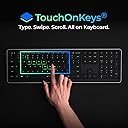
⌨️ Elevate your desk game with the AI-powered keyboard that types, swipes, and glows on your terms.
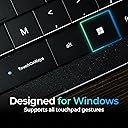
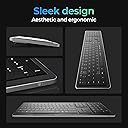
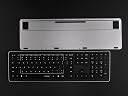
The Clevetura CLVX 1 is a cutting-edge Windows-compatible keyboard featuring 110 low-profile silent scissor keys, integrated touch-on-key gestures, and AI-driven input intelligence. It supports multi-device Bluetooth connectivity and USB-C, offers up to 40 hours of battery life without backlighting, and boasts fully customizable RGB lighting with 16.5 million colors. Designed for professionals who demand seamless multitasking, precision typing, and personalized control across Windows, Linux, and Android platforms.


| ASIN | B0FCSN1XPV |
| Additional Features | Bluetooth, Interactive Gesture RGB Backlit, Low-Profile Key, Touch On Keys — Native Touchpad on Keyboard, TouchOnKeys App |
| Antenna Location | Business, Coding, Everyday Use, Gaming, Personal, Photo Editing, Productivity, Programming, Video Editing |
| Best Sellers Rank | #394 in Computer Keyboards |
| Brand | Clevetura |
| Built-In Media | Clevetura CLVX 1 for Windows, Quick Start Guide, USB-C to USB-C Cable (2m) |
| Button Quantity | 110 |
| Color | Windows layout, Black |
| Compatible Devices | Android, Linux, Mac (requiers TouchOnKeys App), Smart TV, Windows |
| Compatible Operating System Family | Android, Linux, Windows |
| Compatible Tablet Computer Models | Samsung Galaxy Tab S7 FE 12.4" |
| Connectivity Technology | Bluetooth, USB-C |
| Customer Reviews | 4.4 out of 5 stars 52 Reviews |
| Enclosure Material | Aluminum, Polycarbonate |
| Generation | 1st Generation |
| Global Trade Identification Number | 00198168409145 |
| Hand Orientation | Ambidextrous |
| Item Dimensions L x W x H | 17.2"L x 5.12"W x 0.49"H |
| Keyboard Backlighting Color Support | RGB |
| Keyboard Description | Touch On Keys keyboard with built-in touchpad, Windows QWERTY, 110 keys |
| Keyboard Layout | QWERTY |
| Manufacturer | Clevetura |
| Mechanical Keyboard Switch Model | Scissors |
| Mfr Part Number | CL11RA1ANSB0US |
| Minimum Required Operating System Version | Android 10.0, Windows 10 |
| Model Name | Clevetura CLVX 1 |
| Model Number | CL11RA1ANSB0US |
| Number of Batteries Required | 1 |
| Number of Keys | 110 |
| Power Source | Battery Powered |
| Recommended Uses For Product | Business, Coding, Everyday Use, Gaming, Personal, Photo Editing, Productivity, Programming, Video Editing Recommended Uses For Product Business, Coding, Everyday Use, Gaming, Personal, Photo Editing, Productivity, Programming, Video Editing See more |
| Style Name | Full-size Win |
| Switch Type | Scissors mechanical switches |
| Theme | Minimalism |
| Unit Count | 1.0 Count |
| Warranty Description | 1 year |
| Water Resistance Level | Not Water Resistant |
A**R
The Coolest Keyboard I've Ever Used – Goodbye Mouse!
This keyboard is honestly one of the coolest pieces of tech I've purchased. The touch-sensitive keys and gesture controls are incredibly intuitive, and the built-in shortcuts make navigating my computer so much faster. I find myself barely reaching for my mouse anymore because I can do so much directly from the keyboard. The Bluetooth and USB-C connectivity work great, and the keyboard feels responsive and well-built. There is a bit of a learning curve at first, but once you get used to the gestures and shortcuts, it's hard to go back to a traditional keyboard. If you love productivity tools and trying innovative technology, I highly recommend the Clevetura CLVX 1. It's completely changed the way I work.
D**C
Frankenstein done right!
I have had this keyboard for 90 days, so I am past the honeymoon phase. If you don’t want to read this entire review, then here’s the spoiler. If a Ferrari, a Bentley, and a Waymo had a baby, it would be this keyboard. I am a VP of sales, working from home, and doing Zoom and Teams presentations throughout the day. I have purchased keyboards in this category for 15 years. I have had the good, the bad, and the ugly, but never had 1 keyboard that did it all, until now…. Pros: what matters to me • Excellent backlighting - I am older, I don’t need all the special lighting effects, so I love the fact that I could program the backlighting to just plain white! • Excellent Bluetooth range – I sit across the room, on my couch, about 15 feet from my laptop, which is connected to my 65-inch mounted flat screen. The keyboard works perfectly. • Excellent multi-device toggling – I have both a personal computer and a business computer, both connected to my flat screen. I am able to easily toggle back and forth between computers without leaving my couch! • Touchpad – I scoffed at this keyboard and refused to buy it because I thought that a keypad that doubles as a touchpad was nonsense (remember, I am at the “get off my lawn” age). Anyway, I couldn’t find a better option, so I pulled the trigger. It took me a couple of days to get the hang of it, and a couple of weeks to master it. I don’t even think about it now. • Numberpad – Didn’t think I needed this, and still don’t, but I must admit it is “nice to have”, and well lit. • Battery life – I work from 6am-5pm, sometimes longer, it has never run out of juice on me. I charge it in the middle of the night. • Build – Feels like good quality, nice to the touch, responsive and seems sturdy. Cons: • Expensive! Paid $250, hopefully by the time you read this it will be less. • The App requires a wired connection. The good news is that I only needed the app once for setup, and haven’t needed it since. • As a right-handed person, it would be nice if the touchpad extended another 2 inches further to the right, but I admit this is definitely a nit-pick. Conclusion: I took the time to write this long a@s! review because this is the best keyboard ever made in this wireless keyboard with touchpad category, and it ain’t even close (I have had them all over the years). I will probably buy another one as a backup when the price drops.
O**N
Worth the price!
This is my main keyboard now. Once you get used to not using the mouse, it feels so natural and amazing! You can turn the touch functionality off with the press of a key if you want. But I just leave it on.
D**D
Cool idea, few issues, big price tag
Overall, I like the idea and I think the execution is almost there, but I do have a few grievances. Let me get some of these out of the way first. I think the touchpad area should have a physical outline or border to be able tell where the area ends. I often times would find myself trying to move my cursor outside of the boundary and would have to look down at the keyboard. Another problem I ran into is regarding the initial input response. This can be super problematic when trying to move the mouse cursor over small, incremental, and precise areas like trying to resize a window or a pane. Not really sure how that can be fixed but it can be annoying when trying to move the cursor over small spaces. I also find myself sometimes accidentally moving the mouse cursor when I hover my fingers over the keys to type. This is really moreso from habit, but I'd imagine doing so would common thing for a lot of people who type regularly. I know it seems like I have a lot of bad things to say about this keyboard, but overall I like being able to have this at my desk without needing a mouse AND being able to have touchoad gestures. To me, the gestures was one of my most desired features since I often times switch virtual desktops and using gestures feel much more natural this using a keyboard shortcut. However, I feel as if I'd only recommend this keyboard if you have extra money to spend and you're not already eyeing something like a mechanical keyboard considering how pricey it is. Edit: In the original review, I forgot to mention two nice little features I think someone interested in this might want to know about. This keyboard does have a dedicated key to disable the touchpad while typing so you don't run into the issue mentioned above (I just often times forget to press it). It also has a pair of dedicated left and right mouse buttons if you prefer to use those instead of touch to click on the touchpad. It's probably also worth mentioning that the keyboard worked for me OOTB on Linux without need any other additional software or drivers.
S**E
Was hesitant but this keyboard is worth it!!!
I'm really surpised at how great this keyboard is. I haven't completed the training (which claims to help understand when you're typing versus using the track pad) yet it works perfectly without any misinterpretations. And yes, I do rest my fingers on the keys so there is plenty of chances for it to think the wrong thing, but it doesn't -- it works! I'm using it as my couch workstation at night as a change of pace from sitting at my desk all day. Its the perfect solution for that and has sped up my productivity by not having to remove my hands from the keyboard to scroll or move the mouse or click. I am a highly skeptical buyer of tech products because I'm a very demanding user since I've professionally been in the software industry for 30 years. I'm so glad I took the chance and decided to buy this keyboard. Its leaps and bounds better than the tri-fold travel keyboard with a trackpad on the side that I bought about a month ago. Only note to mention is that it won't connect via Bluetooth to your computer until you use the included USB-C cable to wire-connect it to your computer and update its firmware. Then it connects seamlessly to 3 different devices via Bluetooth. Buy it, you wont regret it!
P**4
This is what I've been looking for
My mouse and keyboard combo weren't very easy to use for my setup. I use a small table that came with my recliner so I was hoping to find something that would combine the two. Then I came across this keyboard. So far it's working out great. Here are the pros: * Trackpad and keyboard in one...exactly what I was looking for. I can click, drag, create gestures and type on the same device. * The addition of physical left and right mouse buttons help for certain activities that aren't easy with a trackpad, such as highlighting areas when taking screenshots. * The backlighting helps when I don't have a lot of light to see the keys. * Ability to create gestures. This was super helpful for how I browse, for example, opening a tab in a new window, I use the 3 key swipe up gesture. For closing a window, I mapped alt + F4 to the 3 key swipe down gesture. * The number pad. I hate keyboards without as I use it often. * Typing is smooth and key feedback is just right. Cons: * Price. This is expensive for what it is. * Bluetooth. Bluetooth is great for short range but it can easily be interfered with for 2.4ghz wi-fi or other electronics. I wish this came with a dongle like some of the other wireless mouse/keyboard options out there. There was also an issue for me where the keyboards internal bus and my chipset weren't working properly so the keyboard would constantly lose connection. Because of this, I had to buy an external bluetooth dongle to get it to work without losing the connection. * It does take a little while to get used to. As others have mentioned, it requires the right amount of touch to do what you want it to. I found one of the hardest things for me was to click and drag as that is a double click and move and I opened files when what I wanted to do was move them. Overall, I'm happy with this keyboard and it is exactly what I was looking for. Most of my complaints are minor but still rating 4/5 due to lack of usb dongle option, price and time to adjust/learn the new device.
R**E
Nothing else like it!
This is seriously the coolest keyboard I have ever used. The touch pad being the keys is by far the leading reason why I go this, and it keeps on being the number one reason why I love this keyboard. It is a great gaming and entertainment device, and I love using it- especially with how easy and fast the sensor is. I don’t understand how this isn’t well known yet- but it will be. There’s nothing else like it on the market. I’m obsessed!
M**E
Great Keyboard — Just Takes a Little Muscle Memory
This is an excellent keyboard and I’m glad I bought it. The build quality is solid, the layout is smart, and it performs exactly as advertised. One thing to keep in mind: you’ll need to train your muscle memory if you’re switching from a mouse‑heavy workflow. After a short adjustment period, everything becomes much smoother and more intuitive. Highly recommended.
Trustpilot
1 month ago
1 month ago